
1. บทนำ
This manual provides essential information for the safe and effective operation of your DJI Mavic 3 drone. The DJI Mavic 3 is a high-performance camera drone featuring a dual-camera system, including a 20MP wide-angle Hasselblad camera with a 4/3" CMOS sensor and a 12MP telephoto camera with a 1/2" CMOS sensor. It is designed for professional-quality aerial imaging, offering 5.1K video capabilities, omnidirectional obstacle sensing, and extended flight times.
Please read this manual thoroughly before operating the aircraft to ensure proper usage and to prevent damage or injury. Keep this manual for future reference.
2. ข้อมูลด้านความปลอดภัย
Operating the DJI Mavic 3 requires adherence to safety guidelines to prevent accidents and ensure legal compliance. Always prioritize safety during flight operations.
- การตรวจสอบก่อนบิน: Before each flight, inspect the drone, propellers, battery, and remote controller for any damage or abnormalities. Ensure all components are securely attached.
- สภาพแวดล้อมการบิน: Fly in open areas, away from people, buildings, and obstacles. Avoid flying near airports, power lines, or in restricted airspace. Check local regulations before flying.
- สภาพอากาศ : Do not fly in strong winds, rain, snow, or fog. Optimal flight conditions are clear and calm.
- ความปลอดภัยของแบตเตอรี่: Use only genuine DJI batteries and chargers. Do not overcharge or discharge batteries. Store batteries in a cool, dry place.
- รักษาแนวสายตา: ควรควบคุมโดรนให้อยู่ในสายตาตลอดเวลาขณะบิน
- เคารพความเป็นส่วนตัว: Be mindful of privacy concerns when operating the drone, especially when recording video or taking photos.
- ขั้นตอนฉุกเฉิน: Familiarize yourself with the Return to Home (RTH) function and emergency stop procedures.
3. เนื้อหาบรรจุภัณฑ์
Verify that all items are present in your package. If any items are missing or damaged, contact your retailer or DJI support.

Image: DJI Mavic 3 drone and included accessories.

ภาพ: รายละเอียด view of various accessories.
รายการที่ผู้ผลิตรวมอยู่:
- DJI Mavic 3 Aircraft
- รีโมทคอนโทรล RC-N1
- แบตเตอรี่บินอัจฉริยะ
- 3 x Pair of Low-Noise Propellers
- ที่ชาร์จแบบพกพา 65W
- ฝาครอบจัดเก็บ
- RC-N1 Remote Controller Sticks (Pair)
- RC-N1 Remote Controller USB Type-C Cable
- RC-N1 Remote Controller Micro-USB Cable
- RC-N1 Remote Controller Lightning Cable
- สายเคเบิล USB Type-C
Bundle Items (if applicable):
- การ์ด Micro SDXC Sandisk Extreme Pro 64GB
- Pro Sling Backpack
- เครื่องอ่านการ์ดหน่วยความจำ
- ชุดทำความสะอาด
- กระเป๋าใส่การ์ดหน่วยความจำ
4. สินค้าหมดview
The DJI Mavic 3 integrates advanced technology for superior aerial photography and videography. Key components and features are outlined below.
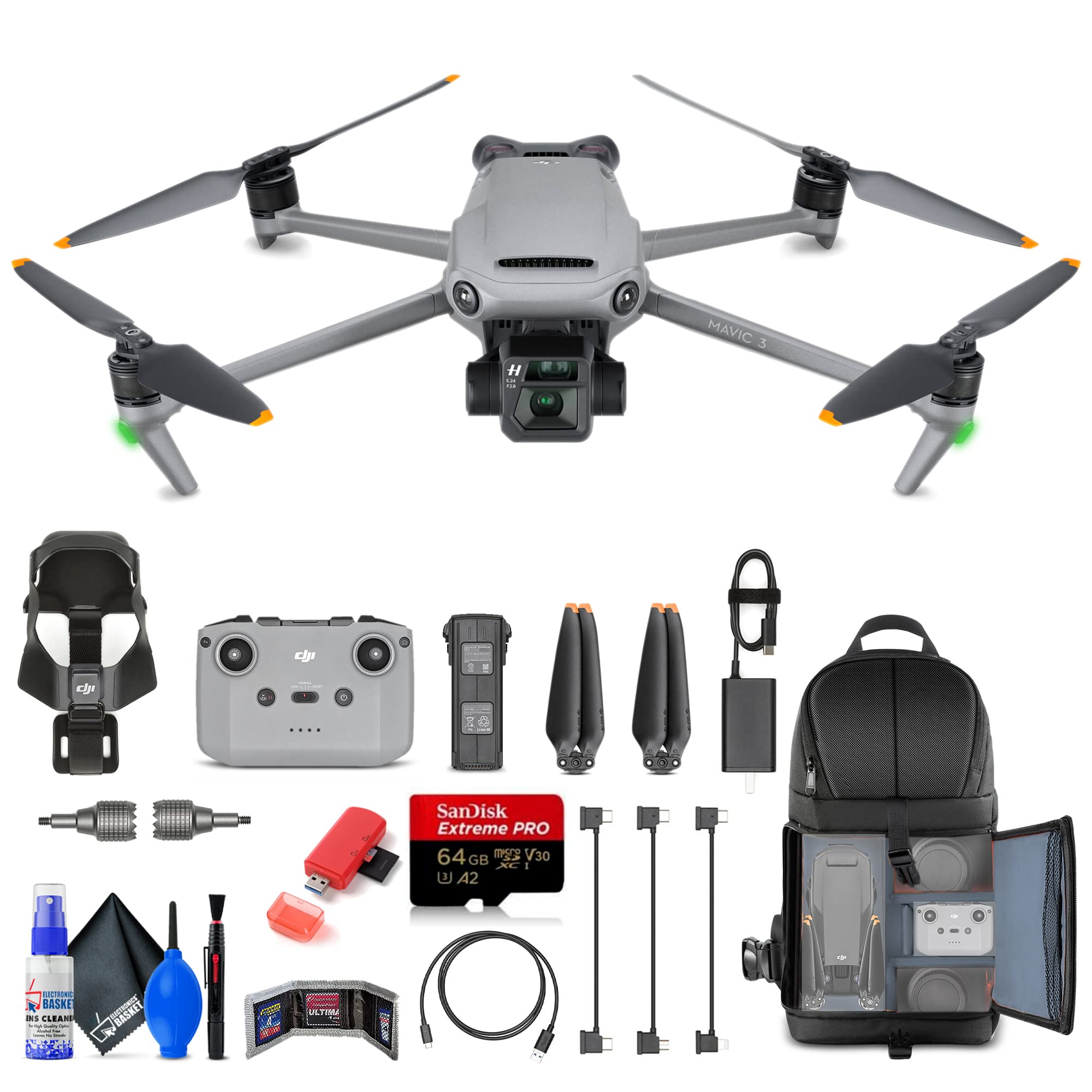
Image: DJI Mavic 3 unfolded, ready for flight.

Image: DJI Mavic 3 in its folded, compact state.
Aircraft Features:
- ระบบกล้องคู่: Features a 20MP 4/3" CMOS Hasselblad wide-angle camera capable of 5.1K video, and a 12MP 1/2" CMOS telephoto camera with 28x hybrid zoom.
- กิมบอล 3 แกน: จัดหาอาหารที่มั่นคงtage and precise camera control.
- ระบบตรวจจับสิ่งกีดขวางแบบรอบทิศทาง: Multiple wide-angle vision sensors detect obstacles in all directions, enabling the drone to plan safe flight routes.
- เวลาบินขยาย: Up to 46 minutes of flight on a single charge.
- Advanced Auto Return (RTH): Automatically plans the optimal route back to its home point, considering wind speed and power consumption.
- ระบบส่งสัญญาณ OcuSync 2.0: Offers a transmission range of up to 9.3 miles (15 km) for reliable video feed.
- 10-Bit D-Log Color Profile & HNCS: For professional-grade color grading and natural color reproduction.
- พื้นที่เก็บข้อมูลภายใน: 8GB of internal storage space.
Remote Controller (RC-N1):
The RC-N1 remote controller provides intuitive control over the aircraft and camera. It connects to your smartphone for live video feed and advanced settings via the DJI Fly app.
Image: RC-N1 Remote Controller.
5. การตั้งค่า
Follow these steps to prepare your DJI Mavic 3 for its first flight.
5.1 การชาร์จแบตเตอรี่
- Connect the 65W Portable Charger to a power outlet.
- Connect the Intelligent Flight Battery to the charger using the provided USB Type-C cable.
- Charge the RC-N1 Remote Controller using its respective USB cable.
- Ensure both the flight battery and remote controller are fully charged before flight.
5.2 การติดตั้งใบพัด
- กางแขนโดรนออก
- Match the propellers with the corresponding motor mounts. Propellers with orange marks should be attached to motors with orange marks. Propellers without marks attach to motors without marks.
- Press the propeller down onto the motor mount and rotate in the lock direction until it is secure.
- Verify that all propellers are securely attached and free from damage.
Image: DJI Mavic 3 with propellers correctly installed.
5.3 Installing the Flight Battery
- ตรวจสอบให้แน่ใจว่าแบตเตอรี่เที่ยวบินอัจฉริยะชาร์จเต็มแล้ว
- Slide the battery into the battery compartment on the rear of the aircraft until it clicks into place.
- Gently pull on the battery to ensure it is securely locked.
5.4 การตั้งค่ารีโมทคอนโทรล
- ติดแท่งควบคุมเข้ากับรีโมทคอนโทรล
- Pull out the mobile device holder and attach your smartphone.
- Connect your smartphone to the remote controller using the appropriate RC cable (USB Type-C, Micro-USB, or Lightning).
- Download and install the DJI Fly app on your smartphone.
6. Operating the DJI Mavic 3
This section covers basic flight operations and camera controls.
6.1 การเปิด/ปิดเครื่อง
- การเปิดเครื่อง: Press the power button once, then press and hold for two seconds. The battery level indicators will light up.
- วิธีปิดเครื่อง: Press the power button once, then press and hold for two seconds.
6.2 การขึ้นและลงจอด
- ระบบบินขึ้นอัตโนมัติ: In the DJI Fly app, tap the auto takeoff icon and confirm. The drone will take off and hover at a safe altitude.
- การบินขึ้นด้วยมือ: Push both control sticks to the bottom inner or outer corners to start the motors. Slowly push the left stick (throttle) up to ascend.
- ระบบลงจอดอัตโนมัติ: In the DJI Fly app, tap the auto landing icon and confirm. The drone will land automatically.
- การลงจอดด้วยตนเอง: Slowly pull the left stick (throttle) down to descend. Once landed, push both sticks to the bottom inner or outer corners to stop the motors.
6.3 Flight Controls (Mode 2)
| สติ๊กควบคุม | ความเคลื่อนไหว | การทำงาน |
|---|---|---|
| สติ๊กซ้าย | ขึ้น/ลง | ขึ้น/ลง (คันเร่ง) |
| สติ๊กซ้าย | ซ้าย/ขวา | หมุนซ้าย/ขวา (ยอว์) |
| สติ๊กขวา | ขึ้น/ลง | เดินหน้า/ถอยหลัง (ระดับเสียง) |
| สติ๊กขวา | ซ้าย/ขวา | Left/Right (Roll) |
6.4 การทำงานของกล้อง
- การสลับกล้อง: Use the DJI Fly app to switch between the Hasselblad wide-angle camera and the telephoto camera.
- ภาพถ่าย/วิดีโอ: Use the dedicated buttons on the remote controller or the app interface to capture photos or start/stop video recording.
- การควบคุม Gimbal: Use the gimbal dial on the remote controller to adjust the camera's tilt angle.
- ซูม: The telephoto camera offers 28x hybrid zoom, controllable via the DJI Fly app.
6.5 Obstacle Sensing and Avoidance
The Mavic 3 features omnidirectional obstacle sensing. The drone will automatically detect and attempt to avoid obstacles in its flight path. This system enhances flight safety, but it is not a substitute for pilot vigilance. Always monitor your surroundings.
6.6 กลับบ้าน (RTH)
The RTH function allows the aircraft to return to its recorded home point automatically. This can be initiated manually via the remote controller or the app, or it can be triggered automatically in cases of low battery or loss of signal.
- Ensure the home point is recorded before takeoff.
- Clear the flight path around the home point for safe landing.
7. การบำรุงรักษา
Proper maintenance ensures the longevity and optimal performance of your DJI Mavic 3.
7.1 การทำความสะอาด
- Wipe the aircraft body with a soft, dry cloth.
- Use a lens cleaning cloth for the camera and vision sensors. Avoid harsh chemicals.
- Remove any debris from motors and propeller mounts.
7.2 พื้นที่จัดเก็บ
- Store the drone in a cool, dry place, away from direct sunlight.
- Remove the Intelligent Flight Battery from the aircraft if storing for extended periods.
- Store batteries at approximately 50-60% charge for optimal longevity.
- Use the provided storage cover to protect the gimbal and camera.
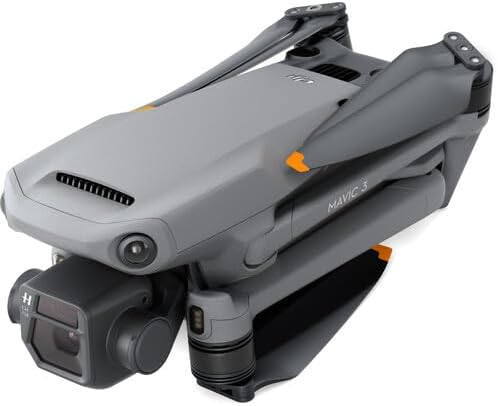
Image: DJI Mavic 3 folded with its storage cover.
8 การแก้ไขปัญหา
This section addresses common issues you might encounter with your DJI Mavic 3.
| ปัญหา | สาเหตุที่เป็นไปได้ | สารละลาย |
|---|---|---|
| โดรนไม่เปิดเครื่อง | Low battery; incorrect power-on procedure | Charge the Intelligent Flight Battery; press power button once, then press and hold for two seconds. |
| ไม่มีภาพวิดีโอในแอป DJI Fly | Loose cable connection; app not running; remote controller not linked | Ensure smartphone is securely connected to RC; restart app; link remote controller to aircraft. |
| โดรนลอยไปมาระหว่างบิน | IMU calibration needed; strong winds | Perform IMU calibration via DJI Fly app; avoid flying in strong winds. |
| การหลีกเลี่ยงสิ่งกีดขวางไม่ทำงาน | Sensors obstructed; low light conditions; system disabled | Clean sensors; fly in adequate lighting; ensure obstacle avoidance is enabled in app. |
| คุณภาพรูปภาพ/วิดีโอไม่ดี | Dirty lens; incorrect camera settings; insufficient lighting | Clean camera lens; adjust camera settings (ISO, shutter speed, white balance); ensure adequate lighting. |
9. ข้อมูลจำเพาะ
Detailed technical specifications for the DJI Mavic 3 drone.
| คุณสมบัติ | ข้อมูลจำเพาะ |
|---|---|
| ยี่ห้อ | ดีเจไอ |
| ชื่อรุ่น | ซีพี.MA.00000439.01 |
| กล้อง | 20MP 4/3" CMOS Hasselblad (Wide-Angle), 12MP 1/2" CMOS (Telephoto) |
| ความละเอียดวิดีโอ | Up to 5.1K (Hasselblad), 4K (Telephoto) |
| เวลาบินสูงสุด | 46 นาที |
| ช่วงการส่งผ่าน | สูงสุด 9.3 ไมล์ (15 กม.) |
| การตรวจจับสิ่งกีดขวาง | รอบทิศทาง |
| น้ำหนักสินค้า | 6.92 ปอนด์ (ประมาณ 3.14 กก.) |
| ขนาด (กว้าง x ยาว x สูง) | 13.7"L x 4.2"W x 11.1"H (folded, approximate) |
| การจัดเก็บข้อมูลภายใน | 8GB |
| การเชื่อมต่อ | USB, Wi-Fi (for remote controller) |
| ประเภทการควบคุม | รีโมทคอนโทรล |
| เทคโนโลยีเซ็นเซอร์ออปติคัล | ซีมอส |
| ประเภทสื่อ | SDXC (for external storage) |
10. การรับประกันและการสนับสนุน
The DJI Mavic 3 is covered by a manufacturer's warranty. For detailed warranty terms and conditions, please refer to the official DJI webเว็บไซต์หรือบัตรรับประกันที่รวมอยู่ในผลิตภัณฑ์ของคุณ
For technical support, troubleshooting assistance, or service requests, please contact DJI Customer Support through their official channels. You can typically find contact information on the DJI webเว็บไซต์:
เยี่ยมชมฝ่ายสนับสนุนของ DJI Webเว็บไซต์
Always provide your product model number (CP.MA.00000439.01) and proof of purchase when seeking support.