
1. บทนำ
The MIDAS DN4888 is an 8x8 line-level StageConnect interface designed to expand the analog input and output capabilities of compatible digital mixers, such as the Behringer WING. It features 8 combo jack inputs and 8 XLR outputs, facilitating the integration of line-level equipment like wireless microphones, in-ear transmitters, or outboard hardware inserts. The unit utilizes the StageConnect protocol for ultra-low latency audio transmission and offers dual Ultranet outputs for seamless integration with personal monitoring systems.
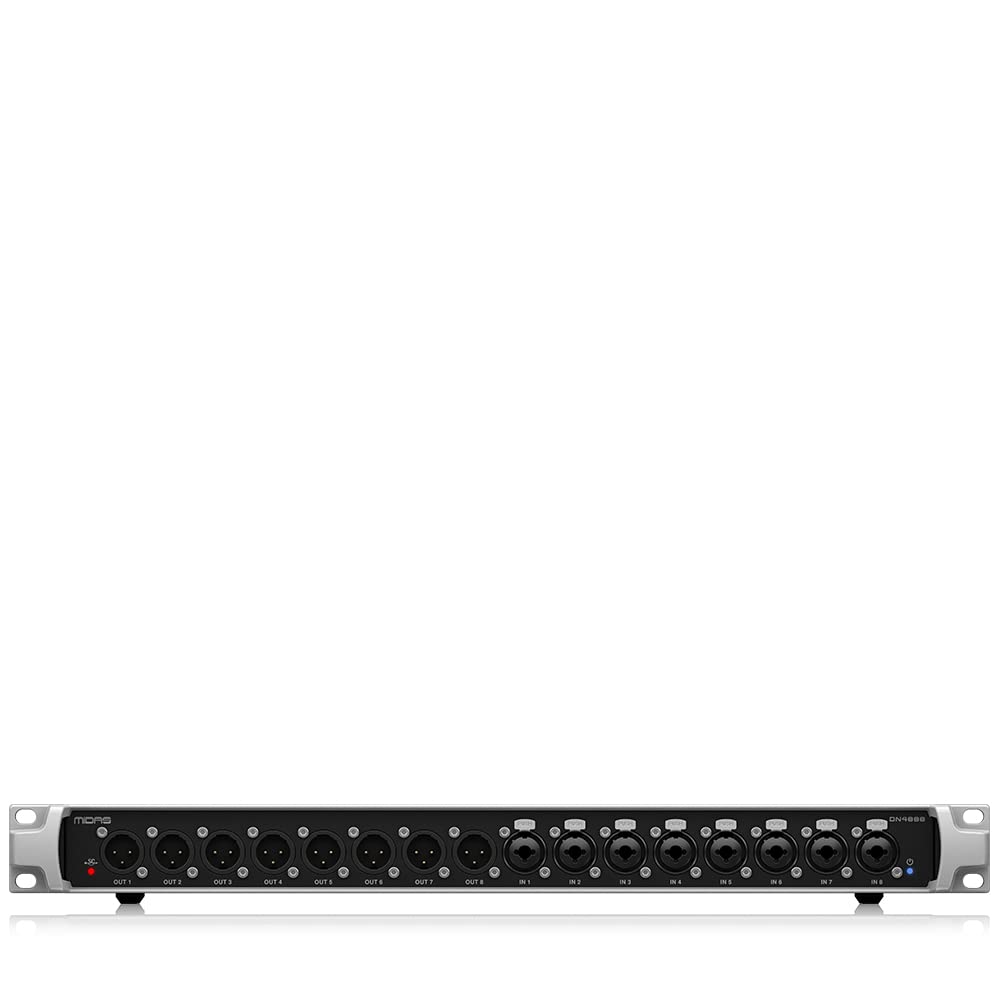
รูปที่ 1 : ด้านหน้า view of the MIDAS DN4888 StageConnect Interface.
2. การตั้งค่า
2.1 การแกะกล่องและการตรวจสอบเบื้องต้น
Carefully remove the DN4888 from its packaging. Inspect the unit for any signs of damage during transit. Ensure all components are present.
2.2 การจ่ายไฟให้กับอุปกรณ์
The DN4888 is bus-powered via the StageConnect XLR connection when connected to a compatible mixer. In this configuration, an external power supply is not required. For standalone operation or when additional power is needed, connect the provided 12V DC power adapter to the 'DC INPUT' port on the rear panel.

Figure 2: Rear panel highlighting the DC Input and StageConnect power capabilities.
2.3 Connecting to a Mixer (StageConnect)
Connect a high-quality 110-ohm XLR cable, rated for DMX and digital audio, from the StageConnect 'MASTER' port on your digital mixer to the 'SLAVE' port on the DN4888. This single cable transmits 32 channels of uncompressed audio at sub-millisecond latency and provides power to the DN4888.

รูปที่ 3: ภาพประกอบของ StageConnect XLR cable connection.
2.4 Connecting Ultranet Devices
The DN4888 features two Ultranet outputs (OUTPUT 1 and OUTPUT 2) for connecting Behringer P16-M personal monitoring mixers. OUTPUT 1 carries StageConnect channels 1-16, while OUTPUT 2 carries the 8 onboard analog input signals (ANALOGUE IN 1-8). Note that these Ultranet ports do not provide power to the P16-M units; they must be powered locally.

Figure 4: Rear panel showing Ultranet outputs.
2.5 การเชื่อมต่ออุปกรณ์หลายตัวเข้าด้วยกันแบบลูกโซ่
Multiple DN4888 units, or other StageConnect devices, can be daisy-chained. Connect the 'MASTER' StageConnect output of the first unit to the 'SLAVE' input of the next unit in the chain. Up to 11 devices can be connected in a chain, supporting a maximum of 32 channels total and a total cable distance of approximately 40 meters (130 feet). Audio can be routed between the leader (mixer) and followers, but not directly between followers.

รูปที่ 5: อดีตample of cascading multiple StageConnect interfaces.
3. การดำเนินการ
3.1 โอเวอร์แผงด้านหน้าview
The front panel of the DN4888 features 8 balanced XLR line outputs (OUT 1-8) and 8 balanced combo jack inputs (IN 1-8). These inputs accept both XLR and 1/4-inch TRS/TS connectors, providing flexibility for various line-level sources.

Figure 6: Front panel showing analog I/O ports.
3.2 แผงด้านหลัง Overview
The rear panel includes the DC input, a USB port (for firmware updates only), two Ultranet outputs, and the StageConnect Master/Slave XLR ports. Additionally, there are switches for StageConnect Synchronization and Output Mode.

รูปที่ 7: ด้านหลัง view of the DN4888, showing all connections and switches.
3.3 วินาทีtageConnect Synchronization
The 'StageConnect Synchronisation' switch allows you to set the unit as 'SLAVE' or 'MASTER'. In a typical setup, your digital mixer will act as the master clock, and the DN4888 units will be set to 'SLAVE'.
3.4 โหมดเอาต์พุต
The 'OUTPUT MODE' switch offers several options for routing audio:
- 8x8: In this mode, the first 8 channels of StageConnect audio are routed to the 8 analog outputs of the unit. When using Ultranet, only channels 1-8 will be active.
- 16x8: This mode allows access to all 16 channels of StageConnect audio via the Ultranet ports, while the analog outputs still receive the first 8 channels.
- รายบุคคล: When multiple units are daisy-chained, 'Individual' mode routes outputs 1-8 to the XLR outputs of the first unit, and outputs 9-16 to the XLR outputs of the second unit, and so on.
- แชร์: In 'Shared' mode, outputs 1-8 are routed to the XLR outputs of ทั้งหมด connected units in the chain. This is useful for distributing the same 8 channels to multiple locations.
ใช้ StageConnect Calculator tool (available from MIDAS) to plan complex routing configurations effectively.

รูปที่ 8: StageConnect Calculator for planning device configurations.
4. การบำรุงรักษา
4.1 การทำความสะอาด
To clean the unit, use a soft, dry cloth. Do not use abrasive cleaners, solvents, or waxes. Ensure the unit is powered off and disconnected from all sources before cleaning.
4.2 พื้นที่จัดเก็บ
Store the DN4888 in a cool, dry place away from direct sunlight and extreme temperatures. If storing for extended periods, ensure it is protected from dust and moisture.
5 การแก้ไขปัญหา
5.1 No Power/No Signal
- ยืนยันว่า StageConnect XLR cable is securely connected between the mixer (Master) and the DN4888 (Slave).
- If using an external power supply, ensure it is correctly connected and the power outlet is functional.
- Check the status indicator lights on the unit for any error signals.
5.2 Audio Dropouts or Interference
- Ensure you are using a high-quality 110-ohm XLR cable rated for DMX and digital audio.
- Check the total cable length in your StageConnect chain; it should not exceed 40 meters (130 feet).
- ยืนยันว่า StageConnect Synchronization switch is correctly set (SLAVE for the DN4888).
- Confirm that the Output Mode settings on all units are appropriate for your routing configuration.
5.3 Ultranet Connectivity Issues
- Ensure standard Ethernet cables are used for Ultranet connections.
- Confirm that connected P16-M units are receiving local power.
- Check the Ultranet output mode settings on the DN4888 (8x8 or 16x8) to ensure the correct channels are being transmitted.
6. ข้อมูลจำเพาะ
| ยี่ห้อ | ไมดาส |
| หมายเลขรุ่น | DN4888 |
| ชื่อประเภทรายการ | อุปกรณ์เสริมมิกเซอร์ |
| เทคโนโลยีการเชื่อมต่อ | เอ็กซ์แอลอาร์ |
| จำนวนช่องสัญญาณ | 32 (สtageConnect) |
| อินพุตเสียง | แจ็ค XLR/TRS แบบคอมโบ 8 ช่อง |
| เอาท์พุตเสียง | 8 x XLR Outputs, 2 x Ultranet Outputs |
| สูงสุด Sampเลอ อัตรา | ความถี่ 48 กิโลเฮิรตซ์ |
| เวลาในการตอบสนอง (StageConnect) | 0.05 milliseconds (per direction) |
| น้ำหนักสินค้า | 2.9 กิโลกรัม |
| ผู้ผลิต | เผ่าดนตรี |
7. การรับประกัน
For detailed warranty information, please refer to the official MIDAS website or the Community.Musictribe.Com platform. Warranty terms and conditions may vary by region and product.
8. การสนับสนุน
For technical assistance, product registration, or further inquiries, please visit the official MIDAS support website or contact your local distributor. Online resources, including FAQs and additional documentation, are available to help you maximize your experience with the DN4888 StageConnect Interface.