
1. บทนำ
The UMLIFE STC-1000 is a versatile digital temperature controller designed for precise temperature management in various applications. This device features a clear LED display, NTC 10K thermistor sensor, and dual relay outputs for both heating and cooling control. This manual provides detailed instructions for installation, operation, and maintenance to ensure optimal performance and longevity of your temperature controller.
2. สินค้าหมดview
2.1 คุณสมบัติหลัก
- Digital LED display for clear temperature readings.
- Wide temperature measurement and control range: -50°C to 99°C.
- High control accuracy of 0.1°C.
- Dual relay output for simultaneous heating and cooling control.
- Waterproof NTC 10K thermistor sensor for reliable measurements in various environments.
- ฟังก์ชั่นการสอบเทียบอุณหภูมิ
- Delay start protection for cooling control.
- ABS flame-retardant shell for enhanced safety.
2.2 ส่วนประกอบและจอแสดงผล
Familiarize yourself with the main components and display interface of the STC-1000 controller.

รูปที่ 1: Front panel of the STC-1000 controller showing the digital display, power switch, UP button, Setting button, and DOWN button.
- Digital Display Window: Shows current temperature and parameter settings.
- สวิตช์ไฟ: เปิดหรือปิดอุปกรณ์
- ปุ่มขึ้น (▲): เพิ่มค่าหรือนำทางเมนู
- ปุ่มลง (▼): ลดค่าหรือไปยังเมนูต่างๆ
- Setting Button (S): เข้าสู่โหมดการตั้งค่าพารามิเตอร์
- Cool Indicator: Illuminates when cooling relay is active.
- ตัวบ่งชี้ความร้อน: Illuminates when heating relay is active.

รูปที่ 2: Physical dimensions of the STC-1000 controller and the included 1-meter NTC 10K waterproof sensor probe.
3. ข้อมูลจำเพาะ
| พารามิเตอร์ | ค่า |
|---|---|
| แบบอย่าง | เอสทีซี-1000 |
| ช่วงการวัดอุณหภูมิ | -50°C ถึง 99°C |
| ช่วงการควบคุมอุณหภูมิ | -50°C ถึง 110°C |
| ความแม่นยำในการวัด | ±0.2 องศาเซลเซียส |
| ปณิธาน | 0.1 องศาเซลเซียส |
| ความแม่นยำในการควบคุม | ±0.1 องศาเซลเซียส |
| เซ็นเซอร์ | NTC 10K L=1M waterproof probe |
| แหล่งจ่ายไฟ | กระแสตรง 12 โวลต์ |
| การใช้พลังงาน | <3วัตต์ |
| ความจุของหน้าสัมผัสรีเลย์ | Cool (10A/220VAC), Heat (10A/220VAC) |
| อุณหภูมิโดยรอบ | 0°C ถึง 60°C |
| อุณหภูมิในการจัดเก็บ | -30°C ถึง 75°C |
| ความชื้นสัมพัทธ์ | 20-84% |
| ขนาดการติดตั้ง | 71มม. x 29มม. |
| ขนาดสินค้า | 75มม. x 34.5มม. x 85มม. |
| น้ำหนักสินค้า | 7 ออนซ์ (ประมาณ 198 กรัม) |
| วัสดุ | อะคริโลไนไตรล์ บิวทาไดอีน สไตรีน (ABS) |
4. การตั้งค่าและการติดตั้ง
ประกาศความปลอดภัยที่สำคัญ: Installation should be performed by qualified personnel. Ensure power is disconnected before wiring to prevent electric shock. Strictly distinguish between power supply, sensor, and relay interfaces. Maintain proper distance between sensor down-lead and power wires to avoid interference.
4.1 แผนผังการเดินสายไฟ
Refer to the following diagram for correct wiring connections. This model operates on DC 12V power supply.
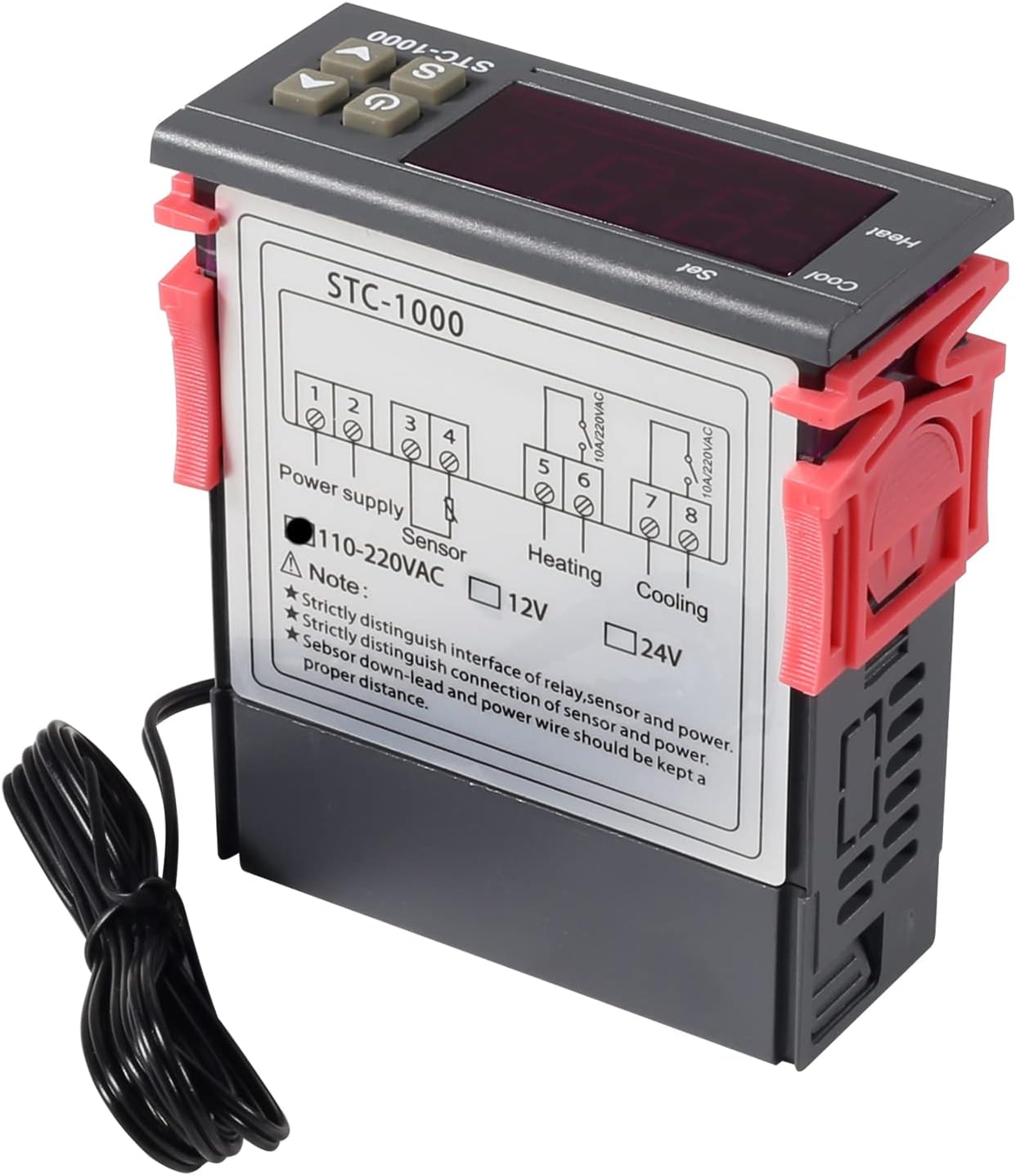
รูปที่ 3: Wiring diagram for the STC-1000 12V temperature controller. Connections are for power supply, NTC sensor, heating relay, and cooling relay.
- อาคารผู้โดยสาร 1 และ 2: Power Supply (DC 12V).
- อาคารผู้โดยสาร 3 และ 4: NTC Sensor connection.
- อาคารผู้โดยสาร 5 และ 6: Heating Relay Output (Connect to heating device).
- อาคารผู้โดยสาร 7 และ 8: Cooling Relay Output (Connect to cooling device).
Ensure all connections are secure and insulated. Verify the power supply voltage matches the controller's requirement (DC 12V for this model).
4.2 การติดตั้ง
The STC-1000 is designed for panel mounting. Cut an opening of 71mm x 29mm in your panel. Insert the controller and secure it using the provided clips or mounting brackets.
5. คู่มือการใช้งาน
The STC-1000 operates in Celsius only. It cannot be switched to Fahrenheit.
5.1 เปิด/ปิดเครื่อง
- กดปุ่ม สวิตซ์ไฟฟ้า button (marked with ⏻) to turn the controller on or off.
5.2 การตั้งค่าพารามิเตอร์อุณหภูมิ
The controller has two main temperature settings: the Set Temperature (ST) และ Difference Temperature (DT), also known as hysteresis.
- ถึง view the Set Temperature (ST): กดปุ่มสั้นๆ Setting (S) button. The display will show the current set temperature.
- To modify the Set Temperature (ST):
- กดปุ่มค้างไว้ Setting (S) button for approximately 3 seconds until the display flashes.
- ใช้ ขึ้น (▲) or ลง (▼) buttons to adjust the desired set temperature.
- กดปุ่ม สวิตซ์ไฟฟ้า button to save the setting and exit, or wait for 10 seconds for it to save automatically.
5.3 Advanced Parameter Settings (F1-F4)
To access and modify advanced parameters:
- กดปุ่มค้างไว้ Setting (S) button for approximately 3 seconds until the display flashes.
- ขณะที่หน้าจอกำลังกะพริบ ให้กดปุ่ม Setting (S) button again (do not hold) to cycle through parameters F1, F2, F3, F4.
- ใช้ ขึ้น (▲) or ลง (▼) buttons to adjust the value of the selected parameter.
- กดปุ่ม สวิตซ์ไฟฟ้า button to save the setting and exit, or wait for 10 seconds for it to save automatically.
| พารามิเตอร์ | คำอธิบาย | พิสัย | ค่าเริ่มต้น |
|---|---|---|---|
| F1 | Difference Temperature (Hysteresis): The difference between the set temperature and the temperature at which the relay switches off. | 0.3°C ถึง 10°C | 2.0 องศาเซลเซียส |
| F2 | Highest Set Point Limit: Limits the maximum adjustable set temperature. | Set Temp to 110°C | 110 องศาเซลเซียส |
| F3 | Lowest Set Point Limit: Limits the minimum adjustable set temperature. | -50°C to Set Temp | -50 องศาเซลเซียส |
| F4 | การสอบเทียบอุณหภูมิ: Adjusts the temperature reading to match a known accurate thermometer. | -10°C ถึง 10°C | 0.0 องศาเซลเซียส |
5.4 โหมดทำความร้อนและทำความเย็น
The STC-1000 automatically switches between heating and cooling based on the set temperature (ST) and difference temperature (DT).
- โหมดทำความเย็น: If the current temperature is higher than (ST + DT), the cooling relay activates. It deactivates when the temperature drops to ST.
- โหมดการให้ความร้อน: If the current temperature is lower than (ST - DT), the heating relay activates. It deactivates when the temperature rises to ST.
6. การบำรุงรักษา
- การทำความสะอาด: เช็ดพื้นผิวของตัวควบคุมด้วยผ้าแห้งนุ่มๆ ห้ามใช้สารทำความสะอาดที่มีฤทธิ์กัดกร่อนหรือตัวทำละลาย
- การดูแลเซ็นเซอร์: Ensure the NTC sensor probe is clean and free from debris. While waterproof, avoid unnecessary physical damage to the probe or cable.
- การเชื่อมต่อ: Periodically check wiring connections for tightness and signs of corrosion.
- สิ่งแวดล้อม: Operate the controller within the specified ambient temperature and humidity ranges to ensure optimal performance and lifespan.
7 การแก้ไขปัญหา
| ปัญหา | สาเหตุที่เป็นไปได้ | สารละลาย |
|---|---|---|
| Display shows "EE" | Sensor error or open circuit. | Check sensor connection. Replace sensor if damaged. |
| Display shows "HHH" | Temperature exceeds upper limit of measurement range. | Ensure the environment temperature is within the sensor's range (-50°C to 99°C). |
| Display shows "LLL" | Temperature falls below lower limit of measurement range. | Ensure the environment temperature is within the sensor's range (-50°C to 99°C). |
| คอนโทรลเลอร์ไม่เปิดเครื่อง | ไม่มีแหล่งจ่ายไฟหรือแรงดันไฟฟ้าไม่ถูกต้องtage. | Check power connections and ensure DC 12V is supplied. |
| ระบบทำความร้อน/ทำความเย็นไม่ทำงาน | Incorrect temperature settings (ST, DT), wiring error, or device malfunction. | Verify ST and DT settings. Check heating/cooling device wiring. Ensure the device is within operating parameters. |
8. การรับประกันและการสนับสนุน
UMLIFE products are manufactured to high-quality standards. For warranty information or technical support, please contact UMLIFE customer service through your purchase platform or visit the official UMLIFE website. Please have your product model (STC-1000 12V) and purchase details ready when contacting support.
หากต้องการความช่วยเหลือเพิ่มเติม คุณสามารถดูได้ที่ [แหล่งข้อมูลเพิ่มเติม] UMLIFE Store on Amazon.