
1. บทนำ
The SteelSeries Arctis Nova 1X Gaming Headset delivers an immersive audio experience across multiple platforms. Designed for comfort and clarity, it features the Signature Arctis Sound and a ClearCast Gen 2 Microphone, making it ideal for Xbox Series X|S, PC, PlayStation, Switch, and mobile gaming.
This manual provides detailed instructions for setting up, operating, and maintaining your Arctis Nova 1X headset to ensure optimal performance and longevity.
2. อะไรอยู่ในกล่อง
Upon unboxing your SteelSeries Arctis Nova 1X Gaming Headset, you should find the following components:
- ชุดหูฟัง Arctis Nova 1X
- Main Headset Cable (3.5mm)
- Headband (pre-installed or separate, as per packaging)
- คู่มือข้อมูลผลิตภัณฑ์

ภาพ: ด้านหน้า view of the SteelSeries Arctis Nova 1X Gaming Headset, showcasing its sleek design and microphone.
3. การตั้งค่า
3.1 การเชื่อมต่อชุดหูฟัง
The Arctis Nova 1X is a wired headset designed for universal compatibility. To connect your headset:
- Locate the 3.5mm main headset cable.
- Plug one end of the 3.5mm cable into the audio jack on the left earcup of your Arctis Nova 1X headset.
- Plug the other end of the 3.5mm cable into the corresponding audio port on your gaming device (Xbox Series X|S controller, PC, PlayStation controller, Nintendo Switch, or mobile device).
Note: Ensure the cable is securely connected to both the headset and your device for optimal audio and microphone performance.

Image: Diagram illustrating the multi-platform compatibility of the Arctis Nova 1X headset, showing connections to various gaming devices.
4. การใช้งานชุดหูฟัง
4.1 การควบคุมระดับเสียง
Adjust the audio volume directly from the headset:
- Locate the volume wheel on the left earcup.
- Roll the wheel up to increase the volume or down to decrease it.
4.2 ปิดเสียงไมโครโฟน
To mute or unmute your microphone:
- Find the microphone mute button on the left earcup, adjacent to the volume wheel.
- Press the button to toggle the microphone on or off. A red indicator will typically show when the microphone is muted.
4.3 Retractable ClearCast Gen 2 Microphone
The ClearCast Gen 2 microphone is retractable for convenience:
- To use the microphone, gently pull it out from the left earcup until it reaches your desired position.
- To store the microphone, push it back into the earcup until it is fully retracted.
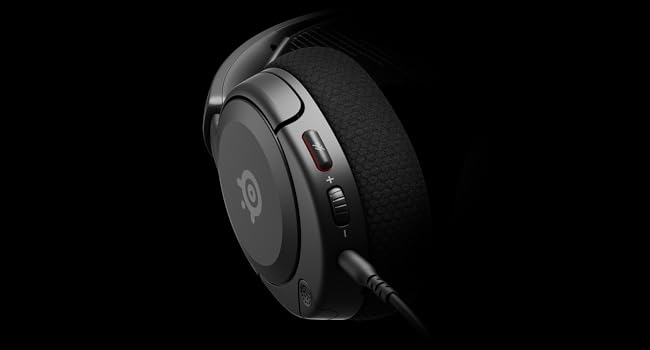
ภาพ: ระยะใกล้ view of the left earcup of the Arctis Nova 1X, highlighting the volume wheel and microphone mute button for easy access during gameplay.
Video: Official SteelSeries video demonstrating the features of the Arctis Nova 1 headset, including its audio capabilities and microphone design.
5. ความสบายและการสวมใส่
The Arctis Nova 1X is designed for extended gaming sessions with its ComfortMAX System:
- การออกแบบน้ำหนักเบามาก: Weighing only 236g, the headset minimizes pressure during long use.
- Height-Adjustable Earcups: The earcups can be adjusted vertically to fit various head sizes comfortably.
- Flexible Suspension Headband: The elastic headband conforms to your head for a secure yet gentle fit.

Image: The Arctis Nova 1X headset highlighting its ultra-lightweight and slim profile, designed for comfort.

Image: The Arctis Nova 1X headset demonstrating its height-adjustable earcups for a personalized and comfortable fit.
6. คุณสมบัติด้านเสียง
Experience superior sound with the Arctis Nova 1X:
- อัลไมตี้ ออดิโอ: The Nova Acoustic System with High Fidelity Drivers delivers crystal-clear highs, precise mids, and deep bass.
- ระบบเสียงรอบทิศทาง 360°: Immerse yourself in the game with surround sound that allows you to pinpoint enemy positions and environmental cues.
- Pro-grade Parametric EQ: ปรับแต่งระบบเสียงของคุณfile with the SteelSeries Sonar Audio Software Suite for a competitive edge.

Image: The Arctis Nova 1X headset highlighting its "Almighty Audio" capabilities for a rich sound experience.
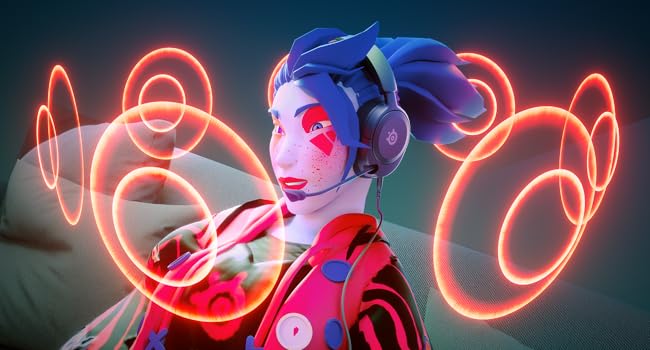
Image: Visual representation of 360° Spatial Audio, showing sound waves surrounding a gamer wearing the Arctis Nova 1X headset.

Image: Graphic illustrating the Pro-grade Parametric EQ, suggesting advanced audio customization options available with the headset.
7. คุณสมบัติของไมโครโฟน
The ClearCast Gen 2 Mic ensures clear communication:
- AI Noise Cancelling: Advanced AI algorithms filter out background noise, ensuring your voice is heard clearly by teammates.
- การออกแบบที่สามารถยืดหดได้: The microphone can be fully retracted into the earcup when not in use, maintaining a sleek profile.

Image: The Nova 1 AI Microphone, emphasizing its noise-cancelling capabilities for clear voice communication.
8. การบำรุงรักษา
To ensure the longevity and optimal performance of your Arctis Nova 1X headset, follow these maintenance guidelines:
- การทำความสะอาด: ใช้ผ้าแห้งนุ่มเช็ดทำความสะอาดที่ครอบหูและแถบคาดศีรษะ สำหรับการทำความสะอาดอย่างล้ำลึก ให้ใช้ผ้าชุบน้ำหมาดๆ เช็ดทำความสะอาดamp สามารถใช้ผ้าชุบสบู่เหลวอ่อนๆ เช็ดได้ โดยต้องแน่ใจว่าไม่มีความชื้นเข้าไปในตะแกรงลำโพงหรือช่องระบายอากาศ
- การดูแลสายเคเบิล: Avoid sharp bends or excessive pulling on the headset cable to prevent internal damage. Store the cable neatly when not in use.
- พื้นที่จัดเก็บ: เก็บหูฟังไว้ในที่แห้งและเย็น หลีกเลี่ยงแสงแดดโดยตรงและอุณหภูมิที่สูงหรือต่ำเกินไป
- จุกหูฟัง: If applicable, ensure earbud tips (if using with mobile) fit snugly. Replace worn-out earbud tips to maintain sound quality and comfort.
9 การแก้ไขปัญหา
If you encounter issues with your Arctis Nova 1X headset, try the following solutions:
- ไม่มีเสียง/ระดับเสียงต่ำ:
- Ensure the 3.5mm cable is fully inserted into both the headset and your device.
- ตรวจสอบปุ่มปรับระดับเสียงบนหูฟังและระดับเสียงของระบบในอุปกรณ์ของคุณ
- ทดสอบชุดหูฟังกับอุปกรณ์อื่นเพื่อตัดปัญหาเฉพาะอุปกรณ์ออกไป
- ไมโครโฟนไม่ทำงาน:
- Ensure the microphone mute button is not activated (red indicator off).
- Verify the microphone is fully extended and positioned correctly.
- ตรวจสอบการตั้งค่าเสียงของอุปกรณ์ของคุณเพื่อให้แน่ใจว่าได้เลือกอินพุตไมโครโฟนที่ถูกต้องและไม่ได้ปิดเสียงไมโครโฟนไว้
- คุณภาพเสียงไม่ดี:
- Ensure the 3.5mm cable is not damaged and is securely connected.
- Adjust your device's audio settings or equalizer settings.
10. ข้อมูลจำเพาะ
| คุณสมบัติ | รายละเอียด |
|---|---|
| ยี่ห้อ | สตีลซีรีส์ |
| ชื่อรุ่น | อาร์ติส โนวา 1X |
| หมายเลขรุ่น | 61616 |
| เทคโนโลยีการเชื่อมต่อ | ต่อสาย (แจ็ค 3.5 มม.) |
| การวางตำแหน่งหู | ครอบหู |
| การควบคุมเสียงรบกวน | ระบบตัดเสียงรบกวนแบบแอคทีฟ (ไมโครโฟน) |
| ประเภทไดร์เวอร์เสียง | ไดร์เวอร์แบบไดนามิก |
| ช่วงความถี่ | 20 เฮิรตซ์ - 20,000 เฮิรตซ์ |
| ไมโครโฟน | ClearCast Gen 2 (Retractable, AI Noise Cancelling) |
| อุปกรณ์ที่รองรับ | Xbox Series X|S, PC, PlayStation, Switch, Mobile |
| น้ำหนักสินค้า | 1.1 ปอนด์ (ประมาณ 500 กรัม) |
| สี | สีดำ |
| ยูพีซี | 850014119737 |
วิดีโอ: 360 องศา view of the SteelSeries Arctis Nova 1X headset in black, showcasing การออกแบบจากทุกมุม
11. การรับประกันและการสนับสนุน
11.1 ข้อมูลการรับประกัน
The SteelSeries Arctis Nova 1X Gaming Headset comes with a รับประกันจำกัด 1 ปี นับจากวันที่ซื้อ การรับประกันนี้ครอบคลุมข้อบกพร่องจากการผลิตและรับประกันว่าผลิตภัณฑ์ของคุณทำงานได้ตามวัตถุประสงค์ในการใช้งานปกติ โปรดเก็บหลักฐานการซื้อไว้เพื่อขอรับสิทธิ์การรับประกัน
For detailed warranty terms and conditions, please refer to the official SteelSeries webเว็บไซต์หรือบัตรรับประกันที่รวมอยู่ในบรรจุภัณฑ์ผลิตภัณฑ์ของคุณ
11.2 การสนับสนุนลูกค้า
For further assistance, technical support, or warranty claims, please contact SteelSeries customer support through their official webเว็บไซต์:
เยี่ยมชมฝ่ายสนับสนุนของ SteelSeries
You may also find additional resources, FAQs, and software downloads on their support page.