
1. บทนำ
The Guardo Fit Coach Explore is an advanced activity tracker designed to monitor various aspects of your health and fitness. This manual provides essential information for setting up, operating, and maintaining your device to ensure optimal performance and longevity.
2. เนื้อหาบรรจุภัณฑ์
โปรดตรวจสอบว่าสินค้าทั้งหมดมีอยู่ในแพ็คเกจของคุณ:
- Guardo Fit Coach Explore Activity Tracker
- สายชาร์จ
- คู่มือการใช้งาน (เอกสารนี้)
3. การตั้งค่า
3.1 การชาร์จอุปกรณ์
Before first use, fully charge your Guardo Fit Coach Explore. Connect the charging cable to the charging port on the back of the device and plug the other end into a USB power source (e.g., computer, USB wall adapter). The device will display a charging indicator.

ภาพ: ด้านหลัง view of the activity tracker highlighting the charging contacts and sensors, alongside a display showing blood pressure readings.
3.2 การติดตั้งและการจับคู่แอป
- Download the official Guardo Fit Coach app from your smartphone's app store (compatible with Android operating systems).
- ตรวจสอบให้แน่ใจว่าได้เปิดใช้งาน Bluetooth บนสมาร์ทโฟนของคุณแล้ว
- เปิดแอปและทำตามคำแนะนำบนหน้าจอเพื่อสร้างบัญชีหรือเข้าสู่ระบบ
- เลือก 'เพิ่มอุปกรณ์' หรือ 'จับคู่อุปกรณ์ใหม่' ภายในแอป
- The app will search for your Guardo Fit Coach Explore. Select your device from the list to initiate pairing.
- Confirm the pairing request on both your smartphone and the activity tracker if prompted.

Image: The activity tracker worn on a wrist, showing a watch face with icons for different applications, indicating smartphone connectivity.
4. คู่มือการใช้งาน
4.1 การนำทางพื้นฐาน
The Guardo Fit Coach Explore features a touchscreen display for interaction. Swipe left, right, up, or down to navigate through menus and features. Tap to select an option or confirm an action. The device may also have physical buttons for specific functions like power on/off or returning to the home screen.

Image: The activity tracker's display showing a customizable watch face with a unique spiral graphic.
4.2 การรับการแจ้งเตือน
Once paired with your smartphone, the activity tracker can display notifications for incoming calls, messages, and app alerts. Ensure notification permissions are granted in your smartphone's settings and within the Guardo Fit Coach app.

Image: The activity tracker's screen showing an incoming call notification with the caller's number and options to answer or reject the call.
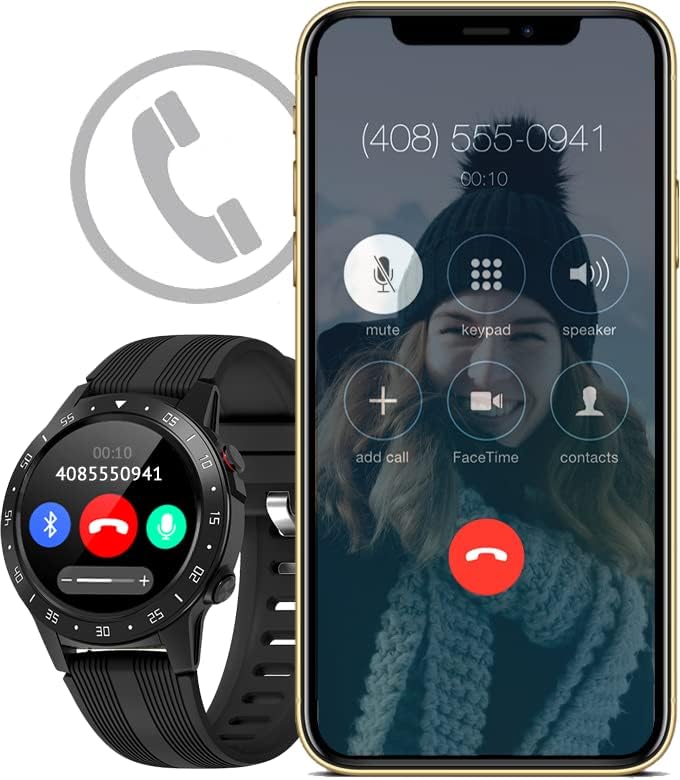
Image: The activity tracker and a smartphone side-by-side, both indicating an incoming call, demonstrating call notification synchronization.
4.3 การควบคุมเพลง
Control music playback on your paired smartphone directly from your activity tracker. This feature allows you to play, pause, skip tracks, and adjust volume without needing to access your phone.

Image: The activity tracker and a smartphone displaying synchronized music playback interfaces, allowing remote control of audio.
5. คุณสมบัติ
The Guardo Fit Coach Explore offers a range of features to support your active lifestyle:
- เครื่องติดตามกีฬาหลายประเภท: Track various activities such as indoor and outdoor sports, cycling, and climbing.
- Custom Activity Tracking: Monitor specific activities with tailored settings.
- จีพีเอส: Built-in GPS for accurate tracking of routes and distances during outdoor activities.
- เครื่องวัดอัตราการเต้นของหัวใจ: Continuously monitor your heart rate.
- เครื่องวัดความดันโลหิต: Measure your blood pressure directly from the device.
- การแจ้งเตือน: รับการแจ้งเตือนสำหรับสายเรียกเข้า ข้อความ และการแจ้งเตือนจากแอปต่างๆ
- เข็มทิศ: Integrated digital compass for navigation.
- เครื่องวัดความเร่ง: Measures movement and activity.
- เครื่องวัดระยะสูง: Measures altitude, useful for hiking and climbing.
- บารอมิเตอร์: Measures atmospheric pressure, aiding in weather prediction and altitude accuracy.

Image: The activity tracker's display surrounded by icons symbolizing its diverse functionalities, including communication and utility features.

Image: The activity tracker's screen showing real-time GPS data, such as distance covered, pace, and heart rate, overlaid on a map.
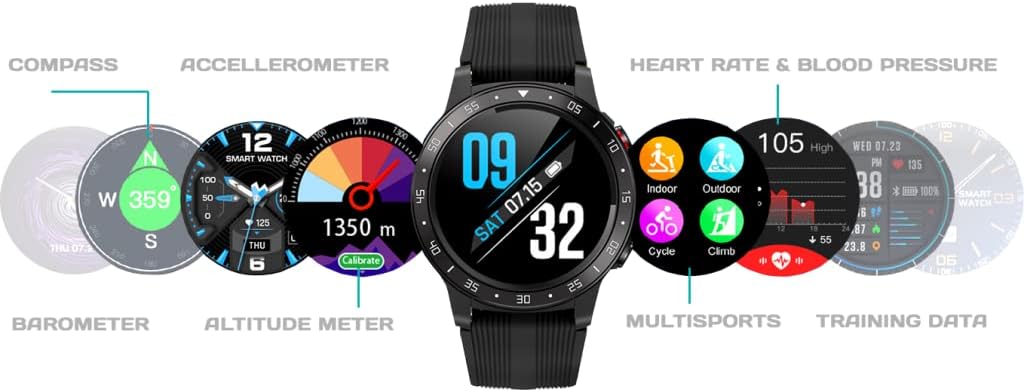
ภาพ: ครอบคลุม view of the activity tracker's display, showcasing various data points from its integrated sensors, including environmental and health metrics.
6. การบำรุงรักษา
6.1 การทำความสะอาด
Regularly clean your activity tracker to prevent skin irritation and maintain device functionality. Use a soft, damp, lint-free cloth to wipe the screen and strap. Avoid harsh chemicals or abrasive materials.
6.2 การดูแลแบตเตอรี่
เพื่อยืดอายุการใช้งานแบตเตอรี่ ควรหลีกเลี่ยงการวางอุปกรณ์ไว้ในที่ที่มีอุณหภูมิสูงหรือต่ำเกินไป ชาร์จอุปกรณ์เป็นประจำ แต่ควรหลีกเลี่ยงการปล่อยให้แบตเตอรี่ชาร์จเต็มหรือหมดเกลี้ยงเป็นเวลานาน
7 การแก้ไขปัญหา
7.1 อุปกรณ์ไม่เปิด
- ตรวจสอบให้แน่ใจว่าอุปกรณ์ชาร์จเต็มแล้ว เสียบอุปกรณ์เข้ากับเครื่องชาร์จอย่างน้อย 30 นาที
- Press and hold the power button (if applicable) for 10-15 seconds to attempt a forced restart.
7.2 ปัญหาการจับคู่
- ตรวจสอบให้แน่ใจว่าได้เปิดใช้งาน Bluetooth บนสมาร์ทโฟนของคุณแล้วและอุปกรณ์อยู่ในระยะ
- Restart both your smartphone and the activity tracker.
- Forget the device in your smartphone's Bluetooth settings and attempt to pair again through the Guardo Fit Coach app.
- ตรวจสอบว่าแอปได้รับการอัปเดตเป็นเวอร์ชั่นล่าสุดหรือไม่
7.3 การอ่านค่าที่ไม่ถูกต้อง
- Ensure the device is worn snugly on your wrist, about one finger's width above your wrist bone.
- ทำความสะอาดเซ็นเซอร์ที่ด้านหลังของอุปกรณ์
- สำหรับการใช้งาน GPS โปรดตรวจสอบให้แน่ใจว่าคุณอยู่ในพื้นที่โล่งและมีทัศนวิสัยที่ชัดเจน view ของท้องฟ้า
8. ข้อมูลจำเพาะ
| คุณสมบัติ | ข้อมูลจำเพาะ |
|---|---|
| ยี่ห้อ | กวาร์โด |
| แบบอย่าง | สำรวจ |
| อุปกรณ์ที่รองรับ | สมาร์ทโฟน (ระบบปฏิบัติการแอนดรอยด์) |
| ประเภทจอภาพ | จอแอลซีดี |
| ขนาดหน้าจอ | 40 มิลลิเมตร |
| การเชื่อมต่อแบบไร้สาย | บลูทูธ |
| จีพีเอส | มี GPS ในตัว |
| อุปกรณ์อินพุต | ไมโครโฟน, หน้าจอสัมผัส |
| รวมแบตเตอรี่แบบชาร์จไฟได้ | ใช่ |
| คุณสมบัติพิเศษ | Custom activity tracking, Blood pressure monitor, GPS, Notifications, Multisport Tracker |
9. ข้อมูลด้านความปลอดภัย
- อย่าพยายามเปิดหรือถอดแยกชิ้นส่วนอุปกรณ์
- เก็บอุปกรณ์ให้ห่างจากอุณหภูมิที่สูงหรือต่ำมาก แสงแดดโดยตรง และความชื้น
- This device is not a medical instrument. The data provided is for reference only and should not be used for medical diagnosis or treatment.
- Consult your doctor before starting any new exercise regimen or if you have any health concerns.
- กำจัดอุปกรณ์และแบตเตอรี่ตามระเบียบข้อบังคับท้องถิ่น