
1. บทนำ
This manual provides essential information for the safe and efficient operation of your Dual DL-32HD-008 LED TV. Please read these instructions carefully before using the television and retain them for future reference. This 32-inch (81 cm) HD LED TV features a 1366 x 768 resolution, multiple connectivity options including HDMI and USB, and an integrated DVB-T/C/S2 tuner.

Image 1.1: The Dual DL-32HD-008 LED TV.
2. ข้อมูลด้านความปลอดภัย
ปฏิบัติตามข้อควรระวังด้านความปลอดภัยขั้นพื้นฐานเสมอเมื่อใช้โทรทัศน์เครื่องนี้เพื่อลดความเสี่ยงต่อการเกิดไฟไหม้ ไฟฟ้าช็อต และการบาดเจ็บ
- อย่าให้ทีวีโดนฝนหรือความชื้น
- อย่าเปิดทีวีasinง. ส่งต่อการบริการทั้งหมดให้กับบุคลากรที่มีคุณสมบัติ
- ตรวจสอบให้แน่ใจว่ามีการระบายอากาศที่เหมาะสมรอบๆ ทีวี
- เก็บทีวีให้ห่างจากแสงแดดโดยตรง แหล่งความร้อน และสนามแม่เหล็กแรงสูง
- ถอดปลั๊กทีวีในระหว่างที่มีพายุฝนฟ้าคะนองหรือเมื่อไม่ได้ใช้งานเป็นเวลานาน
3. เนื้อหาบรรจุภัณฑ์
ตรวจสอบว่ามีสิ่งของทั้งหมดอยู่ในกล่อง:
- Dual DL-32HD-008 LED TV
- ขาตั้ง (2 ชิ้น)
- รีโมทคอนโทรล
- คู่มือการใช้งาน (เอกสารนี้)
4. การตั้งค่า
4.1. การติดตั้งขาตั้ง
To install the stand feet:
- วางทีวีคว่ำหน้าลงบนพื้นผิวเรียบและนุ่มอย่างระมัดระวังเพื่อป้องกันไม่ให้หน้าจอเสียหาย
- จัดวางขาตั้งแต่ละข้างให้ตรงกับช่องที่ตรงกันที่ด้านล่างของทีวี
- ยึดขาโดยใช้สกรูที่ให้มา

Image 4.1: TV with stand feet installed.
4.2. การติดตั้งบนผนัง
The TV supports VESA 100 x 100 mm wall mounts. A wall mount kit is not supplied. Please consult a professional for wall mounting to ensure safety and proper installation.
4.3. การเชื่อมต่ออุปกรณ์ภายนอก
ทีวีมีพอร์ตต่างๆ สำหรับเชื่อมต่ออุปกรณ์ภายนอก:
- พอร์ต HDMI: Connect Blu-ray players, game consoles, or set-top boxes. This model includes 1 HDMI 1.4 port and 1 HDMI ARC port.
- พอร์ต USB 2.0: For media playback or PVR (Personal Video Recorder) functionality.
- อินพุตเสาอากาศ: Connect your terrestrial, cable, or satellite antenna for DVB-T/C/S2 reception.
- สล็อต CI+: สำหรับโมดูลการเข้าถึงแบบมีเงื่อนไข (CAM) เพื่อถอดรหัสช่องสัญญาณที่เข้ารหัส

Image 4.2: Rear panel with connectivity ports.
4.4. Power Connection and First-Time Setup
- เชื่อมต่อสายไฟเข้ากับทีวีแล้วจึงเสียบเข้ากับเต้ารับที่ผนัง
- กดปุ่มเปิด/ปิดบนรีโมทคอนโทรลหรือบนทีวี
- Follow the on-screen instructions for the initial setup, including language selection, channel scanning, and network configuration (if applicable).
5. ปฏิบัติการ
5.1. การควบคุมระยะไกลview
Familiarize yourself with the remote control buttons for optimal TV operation.

ภาพที่ 5.1: รีโมทคอนโทรล
5.2. ฟังก์ชั่นพื้นฐานของทีวี
- พลัง: กดปุ่ม พลัง button to turn the TV on or off.
- ปริมาณ: ใช้ ฉบับ +/- ปุ่มปรับระดับเสียง
- ช่อง: ใช้ ช +/- ปุ่มเปลี่ยนช่อง
- ป้อนข้อมูล: กดปุ่ม ป้อนข้อมูล button to select different input sources (HDMI, USB, TV).
- เมนู: กดปุ่ม เมนู button to access the main menu for settings adjustments.
5.3. การใช้งานจูนเนอร์
Your TV supports DVB-T (terrestrial), DVB-C (cable), and DVB-S2 (satellite) signal formats. After initial setup, channels will be scanned and stored. Use the อีพีจี ปุ่มที่จะ view the Electronic Program Guide.
5.4. USB PVR Function
Connect a USB storage device to the USB 2.0 port to record TV programs. Refer to the on-screen menu for PVR setup and operation instructions.
6. การบำรุงรักษา
6.1. การทำความสะอาดหน้าจอ
เช็ดหน้าจอเบาๆ ด้วยผ้านุ่มที่ไม่เป็นขุย สำหรับรอยฝังแน่น ให้เช็ดเบาๆampชุบผ้าด้วยน้ำหรือน้ำยาทำความสะอาดหน้าจอโดยเฉพาะ ห้ามฉีดน้ำยาลงบนหน้าจอโดยตรง
6.2. การทำความสะอาด Casing
ใช้ผ้าแห้งนุ่มๆ เช็ดทำความสะอาดทีวีasinก. หลีกเลี่ยงการใช้น้ำยาทำความสะอาดหรือตัวทำละลายที่มีฤทธิ์กัดกร่อน
7 การแก้ไขปัญหา
หากคุณพบปัญหา โปรดดูปัญหาทั่วไปและวิธีแก้ไขต่อไปนี้:
| ปัญหา | สาเหตุที่เป็นไปได้ | สารละลาย |
|---|---|---|
| ไม่มีไฟฟ้า | สายไฟถูกถอดออก ไม่มีไฟเข้าปลั๊ก | ตรวจสอบการเชื่อมต่อสายไฟ ทดสอบเต้ารับกับอุปกรณ์อื่น |
| ไม่มีภาพแต่มีเสียง | เลือกแหล่งสัญญาณเข้าไม่ถูกต้อง สายเคเบิลชำรุด | กด ป้อนข้อมูล to select correct source; check HDMI/AV cable connections. |
| ไม่มีเสียงแต่มีภาพ | เสียงถูกปิดหรือเบาเกินไป มีปัญหากับระบบเสียงภายนอก | เปิดเสียงหรือเพิ่มระดับเสียง ตรวจสอบการเชื่อมต่อเสียงภายนอก |
| รีโมตคอนโทรลไม่ทำงาน | แบตเตอรี่หมดหรือใส่ไม่ถูกต้อง; มีสิ่งกีดขวาง | Replace batteries (CR2032 type); ensure clear path to TV's IR sensor. |
| คุณภาพของภาพไม่ดี | สัญญาณอ่อน; การตั้งค่าภาพไม่ถูกต้อง | Check antenna connection; adjust picture settings in the menu. |
8. ข้อมูลจำเพาะ
Detailed technical specifications for the Dual DL-32HD-008 LED TV:
| คุณสมบัติ | ข้อมูลจำเพาะ |
|---|---|
| ชื่อรุ่น | DL-32HD |
| ขนาดหน้าจอ | 32 นิ้ว (81 ซม.) |
| เทคโนโลยีการแสดงผล | นำ |
| ปณิธาน | 720p (1366 x 768) |
| อัตราการรีเฟรช | 60 เฮิรตซ์ |
| อัตราส่วนภาพ | 16:9 น. |
| อัตราส่วนคอนทราสต์ | 1200:1 น. |
| ความสว่างสูงสุด | 180 Candelas per square meter |
| เวลาตอบสนอง | 8 มิลลิวินาที |
| Viewอิงแองเกิล | 178 องศา |
| โหมดเอาต์พุตเสียง | ล้อมรอบ |
| คำอธิบายลำโพง | 2 x 8 Watts Speakers |
| พอร์ต HDMI ทั้งหมด | 2 (1x HDMI 1.4, 1x HDMI ARC) |
| พอร์ต USB รวม | 2 (ยูเอสบี 2.0) |
| ประเภทจูนเนอร์ | DVB-T, DVB-C, DVB-S2 |
| มาตรฐาน VESA Mount | 100 x 100 มม. |
| การใช้พลังงาน | 65 Watts (On), 0.5 Watts (Standby) |
| บรรทัดฉบับtage | 100-240 โวลต์ ไฟฟ้ากระแสสลับ 50-60 เฮิรตซ์ |
| ขนาดสินค้า (ลึก x กว้าง x สูง) | ขนาด 19P x 73.2W x 47.8H ซม. |
| น้ำหนักสินค้า (ไม่รวมขาตั้ง) | 3.5 กิโลกรัม |
| น้ำหนักสินค้า (รวมขาตั้ง) | 4.5 กิโลกรัม |
| ประเภทแบตเตอรี่รีโมทคอนโทรล | CR2032 |
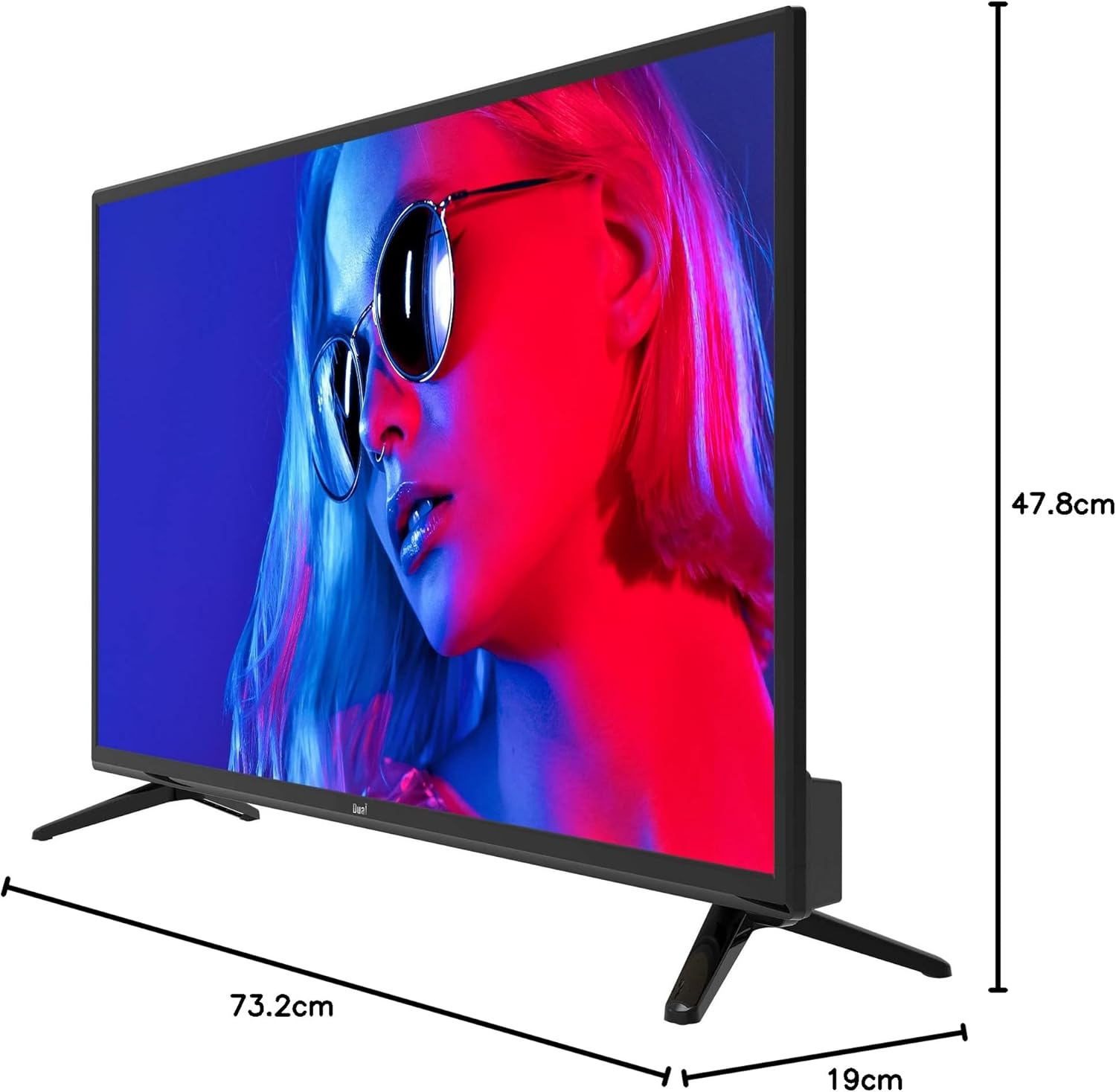
Image 8.1: TV dimensions.
8.1. ฉลากพลังงาน

Image 8.2: EU Energy Label. For more details, visit the official EPREL database: หน้าผลิตภัณฑ์ EPREL
9. การรับประกันและการสนับสนุน
9.1. ข้อมูลการรับประกัน
This product comes with a Limited Warranty. Please refer to the warranty card included in your package for specific terms and conditions.
9.2. Spare Parts and Software Updates
Information regarding the availability of spare parts and guaranteed software updates for this model is currently not available. Please contact your retailer or the manufacturer for further inquiries.
9.3. การสนับสนุนลูกค้า
For technical assistance or customer service, please contact your point of purchase or visit the official Dual webเว็บไซต์สำหรับทรัพยากรสนับสนุน