
1. บทนำ
Thank you for choosing the ILIFE V3s Max Robot Vacuum and Mop Combo. This device is designed to provide efficient and convenient cleaning for your home, combining powerful vacuuming with intelligent mopping capabilities. This manual provides essential information for the safe operation, maintenance, and troubleshooting of your robot vacuum. Please read it thoroughly before use and retain it for future reference.
2. คำแนะนำด้านความปลอดภัย
เพื่อลดความเสี่ยงต่อการบาดเจ็บหรือความเสียหาย โปรดอ่านและปฏิบัติตามข้อควรระวังด้านความปลอดภัยทั้งหมด เครื่องใช้ไฟฟ้านี้สำหรับใช้ในครัวเรือนเท่านั้น
- Do not operate the robot near open flames or fragile objects.
- ให้ผม เสื้อผ้าหลวม นิ้ว และส่วนต่างๆ ของร่างกายอยู่ห่างจากช่องเปิดและชิ้นส่วนที่เคลื่อนไหว
- ห้ามปล่อยให้เด็กใช้งานหุ่นยนต์ ควรดูแลเด็กและสัตว์เลี้ยงอย่างใกล้ชิดขณะที่หุ่นยนต์กำลังทำงาน
- ใช้เฉพาะอะแดปเตอร์ไฟและแท่นชาร์จดั้งเดิมที่ผู้ผลิตให้มาเท่านั้น
- ตรวจสอบให้แน่ใจว่าหุ่นยนต์ชาร์จเต็มแล้วก่อนใช้งานครั้งแรก
- ห้ามใช้หุ่นยนต์เก็บเศษขยะขนาดใหญ่ ของเหลว หรือวัตถุที่กำลังเผาไหม้
- Remove power cords, small objects, and curtains from the cleaning path to prevent entanglement.
- Do not use the mopping function on carpets or rugs.
3. เนื้อหาบรรจุภัณฑ์
ตรวจสอบว่าส่วนประกอบทั้งหมดมีอยู่และอยู่ในสภาพดี:
- 1x ILIFE V3s Max Robot Vacuum
- 1x รีโมทคอนโทรล
- 1x Filter (pre-installed)
- อะแดปเตอร์ AC 1x
- แท่นชาร์จ 1x
- แปรงทำความสะอาด 1x
- 2x Side Brushes (spare)
- 1x Mop Cloth
- 1x Water Tank
- 1x คู่มือผู้ใช้
- 3x Dust Bags
4. สินค้าหมดview
Familiarize yourself with the main components of your ILIFE V3s Max.

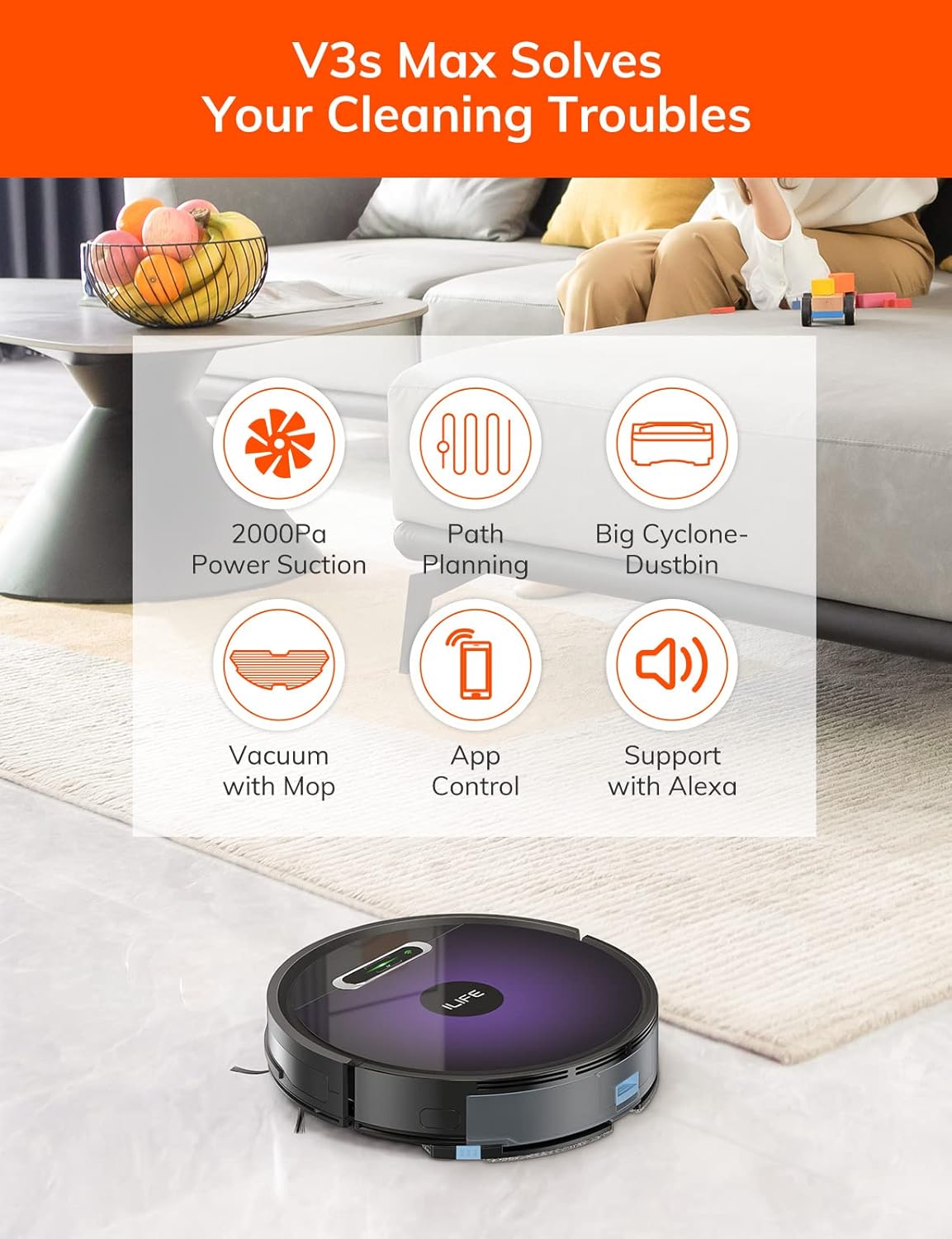
รูปที่ 4.1: สูงสุด view of the ILIFE V3s Max robot vacuum, illustrating its 2000Pa suction, path planning, large dustbin, vacuum with mop function, app control, and Alexa support.

รูปที่ 4.2: ส่วนล่าง view of the robot vacuum, highlighting the deep edge cleaning brush, powerful suction inlet, and the mop attachment for combined cleaning.
องค์ประกอบหลัก:
- เนื้อหาหลัก: Contains the motor, dustbin, water tank, and navigation sensors.
- แปรงด้านข้าง: กวาดเศษสิ่งสกปรกเข้าไปในช่องดูด
- ล้อขับเคลื่อน: Allow the robot to move across various surfaces.
- ล้อสากล: Provides directional movement.
- หน้าสัมผัสการชาร์จ: Connects with the charging dock.
- ถังขยะ: เก็บเศษขยะแห้ง
- ถังเก็บน้ำ: สามารถกักเก็บน้ำไว้สำหรับถูพื้นได้
- ผ้าม็อบ: ติดกับถังน้ำเพื่อการทำความสะอาดแบบเปียก
- ปุ่มเปิด/ปิด: Turns the robot on/off and starts/pauses cleaning.
- เซ็นเซอร์: เซ็นเซอร์ป้องกันการตก ป้องกันการชน และติดตามผนัง
5. การตั้งค่า
5.1 การชาร์จเริ่มต้น
- วางแท่นชาร์จไว้ชิดผนังในพื้นที่เปิดโล่ง โดยให้แน่ใจว่าไม่มีสิ่งกีดขวางใดๆ ในระยะ 1 เมตรทางด้านข้างและ 2 เมตรทางด้านหน้า
- Connect the AC adapter to the charging dock and plug it into a power outlet.
- Place the robot onto the charging dock, ensuring the charging contacts align. The indicator light will show charging status.
- Allow the robot to charge completely before first use (approximately 5-6 hours).
รูปที่ 5.1: The robot vacuum returning to its charging dock. Ensure the dock is placed in an accessible area.
5.2 การเชื่อมต่อแอปและ Wi-Fi
The ILIFE V3s Max supports app control via 2.4G Wi-Fi (5G Wi-Fi is not supported).
- ดาวน์โหลดแอป "ILIFEHOME" จากแอปสโตร์ของสมาร์ทโฟนของคุณ (iOS หรือ Android)
- ลงทะเบียนบัญชีและเข้าสู่ระบบ
- Ensure your phone is connected to a 2.4G Wi-Fi network.
- Follow the in-app instructions to add your device. This typically involves pressing and holding the robot's power button until it enters pairing mode, then entering your Wi-Fi password in the app.

รูปที่ 5.2: The ILIFEHOME app interface, demonstrating features like scheduling, cleaning history, suction settings, and cleaning modes. The robot also supports Amazon Alexa integration.
6. คู่มือการใช้งาน
6.1 การเริ่ม/หยุดการทำความสะอาด
- จากหุ่นยนต์: กดปุ่มเปิด/ปิดหนึ่งครั้งเพื่อเริ่มหรือหยุดการทำความสะอาดชั่วคราว
- From Remote Control: Press the "Clean" button.
- จากแอป: Tap "Start" or "Pause" in the ILIFEHOME app.
โหมดทำความสะอาด 6.2 โหมด
The V3s Max offers multiple cleaning modes for different needs:

รูปที่ 6.1: Illustration of the robot's multiple cleaning modes: Random, Spot, Edge, and Path (zigzag) cleaning.
- Path Cleaning (Zigzag): The robot cleans in an efficient zigzag pattern, covering the entire area systematically. This is the default mode for general cleaning.
- การทำความสะอาดเฉพาะจุด: The robot focuses on a specific dirty area, cleaning in a spiral pattern. Activate this mode for concentrated cleaning of spills or heavily soiled spots.
- การทำความสะอาดขอบ: The robot cleans along walls and furniture edges. Useful for thorough cleaning of room perimeters.
- การทำความสะอาดแบบสุ่ม: The robot cleans randomly, suitable for small, uncluttered spaces.
6.3 การดูดฝุ่นและการถูพื้น
The V3s Max can vacuum and mop simultaneously or separately.

รูปที่ 6.2: The robot vacuum demonstrating its 2000Pa suction power, effectively picking up food crumbs and pet hair from hard floors.

รูปที่ 6.3: The robot vacuum illustrating three types of water adjustment for mopping, catering to various floor cleaning needs.
- การดูดฝุ่น: Ensure the dustbin is installed. The robot will use its 2000Pa suction to clean dry debris.
- ถูพื้น: Fill the 200ml water tank with clean water and attach the mop cloth. Insert the water tank into the robot. The robot will then perform wet mopping. Do not use cleaning solutions other than water in the tank.
- การทำความสะอาดแบบผสมผสาน: With both the dustbin and water tank installed, the robot will vacuum and mop simultaneously.
6.4 การจัดตารางงาน
Use the ILIFEHOME app to set cleaning schedules for automated cleaning sessions.
- Open the ILIFEHOME app.
- Navigate to the scheduling section.
- Set desired cleaning times and days.
- Confirm the schedule. The robot will automatically start cleaning at the programmed times.
7. การบำรุงรักษา
การบำรุงรักษาตามปกติจะช่วยให้หุ่นยนต์ดูดฝุ่นของคุณทำงานได้อย่างเหมาะสมที่สุดและยืดอายุการใช้งาน
7.1 การทำความสะอาดถังขยะและตัวกรอง
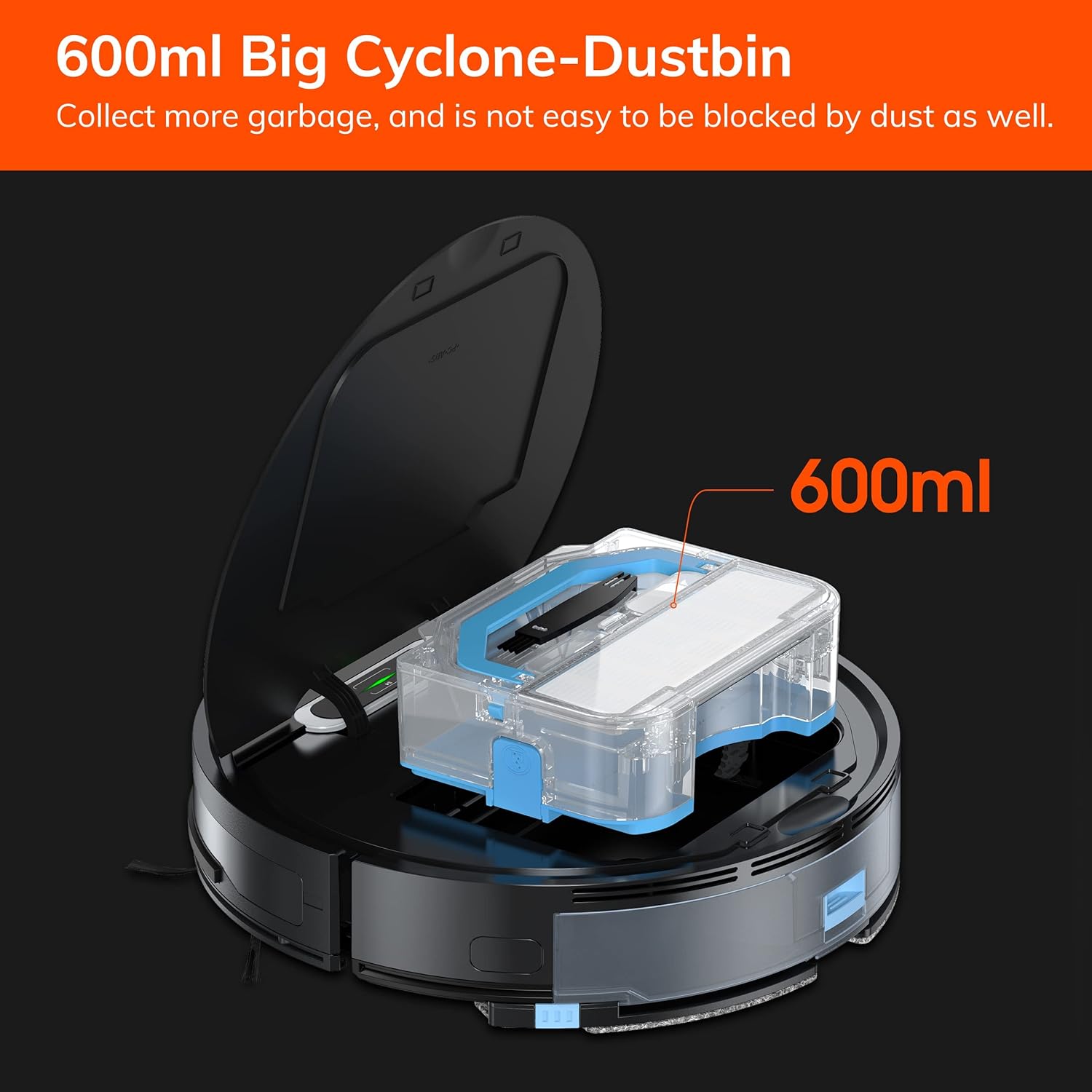
รูปที่ 7.1: The 600ml cyclone dustbin, designed to collect more debris and resist clogging.
- Press the "PUSH" button on the robot's top cover to open it.
- ถอดถังขยะออกโดยดึงขึ้นด้านบน
- เปิดฝาถังขยะและเทสิ่งของภายในลงในถังขยะ
- Remove the filter assembly (pre-filter, sponge filter, high-performance filter).
- Clean the filters with the provided cleaning brush. Do not wash the high-performance filter with water.
- หากจำเป็น ให้ล้างถังขยะด้วยน้ำสะอาด และตรวจสอบให้แน่ใจว่าแห้งสนิทก่อนติดตั้งกลับเข้าไปใหม่
- Reassemble the filters and dustbin, then reinsert into the robot.
7.2 การทำความสะอาดแปรงด้านข้าง
- ตรวจสอบแปรงด้านข้างเป็นประจำเพื่อดูว่ามีเส้นผมพันกันหรือมีเศษสิ่งสกปรกติดอยู่หรือไม่
- ค่อยๆ ดึงแปรงด้านข้างขึ้นด้านบนเพื่อถอดออก
- Use the cleaning brush or scissors to remove any tangled hair or debris.
- Reinstall the side brushes, ensuring they click into place.
7.3 การบำรุงรักษาถังเก็บน้ำและผ้าถูพื้น
- After each mopping session, remove the water tank.
- เทน้ำที่เหลืออยู่ออกจากถัง
- ถอดผ้าถูพื้นออกแล้วซักด้วยมือหรือเครื่องซักผ้า จากนั้นปล่อยให้แห้งสนิทโดยการผึ่งลม
- ล้างถังเก็บน้ำด้วยน้ำสะอาด แล้วปล่อยให้แห้งเองตามธรรมชาติ
7.4 การทำความสะอาดเซ็นเซอร์
- Use a clean, dry cloth to wipe the anti-drop sensors (located on the bottom of the robot) and the anti-collision sensors (located on the front bumper).
- Clean the charging contacts on both the robot and the charging dock.
8 การแก้ไขปัญหา
If you encounter issues with your ILIFE V3s Max, refer to the following common problems and solutions:
| ปัญหา | สาเหตุที่เป็นไปได้ | สารละลาย |
|---|---|---|
| หุ่นยนต์ไม่เริ่มต้นหรือตอบสนอง | แบตเตอรี่ต่ำ, สวิตช์ไฟปิด, หุ่นยนต์ติดขัด | Charge the robot; Turn on the power switch; Clear obstacles. |
| หุ่นยนต์ไม่สามารถกลับไปยังแท่นชาร์จได้ | Charging dock obstructed; Robot too far from dock; Dock not powered. | Ensure clear path to dock; Manually place robot near dock; Check power connection. |
| ประสิทธิภาพการทำความสะอาดไม่ดี | Dustbin full; Filters clogged; Side brushes worn or tangled. | Empty dustbin; Clean/replace filters; Clean/replace side brushes. |
| หุ่นยนต์ติดขัดบ่อยครั้ง | สิ่งกีดขวาง (สายเคเบิล พรม); เซ็นเซอร์ตรวจจับหน้าผาสกปรก | Clear cleaning area; Clean cliff sensors. |
| ปัญหาการเชื่อมต่อแอป | Incorrect Wi-Fi (5G); Incorrect password; Router issues. | Ensure 2.4G Wi-Fi; Re-enter password; Restart router and robot. |
If the problem persists, please contact ILIFE customer support.
9. ข้อมูลจำเพาะ
| คุณสมบัติ | รายละเอียด |
|---|---|
| ยี่ห้อ | ไอไลฟ์ |
| ชื่อรุ่น | V3s สูงสุด |
| พลังดูด | Up to 2000Pa (Spot Mode) |
| ความจุของถังขยะ | 600มล. |
| ความจุถังน้ำ | 200มล. |
| อายุการใช้งานแบตเตอรี่ | สูงสุด 100 นาที |
| ประเภทแบตเตอรี่ | Lithium Ion (14.4 Volts) |
| การนำทาง | Gyroscopic Path Planning |
| วิธีการควบคุม | App Control, Remote Control, Amazon Alexa |
| การรองรับ Wi-Fi | 2.4G Wi-Fi เท่านั้น |
| ขนาดสินค้า | ยาว 12.4 นิ้ว x กว้าง 11.81 นิ้ว x สูง 2.99 นิ้ว |
| น้ำหนักสินค้า | 5.4 ปอนด์ |
| ระดับเสียง | 65 เดซิเบล |
| คำแนะนำด้านพื้นผิว | Hard Floor, Low-Pile Carpet |
10. การรับประกันและการสนับสนุน
ILIFE provides a limited warranty for this product. For detailed warranty information, please refer to the warranty card included in your package or visit the official ILIFE website. For technical support, troubleshooting assistance, or replacement parts, please contact ILIFE customer service through the contact information provided on their website or within the ILIFEHOME app.
การสนับสนุนทางออนไลน์: www.iliferobot.com/support