
1. บทนำ
Thank you for choosing the EBERTH Professional Dehumidifier BT3-B50L. This device is designed for efficient moisture removal in various environments, including construction sites, basements, and other large spaces. Its robust construction, high performance, and user-friendly interface ensure reliable operation. Please read this manual thoroughly before operating the dehumidifier to ensure safe and optimal use.

Figure 1: EBERTH Professional Dehumidifier BT3-B50L, front-side view. This image shows the grey dehumidifier with its top handle and wheels, ready for use.
2. คำแนะนำด้านความปลอดภัย
ปฏิบัติตามข้อควรระวังด้านความปลอดภัยขั้นพื้นฐานเสมอเมื่อใช้เครื่องใช้ไฟฟ้า เพื่อลดความเสี่ยงต่อการเกิดไฟไหม้ ไฟฟ้าช็อต และการบาดเจ็บส่วนบุคคล
- ตรวจสอบให้แน่ใจว่าแหล่งจ่ายไฟตรงกับปริมาตรtage specified on the rating label (230V AC).
- ห้ามใช้งานเครื่องลดความชื้นหากสายไฟหรือปลั๊กชำรุด
- Keep the appliance away from heat sources, flammable materials, and water.
- ห้ามสอดวัตถุเข้าไปในช่องลมเข้าหรือช่องลมออก
- ถอดปลั๊กเครื่องทุกครั้งก่อนทำความสะอาด บำรุงรักษา หรือเมื่อไม่ได้ใช้งาน
- อุปกรณ์นี้ไม่ได้มีไว้สำหรับผู้ที่มีความบกพร่องทางร่างกาย ประสาทสัมผัส หรือทางจิต เว้นแต่จะได้รับการควบคุมดูแล
- ตรวจสอบให้แน่ใจว่าวางเครื่องไว้บนพื้นผิวที่มั่นคงและระดับเพื่อป้องกันการพลิกคว่ำ
3. สินค้าหมดview
คุณสมบัติหลัก:
- ประสิทธิภาพการลดความชื้นสูง: มากถึง 50 ลิตรต่อวัน
- ครอบคลุมพื้นที่กว้าง: Suitable for rooms up to 90 m² or 230 m³.
- สามารถปรับความชื้นได้: Relative humidity (RH) can be set in 1% increments from 20% to 90%.
- แผงควบคุมที่ใช้งานง่าย: Digital display with touch buttons for easy operation.
- ถังเก็บน้ำขนาดใหญ่: ความจุ 5.5 ลิตร พร้อมระบบปิดอัตโนมัติเมื่อเต็ม
- ตัวเลือกการระบายน้ำอย่างต่อเนื่อง: Allows for extended, unsupervised operation with a connected hose.
- ตัวกรองอากาศที่สามารถซักล้างได้: Easily accessible and removable for simple cleaning.
- ดีไซน์แข็งแรงทนทานและพกพาสะดวก: Stable chassis, two solid rubber wheels, and an ergonomic handle for easy transport.
- Rotary Piston Compressor: Enables transport and storage in any position.
- ละลายน้ำแข็งอัตโนมัติ: Ensures efficient operation even at low temperatures.
- ตัวจับเวลา 24 ชั่วโมง: สำหรับการดำเนินการตามกำหนดเวลา
ส่วนประกอบและการควบคุม:

Figure 2: Internal components and key features. This image shows the dehumidifier with its side panel open, revealing the internal 5.5L water collection tank and the washable air filter. Insets highlight the robust handle, solid wheels, and the digital humidity display.

Figure 3: Control Panel. A detailed view of the dehumidifier's control panel, featuring a digital display for humidity and temperature, along with touch buttons for 'In-Dry' (Dry Mode), 'Auto' (Auto Mode), 'Add' (Increase), 'Minus' (Decrease), 'Set' (Settings), and 'Power'.
- ปุ่มเปิด/ปิด: เปิดหรือปิดเครื่อง
- ปุ่มตั้งค่า: เข้าถึงการตั้งค่าและยืนยันการเลือก
- Add/Minus Buttons: Adjusts desired humidity levels or timer settings.
- โหมดอัตโนมัติ: Automatically adjusts operation based on ambient humidity.
- In-Dry Mode (Dry Mode): For continuous maximum dehumidification.
- จอแสดงผลดิจิตอล: Shows current humidity, temperature, and selected settings.
4. การตั้งค่า
- การแกะกล่อง: นำเครื่องลดความชื้นออกจากบรรจุภัณฑ์อย่างระมัดระวัง ตรวจสอบดูว่ามีรอยเสียหายจากการขนส่งหรือไม่
- การจัดวาง: Place the dehumidifier on a firm, level surface. Ensure there is at least 20 cm (8 inches) of clear space around the air inlet and outlet for proper airflow. Avoid placing it near walls or furniture that could obstruct ventilation.
- การเชื่อมต่อไฟฟ้า: เสียบสายไฟเข้ากับเต้ารับไฟฟ้ากระแสสลับ 230 โวลต์ที่มีสายดิน
- Water Tank / Drainage:
- การระบายน้ำด้วยตนเอง: Ensure the 5.5L water tank is correctly inserted. The unit will automatically stop when the tank is full.
- การระบายน้ำอย่างต่อเนื่อง: For continuous operation, connect a drainage hose (12mm inner diameter) to the drainage outlet. Ensure the hose leads to a suitable drain and is sloped downwards to allow gravity drainage.

Figure 4: Moving the Dehumidifier. An individual effortlessly transporting the dehumidifier across a floor, highlighting its portability thanks to the robust handle and wheels.
5. คู่มือการใช้งาน
- เปิดเครื่อง: Press the 'Power' button on the control panel to turn on the dehumidifier. The digital display will illuminate.
- การตั้งค่าความชื้นที่ต้องการ:
- Press the 'Set' button. The humidity percentage on the display will flash.
- Use the 'Add' (up arrow) and 'Minus' (down arrow) buttons to adjust the desired relative humidity (RH) between 20% and 90% in 1% increments.
- Press 'Set' again to confirm, or wait a few seconds for the setting to be automatically saved. The unit will now operate to maintain the set humidity level.
- โหมดอัตโนมัติ: Press the 'Auto' button to activate automatic operation. In this mode, the dehumidifier will intelligently manage humidity levels.
- In-Dry Mode (Continuous Dehumidification): Press the 'In-Dry' button for continuous dehumidification, regardless of the ambient humidity level. This is ideal for rapid drying or very damp เงื่อนไข.
- ฟังก์ชั่นจับเวลา: The 24-hour timer allows you to schedule when the unit turns on or off. Refer to the detailed instructions in the full manual for specific timer programming steps.
- ปิดเครื่องอัตโนมัติ: The dehumidifier will automatically turn off when the water tank is full or when the set humidity level is reached.

Figure 5: Operating the Control Panel. A user's hand interacting with the intuitive touch control panel, demonstrating ease of operation.
6. การบำรุงรักษา
Regular maintenance ensures the longevity and efficient operation of your EBERTH dehumidifier.
6.1. การทำความสะอาดตัวกรองอากาศ
The removable air filter protects the internal components from dust and impurities. It should be cleaned regularly, especially in dusty environments.
- หมดแรง: ควรดึงปลั๊กเครื่องลดความชื้นออกทุกครั้งก่อนทำความสะอาด
- ลบตัวกรอง: Open the side access panel and carefully pull out the air filter.
- ทำความสะอาดตัวกรอง: Wipe the filter with a soft cloth or wash it gently with lukewarm water and mild detergent. Rinse thoroughly.
- เช็ดให้แห้งแล้วติดตั้งใหม่: Allow the filter to air dry completely before reinstalling it. Ensure it is properly seated.

Figure 6: Air Filter. A close-up of the easily accessible and removable air filter, designed for simple cleaning to maintain optimal performance.

Figure 7: Removing the Air Filter. A user demonstrating the simple process of removing the air filter for routine cleaning.
6.2. การล้างถังเก็บน้ำ
When the water tank is full, the dehumidifier will automatically stop operating and an indicator light may illuminate. Empty the tank as follows:
- หมดแรง: ปิดเครื่องและถอดปลั๊กออก
- ถอดถัง: Carefully pull out the water collection tank from the side of the unit.
- น้ำเปล่า: กำจัดน้ำที่เก็บรวบรวมไว้
- ติดตั้งถังใหม่: Slide the empty tank back into its position until it clicks securely.

Figure 8: Water Tank Removed. The 5.5-liter water collection tank, detached from the dehumidifier, ready for emptying or connecting to a continuous drainage hose.

Figure 9: Connecting Drainage Hose. A close-up of a user attaching a hose to the water tank for continuous drainage, allowing for extended, unsupervised operation.
6.3. การจัดเก็บ
หากจะไม่ใช้เครื่องลดความชื้นเป็นเวลานาน:
- เทน้ำออกจากถังให้หมดและทำความสะอาด
- ทำความสะอาดตัวกรองอากาศ
- Store the unit upright in a cool, dry place, protected from direct sunlight and extreme temperatures.
7 การแก้ไขปัญหา
ก่อนติดต่อฝ่ายบริการลูกค้า โปรดตรวจสอบปัญหาและวิธีแก้ไขที่พบบ่อยต่อไปนี้:
| ปัญหา | สาเหตุที่เป็นไปได้ | สารละลาย |
|---|---|---|
| เครื่องลดความชื้นไม่เปิด | ไม่มีแหล่งจ่ายไฟ; ไม่ได้เสียบสายไฟ; ไฟดับtage. | ตรวจสอบการเชื่อมต่อไฟฟ้า ตรวจสอบให้แน่ใจว่าเต้ารับใช้งานได้ และตรวจสอบเบรกเกอร์วงจร |
| ไม่มีน้ำขัง / การลดความชื้นต่ำ | Air filter clogged; ambient humidity too low; temperature too low; unit too far from moisture source; door/windows open. | Clean air filter; ensure desired RH is set lower than ambient; check room temperature; close doors/windows. |
| เครื่องหยุดทำงาน | Water tank full; desired humidity level reached; automatic defrost cycle. | Empty water tank; unit will resume when humidity rises; wait for defrost cycle to complete. |
| เสียงรบกวนที่ผิดปกติ | หน่วยไม่อยู่บนพื้นระดับ มีวัตถุแปลกปลอมอยู่ภายใน | Place on a level surface; inspect for and remove any foreign objects (unplug first). |
8. ข้อมูลจำเพาะ
| ข้อมูลจำเพาะ | ค่า |
|---|---|
| ยี่ห้อ | เอเบิร์ธ |
| หมายเลขรุ่น | BT3-B50L |
| ลดความชื้นความจุ | 50 ลิตร/วัน |
| พลัง | 650 วัตต์ |
| เล่มที่tage | 230 โวลต์ (AC) |
| ปริมาตรถังเก็บน้ำ | 5.5 ลิตร |
| ขนาดสินค้า (กว้าง x ยาว x สูง) | 55 x 40 x 86 ซม. |
| พื้นที่ให้บริการที่แนะนำ | สูงสุด 90 ตารางเมตร (230 ลูกบาศก์เมตร) |
| ช่วงการปรับความชื้น | 20% to 90% RH (in 1% increments) |
| ประเภทคอมเพรสเซอร์ | Rotary Piston |
| ส่วนประกอบที่รวมอยู่ | คู่มือการใช้งาน |
| สี | สีเทา |
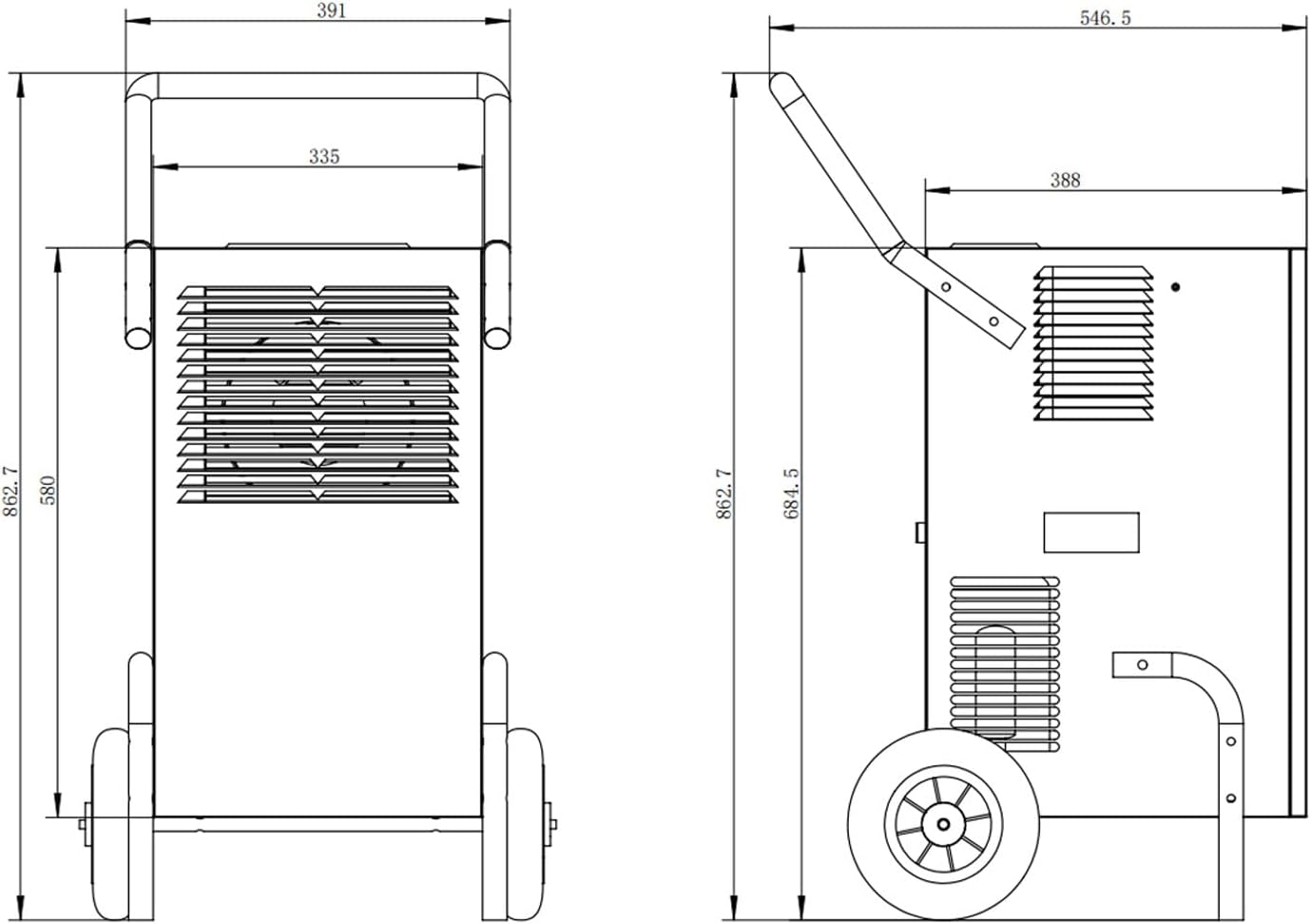
Figure 10: Product Dimensions. A technical diagram illustrating the precise measurements of the dehumidifier, useful for planning placement.
9. การรับประกันและการสนับสนุน
EBERTH products are designed for quality and reliability. For warranty information, technical support, or spare parts inquiries, please refer to the contact details provided with your purchase documentation or visit the official EBERTH webไซต์ โปรดเก็บหลักฐานการซื้อไว้เพื่อใช้ในการเรียกร้องการรับประกัน