
1. บทนำ
ขอบคุณสำหรับการซื้อasing the Blaupunkt PB10DB Bluetooth Karaoke Speaker. This manual provides essential information for the safe and efficient operation of your device. Please read it thoroughly before use and keep it for future reference. The PB10DB is a portable party speaker designed for high-quality audio playback and karaoke, featuring Bluetooth connectivity, USB, and AUX inputs.
2. ข้อมูลด้านความปลอดภัย
เพื่อให้มั่นใจถึงความปลอดภัยในการใช้งานและป้องกันความเสียหาย โปรดปฏิบัติตามข้อควรระวังต่อไปนี้:
- อย่าให้เครื่องสัมผัสกับอุณหภูมิที่สูงหรือต่ำเกินไป แสงแดดโดยตรง หรือความชื้นสูง
- Keep the speaker away from water and other liquids. The product is indicated as waterproof, but avoid submerging it.
- Do not attempt to disassemble or modify the speaker. Repairs should only be performed by qualified personnel.
- ใช้เฉพาะอุปกรณ์ชาร์จที่ระบุเท่านั้น
- ควรจัดให้มีการระบายอากาศที่เหมาะสมรอบๆ ลำโพงขณะใช้งาน
- ควรหลีกเลี่ยงการฟังเพลงด้วยระดับเสียงที่ดังเกินไปเป็นเวลานาน เพื่อป้องกันความเสียหายต่อการได้ยิน
3. เนื้อหาบรรจุภัณฑ์
กรุณาตรวจสอบว่าสินค้าทั้งหมดมีอยู่ในแพ็คเกจ:
- Blaupunkt PB10DB Bluetooth Karaoke Speaker
- อะแดปเตอร์ไฟ/สายชาร์จ
- คู่มือการใช้งาน (เอกสารนี้)
- Microphone (if included in your specific package)
4. สินค้าหมดview
Familiarize yourself with the various parts of your Blaupunkt PB10DB speaker.
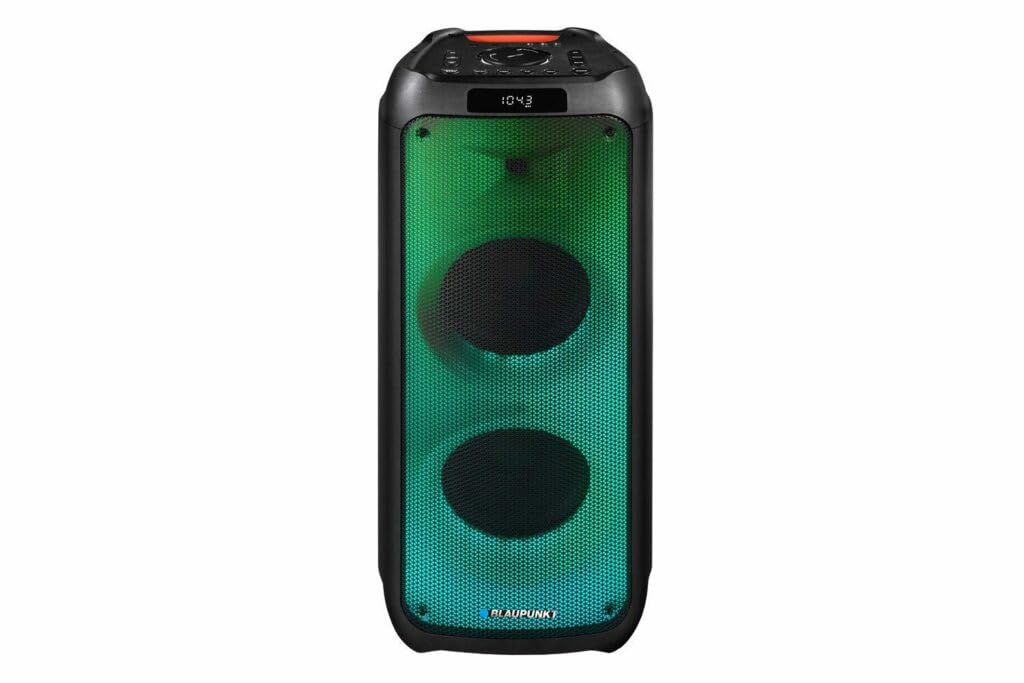
รูปที่ 1: ด้านหน้า view of the Blaupunkt PB10DB speaker, showcasing the dual speaker grilles and dynamic LED lighting. The top panel features a display and control buttons.

รูปที่ 2: มุม view of the Blaupunkt PB10DB speaker, highlighting its portable design and the side profile.
Controls and Ports (Typical Layout)
- ปุ่มเปิด/ปิด: เปิด/ปิดลำโพง
- ปุ่มโหมด: สลับระหว่างโหมด Bluetooth, USB, AUX และวิทยุ FM
- การควบคุมระดับเสียง: ปรับระดับเสียงหลัก
- ปุ่มเล่น/หยุดชั่วคราว: ควบคุมการเล่นสื่อ
- ปุ่มแทร็กก่อนหน้า/ถัดไป: นำทางผ่านเส้นทางต่างๆ
- ช่องต่อไมโครโฟน (MIC IN): For connecting a wired microphone for karaoke.
- พอร์ต USB: สำหรับเล่นเพลงจากอุปกรณ์ USB หรือชาร์จอุปกรณ์ภายนอก
- ช่องต่อ AUX (3.5 มม.): สำหรับเชื่อมต่ออุปกรณ์เสียงภายนอกผ่านสายสัญญาณเสียง
- พอร์ตชาร์จ: สำหรับเชื่อมต่ออะแดปเตอร์แปลงไฟเพื่อชาร์จลำโพง
5. การตั้งค่า
5.1 การชาร์จลำโพง
- Connect the provided power adapter to the charging port on the speaker.
- เสียบอะแดปเตอร์เข้ากับเต้ารับไฟฟ้าที่เหมาะสม
- ไฟแสดงสถานะการชาร์จจะสว่างขึ้น (สีอาจแตกต่างกัน) เพื่อแสดงว่าลำโพงกำลังชาร์จ
- เมื่อชาร์จเต็มแล้ว ไฟแสดงสถานะอาจเปลี่ยนสีหรือดับลง โปรดถอดปลั๊กเครื่องชาร์จ
A full charge typically takes several hours and provides approximately 8 hours of playback time.
5.2 การเปิด/ปิดเครื่อง
- การเปิดเครื่อง: Press and hold the Power button for a few seconds until the display lights up and you hear an audible prompt.
- วิธีปิดเครื่อง: Press and hold the Power button again for a few seconds until the display turns off and you hear an audible prompt.
6. คู่มือการใช้งาน
6.1 การจับคู่บลูทูธ
- Ensure the speaker is powered on and in Bluetooth mode. If not, press the Mode button until "Bluetooth" or a similar indicator appears on the display. The speaker will enter pairing mode, indicated by a flashing Bluetooth icon or LED.
- บนอุปกรณ์เคลื่อนที่ของคุณ (สมาร์ทโฟน แท็บเล็ต ฯลฯ) เปิดใช้งานบลูทูธและค้นหาอุปกรณ์ที่มีอยู่
- Select "Blaupunkt PB10DB" from the list of found devices.
- Once paired, the speaker will emit an audible confirmation, and the Bluetooth indicator will stop flashing.
- ตอนนี้คุณสามารถเล่นเสียงจากอุปกรณ์ของคุณผ่านลำโพงได้
ลำโพงจะพยายามเชื่อมต่อกับอุปกรณ์ที่จับคู่ไว้ครั้งสุดท้ายโดยอัตโนมัติเมื่อเปิดเครื่อง
6.2 ฟังก์ชั่นคาราโอเกะ
- Connect a wired microphone (not always included) to the MIC IN port on the speaker.
- Ensure the microphone is switched on (if it has a power switch).
- Play your desired karaoke track via Bluetooth, USB, or AUX.
- Adjust the microphone volume and echo effects (if available on the speaker) using the dedicated controls.
6.3 การเล่น USB
- ใส่แฟลชไดรฟ์ USB ที่มีไฟล์เสียง MP3 fileลงในพอร์ต USB
- Press the Mode button to switch to USB mode. The speaker will automatically begin playing music from the USB drive.
- ใช้ปุ่มเล่น/หยุดชั่วคราวและปุ่มเพลงก่อนหน้า/ถัดไปเพื่อควบคุมการเล่น
อินพุต AUX 6.4 ช่อง
- เชื่อมต่อปลายด้านหนึ่งของสายสัญญาณเสียงขนาด 3.5 มม. (ไม่ได้รวมอยู่ในชุด) เข้ากับพอร์ต AUX IN บนลำโพง
- เชื่อมต่อปลายสายอีกด้านหนึ่งเข้ากับแจ็คหูฟังหรือเอาต์พุตเสียงของอุปกรณ์เสียงภายนอกของคุณ
- Press the Mode button to switch to AUX mode.
- ควบคุมการเล่นและระดับเสียงจากอุปกรณ์เสียงภายนอกของคุณ
7. การบำรุงรักษา
7.1 การทำความสะอาด
- ควรปิดลำโพงและถอดปลั๊กออกจากแหล่งจ่ายไฟก่อนทำความสะอาดทุกครั้ง
- ใช้ผ้าแห้งนุ่มเช็ดทำความสะอาดภายนอกลำโพง
- ห้ามใช้น้ำยาทำความสะอาดที่มีฤทธิ์กัดกร่อน แว็กซ์ หรือตัวทำละลาย เนื่องจากอาจทำให้พื้นผิวเสียหายได้
7.2 พื้นที่จัดเก็บ
- เก็บลำโพงไว้ในที่แห้งและเย็น หลีกเลี่ยงแสงแดดโดยตรงและอุณหภูมิที่สูงหรือต่ำเกินไป
- If storing for an extended period, charge the battery periodically (e.g., every 3 months) to maintain battery health.
8 การแก้ไขปัญหา
| ปัญหา | สาเหตุที่เป็นไปได้ | สารละลาย |
|---|---|---|
| ลำโพงไม่เปิดเครื่อง | แบตเตอรี่หมด | ชาร์จลำโพงโดยใช้อะแดปเตอร์แปลงไฟที่ให้มา |
| ไม่มีเสียงจากลำโพง | ระดับเสียงเบาเกินไปหรือปิดเสียงอยู่ โหมดอินพุตไม่ถูกต้อง | Increase volume. Press the Mode button to select the correct input (Bluetooth, USB, AUX). |
| การจับคู่บลูทูธล้มเหลว | ลำโพงไม่อยู่ในโหมดจับคู่ อุปกรณ์อยู่ไกลเกินไป มีสัญญาณรบกวน | ตรวจสอบให้แน่ใจว่าลำโพงอยู่ในโหมดจับคู่บลูทูธ ย้ายอุปกรณ์ให้ใกล้กับลำโพงมากขึ้น ปิดอุปกรณ์บลูทูธอื่นๆ |
| ไมโครโฟนไม่ทำงาน | Microphone not connected properly or switched off. Microphone volume too low. | Check microphone connection. Ensure microphone is powered on. Adjust microphone volume. |
| การเล่น USB ไม่ทำงาน | ไดรฟ์ USB ไม่ได้รับการฟอร์แมตอย่างถูกต้องหรือไม่รองรับ file ประเภท | Ensure USB drive is formatted to FAT32 and contains MP3 fileลองใช้แฟลชไดรฟ์ USB ตัวอื่นดู |
9. ข้อมูลจำเพาะ
| ชื่อรุ่น : | PB10DB |
| ยี่ห้อ: | บลูพังค์ |
| เทคโนโลยีการเชื่อมต่อ: | อุปกรณ์เสริม, บลูทูธ, USB |
| กำลังขับสูงสุดของลำโพง: | 1000 วัตต์ |
| โหมดเอาต์พุตเสียง: | สเตอริโอ |
| ประเภทการติดตั้ง: | ติดตั้งบนโต๊ะ |
| วัสดุ: | โลหะและพลาสติก |
| ประเภทลำโพง: | ทวีตเตอร์ |
| คุณสมบัติพิเศษ: | ดนตรี |
| การใช้ที่แนะนำ: | สำหรับเครื่องเล่นเพลง |
| สี: | สีฟ้า |
| กันน้ำ: | จริง |
| วิธีการควบคุม: | สัมผัส |
| เส้นผ่านศูนย์กลางทวีตเตอร์: | 4 เซนติเมตร |
| อายุการใช้งานแบตเตอรี่โดยเฉลี่ย: | 8 ชั่วโมง |
| อุปกรณ์ที่รองรับ: | แล็ปท็อป สมาร์ทโฟน |
| แหล่งพลังงาน: | ใช้พลังงานจากแบตเตอรี่ |
| น้ำหนักสินค้า: | 105 กรัม |
| ขนาดสินค้า (กว้าง x ยาว x สูง) : | 24 x 69 x 2.5 ซม. |
10. การรับประกันและการสนับสนุน
Blaupunkt products are designed and manufactured to the highest quality standards. For detailed warranty information, please refer to the warranty card included with your product or visit the official Blaupunkt webเว็บไซต์.
For technical support, troubleshooting assistance, or service inquiries, please contact Blaupunkt customer support through their official channels.
- เป็นทางการ Webเว็บไซต์: www.blaupunkt.com
- บริการลูกค้า: Refer to your regional Blaupunkt webเว็บไซต์สำหรับรายละเอียดการติดต่อ