
1. บทนำ
This manual provides detailed instructions for the installation, operation, and maintenance of your YEEUU R250 Smart Door Lock. Please read this manual thoroughly before installation and use to ensure proper function and safety.

Image 1.1: YEEUU R250 Smart Door Lock, showing the lock lever, NFC tags, and the accompanying smartphone application interface for control and monitoring.
2. การตั้งค่าและการติดตั้ง
2.1 เนื้อหาบรรจุภัณฑ์
ตรวจสอบว่าส่วนประกอบทั้งหมดมีอยู่ก่อนเริ่มการติดตั้ง:
- YEEUU R250 Smart Door Lock Assembly
- อุปกรณ์สำหรับติดตั้ง (สกรู, แกนหมุน)
- NFC Access Cards (typically 3)
- คู่มือการใช้งาน
2.2 ความเข้ากันได้กับประตู
The YEEUU R250 is designed for doors with a thickness range of 1-1/8 inches to 2-3/8 inches (30-60mm). It is suitable for both front and interior doors.
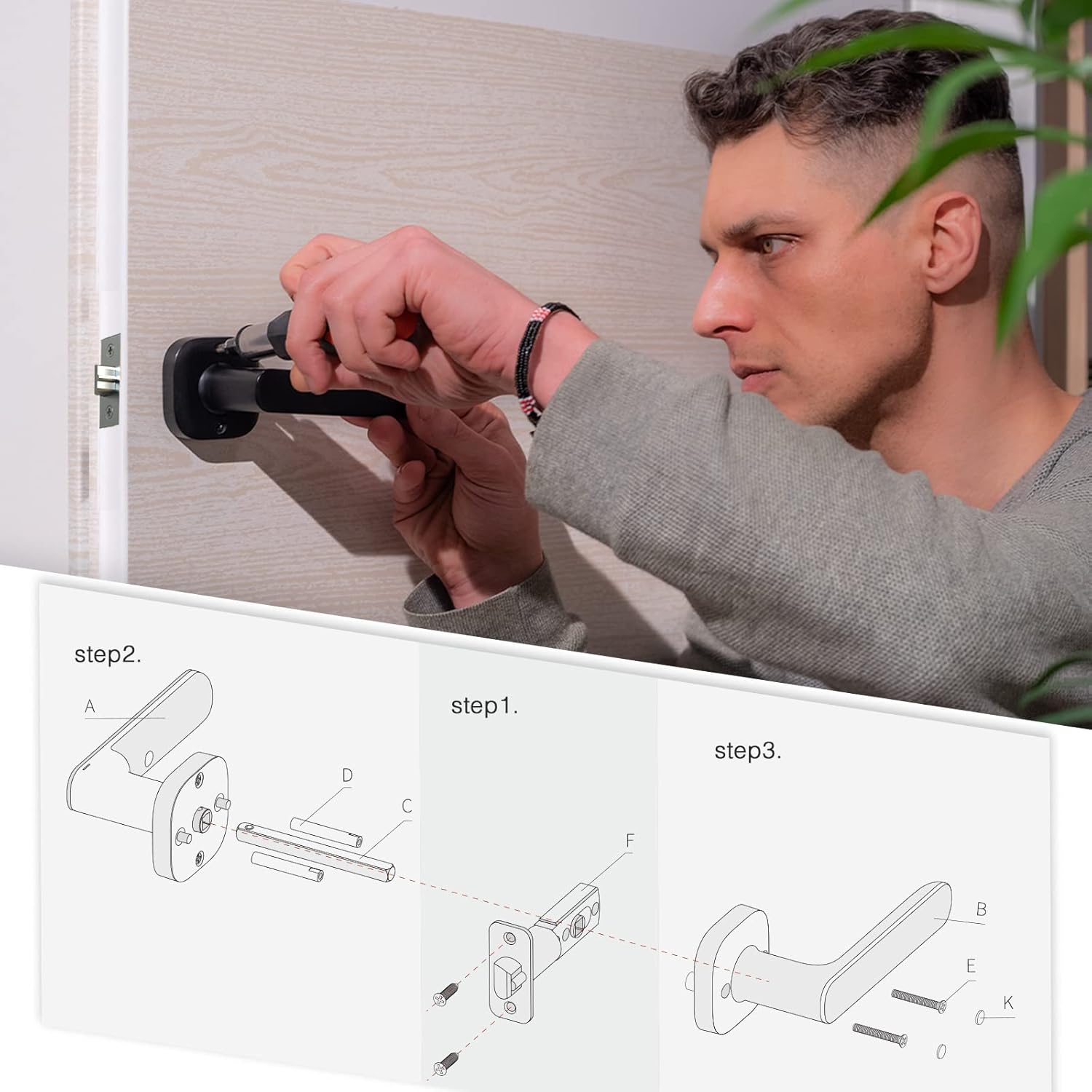
Image 2.1: Diagram illustrating the compatible door thickness range of 1-1/8 to 2-3/8 inches (30-60mm) for the YEEUU R250 Smart Door Lock.
2.3 ขั้นตอนการติดตั้ง
Follow these general steps for installation. Refer to the detailed diagram for component identification.
- เตรียมประตู: Ensure your door is properly prepped for a standard lever lock.
- Install the Latch Mechanism: Insert the latch (F) into the door edge and secure it with screws.
- ติดตั้งคันโยกภายนอก: Position the exterior lever assembly (A) on the door, ensuring the spindle (C) passes through the latch.
- ติดตั้งคันโยกภายใน: Attach the interior lever assembly (B) to the door, aligning it with the exterior assembly and securing it with the provided screws (E, K).
- ติดตั้งแบตเตอรี่: Open the battery compartment on the interior lever and insert 2*AAA alkaline batteries.
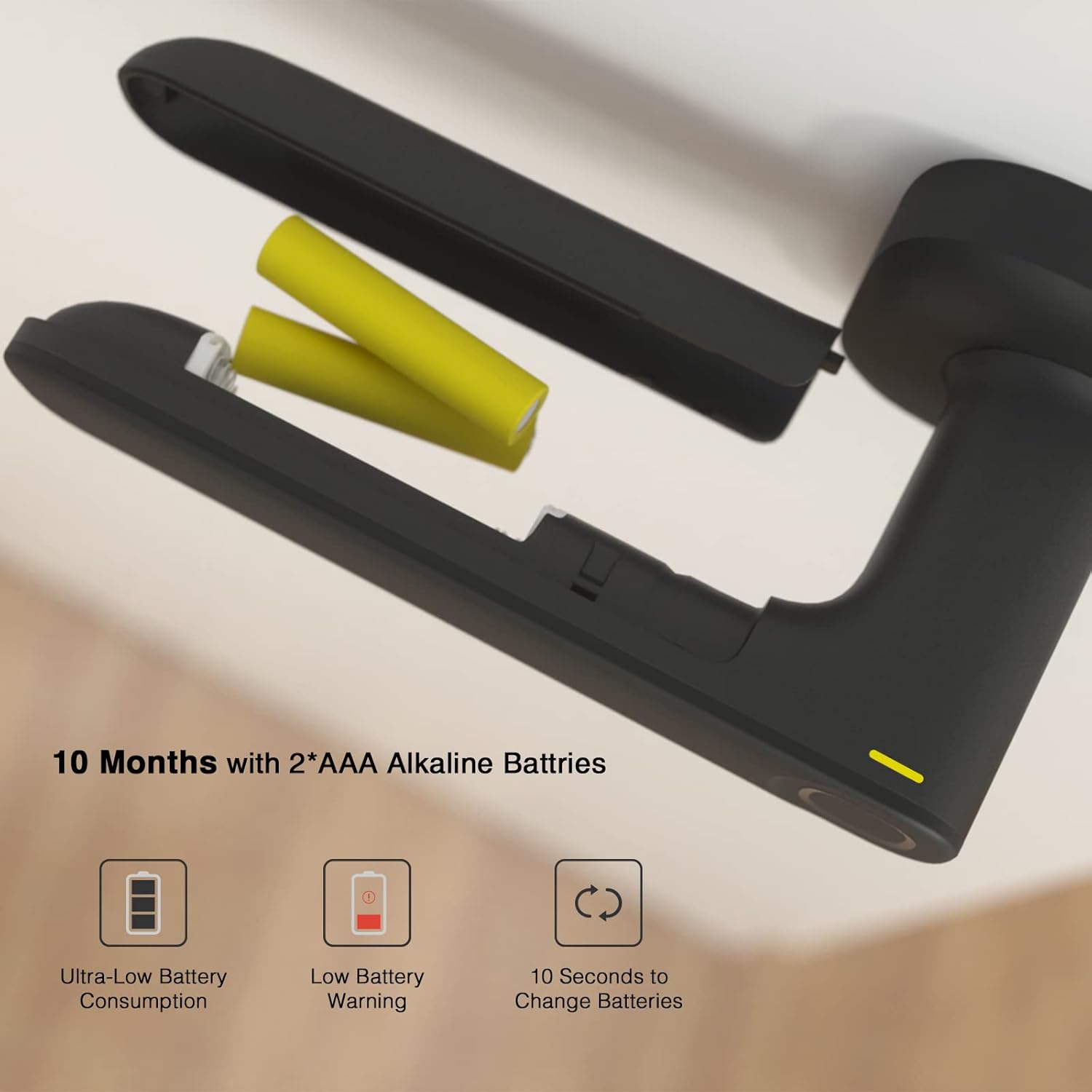
Image 2.2: Step-by-step installation diagram for the YEEUU R250 Smart Door Lock, detailing the placement of components and hardware.
2.4 การติดตั้งแบตเตอรี่
The lock operates on 2*AAA alkaline batteries. To install or replace batteries:
- Locate the battery cover on the interior side of the lock lever.
- Slide or remove the cover to access the battery compartment.
- Insert two AAA alkaline batteries, ensuring correct polarity.
- เปลี่ยนฝาครอบแบตเตอรี่
ภาพที่ 2.3: View of the YEEUU R250 Smart Door Lock's battery compartment, showing the placement of two AAA alkaline batteries and indicators for low battery warning and quick battery change.
3. คู่มือการใช้งาน
3.1 Unlock Methods
The YEEUU R250 Smart Door Lock offers multiple ways to unlock:
- ลายนิ้วมือ: Place your registered fingerprint on the sensor. The lock will unlock in approximately 0.5 seconds with a recognition rate over 99.8%.
- NFC Access Card: Tap a registered NFC access card against the designated area on the lock.
- แอปพลิเคชันบนสมาร์ทโฟน (บลูทูธ): Use the YEEUU App on your smartphone to unlock the door via Bluetooth.

Image 3.1: Illustration of the various unlock methods available for the YEEUU R250 Smart Door Lock, including fingerprint, access card, NFC (Android devices only), and app via Bluetooth Low Energy (BLE).
3.2 คุณสมบัติล็อคอัตโนมัติ
The R250 is equipped with an auto-lock feature. After unlocking, the door will automatically re-lock after 3 seconds to enhance security.
3.3 Stay Unlock Status
This feature allows the lock to remain unlocked for continuous access. To enable or disable this:
- เปิดใช้งาน: Activate the 'Stay Unlock Status' via the YEEUU App.
- Disable Temporarily: Press the red button located on the battery cover once.

Image 3.2: The YEEUU R250 Smart Door Lock demonstrating the 'Stay Unlock Status' feature, allowing the door to remain open without re-locking, and showing how to temporarily disable it by pressing a button on the battery cover.
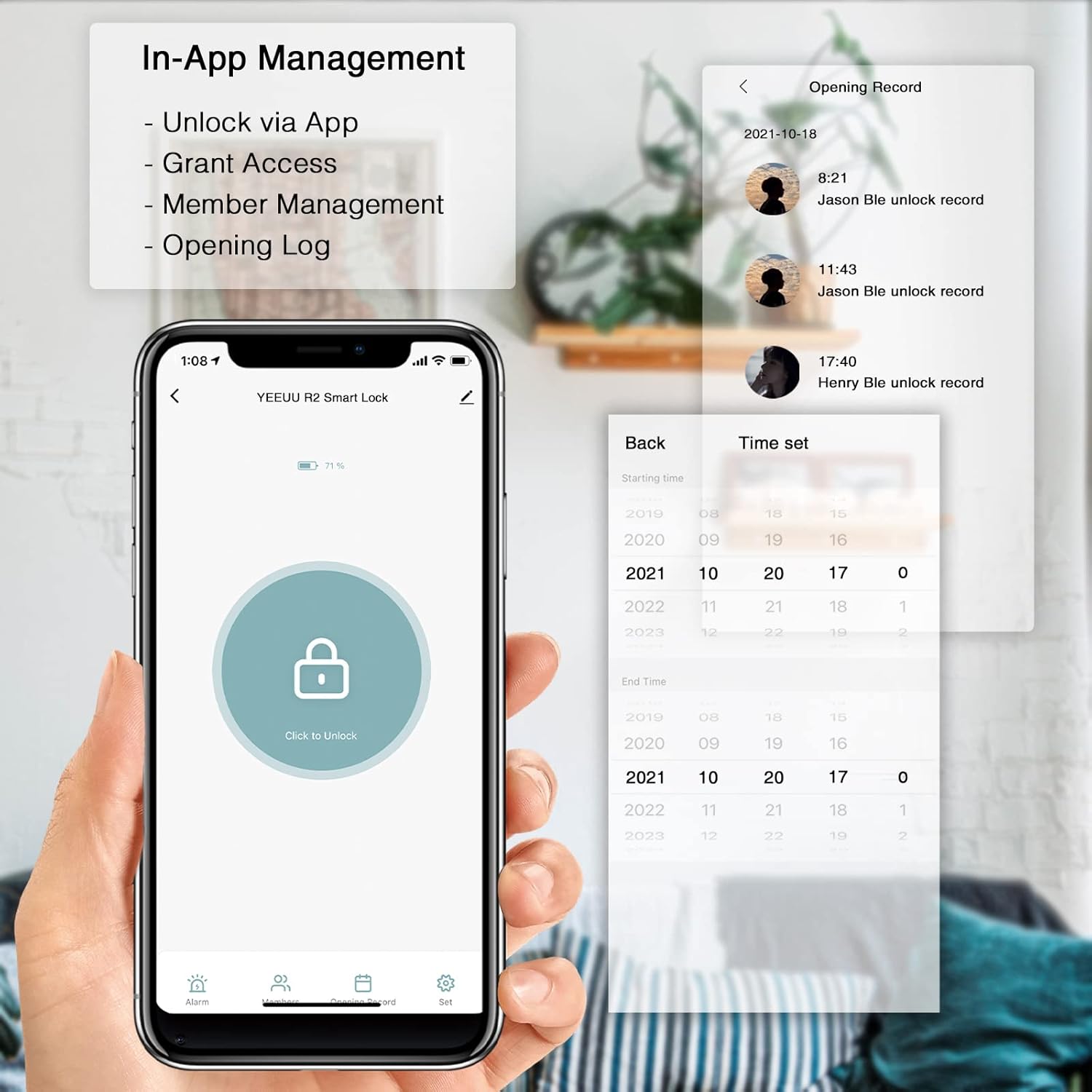
3.4 In-App Management
The YEEUU App provides comprehensive control over your smart lock:
- ปลดล็อคผ่านแอพ: Remotely unlock your door.
- Grant Access: Share temporary or permanent access with family or guests.
- การจัดการสมาชิก: Add, modify, or remove user access.
- Opening Log: View a history of lock and unlock events and alarm alerts.

Image 3.3: Screenshot of the YEEUU App interface, highlighting features such as unlocking, granting access, member management, and viewing the opening record of the smart lock.
4. การบำรุงรักษา
4.1 การเปลี่ยนแบตเตอรี่
The lock will provide a low battery warning when power is critically low. Replace batteries promptly to avoid interruption of service. Refer to Section 2.4 for battery installation steps. The lock is designed for ultra-low battery consumption, offering approximately 10 months of use with 2*AAA alkaline batteries.
4.2 การทำความสะอาด
To maintain the appearance and functionality of your lock, clean it regularly with a soft, dry cloth. Avoid using abrasive cleaners, solvents, or harsh chemicals, as these can damage the finish and internal components.
5 การแก้ไขปัญหา
- Fingerprint Reader Not Recognizing: Ensure your finger is clean and dry. Try repositioning your finger on the sensor. If issues persist, re-register your fingerprint in the app. Dirt or debris on the sensor can affect recognition.
- Lock Not Unlocking (Green Light but No Action): Check if the installation screws are overtightened, which can impede the internal mechanism. Loosen screws slightly and test operation. Ensure the latch mechanism moves freely.
- NFC Cards Not Working: The YEEUU R250 is designed to work with proprietary YEEUU NFC tags. Generic NFC cards may not be compatible. Ensure the card is properly registered in the app.
- ปัญหาการเชื่อมต่อแอพ: Ensure Bluetooth is enabled on your smartphone and you are within range of the lock. Verify that the YEEUU App is updated to the latest version. If the app is outdated, it may not function correctly with newer operating systems.
- คำเตือนแบตเตอรี่ต่ำ: Replace the AAA batteries immediately. Refer to Section 2.4.
6. ข้อมูลจำเพาะ
| คุณสมบัติ | รายละเอียด |
|---|---|
| ยี่ห้อ | เย้ๆ |
| ชื่อรุ่น | R250 |
| ประเภทล็อค | ล็อคอัจฉริยะไบโอเมตริก |
| คุณสมบัติพิเศษ | Fingerprint, NFC, App Control (Bluetooth) |
| วัสดุ | สแตนเลส |
| สี | สีดำ |
| ขนาดรายการ (ยาว x กว้าง x สูง) | 71.76 x 28.32 x 35.4 นิ้ว |
| น้ำหนักสินค้า | 2.99 ปอนด์ (1.36 กิโลกรัม) |
| แหล่งพลังงาน | 2 * แบตเตอรี่อัลคาไลน์ AAA |
| อายุการใช้งานแบตเตอรี่ | ประมาณ 10 เดือน |
| การเชื่อมต่อ | บลูทูธ |
| วิธีการควบคุม | App, Touch (Fingerprint), NFC |
| ความเข้ากันได้ของความหนาของประตู | 1-1/8" ~ 2-3/8" (30-60mm) |
7. ข้อมูลการรับประกัน
YEEUU products are manufactured to high-quality standards. For specific warranty terms and conditions, please refer to the warranty card included with your product or visit the official YEEUU webไซต์นี้ โปรดเก็บหลักฐานการซื้อไว้เพื่อใช้ยืนยันการรับประกัน
8. การสนับสนุนลูกค้า
If you encounter any issues or have questions not covered in this manual, please contact YEEUU customer support. You can typically find contact information on the product packaging, the official YEEUU webไซต์หรือผ่านผู้ค้าปลีกของคุณ