
การแนะนำ
This manual provides detailed instructions for the setup, operation, maintenance, and troubleshooting of your Audioengine A2 HD (HD3) Walnut Computer Speakers and DS1M Metal Stands. Please read this manual thoroughly before using your product to ensure optimal performance and longevity.
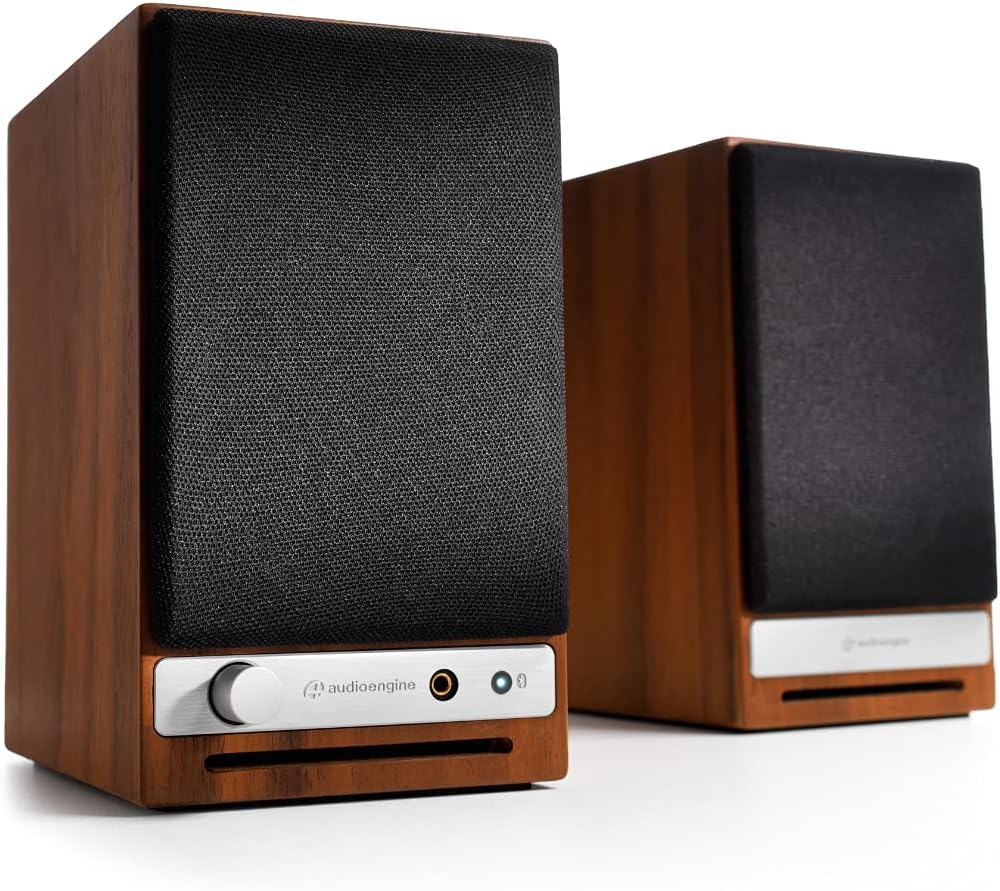
ด้านหน้า view of the Audioengine A2 HD speakers in walnut finish with grilles on. The left speaker features a volume knob, headphone jack, and Bluetooth pairing button.
มีอะไรอยู่ในกล่อง
Your Audioengine A2 HD (HD3) package includes the following items:
- คู่มือเริ่มต้นอย่างรวดเร็ว
- สายไฟ
- บัตรรับประกัน
การตั้งค่า
ตำแหน่งลำโพง
For optimal sound quality, position the speakers on a stable surface, such as a desk or bookshelf. The included DS1M Metal Stands are designed to elevate and angle the speakers towards your listening position, which can significantly enhance audio performance by directing sound more accurately. Place the left speaker (with controls) on the left side and the right speaker on the right side of your listening area.

An Audioengine A2 HD speaker is shown placed on a DS1M metal stand, positioned next to a laptop, illustrating a typical desktop setup.

This image displays the dimensions of the DS1M speaker stands, indicating a length of 6 inches (15.2 cm) and a width of 4 inches (10.2 cm).
การเชื่อมต่อ
The A2 HD speakers offer multiple connectivity options:
- ช่องต่อเข้า/ออก RCA: Connect audio sources using RCA cables. The RCA output can be used to connect a subwoofer.
- อินพุตเสริม: Use a 3.5mm stereo mini-jack cable for connecting devices like smartphones or tablets.
- ช่องต่อ USB: Connect directly to your computer for high-quality digital audio playback.
- บลูทูธ: สำหรับการสตรีมเสียงแบบไร้สาย
Connect the left (active) speaker to the right (passive) speaker using the provided speaker wire. Ensure correct polarity (+ to + and - to -).

หลัง view of the Audioengine A2 HD speakers, highlighting the various input and output ports, including RCA, USB, and speaker wire terminals for connecting the passive speaker.
การเชื่อมต่อไฟฟ้า
Connect the power cable to the left speaker and then to a power outlet. The power indicator on the front of the left speaker will illuminate.
การดำเนินงาน
การเปิด/ปิดเครื่อง
The speakers will power on automatically when connected to a power source. To turn them off, disconnect the power cable.
การควบคุมระดับเสียง
Adjust the volume using the knob on the front of the left speaker. You can also control the volume from your connected audio source.
การเลือกอินพุต
The A2 HD speakers automatically detect and switch to the active input. For Bluetooth, press the Bluetooth pairing button to initiate pairing mode.
จับคู่บลูทู ธ
- Turn on your A2 HD speakers.
- Press and hold the Bluetooth pairing button on the front of the left speaker until the indicator light flashes.
- On your device (smartphone, tablet, computer), go to Bluetooth settings and select "Audioengine A2 HD" from the list of available devices.
- Once paired, the indicator light will turn solid.
การซ่อมบำรุง
เพื่อรักษารูปลักษณ์และประสิทธิภาพของลำโพงของคุณ:
- Wipe the cabinets with a soft, dry cloth. Avoid using harsh chemicals or abrasive cleaners.
- ควรวางลำโพงให้ห่างจากแสงแดดโดยตรง แหล่งความร้อน และความชื้น
- ตรวจสอบให้แน่ใจว่ามีการระบายอากาศที่เหมาะสมรอบ ๆ ลำโพง
การแก้ไขปัญหา
ไม่มีเสียง
- Check all cable connections, including power, speaker wire, and audio input cables.
- Ensure the volume knob on the speaker and your audio source is turned up.
- Verify that the correct input source is selected (if applicable, for automatic switching, ensure only one source is active).
- If using Bluetooth, ensure the speakers are properly paired and connected to your device.
ปัญหาการเชื่อมต่อบลูทูธ
- Ensure the speakers are in pairing mode (flashing Bluetooth light).
- Delete "Audioengine A2 HD" from your device's Bluetooth list and try pairing again.
- Move your device closer to the speakers to ensure it's within the 100-foot Bluetooth range.
- Restart both your device and the speakers.
ข้อมูลจำเพาะ
| ยี่ห้อ | ออดิโอเอนจิ้น |
| หมายเลขรุ่น | เอชดี3 |
| ชื่อรุ่น | A2-HD |
| ประเภทลำโพง | ชั้นวางหนังสือ |
| กำลังขับสูงสุดของลำโพง | 60 วัตต์ |
| การตอบสนองความถี่ | 50 เฮิรตซ์ |
| เทคโนโลยีการเชื่อมต่อ | ช่องต่อเสริม, บลูทูธ, RCA, USB |
| โหมดเอาต์พุตเสียง | สเตอริโอ |
| ประเภทการติดตั้ง | ที่วางบนโต๊ะ |
| วัสดุของตู้หุ้ม | ไม้ |
| คุณสมบัติเพิ่มเติม | Hi Res Audio, Lightweight, Portable |
| ประเภทตัวควบคุม | ไอโอเอส, แอนดรอยด์ |
| ระยะสูงสุด | 30 เมตร |
| วิธีการควบคุม | สัมผัส |
| ขนาดลำโพง | 2.75 นิ้ว |
| ช่วงบลูทูธ | 100 ฟุต |
| Total USB 2.0 Ports | 1 |
| การใช้งานเฉพาะของผลิตภัณฑ์ | Gaming, Home Theatre, Pro Audio |
| จำนวนช่องสัญญาณเสียง | 3.0 |
| อิมพีแดนซ์ | 10000 โอห์ม |
| อัตราส่วนสัญญาณต่อเสียงรบกวน | 95 เดซิเบล |
| อุปกรณ์ที่รองรับ | สมาร์ทโฟน, แท็บเล็ต, แล็ปท็อป |
| แหล่งพลังงาน | สายไฟ |
| อินพุต Voltage | 110 โวลต์ |
| จำนวนหน่วย | 2.0 จำนวน |
| เทคโนโลยีไร้สาย | บลูทูธ |
| เทคโนโลยีการเชื่อมต่อซับวูฟเฟอร์ | มีสาย |
| โปรโตคอลการเชื่อมต่อ | บลูทูธ |
| ประเภทไดร์เวอร์เสียง | ไดร์เวอร์แบบไดนามิก |
การรับประกันและการสนับสนุน
Your Audioengine A2 HD (HD3) speakers come with a รับประกัน 3 ปี. For warranty claims or technical support, please refer to the contact information provided in your Warranty Card or visit the official Audioengine webเว็บไซต์.
วิดีโอผลิตภัณฑ์อย่างเป็นทางการ
Audioengine - Never Settle for Less
This video highlights the Audioengine philosophy of never settling for less, showcasing various life moments enhanced by music. It features different Audioengine products in diverse settings.
20th Anniversary Video
A commemorative video celebrating 20 years of Audioengine, reflecting on the company's journey and commitment to quality audio products.
Doesn't Music Deserve it? Active Wireless Bookshelf Speakers
This video emphasizes the importance of high-quality audio for music, featuring active wireless bookshelf speakers in various home environments.