
1. ข้อมูลสำคัญ
This RAINPOINT Bluetooth Soil Moisture and Temperature Sensor (Model TCS005ARF) is designed to monitor soil conditions. Please note that this sensor requires a separate RAINPOINT Bluetooth Monitor Display for operation. It cannot function independently or connect directly to a smartphone application. Ensure you have the compatible monitor display before attempting setup.
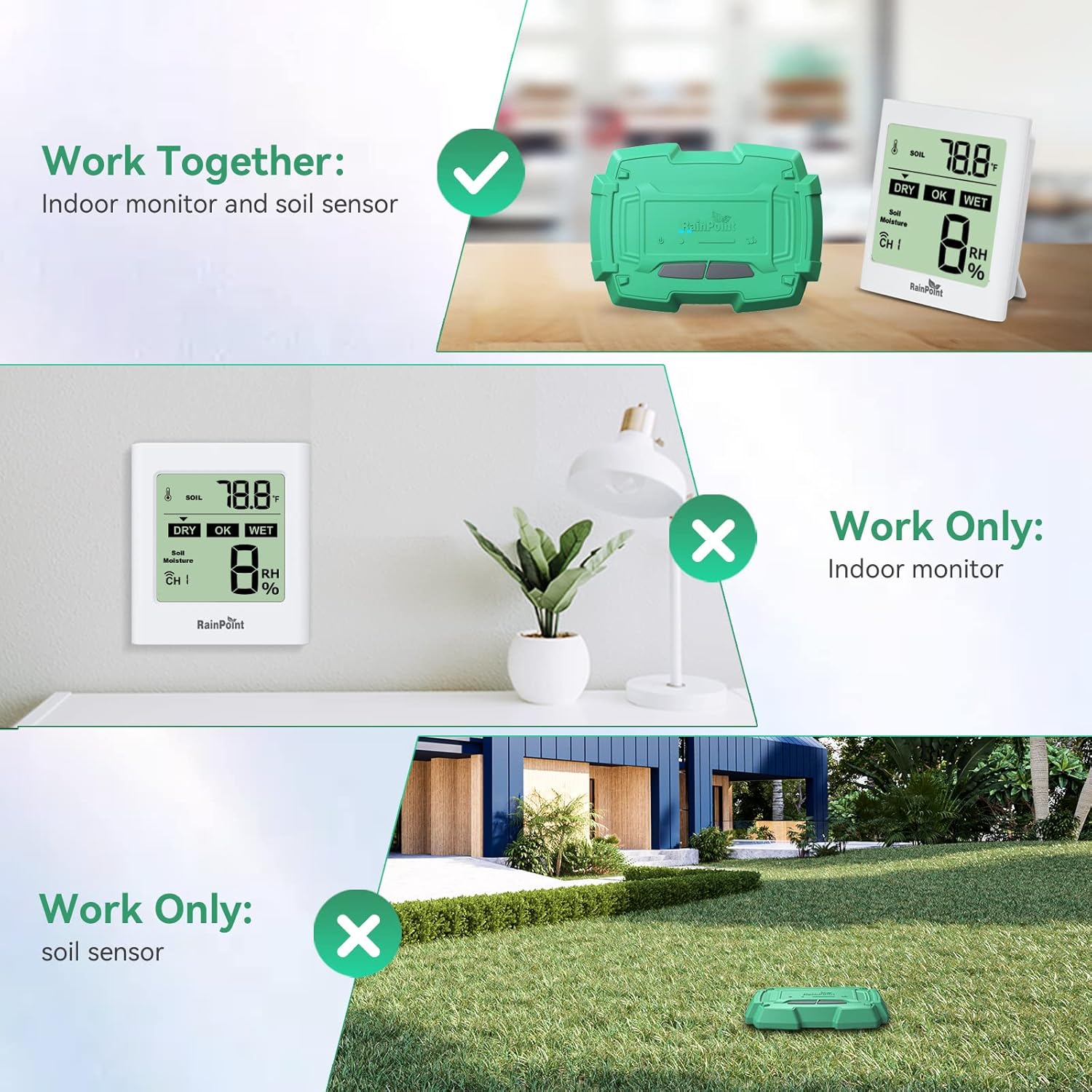
ภาพที่ 1.1: The RAINPOINT Soil Moisture Sensor (TCS005ARF) must be paired with a compatible Indoor Monitor Display to function. It does not operate as a standalone device.
2. สินค้าหมดview
The RAINPOINT Bluetooth Soil Moisture and Temperature Sensor provides real-time data on your soil's moisture and temperature levels. This information is transmitted wirelessly to a compatible RAINPOINT Bluetooth Monitor Display, helping you maintain optimal conditions for your plants.
2.1 ส่วนประกอบ
- RAINPOINT Bluetooth Soil Moisture and Temperature Sensor (TCS005ARF)
- คู่มือการใช้งาน
Note: The Indoor Monitor Display and 4 x AAA batteries for the sensor are not included and must be purchased separately.
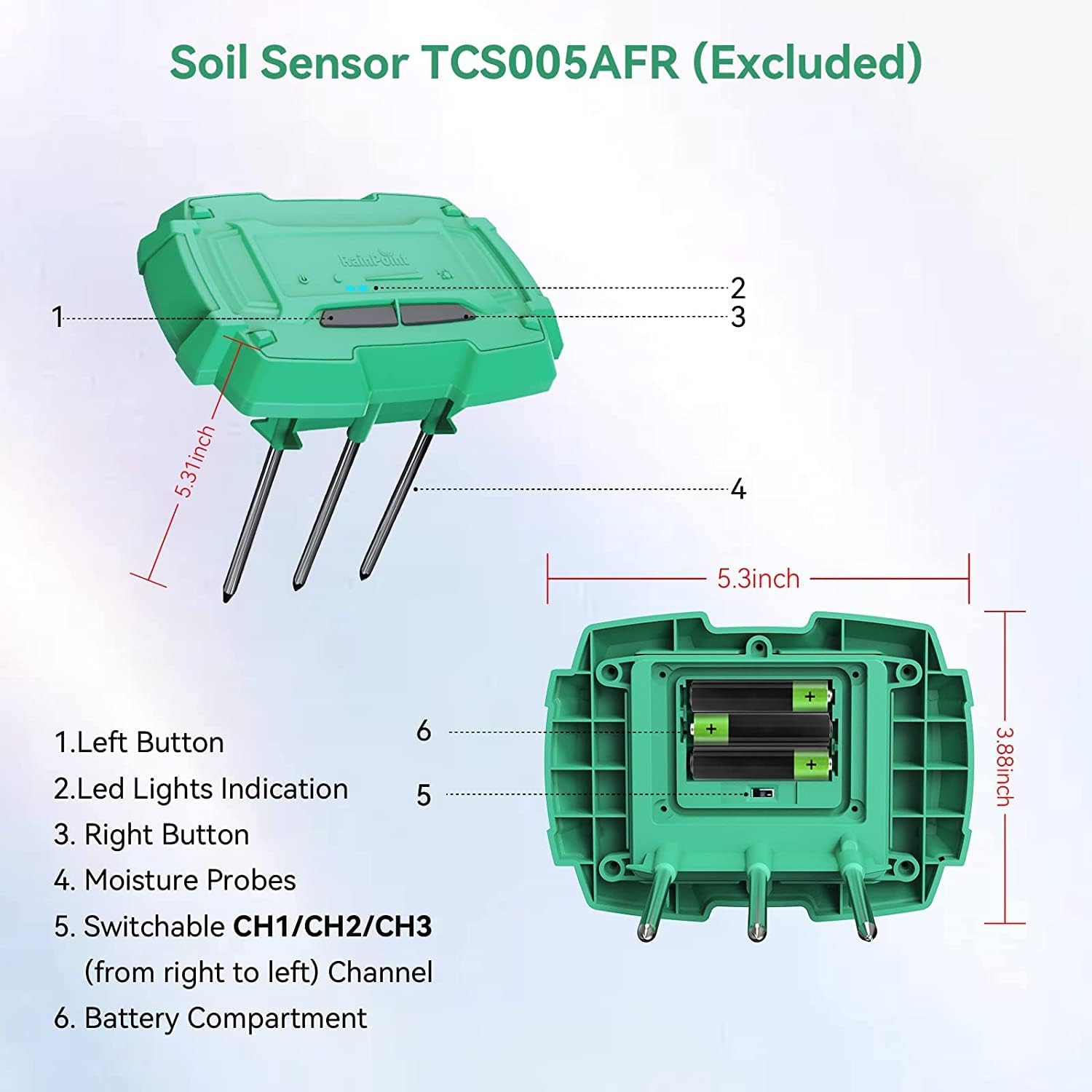
ภาพที่ 2.1: รายละเอียด view of the Soil Sensor TCS005AFR.
- ปุ่มซ้าย
- ไฟ LED บ่งชี้
- ปุ่มขวา
- Moisture Probes (SS304 material for precision and corrosion resistance)
- Switchable CH1/CH2/CH3 (from right to left) Channel Selector
- ช่องใส่แบตเตอรี่
3. คำแนะนำในการตั้งค่า
3.1 การติดตั้งแบตเตอรี่
- Locate the battery compartment (6) on the underside of the sensor.
- ใช้ไขควงขนาดเล็ก ค่อยๆ ถอดสกรูที่ยึดฝาปิดช่องใส่แบตเตอรี่ออก
- Insert 4 x AAA 1.5V alkaline batteries into the compartment, ensuring correct polarity (+/-).
- ปิดฝาช่องใส่แบตเตอรี่และขันสกรูให้แน่น
3.2 การเลือกช่องสัญญาณ
- The sensor supports up to 3 channels (CH1, CH2, CH3). Use the channel selector (5) to choose a channel.
- Ensure that each sensor you use with your monitor display is set to a unique channel.
3.3 Pairing with Monitor Display
Follow the instructions provided with your RAINPOINT Bluetooth Monitor Display to pair the sensor. Generally, this involves:
- Ensure the monitor display is powered on and in pairing mode.
- Press and hold the Left Button (1) and Right Button (3) on the sensor simultaneously for a few seconds until the LED Lights Indication (2) flashes, indicating it's in pairing mode.
- Once paired, the monitor display will show the sensor's data.
3.4 การวางตำแหน่งเซ็นเซอร์
Insert the moisture probes (4) into the soil of the plant or area you wish to monitor. Ensure the sensor body is above ground and the probes are fully submerged in the soil for accurate readings.

ภาพที่ 3.1: Proper placement of the soil sensor in the ground.
4. คู่มือการใช้งาน
Once the sensor is set up and paired with your RAINPOINT Bluetooth Monitor Display, it will automatically begin transmitting soil moisture and temperature data.
4.1 การตรวจสอบข้อมูล
- The monitor display will show real-time soil moisture (0-100%) and temperature (-10℃ to 60℃ / 14°F to 140°F) readings.
- Data is updated approximately every 7 seconds.
- The monitor display may also indicate soil humidity levels as 20%, 40%, 60%, 80%, or 100%.

ภาพที่ 4.1: Monitor display showing soil temperature and humidity ranges.
4.2 ระยะสัญญาณไร้สาย
The sensor communicates with the monitor display via Bluetooth 5.0, offering a wireless transmission range of up to 50 meters (160 feet) in open areas. Obstacles such as walls or dense foliage may reduce this range.

ภาพที่ 4.2: Illustration of the wireless range and multi-channel capability.
5. การบำรุงรักษา
- การทำความสะอาด: Periodically clean the moisture probes (4) with a soft cloth to remove any soil buildup that might affect accuracy.
- การเปลี่ยนแบตเตอรี่: The sensor is powered by 4 x AAA batteries, which typically last 3-6 months. Replace batteries when the low battery indicator appears on your monitor display. Follow the battery installation steps in Section 3.1.
- พื้นที่จัดเก็บ: When not in use for extended periods, remove the batteries and store the sensor in a dry, cool place.
6 การแก้ไขปัญหา
| ปัญหา | สาเหตุที่เป็นไปได้ | สารละลาย |
|---|---|---|
| No data displayed on monitor. |
|
|
| การอ่านที่ไม่ถูกต้อง |
|
|
| แบตเตอรี่มีอายุสั้น |
|
|
7. ข้อมูลจำเพาะ
| คุณสมบัติ | ข้อมูลจำเพาะ |
|---|---|
| แบบอย่าง | TCS005ARF |
| ความเข้ากันได้ | Requires RAINPOINT Bluetooth Monitor Display (Excluded) |
| การเชื่อมต่อ | บลูทูธ 5.0 |
| ช่วงสาย | ในพื้นที่โล่งกว้าง สามารถมองเห็นได้ไกลถึง 50 เมตร (160 ฟุต) |
| ช่วงเวลาการอัพเดตข้อมูล | ประมาณทุกๆ 7 วินาที |
| ช่วงความชื้นของดิน | 0% ~ 100% |
| Soil Moisture Accuracy | ≤ 5% (0% ~ 50%) or ≤ 10% (51% ~ 100%) |
| ช่วงอุณหภูมิของดิน | -10°F ~ 60°F (14°F ~ 140°F) |
| วัสดุโพรบ | SS304 Stainless Steel |
| ระดับการกันน้ำ | IP65 |
| แหล่งพลังงาน | 4 x AAA 1.5V Alkaline Batteries (Not Included) |
| อายุการใช้งานแบตเตอรี่ | 3-6 months (typical) |
| ขนาด (เซนเซอร์) | Approximately 5.31 inches (length) x 3.88 inches (width) x 5.3 inches (height, including probes) |
8. การรับประกันและการสนับสนุน
For warranty information and technical support, please refer to the documentation included with your RAINPOINT Bluetooth Monitor Display or visit the official RAINPOINT webเว็บไซต์.
You can also contact RAINPOINT customer service directly for assistance.
- อีเมล: Refer to RAINPOINT product packaging or webเว็บไซต์.
- Webเว็บไซต์: Visit the RAINPOINT Store on Amazon