
การแนะนำ
The Blaupunkt Lemon 122 is a versatile multimedia car stereo designed to enhance your in-car entertainment and connectivity. Featuring a 6.5-inch touchscreen, it supports various media formats including DVD/CD, USB, and TF cards. Enjoy wireless audio streaming and hands-free calling via Bluetooth, or mirror your smartphone screen with Mirror Link. The unit also includes an AM/FM radio tuner and multiple equalizer presets for optimized sound.
มีอะไรอยู่ในกล่อง
Before proceeding with installation, please verify that all the following components are present in the packaging:
- Blaupunkt Lemon 122 Car Stereo Unit
- รีโมทคอนโทรล
- ชุดสายไฟ
- ขายึด
- สกรู
- คู่มือการใช้งาน (เอกสารนี้)

รูปที่ 1: Contents of the Blaupunkt Lemon 122 package, showing the main unit, remote, wiring, mounting hardware, and documentation.
การติดตั้งและการตั้งค่า
ข้อควรระวังเพื่อความปลอดภัย
- ถอดขั้วลบของแบตเตอรี่รถยนต์ออกก่อนเริ่มงานเกี่ยวกับระบบไฟฟ้าใดๆ เพื่อป้องกันการลัดวงจร
- Ensure proper insulation for all wiring connections.
- แนะนำให้ติดตั้งโดยช่างผู้เชี่ยวชาญเพื่อให้มั่นใจได้ว่าการเดินสายไฟและการทำงานเป็นไปอย่างถูกต้อง
- อย่าติดตั้งอุปกรณ์ในจุดที่อาจทำให้กีดขวางการขับขี่ view หรือรบกวนการทำงานของยานพาหนะ
แผนผังการเดินสายไฟ
Refer to the included wiring harness and the diagram below for proper connections. Incorrect wiring can damage the unit or vehicle electrical system.
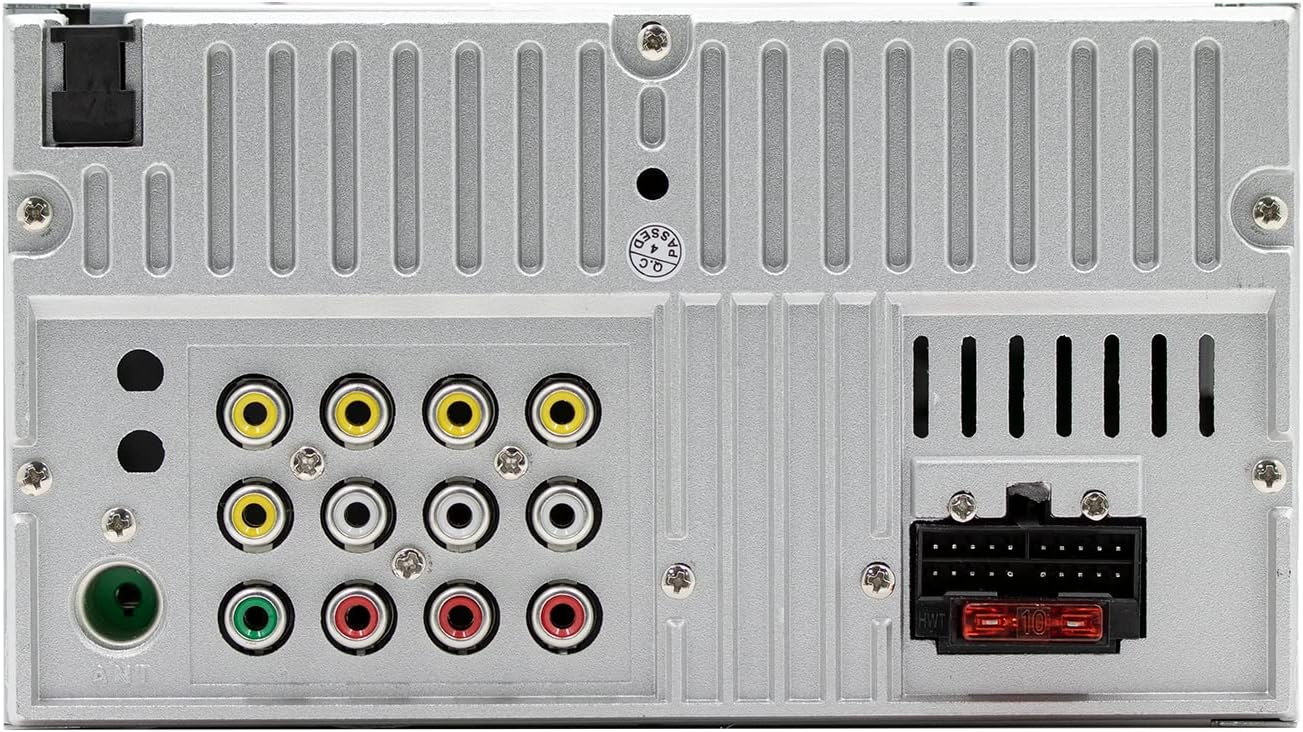
รูปที่ 2: Rear panel connections of the Blaupunkt Lemon 122, illustrating power, speaker, video, and antenna inputs/outputs.
- พาวเวอร์ (สีเหลือง): เชื่อมต่อกับแหล่งจ่ายไฟ 12V คงที่
- อุปกรณ์เสริม (สีแดง): Connect to switched 12V accessory power.
- พื้น(สีดำ): เชื่อมต่อกับกราวด์ของแชสซีรถยนต์
- สายลำโพง: Connect to corresponding vehicle speakers (e.g., Front Left +, Front Left -).
- เสาอากาศ: เชื่อมต่อกับเสาอากาศวิทยุของรถยนต์
- อินพุตกล้องมองหลัง: Connect to a compatible rear view กล้องสำหรับแสดงผลอัตโนมัติขณะถอยหลัง
การติดตั้งหน่วย
Use the provided mounting brackets and screws to secure the car stereo into the vehicle's dashboard opening. Ensure the unit is firmly seated and does not vibrate during driving.
คำแนะนำการใช้งาน
เปิด/ปิดเครื่อง
กดปุ่ม ปุ่มเปิด/ปิดเครื่อง/ปรับระดับเสียง to turn the unit on or off. Rotate the knob to adjust the volume.
อินเทอร์เฟซหน้าจอสัมผัส
Navigate through menus and select functions by touching the icons on the 6.5-inch display. Swipe gestures may be used for certain functions.
วิทยุ (AM/FM)
Select the 'Radio' source. Use the touchscreen controls to scan for stations, manually tune, and save up to 30 preset stations.
เล่นดีวีดี/ซีดี
Insert a DVD or CD into the disc slot. The unit will automatically switch to the DVD/CD source and begin playback. Use the on-screen controls for playback functions (play, pause, skip, stop).
เล่นการ์ด USB/TF
Insert a USB drive into the front USB port or a TF card into the designated slot. Select the 'USB' or 'TF Card' source. The unit will display compatible media files (MP3, WMA, MP4, AVI, etc.) for selection and playback.

รูปที่ 3: Front panel of the Blaupunkt Lemon 122, showing the USB and AUX ports for media input.
การเชื่อมต่อบลูทูธ
วิธีเชื่อมต่อสมาร์ทโฟนของคุณ:
- เปิดใช้งานบลูทูธบนสมาร์ทโฟนของคุณ
- On the Lemon 122, select the 'Bluetooth' source.
- ค้นหา available devices on your phone and select 'Blaupunkt Lemon 122'.
- ยืนยันรหัสการจับคู่หากได้รับแจ้ง
Once paired, you can stream audio and make/receive hands-free calls through the car stereo.
ฟังก์ชันการเชื่อมโยงกระจก
Mirror Link allows you to display your smartphone's screen directly on the Lemon 122's touchscreen. This feature requires a compatible smartphone and a USB connection. Follow the on-screen prompts on the stereo and your phone to establish the connection.

รูปที่ 4: The Mirror Link feature in action, showing a smartphone screen mirrored onto the Blaupunkt Lemon 122 display.
การตั้งค่าเสียง (อีควอไลเซอร์)
Access the audio settings menu to adjust sound preferences. The unit includes multiple preset equalizer modes such as POP, CLASSIC, ROCK, and JAZZ to optimize your listening experience.
หลัง View กล้อง
ถ้าเป็นกองหลัง view เมื่อเชื่อมต่อกล้องแล้ว จอภาพจะสลับไปที่ภาพจากกล้องโดยอัตโนมัติเมื่อรถเข้าเกียร์ถอยหลัง
รีโมทคอนโทรล
The included remote control provides convenient access to various functions, including power, volume, source selection, track/station navigation, and menu controls.
การซ่อมบำรุง
การทำความสะอาดตัวเครื่อง
Use a soft, dry cloth to clean the touchscreen and the unit's exterior. For stubborn marks, a slightly damp สามารถใช้ผ้าชุบน้ำยาทำความสะอาดอ่อนๆ แล้วเช็ดตามด้วยการเช็ดแห้ง หลีกเลี่ยงน้ำยาทำความสะอาดหรือตัวทำละลายที่มีฤทธิ์กัดกร่อน
การดูแลแผ่นดิสก์
Handle discs by their edges to avoid fingerprints. Keep discs clean and free from scratches. Store discs in their cases when not in use.
การอัพเดตซอฟต์แวร์
Periodically check the official Blaupunkt website for any available software or firmware updates for your Lemon 122 model. Follow the provided instructions carefully for any update procedures.
การแก้ไขปัญหา
| ปัญหา | สาเหตุที่เป็นไปได้ | สารละลาย |
|---|---|---|
| ไม่มีไฟฟ้า | การเดินสายไฟไม่ถูกต้อง; ฟิวส์ขาด; แบตเตอรี่รถยนต์อ่อน | Check power and ground connections; Replace fuse; Check vehicle battery. |
| ไม่มีเสียง | Volume too low; Speaker wires disconnected; Incorrect audio settings | Increase volume; Check speaker connections; Verify audio output settings. |
| ปัญหาการเชื่อมต่อบลูทูธ | Device not paired; Bluetooth off on phone; Interference | Ensure Bluetooth is enabled on both devices; Re-pair the device; Move closer to the unit. |
| ลิงค์มิเรอร์ไม่ทำงาน | Incorrect USB cable; Incompatible phone; App not installed/running | Use a high-quality USB cable; Check phone compatibility; Ensure Mirror Link app is running on phone. |
| ข้อผิดพลาดในการอ่านดิสก์ | Dirty or scratched disc; Incompatible disc format | ทำความสะอาดแผ่นดิสก์ ลองใช้แผ่นดิสก์แผ่นอื่น ตรวจสอบให้แน่ใจว่าแผ่นดิสก์นั้นรองรับรูปแบบไฟล์ดังกล่าว |
ข้อมูลจำเพาะ
- แสดง: หน้าจอสัมผัสขนาด 6.5 นิ้ว
- กำลังขับ: 4 x 50W Max (200 watts total)
- การเชื่อมต่อ: Bluetooth, USB, TF Card, AUX In, Mirror Link
- ความเข้ากันได้ของสื่อ: DVD/VCD/CD/CR-R/CD-RW/MP4/AVI/DIVX/XVID/RM/FLV/MP3/WMA/APE/FLAC
- เครื่องรับวิทยุ: AM/FM with 30 Channel Presets
- ค่าที่ตั้งไว้ล่วงหน้าของอีควอไลเซอร์: POP/CLASSIC/ROCK/JAZZ
- คุณสมบัติพิเศษ: หลัง View Camera Input, 7 Color Button Lights
- วิธีการควบคุม: รีโมท, สัมผัส
- โหมดเอาต์พุตเสียง: สเตอริโอ
- การกำหนดค่าช่องสัญญาณเสียงรอบทิศทาง: 2
- ผู้ผลิต: บลาพุงท์
- หมายเลขรุ่น: Lemon 122
- ยูพีซี: 815592028345
การรับประกันและการสนับสนุน
ข้อมูลการรับประกัน
The Blaupunkt Lemon 122 Multimedia Car Stereo is covered by a 1 Year Limited Manufacturer's Warranty นับจากวันที่ซื้อสินค้า การรับประกันนี้ครอบคลุมถึงข้อบกพร่องในวัสดุและฝีมือการผลิตภายใต้การใช้งานปกติ ไม่ครอบคลุมถึงความเสียหายที่เกิดจากการติดตั้งที่ไม่ถูกต้อง อุบัติเหตุ การใช้งานผิดวิธี การใช้ในทางที่ผิด การละเลย หรือการดัดแปลงโดยไม่ได้รับอนุญาต
การสนับสนุนลูกค้า
For technical assistance, warranty claims, or further information, please refer to the official Blaupunkt website or contact their customer support directly. Keep your proof of purchase for warranty service.