
ข้อมูลด้านความปลอดภัยที่สำคัญ
Please read these instructions carefully before installation. If you do not understand these instructions or have doubts about the safety of the installation, please contact a qualified installer. The manufacturer is not liable for damage or injury caused by incorrect assembly or use.
- ความจุน้ำหนัก: Do not exceed the maximum weight capacity specified for your model. Overloading can result in serious injury or property damage.
- โครงสร้างผนัง: The wall mount must be securely attached to a suitable wall structure. Do not install on drywall alone. Ensure the mounting surface can safely support the combined weight of the mount and the television.
- ความเข้ากันได้ของ VESA: Verify your TV's VESA mounting pattern (hole spacing) is compatible with this mount.
- เด็ก: ควรกันเด็กให้ออกห่างจากบริเวณติดตั้ง ชิ้นส่วนขนาดเล็กอาจเป็นอันตรายจากการสำลักได้
- เครื่องมือ: ใช้เครื่องมือที่เหมาะสมสำหรับการติดตั้ง
ความเข้ากันได้ของผลิตภัณฑ์
This instruction manual covers two models of PERLESMITH Full Motion TV Wall Mounts, PSMFK7 and PSMFK1. Please identify your model and confirm your television's specifications before proceeding with installation.
Model PSMFK7
- ความเข้ากันได้ของขนาดหน้าจอ: Most 26-55 inch TVs.
- ความจุน้ำหนัก: น้ำหนักไม่เกิน 70 ปอนด์ (31.7 กิโลกรัม)
- รูปแบบ VESA: 100x100mm to 400x400mm.

Figure 1: PSMFK7 Model Compatibility Overview. This image illustrates the supported screen sizes (26-55 inches), maximum weight capacity (70 lbs), and VESA mounting patterns (100x100mm to 400x400mm) for the PSMFK7 TV wall mount.
Model PSMFK1
- ความเข้ากันได้ของขนาดหน้าจอ: Most 26-60 inch TVs.
- ความจุน้ำหนัก: น้ำหนักไม่เกิน 77 ปอนด์ (35 กิโลกรัม)
- รูปแบบ VESA: Up to 400x400mm (16x16 inches).

Figure 2: PSMFK1 Model Compatibility and Wall Types. This image details the wide compatibility of the PSMFK1 model, supporting TVs up to 60 inches and various VESA patterns. It also indicates suitability for single wood stud, brick, and concrete walls.
Confirm Before Purchase
ก่อนการซื้อasing or installing, ensure your TV meets the following criteria:
- น้ำหนักทีวี: Your TV's weight is within the mount's capacity (70 lbs for PSMFK7, 77 lbs for PSMFK1).
- ขนาดทีวี: Your TV's screen size is within the recommended range (26-55" for PSMFK7, 26-60" for PSMFK1).
- รูปแบบ VESA: Your TV's VESA mounting holes match one of the supported patterns.
- ประเภทผนัง: Your wall is suitable for installation (single wood stud, concrete, or brick).
- Cable Blockage: Ensure the mounting holes on your TV do not block any cables or inputs.

Figure 3: Pre-Purchase Confirmation Checklist. This image provides a visual summary of essential checks to perform before installing the TV mount, including TV weight, size, VESA, wall type, and potential cable interference.
สิ่งที่รวมอยู่
Carefully unpack the box and ensure all parts are present and undamaged. If any parts are missing or damaged, do not attempt to install. Contact customer service for assistance.
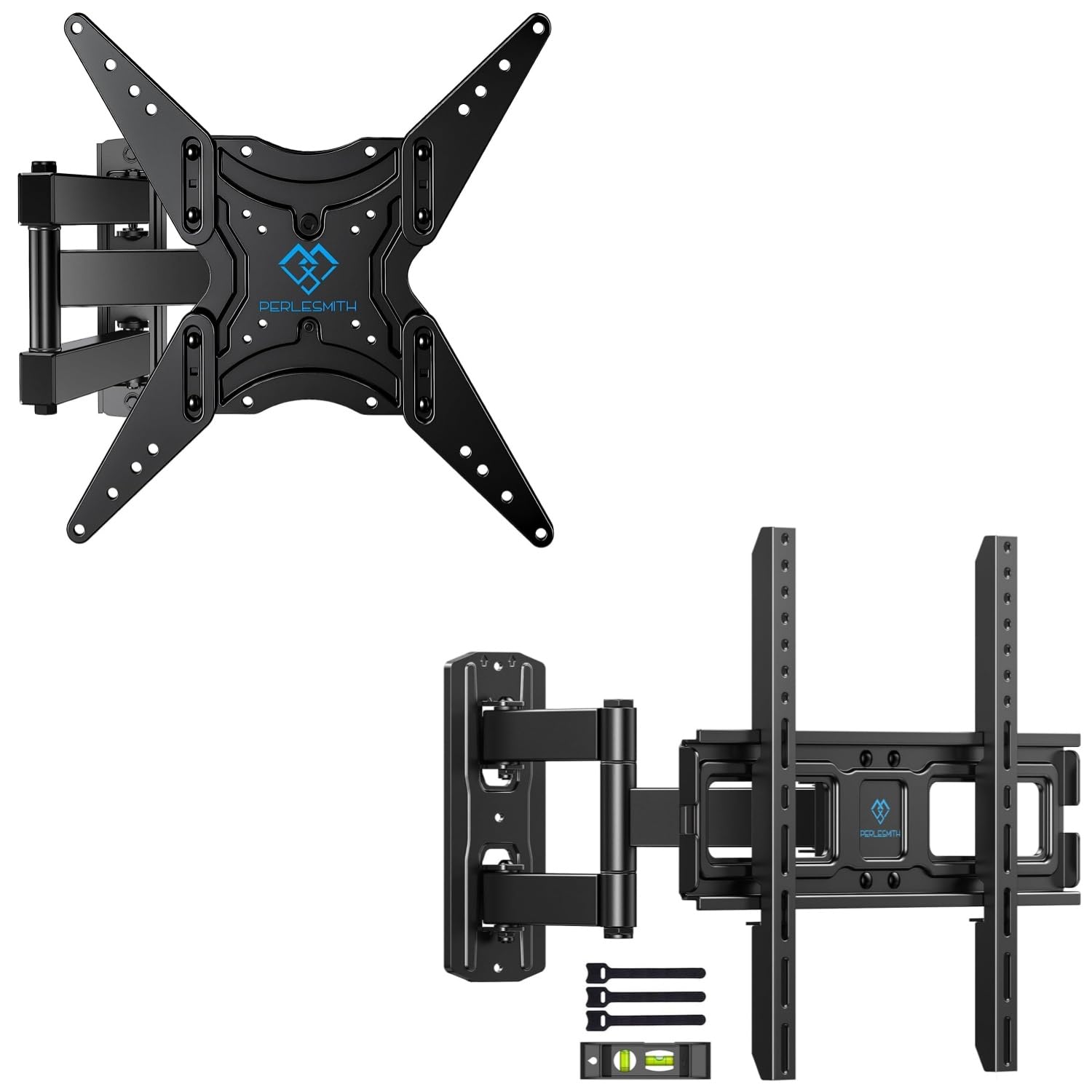
Figure 4: Package Contents. This image displays the main components of the PERLESMITH full motion TV wall mount kit, including the mount assembly, a bubble level for installation, and cable ties for cable management.
โดยทั่วไปแล้วสิ่งของในบรรจุภัณฑ์จะประกอบด้วย:
- ชุดติดตั้งทีวีติดผนังแบบปรับได้รอบทิศทาง
- ขาตั้งทีวี (2 ชิ้น)
- ชุดอุปกรณ์ติดตั้ง (สกรู แหวนรอง ตัวเว้นระยะ พุกต่างๆ)
- ระดับน้ำ
- เคเบิ้ลไทร์ (x3)
- คู่มือการใช้งาน
การติดตั้งและการตั้งค่า
การติดตั้งอย่างถูกต้องมีความสำคัญอย่างยิ่งต่อความปลอดภัยและความเสถียรของทีวีของคุณ โปรดปฏิบัติตามขั้นตอนเหล่านี้อย่างระมัดระวัง
ก่อนที่คุณจะเริ่มต้น
- Gather all necessary tools (e.g., drill, stud finder, level, screwdriver, tape measure).
- Ensure you have a clear, safe workspace.
- Confirm your TV and wall meet the compatibility requirements.
Wall Type Considerations
ฐานยึดนี้ออกแบบมาสำหรับการติดตั้งบน:
- Single Wood Stud: Locate the center of the wood stud using a stud finder.
- Solid Concrete Wall: Requires a masonry drill bit and concrete anchors.
- กำแพงอิฐ: Requires a masonry drill bit and brick anchors.
คำเตือน: Do not install this TV mount on drywall alone. Drywall cannot support the weight of the mount and TV.
ขั้นตอนการติดตั้งทั่วไป
- ติดตั้งขาตั้งทีวีเข้ากับทีวี: ติดตั้งขายึดทีวีแนวตั้งเข้ากับด้านหลังของทีวีโดยใช้สกรู แหวนรอง และตัวเว้นระยะที่เหมาะสมจากชุดอุปกรณ์ ตรวจสอบให้แน่ใจว่าขายึดอยู่ตรงกลางและได้ระดับ
- กำหนดตำแหน่งแผ่นปิดผนัง: Hold the wall plate against the wall at your desired viewing height. Use the included bubble level to ensure it is perfectly horizontal. Mark the drilling locations.
- เจาะรูนำ: Drill pilot holes at the marked locations. For wood studs, drill directly. For concrete or brick, use a masonry bit and insert concrete/brick anchors.
- แผ่นปิดผนังแบบยึดแน่น: Attach the wall plate to the wall using the lag bolts and washers. Tighten securely, but do not overtighten.
- ติดตั้งทีวีบนแผ่นยึดติดผนัง: Carefully lift the TV (with brackets attached) and hook the brackets onto the wall plate. Ensure the TV is securely seated.
- ยึดทีวีเข้ากับขาตั้งให้แน่น: Use the safety screws or locking mechanisms on the TV brackets to secure the TV to the wall mount, preventing accidental dislodgement.

Figure 5: Centering Your TV. This image demonstrates a TV mounted centrally on a wall, providing a visual guide for optimal placement above a feature like a fireplace.

Figure 6: Corner Mounting Example. This image illustrates how the full motion design allows for effective TV placement in a room corner, maximizing viewมุมการเอียง
การปรับปรุงการดำเนินงาน
The full motion design allows for flexible viewing angles. Adjustments can be made after installation.
- เอียง: The TV can be tilted +5° upwards to -15° downwards to reduce glare or optimize viewing from different heights. Loosen the tilt knobs on the TV brackets, adjust to the desired angle, and re-tighten.
- หมุน: The articulating arm allows the TV to swivel up to +/-90° (180° total range) left or right, depending on TV size and wall distance. Gently push or pull the TV to the desired angle.
- การยืด/หด: The mount can extend the TV up to 19.17 inches (48.7 cm) from the wall for optimal viewing or retract it back to 3.2 inches (8.1 cm) for a low-profile ดู.
- การปรับระดับ: After installation, the TV can be leveled +/-3° to correct any minor misalignments. Loosen the leveling screws, adjust, and re-tighten.

Figure 7: Full Motion Adjustments. This image visually explains the tilt, extension, swivel, and leveling features of the TV mount, demonstrating the range of motion available for optimal viewการไอเอ็นจี
การซ่อมบำรุง
การบำรุงรักษาอย่างสม่ำเสมอจะช่วยให้ขาตั้งทีวีติดผนังของคุณใช้งานได้ยาวนานและปลอดภัย
- การทำความสะอาด: เช็ดฐานยึดด้วยผ้าแห้งเนื้อนุ่มเพื่อกำจัดฝุ่น หลีกเลี่ยงการใช้สารทำความสะอาดที่มีฤทธิ์กัดกร่อนหรือตัวทำละลาย
- ตรวจสอบการเชื่อมต่อ: ตรวจสอบสกรูและข้อต่อทั้งหมดเป็นระยะเพื่อให้แน่ใจว่าขันแน่นและแน่นหนาดี ขันให้แน่นอีกครั้งหากจำเป็น
- ตรวจสอบความเสียหาย: Regularly inspect the mount for any signs of wear, corrosion, or damage. If any issues are found, discontinue use and contact customer support.
การแก้ไขปัญหา
หากพบปัญหาในระหว่างหรือหลังการติดตั้ง โปรดดูปัญหาและวิธีแก้ไขที่พบบ่อยต่อไปนี้
| ปัญหา | สาเหตุที่เป็นไปได้ | สารละลาย |
|---|---|---|
| ทีวีไม่ตั้งตรงหลังจากติดตั้งเสร็จ | เกิดความคลาดเคลื่อนเล็กน้อยระหว่างการติดตั้ง | Use the +/-3° leveling adjustment feature. Loosen leveling screws, adjust, and re-tighten. |
| ฐานยึดดูหลวมหรือไม่มั่นคง | Screws not fully tightened; incorrect wall anchors used; wall structure insufficient. | Ensure all mounting screws are securely tightened. Verify correct anchors for your wall type. If the wall is insufficient, consult a professional. |
| ปรับมุมเอียงหรือหมุนได้ยาก | Adjustment knobs/bolts are too tight. | Loosen the relevant adjustment knobs or bolts slightly, make the adjustment, then re-tighten to hold the position. |
| ทีวีไม่สามารถติดตั้งบนขาตั้งได้ | Incorrect TV size, weight, or VESA pattern for the mount model. | Verify your TV's specifications against the mount's compatibility (refer to Product Compatibility section). |
ข้อมูลจำเพาะผลิตภัณฑ์
| คุณสมบัติ | PSMFK7 Model | PSMFK1 Model |
|---|---|---|
| ประเภทการติดตั้ง | ติดผนัง | |
| ประเภทการเคลื่อนไหว | ปรับมุมได้ หมุนได้ เอียงได้ | |
| ขนาดหน้าจอที่เข้ากันได้ | 26 - 55 นิ้ว | 26 - 60 นิ้ว |
| ความจุน้ำหนักสูงสุด | 70 ปอนด์ (31.7 กก.) | 77 ปอนด์ (35 กก.) |
| ความเข้ากันได้ของ VESA | 100x100มม. ถึง 400x400มม. | สูงสุด 400x400 มม |
| มุมเอียง | +5° / -15° | |
| มุมหมุน | +/-90° (up to 180° total, depending on TV size) | |
| การปรับระดับ | +/-3° | |
| ส่วนต่อเติมจากผนัง | 3.2 นิ้ว (หด) ถึง 19.17 นิ้ว (ยืดออก) | |
| วัสดุ | เหล็กอัลลอยด์ | |
| ประเภทผนังที่เข้ากันได้ | Single Wood Stud, Solid Concrete, Brick Wall | |
การรับประกันและการสนับสนุน
For warranty information or technical support, please refer to the product packaging or contact PERLESMITH customer service directly. Keep your purchase receipt for warranty claims.
If you have any questions or require assistance with installation or operation, please do not hesitate to reach out to our support team.