
การแนะนำ
The Naxa NSH-3001 Wi-Fi Smart Camera provides reliable home security monitoring with 24/7 HD recording capabilities. This camera allows you to check in on your home remotely from anywhere using your smartphone. It features motion detection, two-way audio communication, night vision, and customizable activity alerts.
This manual provides detailed instructions for setting up, operating, and maintaining your Naxa NSH-3001 Wi-Fi Smart Camera to ensure optimal performance and security.
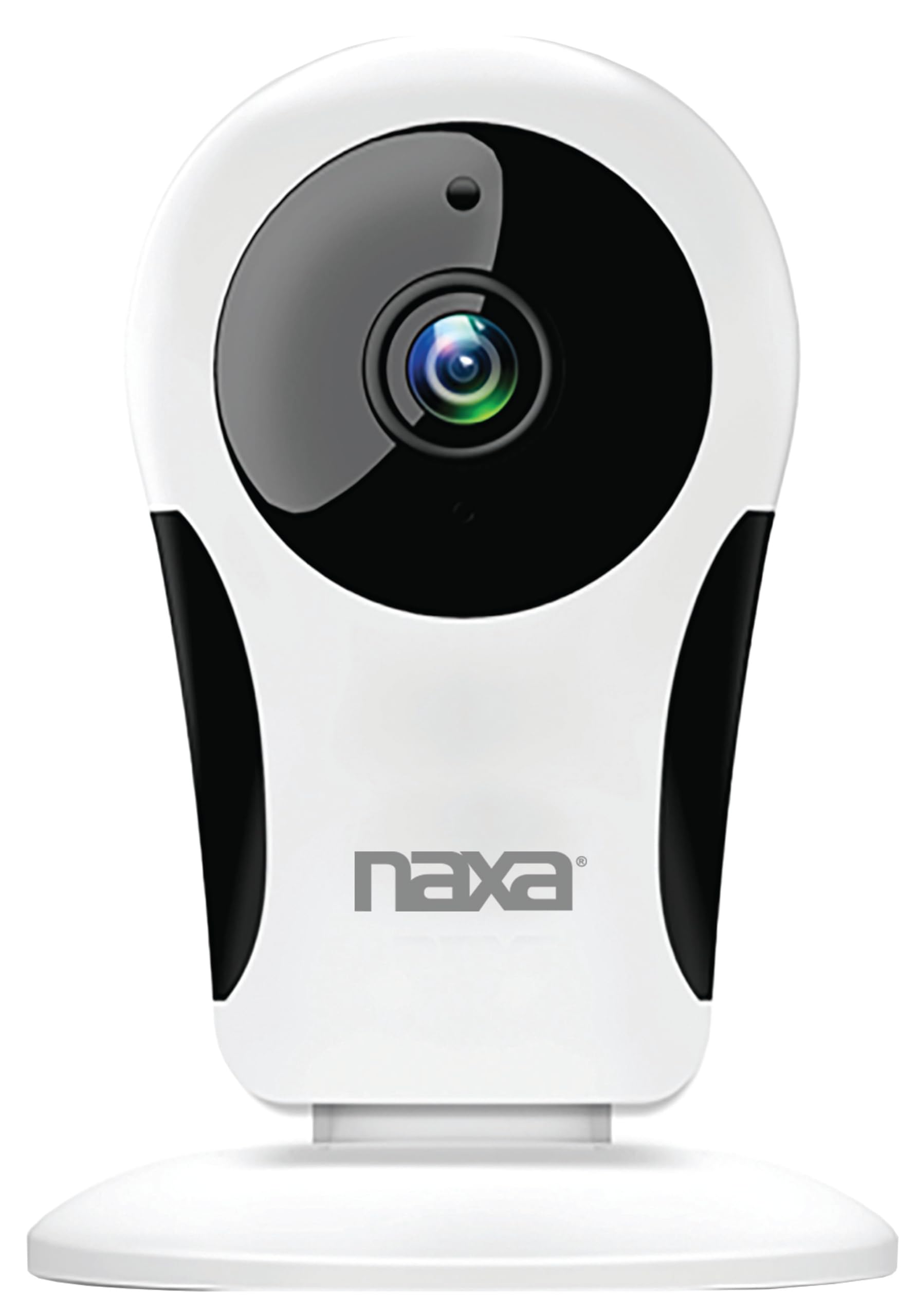
ภาพ: ด้านหน้า view of the Naxa NSH-3001 Wi-Fi Smart Camera, showing the lens and Naxa logo.
มีอะไรอยู่ในกล่อง
Upon unpacking your Naxa NSH-3001 Wi-Fi Smart Camera, please ensure all the following components are present:
- กล้องอัจฉริยะ Wi-Fi
- อะแดปเตอร์ AC
- สาย USB
- คู่มือการใช้งาน (เอกสารนี้)
สินค้าเกินview
Familiarize yourself with the main components of your Naxa NSH-3001 Wi-Fi Smart Camera.

Image: The Naxa NSH-3001 Wi-Fi Smart Camera displayed alongside icons representing its key features: HD Resolution, Encrypted ID, 2-Way Audio, Cloud Service, Motion Detection, IR Night Vision, Time Scheduling, and Hotspot capability.
- เลนส์กล้อง: จับภาพวิดีโอ footage.
- ไฟ LED อินฟราเรด (IR): มีฟังก์ชันการมองเห็นในเวลากลางคืน
- ไมโครโฟน: สำหรับรับสัญญาณเสียงและการสื่อสารสองทาง
- ผู้บรรยาย: สำหรับส่งสัญญาณเสียงและการสื่อสารสองทาง
- พอร์ตไมโครยูเอสบี: สำหรับการเชื่อมต่อไฟฟ้า
- ปุ่มรีเซ็ต: ใช้เพื่อรีเซ็ตกล้องให้กลับเป็นการตั้งค่าจากโรงงาน
- ช่องเสียบการ์ด Micro SD: สำหรับการจัดเก็บไฟล์ที่บันทึกไว้ในเครื่องtage (Micro SD card not included).
คู่มือการติดตั้ง
1. การเปิดกล้อง
- Connect the provided USB cable to the camera's Micro USB port.
- เชื่อมต่อปลายอีกด้านของสาย USB เข้ากับอะแดปเตอร์ไฟ AC
- เสียบอะแดปเตอร์แปลงไฟ AC เข้ากับเต้ารับไฟฟ้ามาตรฐาน
- The camera will power on, and an indicator light will show its status (refer to the camera's LED indicator guide for specific light patterns).
2. Downloading the Smart Life App
The Naxa NSH-3001 camera is controlled via the Smart Life app. Download it to your smartphone:
- For iOS devices, search for "Smart Life" in the Apple App Store.
- For Android devices, search for "Smart Life" in the Google Play Store.
- ติดตั้งแอปและสร้างบัญชีหากคุณยังไม่มี

Image: The Naxa NSH-3001 Wi-Fi Smart Camera shown with the Smart Life app logo and icons for the Apple App Store and Google Play, indicating app compatibility.
3. การเชื่อมต่อกับ Wi-Fi
Ensure your smartphone is connected to a 2.4 GHz Wi-Fi network. The NSH-3001 camera only supports 2.4 GHz Wi-Fi.
- Open the Smart Life app and tap "Add Device" or the "+" icon.
- เลือก "ระบบรักษาความปลอดภัยและกล้องวงจรปิด" จากนั้นเลือก "กล้องอัจฉริยะ"
- Follow the on-screen instructions in the app to connect your camera to your Wi-Fi network. This typically involves scanning a QR code generated by the app with the camera's lens.
- Once connected, the camera's indicator light will change (refer to the LED indicator guide), and you will see the camera added to your app.
4. การติดตั้งกล้อง
The NSH-3001 camera is designed for wall mount installation, but can also be placed on a flat surface. Choose a location that provides the desired viewing angle (105 degrees) and is within range of your Wi-Fi signal.

Image: The Naxa NSH-3001 Wi-Fi Smart Camera positioned on a nightstand in a bedroom, demonstrating a typical indoor placement.
- For wall mounting, use appropriate screws and anchors (not included) to secure the camera's base to the wall.
- ปรับมุมกล้องเพื่อให้ครอบคลุมพื้นที่ที่ต้องการ
คำแนะนำการใช้งาน
สด View และการเข้าถึงระยะไกล
Once connected, you can access your camera's live feed from anywhere using the Smart Life app on your smartphone.
- Open the Smart Life app and select your NSH-3001 camera from the device list.
- The live video stream will appear.
การสื่อสารด้วยเสียงสองทาง
The camera supports two-way audio, allowing you to hear and speak through the camera.
- ในไลฟ์สด view interface of the app, tap the microphone icon to speak.
- แตะไอคอนลำโพงเพื่อฟังเสียงจากตำแหน่งของกล้อง
การตรวจจับการเคลื่อนไหวและการแจ้งเตือน
The camera can detect motion and send real-time push notifications to your phone.
- Navigate to the camera settings within the Smart Life app.
- เปิดใช้งาน "การตรวจจับการเคลื่อนไหว" และปรับระดับความไวตามต้องการ
- Configure alert schedules and notification preferences.
การมองเห็นตอนกลางคืน
The NSH-3001 features an IR-cut filter for clear night vision, automatically switching between day and night modes based on ambient light.
- Night mode activates automatically in low-light conditions.
- The IR-cut filter ensures optimal clarity in both day and night recordings.
การบันทึกและจัดเก็บวิดีโอ
The camera supports 24/7 HD recording. Footage can be stored locally or via cloud service (subscription may be required).
- ที่เก็บข้อมูลไมโคร SD การ์ด: Insert a compatible Micro SD card (up to 128GB, not included) into the camera's SD card slot for continuous or event-based recording.
- การเก็บข้อมูลบนคลาวด์: Check the Smart Life app for available cloud storage options and subscription details.
- Review บันทึกเสียงฟูtage directly through the Smart Life app.
Video Tuning
Adjust video parameters directly from your smartphone for optimal image quality.
- Within the Smart Life app, access video settings to adjust contrast, brightness, saturation, and sharpness.
การจัดตารางเวลา
Set schedules for camera operation, recording, or alerts.
- Use the Smart Life app's scheduling feature to define specific times for motion detection, recording, or other functions.
การซ่อมบำรุง
Proper maintenance ensures the longevity and optimal performance of your Naxa NSH-3001 Wi-Fi Smart Camera.
- การทำความสะอาด: เช็ดเลนส์และตัวกล้องเบาๆ ด้วยผ้านุ่มและแห้ง หลีกเลี่ยงการใช้สารเคมีรุนแรงหรือน้ำยาทำความสะอาดที่มีฤทธิ์กัดกร่อน
- การอัปเดตซอฟต์แวร์: Regularly check the Smart Life app for firmware updates for your camera. Keeping the firmware updated ensures you have the latest features and security enhancements.
- การจัดวาง: Ensure the camera is placed in a stable location and protected from extreme temperatures, direct sunlight, and moisture.
การแก้ไขปัญหา
If you encounter issues with your Naxa NSH-3001 Wi-Fi Smart Camera, refer to the following common solutions:
| ปัญหา | วิธีแก้ปัญหาที่เป็นไปได้ |
|---|---|
| กล้องไม่เชื่อมต่อกับ Wi-Fi |
|
| ไม่มีภาพวิดีโอในแอป |
|
| ไม่ได้รับการแจ้งเตือนการเคลื่อนไหว |
|
| เสียงสองทางไม่ทำงาน |
|
If problems persist, please contact Naxa customer support.
ข้อมูลจำเพาะ
| คุณสมบัติ | รายละเอียด |
|---|---|
| ชื่อรุ่น | เอ็นเอสเอช-3001 |
| ยี่ห้อ | นาซ่า |
| เทคโนโลยีการเชื่อมต่อ | Wi-Fi (2.4 GHz) |
| ความละเอียดในการจับภาพวิดีโอ | 720p |
| Viewอิงแองเกิล | 105 องศา |
| คุณสมบัติพิเศษ | เซ็นเซอร์ตรวจจับความเคลื่อนไหว, ระบบมองเห็นในเวลากลางคืน, ระบบเสียงสองทาง |
| การใช้งานภายใน/ภายนอกอาคาร | Indoor, Outdoor (Note: IP54 rating suggests splash resistance, not full outdoor weatherproofing) |
| แหล่งพลังงาน | สายไฟ |
| อุปกรณ์ที่รองรับ | สมาร์ทโฟน (ผ่านแอป Smart Life) |
| ประเภทการติดตั้ง | ติดผนัง |
| พื้นที่จัดเก็บ | การ์ด Micro SD (สูงสุด 128GB ไม่รวมอยู่ในชุด), พื้นที่จัดเก็บข้อมูลบนคลาวด์ (เลือกได้) |
| ขนาด (กว้าง x ยาว x สูง) | 3.2 x 3.2 x 4.3 นิ้ว |
| น้ำหนักสินค้า | 3.2 ออนซ์ |
| วัสดุ | พลาสติก |
| การให้คะแนนการคุ้มครองระหว่างประเทศ | IP54 |
การรับประกันและการสนับสนุน
Naxa Electronics, Inc. manufactures the NSH-3001 Wi-Fi Smart Camera. For specific warranty information, please refer to the warranty card included with your product or visit the official Naxa webเว็บไซต์.
For technical support, troubleshooting assistance beyond this manual, or inquiries about your product, please contact Naxa customer service. Contact details can typically be found on the Naxa webไซต์หรือบนบรรจุภัณฑ์ผลิตภัณฑ์
Naxa Official Webเว็บไซต์: www.naxa.com