
พาร์สันเวอร์ LW45
คู่มือผู้ใช้ Parsonver LW45 Smart Watch
Model: LW45 | Brand: Parsonver
การแนะนำ
This manual provides detailed instructions for the Parsonver LW45 Smart Watch. Please read this guide thoroughly to understand the watch's functions, setup, and maintenance, ensuring optimal performance and longevity of your device.
เนื้อหาแพ็คเกจ
เมื่อเปิดบรรจุภัณฑ์ ตรวจสอบว่ามีสิ่งของครบทั้งหมด:
- Parsonver LW45 สมาร์ทวอทช์
- สายชาร์จ
- คู่มือการใช้งาน
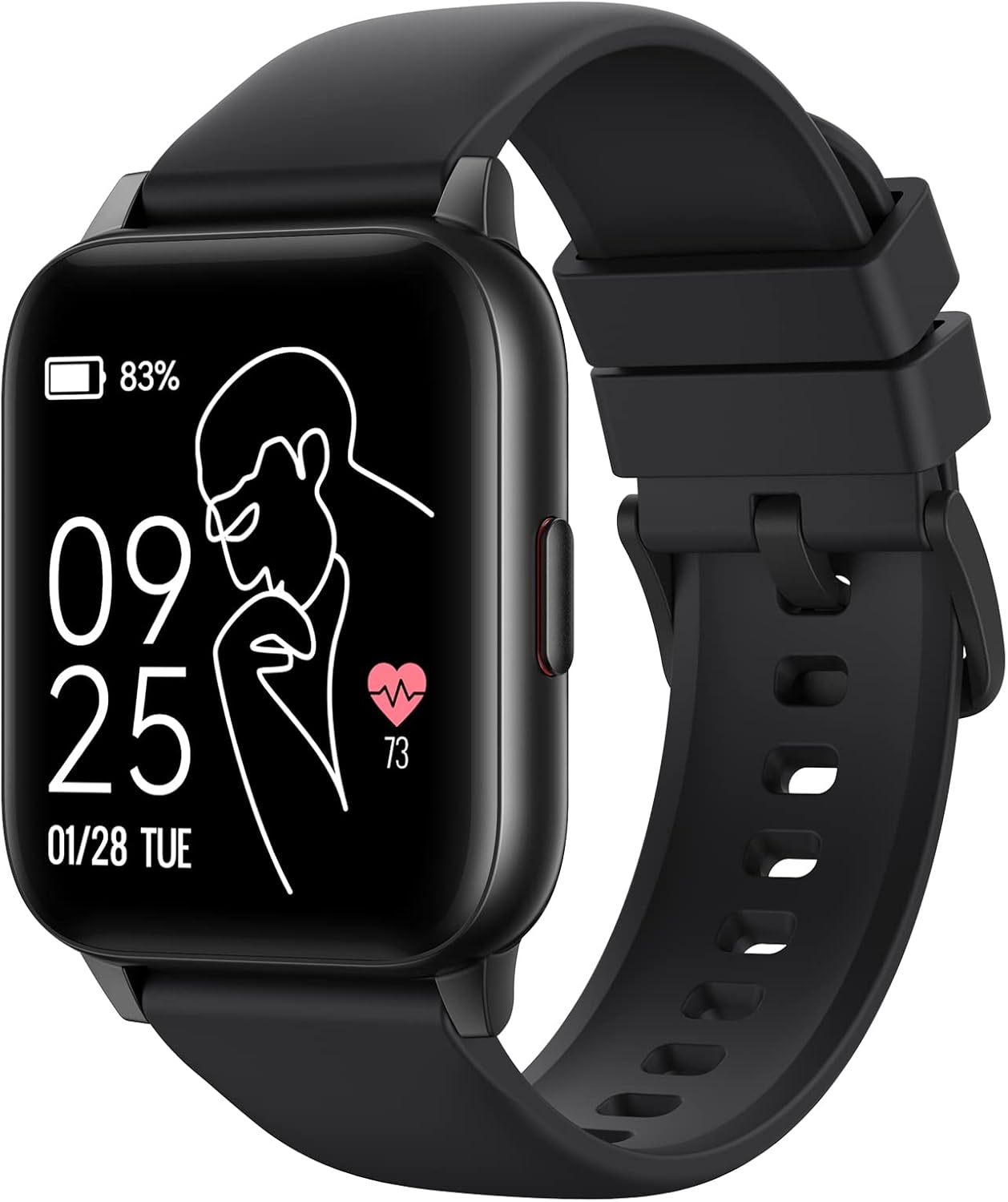
Image: The Parsonver LW45 Smart Watch, black model, displaying time and health metrics.
คู่มือการติดตั้ง
1. การชาร์จอุปกรณ์
Before initial use, fully charge the smart watch. Connect the charging cable to the charging port on the back of the watch and to a USB power source. The watch display will indicate charging status.
2. การติดตั้งและการจับคู่แอป
- Download the official Parsonver app from your smartphone's app store (compatible with iOS 10.0/Android 5.0 or above).
- ตรวจสอบให้แน่ใจว่าได้เปิดใช้งาน Bluetooth บนสมาร์ทโฟนของคุณแล้ว
- เปิดแอปและทำตามคำแนะนำบนหน้าจอเพื่อสร้างบัญชีหรือเข้าสู่ระบบ
- Select "Add Device" or similar option within the app to search for your LW45 Smart Watch.
- ยืนยันคำขอจับคู่บนสมาร์ทโฟนและนาฬิกาของคุณทั้งคู่
บันทึก: The watch connects via Bluetooth 5.0. Maintain proximity between the watch and your smartphone for a stable connection.

Image: A smartphone displaying the Parsonver app, illustrating the device connection process.
คำแนะนำการใช้งาน
การนำทางพื้นฐาน
- หน้าจอสัมผัส: ปัดไปทางซ้าย/ขวา และขึ้น/ลง เพื่อไปยังเมนูและเข้าถึงฟีเจอร์ต่างๆ แตะเพื่อเลือก
- ปุ่มด้านข้าง: กดเพื่อกลับไปยังหน้าจอหลักหรือปลุกอุปกรณ์
โหมดกีฬา
The LW45 Smart Watch features 16 default sports modes. Over 100 additional sports modes can be customized and added via the companion app. These include activities such as walking, running, cycling, swimming, yoga, and strength training.
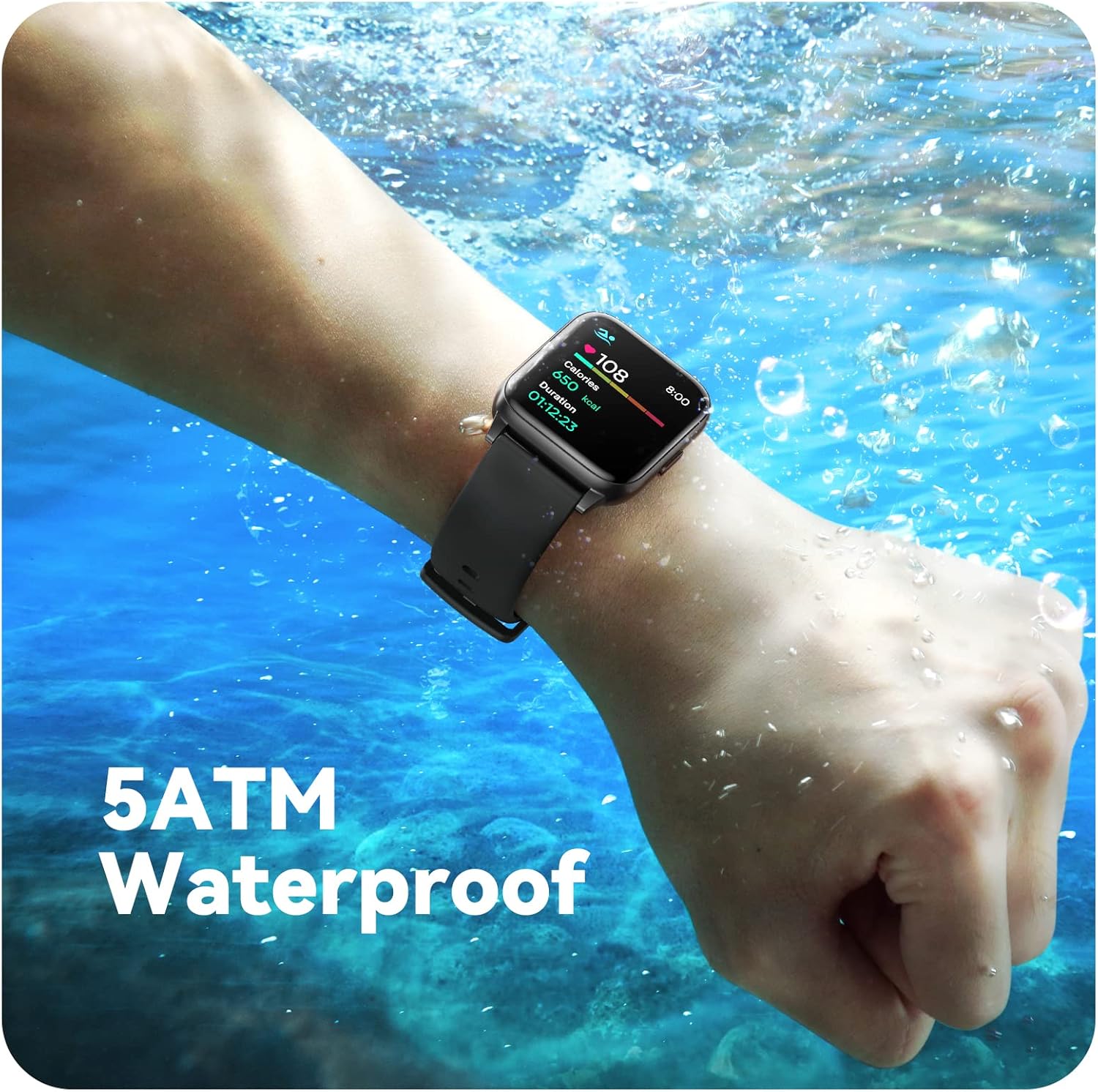
Image: A person engaged in soccer, wearing the smart watch, demonstrating its use during sports activities.

Image: A smartphone screen displaying a wide selection of sports modes within the Parsonver application.
การติดตามสุขภาพ
- การตรวจสอบอัตราการเต้นของหัวใจ: Provides 24/7 real-time heart rate data.
- การตรวจวัดออกซิเจนในเลือด: วัดระดับออกซิเจนในเลือด
- การติดตามการนอนหลับ: Automatically monitors sleep patterns, including deep sleep, light sleep, and awake times (from 9:00 PM to 12:00 PM the next day).
- Hydration and Sedentary Alerts: The watch can provide reminders for hydration and prolonged inactivity.

Image: A man running, with the smart watch on his wrist showing real-time fitness data.

Image: A person sleeping, with the smart watch tracking sleep and displaying data on a connected phone.
การแจ้งเตือน
Receive notifications for incoming calls, SMS messages, emails, and alerts from social media applications (WhatsApp, LinkedIn, Instagram, Twitter) when connected to your smartphone. You can reject calls directly from the watch, but cannot answer or reply to messages.
Image: The smart watch screen showing icons for different types of notifications.
ฟังก์ชั่นเพิ่มเติม
The 1.69-inch high-definition touch screen provides access to various features:
- พยากรณ์อากาศ
- นาฬิกาปลุก
- นาฬิกาจับเวลาและตัวจับเวลา
- การควบคุมกล้องระยะไกล
- การควบคุมการเล่นเพลง
Image: The smart watch screen showing a weather forecast display.
การปรับแต่ง
ปรับแต่งประสบการณ์การรับชมนาฬิกาของคุณ:
- หน้าปัดนาฬิกา: Choose from a variety of pre-installed watch faces or download more via the app.
- พื้นหลังที่กำหนดเอง: Set your own photos as watch face backgrounds through the app.
- Time and Unit Formats: Adjust time display (12/24 hour) and measurement units (Metric/Imperial, Celsius/Fahrenheit) in the app settings.

Image: Multiple watch face designs shown on the smart watch, highlighting customization.

Image: A visual guide demonstrating how to adjust time formats, units, and customize watch faces via the companion app.
ความต้านทานต่อน้ำ
The Parsonver LW45 Smart Watch is rated 5ATM waterproof, meaning it is water-resistant up to 50 meters. This allows for use during swimming, showering, and in various weather conditions like rain or snow. Important: Do not press any buttons while the watch is submerged in water.

Image: The smart watch submerged in water, illustrating its 5ATM waterproof capability.
การซ่อมบำรุง
- การทำความสะอาด: ควรทำความสะอาดนาฬิกาและสายนาฬิกาเป็นประจำด้วยผ้าแห้งเนื้อนุ่ม สำหรับคราบสกปรกฝังแน่น ให้ใช้ผ้าที่ชุบน้ำยาทำความสะอาดเล็กน้อยamp ผ้าและสบู่ชนิดอ่อน จากนั้นล้างออกและเช็ดให้แห้งสนิท
- หน้าสัมผัสการชาร์จ: รักษาความสะอาดและปราศจากสิ่งสกปรกบริเวณขั้วชาร์จด้านหลังนาฬิกา เพื่อให้การชาร์จเป็นไปอย่างถูกต้อง
- พื้นที่จัดเก็บ: ควรเก็บนาฬิกาไว้ในที่แห้งและเย็นเมื่อไม่ได้ใช้งาน
- หลีกเลี่ยงสารเคมี: Do not expose the watch to strong chemicals, solvents, or detergents, as these can damage the materials.
การแก้ไขปัญหา
| ปัญหา | วิธีแก้ปัญหาที่เป็นไปได้ |
|---|---|
| นาฬิกาไม่เปิดหรือชาร์จไฟ | Ensure the charging cable is securely connected to both the watch and a working USB power source. Clean the charging contacts. Try a different USB port or adapter. |
| ไม่สามารถจับคู่กับสมาร์ทโฟนได้ | Ensure Bluetooth is enabled on your phone. Restart both the watch and phone. Make sure the watch is within Bluetooth range. Check if other Bluetooth devices are interfering. Uninstall previous watch apps if present. |
| ไม่ได้รับการแจ้งเตือน | Verify that notification permissions are enabled for the Parsonver app in your phone's settings. Ensure the watch is connected via Bluetooth. Check app settings for specific notification toggles. |
| Inaccurate step count or sleep data | Ensure the watch is worn snugly on your wrist. Calibrate the watch through the app if available. Note that some activities (like driving) might register as steps. Sleep tracking is active from 9:00 PM to 12:00 PM the next day. |
ข้อมูลจำเพาะ
| คุณสมบัติ | รายละเอียด |
|---|---|
| ชื่อรุ่น | LW45 |
| ขนาดหน้าจอ | 1.69 นิ้ว |
| ความต้านทานต่อน้ำ | 5ATM (สูงสุด 50 เมตร) |
| น้ำหนัก | 40 กรัม |
| ความเข้ากันได้ของระบบปฏิบัติการ | iOS 10.0/Android 5.0 ขึ้นไป |
| การเชื่อมต่อ | บลูทูธ 5.0 |
| ความจุของแบตเตอรี่ | 300 มิลลิวินาทีamp ชั่วโมง |
| ความจุของหน่วยความจำ | 128MB |
| จีพีเอส | ผ่านสมาร์ทโฟน |
| ส่วนประกอบที่รวมอยู่ | สมาร์ทวอทช์ |
การสนับสนุนและการรับประกัน
For technical assistance or warranty inquiries, please contact Parsonver customer service. Refer to the product packaging or the official Parsonver webเว็บไซต์สำหรับข้อมูลการติดต่อล่าสุด
อีเมลฝ่ายบริการลูกค้า: support@parsonver.com

Image: The official Parsonver brand logo.

Image: A graphic indicating 24/7 online customer support availability.
ข้อมูลด้านความปลอดภัยที่สำคัญ
- อย่าพยายามถอดแยกชิ้นส่วนหรือดัดแปลงนาฬิกา
- Keep the watch away from extreme temperatures.
- Consult a medical professional before starting any new exercise regimen, especially if you have pre-existing health conditions. The health monitoring features are for informational purposes and not for medical diagnosis.
- กำจัดอุปกรณ์และแบตเตอรี่ตามระเบียบข้อบังคับท้องถิ่น