
1. บทนำ
This manual provides detailed instructions for the proper use and care of your Samyang 135mm F1.8 Full Frame Telephoto Lens for Sony E-mount cameras. Please read this manual thoroughly before using the product to ensure optimal performance and longevity.
The Samyang 135mm F1.8 AF Full Frame Telephoto Lens is designed for high-performance imaging, offering sharp detail, pleasing bokeh, and advanced focus control. Its 135mm focal length is suitable for portraiture, close-ups, landscapes, and astrophotography, providing a focused field of view and subject separation. The wide F1.8 aperture, combined with a sophisticated optical design, ensures sharp results with smooth background blur.
2. อะไรอยู่ในกล่อง
ตรวจสอบว่ามีรายการทั้งหมดอยู่ในแพ็คเกจ:
- Samyang 135mm F1.8 Lens
- ฮูดเลนส์
- ฝาปิดหน้าเลนส์
- ฝาปิดเลนส์ด้านหลัง
- กระเป๋าใส่อุปกรณ์
- คู่มือการใช้งาน (เอกสารนี้)
- บัตรรับประกัน
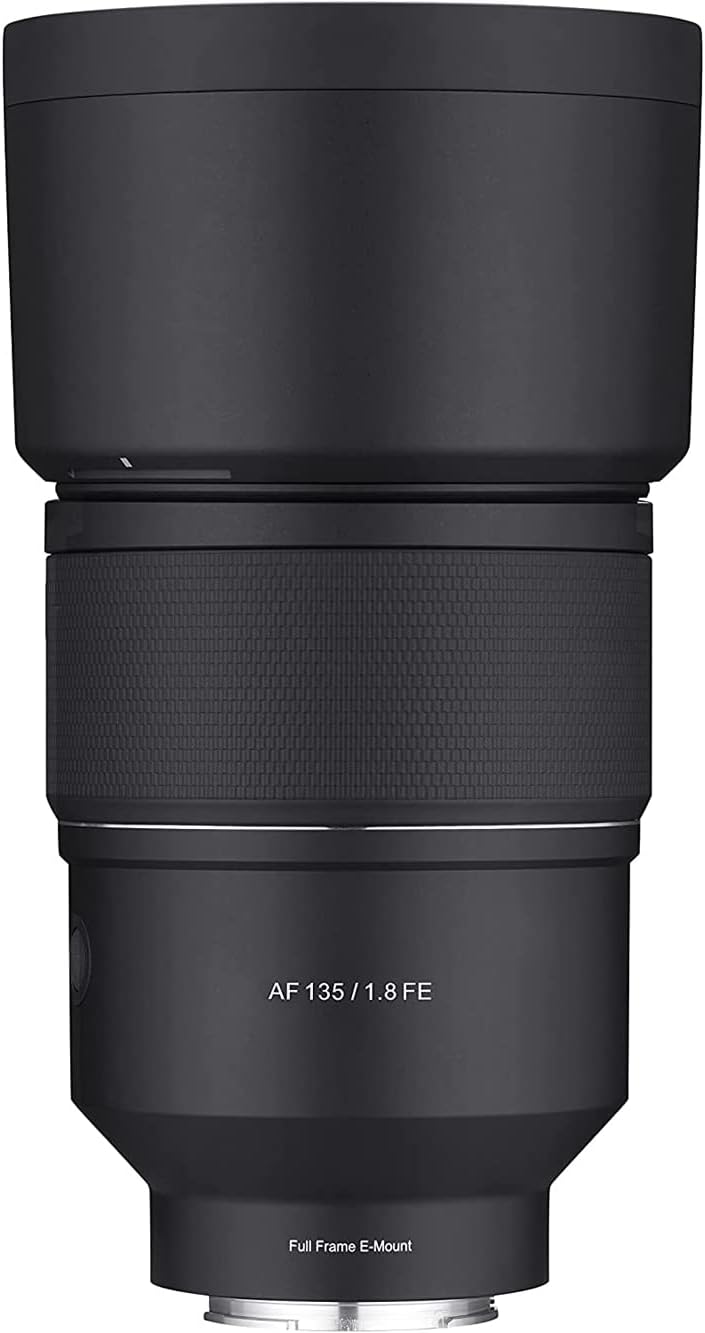
Image: Samyang 135mm F1.8 lens with its included lens hood, shown from a front-facing perspective.
3. การตั้งค่า
3.1 การติดเลนส์
- โปรดตรวจสอบให้แน่ใจว่ากล้องของคุณปิดอยู่
- ถอดฝาปิดเลนส์ด้านหลังออกจากเลนส์ และถอดฝาปิดตัวกล้องออกจากกล้องของคุณ
- จัดตำแหน่งเครื่องหมายสีขาวบนตัวเลนส์ให้ตรงกับเครื่องหมายสีขาวที่ตรงกันบนฐานยึดเลนส์ของกล้อง
- ใส่เลนส์เข้าไปในช่องยึดกล้องแล้วหมุนตามเข็มนาฬิกาจนกระทั่งได้ยินเสียงคลิก อย่าฝืนใส่เลนส์
- ติดตั้งฮูดเลนส์โดยจัดตำแหน่งเครื่องหมายบนฮูดให้ตรงกับเครื่องหมายที่ด้านหน้าของเลนส์ แล้วหมุนจนล็อคเข้าที่

Image: The Samyang 135mm F1.8 lens, displaying its rear optical element and the camera mount. Control switches are visible on the side of the lens barrel.
3.2 การถอดเลนส์
- โปรดตรวจสอบให้แน่ใจว่ากล้องของคุณปิดอยู่
- กดปุ่มปลดล็อคเลนส์บนตัวกล้องค้างไว้
- หมุนเลนส์ทวนเข็มนาฬิกาจนกว่าจะหลุดออกจากตัวกล้อง
- Immediately attach the rear lens cap to the lens and the body cap to your camera to protect the sensor and lens elements.
4. การใช้งานเลนส์
4.1 Autofocus (AF) System
The lens features a Linear STM autofocus motor, providing fast, smooth, and quiet autofocus performance. This is beneficial for both still photography and video recording, minimizing focus breathing.
4.2 ปุ่มล็อคโฟกัส
The Focus Hold Button allows you to lock the focus at a specific distance. This button can often be customized via your camera's menu to perform other functions, such as Eye AF activation.
4.3 Custom Switch
The Custom Switch provides additional control options. In its default setting, it may control aperture silently, which is useful for video. Refer to your camera's manual for potential customization options for this switch.
4.4 Focus Range Limiter
The Focus Range Limiter switch optimizes autofocus speed by restricting the focus range. This is particularly useful when you know your subject will be within a certain distance, preventing the lens from hunting across its full focus range.
- เต็ม: Allows focusing across the entire range (0.69m to infinity).
- 0.69 ม. - 2 ม.: Limits focus to close-up distances (0.69 meters to 2 meters).
- 1.5 ม. - ∞: Limits focus to longer distances (1.5 meters to infinity).

Image: An illustration of the Samyang 135mm F1.8 lens, pointing out the locations of the Focus Hold Button, Custom Switch, and Focus Range Limiter for user reference.
4.5 ระบบโฟกัสแบบแมนนวล (MF)
To use manual focus, set your camera to MF mode. Rotate the focus ring on the lens to adjust focus. The lens features a micro-pattern focus ring for enhanced grip and precise control.
4.6 Aperture and Bokeh
The wide F1.8 aperture allows for significant light gathering and shallow depth of field, producing smooth, aesthetically pleasing background blur (bokeh). The optical design, including an ultra-precision aspherical lens, contributes to refined and natural bokeh.

ภาพ: แอสample portrait photograph demonstrating the shallow depth of field and smooth background blur achievable with the Samyang 135mm F1.8 lens.
4.7 ระยะโฟกัสต่ำสุด
The lens has a minimum focusing distance of 0.69 meters (2.26 feet) and a maximum magnification of 0.243x, enabling detailed close-up photography.
5. การบำรุงรักษาและการดูแล
- การทำความสะอาดเลนส์: Use a soft, lint-free cloth or a lens brush to remove dust. For smudges or fingerprints, use a specialized lens cleaning solution and a microfiber cloth. Apply solution to the cloth, not directly to the lens.
- พื้นที่จัดเก็บ: When not in use, always attach the front and rear lens caps. Store the lens in a cool, dry place, away from direct sunlight and extreme temperatures. Use the provided carrying pouch for added protection.
- การปิดผนึกสภาพอากาศ: The lens features weather sealing to protect against dust and light moisture. While it offers protection, avoid exposing the lens to heavy rain or submerging it in water.

Image: An internal diagram of the lens highlighting the weather-sealed areas, indicating protection against environmental elements.
6 การแก้ไขปัญหา
| ปัญหา | สาเหตุที่เป็นไปได้ | สารละลาย |
|---|---|---|
| กล้องไม่รู้จักเลนส์ | Improper attachment; dirty electrical contacts. | Re-attach the lens securely. Clean the lens and camera electrical contacts with a clean, dry cloth. Ensure camera firmware is up to date. |
| ระบบโฟกัสอัตโนมัติทำงานช้าหรือไม่แม่นยำ | Low light conditions; Focus Range Limiter set incorrectly; dirty lens elements. | Ensure adequate lighting. Adjust the Focus Range Limiter to "FULL" or the appropriate range. Clean the front and rear lens elements. Update lens firmware if available. |
| ภาพก็เบลอ | การโฟกัสไม่ถูกต้อง; กล้องสั่น; เลนส์สกปรก. | Verify focus settings. Use a faster shutter speed or tripod. Clean lens elements. |
7. ข้อมูลจำเพาะ
| คุณสมบัติ | รายละเอียด |
|---|---|
| ยี่ห้อ | ซัมยัง |
| หมายเลขรุ่น | SYIO13518-E |
| ระยะโฟกัส | 135มม. |
| รูรับแสงสูงสุด | เอฟ1.8 |
| ประเภทเลนส์ | Telephoto Prime |
| การติดตั้งที่เข้ากันได้ | โซนี่ อี เมาท์ |
| ระยะโฟกัสต่ำสุด | 0.69เมตร (2.26ฟุต) |
| กำลังขยายสูงสุด | 0.243 เท่า |
| การออกแบบออปติคอล | 13 elements in 11 groups (including 3 ED, 2 HR, 1 U-ASP) |
| มอเตอร์ออโตโฟกัส | เชิงเส้น STM |
| ซีลสภาพอากาศ | ใช่ |
| ขนาดสินค้า | 7.87 x 3.94 x 1.97 นิ้ว |
| น้ำหนักสินค้า | 2.64 ปอนด์ (ประมาณ 1.2 กก.) |
8. การรับประกันและการสนับสนุน
For warranty information, please refer to the Warranty Card included with your product. Keep your proof of purchase for warranty claims.
A digital version of this user manual is available for download. For further assistance or technical support, please visit the official Samyang webเว็บไซต์หรือติดต่อฝ่ายบริการลูกค้าของพวกเขา
คู่มือผู้ใช้อย่างเป็นทางการ (PDF): ดาวน์โหลด PDF