
แคนนอน เอ2500
คู่มือผู้ใช้กล้องดิจิตอล Canon PowerShot A2500
รุ่น : A2500
1. สินค้าหมดview
The Canon PowerShot A2500 is a compact digital camera designed for ease of use and reliable performance. It features a 16-megapixel sensor, 5x optical zoom, and digital image stabilization, making it suitable for capturing everyday moments in both photos and 720p HD video.

ภาพที่ 1: ด้านหน้า view of the Canon PowerShot A2500 digital camera in red.
คุณสมบัติหลัก:
- 16 Megapixel, 1/2.3-inch CCD sensor and Canon DIGIC 4 image processor for enhanced image quality.
- 5x optical zoom and 28mm wide-angle lens with Digital Image Stabilizer.
- Capture impressive 720p HD video in stereo sound with a dedicated movie button.
- Smart Auto intelligently selects the proper settings based on 32 predefined shooting situations.
- ECO Mode to reduce power consumption.
2. เนื้อหาบรรจุภัณฑ์
โปรดตรวจสอบให้แน่ใจว่าสินค้าทุกชิ้นในบรรจุภัณฑ์ครบถ้วน:
- กล้องดิจิทัล Canon PowerShot A2500
- แบตเตอรี่แพ็ค
- เครื่องชาร์จแบตเตอรี่
- สายรัดข้อมือ

Image 2: Contents of the Canon PowerShot A2500 package, including the camera, battery, charger, and wrist strap.
3. การตั้งค่าเริ่มต้น
3.1. การชาร์จแบตเตอรี่
- Insert the battery into the provided battery charger.
- เสียบที่ชาร์จเข้ากับเต้ารับไฟฟ้า ไฟแสดงสถานะการชาร์จจะสว่างขึ้น
- Once charging is complete, the indicator light will change or turn off. Remove the battery.
3.2. การใส่แบตเตอรี่และการ์ดหน่วยความจำ
- เปิดฝาช่องใส่แบตเตอรี่/การ์ดที่ด้านล่างของกล้อง
- Insert the charged battery into the compartment, ensuring correct orientation.
- Insert a compatible SD/SDHC/SDXC memory card into the card slot until it clicks into place.
- ปิดฝาปิดช่องใส่ให้แน่น
4. คู่มือการใช้งาน
4.1. เปิด/ปิดเครื่อง
กดปุ่ม เปิด/ปิด ปุ่มที่อยู่ด้านบนของกล้องสำหรับเปิดหรือปิดกล้อง
4.2.การถ่ายภาพ
- เปิดกล้อง
- Select your desired shooting mode (e.g., Smart Auto) using the mode dial or menu.
- จัดกรอบภาพถ่ายของคุณโดยใช้หน้าจอ LCD ขนาด 2.7 นิ้ว
- Press the shutter button halfway down to focus. The focus frame will appear.
- Press the shutter button all the way down to capture the photo.

ภาพที่ 3: ด้านหน้า view of the camera, highlighting the lens and flash for photo capture.
4.3. บันทึกวิดีโอ
- เปิดกล้อง
- กดปุ่มเฉพาะ ปุ่มภาพยนตร์ (often marked with a red dot) to start recording.
- Press the Movie Button again to stop recording.
4.4. การเล่น
- กดปุ่ม ปุ่มเล่น (often marked with a triangle icon) to enter playback mode.
- ใช้ปุ่มทิศทางเพื่อนำทางไปยังรูปภาพและวิดีโอของคุณ
- Press the Playback Button again to exit playback mode.
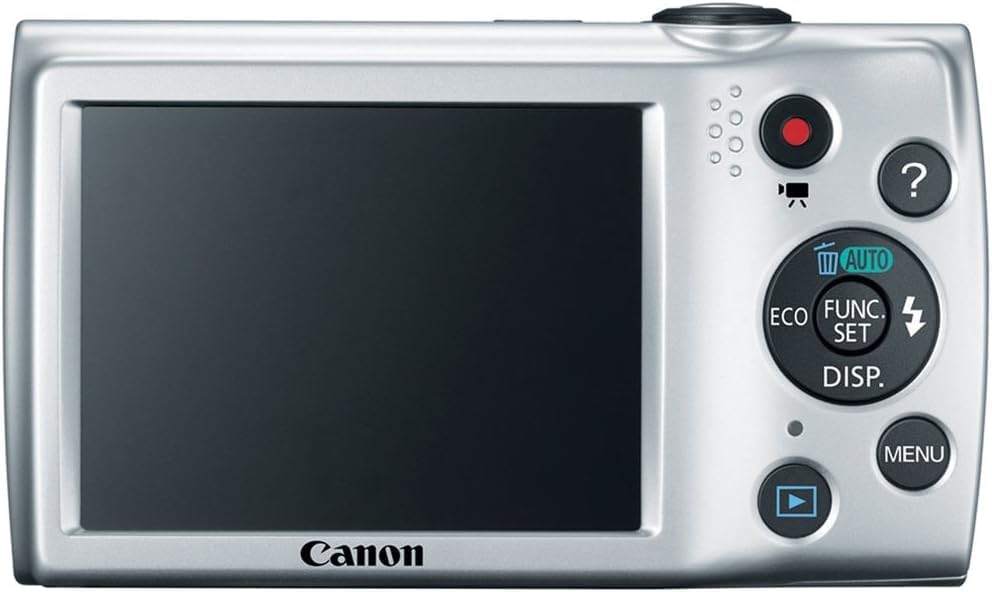
ภาพที่ 4: ด้านหลัง view ของกล้อง แสดงหน้าจอ LCD และปุ่มควบคุมสำหรับการนำทางและการตั้งค่า
5. การบำรุงรักษา
5.1. การทำความสะอาดกล้อง
- ตัวกล้อง: ใช้ผ้านุ่มและแห้งเช็ดตัวกล้อง สำหรับคราบสกปรกฝังแน่น ให้เช็ดเบาๆampเทน้ำลงบนผ้า
- เลนส์: Use a lens brush to remove dust, then gently wipe with a lens cleaning cloth. Avoid touching the lens directly with your fingers.
- หน้าจอ LCD: Use a soft, dry cloth to clean the screen. Avoid harsh chemicals.
5.2. การดูแลแบตเตอรี่
- เก็บแบตเตอรี่ไว้ในที่เย็นและแห้งเมื่อไม่ได้ใช้งาน
- หลีกเลี่ยงการปล่อยแบตเตอรี่จนหมดบ่อยครั้งเพื่อยืดอายุการใช้งาน
- อย่าให้แบตเตอรี่สัมผัสกับอุณหภูมิที่สูงหรือต่ำเกินไป
6 การแก้ไขปัญหา
| ปัญหา | สาเหตุที่เป็นไปได้ | สารละลาย |
|---|---|---|
| กล้องไม่สามารถเปิดได้ | แบตเตอรี่หมดหรือใส่ไม่ถูกต้อง | ชาร์จแบตเตอรี่ให้เต็มและตรวจสอบให้แน่ใจว่าใส่แบตเตอรี่ถูกต้อง |
| ภาพถ่ายมันเบลอๆ | กล้องสั่น การเคลื่อนไหวของวัตถุ หรือการโฟกัสไม่ถูกต้อง | Hold the camera steady, ensure adequate lighting, or use a tripod. Allow the camera to focus before fully pressing the shutter. |
| ข้อผิดพลาดการ์ดหน่วยความจำ | การ์ดเต็ม เสียหาย หรือเข้ากันไม่ได้ | ลบที่ไม่จำเป็น fileหรือฟอร์แมตการ์ด (ซึ่งจะลบข้อมูลทั้งหมด) หรือลองใช้การ์ดหน่วยความจำอื่นที่ใช้งานร่วมกันได้ |
| แฟลชไม่ทำงาน | ไฟแฟลชถูกปิดใช้งานหรือแบตเตอรี่เหลือน้อย | Check flash settings in the menu to ensure it is set to Auto or On. Charge the battery. |
7. ข้อมูลจำเพาะ
| คุณสมบัติ | รายละเอียด |
|---|---|
| ยี่ห้อ | แคนนอน |
| ชื่อรุ่น | เอ2500 |
| ความละเอียดของเซนเซอร์ภาพ | 16 MP |
| ซูมออปติคอล | 5x |
| ซูมดิจิตอล | 4x |
| ระบบป้องกันภาพสั่นไหว | ดิจิตอล |
| ขนาดหน้าจอ | 2.7 นิ้ว |
| ประเภทจอภาพ | จอแอลซีดี |
| ความละเอียดวิดีโอ | 720p |
| รองรับ File รูปแบบ | JPEG (Image), MP4 (Video) |
| เทคโนโลยีโฟโต้เซนเซอร์ | ซีซีดี |
| ความยาวโฟกัสต่ำสุด | 28 มิลลิเมตร |
| ความยาวโฟกัสสูงสุด | 140 มิลลิเมตร |
| เทคโนโลยีการเชื่อมต่อ | ยูเอสบี |
| ประเภทหน่วยความจำแฟลช | เอสดี/เอสดีเอชซี/เอสดีเอ็กซ์ซี |
| น้ำหนักสินค้า | 4.4 ออนซ์ |
8. การรับประกันและการสนับสนุน
8.1. ข้อมูลการรับประกัน
ผลิตภัณฑ์นี้มาพร้อมกับ รับประกันจำกัด 90 วัน. Please retain your proof of purchase for warranty claims. For specific terms and conditions, refer to the warranty documentation included with your product or visit the official Canon support webเว็บไซต์.
8.2. การสนับสนุนลูกค้า
For further assistance, technical support, or service inquiries, please visit the official Canon support website or contact their customer service. You can typically find contact information and FAQs on the manufacturer's webเว็บไซต์.
Ask a question about this manual
Ask about setup, troubleshooting, compatibility, parts, safety, or missing instructions. Manuals+ will review the question and use this page’s manual context to help answer it.