
1. บทนำ
ขอบคุณสำหรับการซื้อasing the Muse M-308 BT Bluetooth Speaker. This manual provides essential information for the safe and correct use of your device. Please read it thoroughly before use and keep it for future reference.
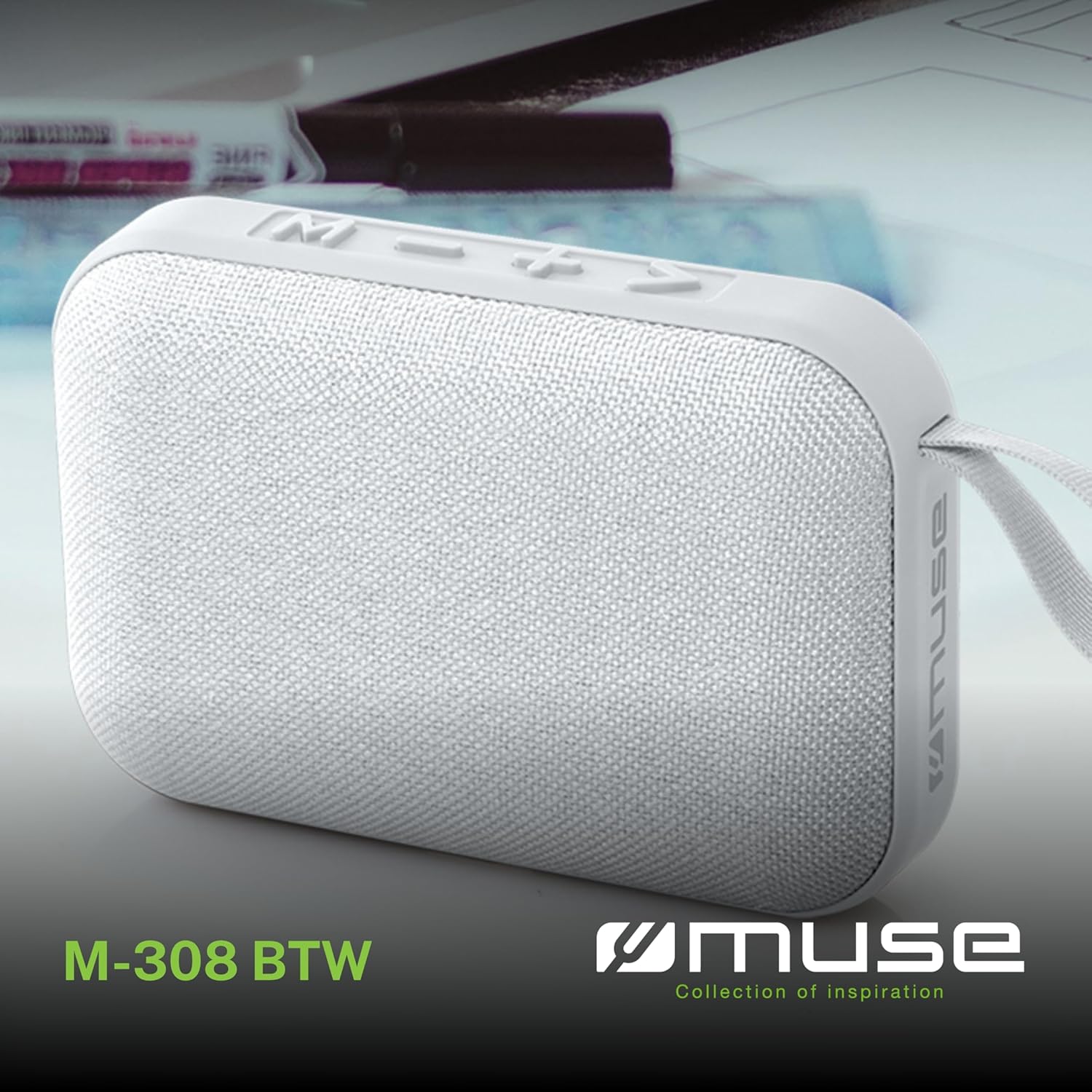
ภาพที่ 1.1: ด้านหน้า view of the Muse M-308 BT Bluetooth Speaker.
2. คุณสมบัติของผลิตภัณฑ์
- การเชื่อมต่อบลูทูธ: สตรีมเสียงแบบไร้สายจากอุปกรณ์ที่รองรับ
- ฟังก์ชั่นแฮนด์ฟรี: Integrated microphone for taking calls.
- การเล่นสื่อ: Supports music playback from USB and MicroSD (TF) cards.
- การจับคู่สเตอริโอ: Connect two M-308 BT speakers for enhanced stereo sound.
- ไฟแสดงสถานะ LED: Provides visual feedback for Bluetooth pairing and charging status.
- ขนาดกะทัดรัดและน้ำหนักเบา: Designed for portability, weighing approximately 200g.
- แบตเตอรี่แบบชาร์จไฟได้ในตัว: 1200mAh capacity for up to 10 hours of playback.
- กำลังขับ: 5 Watts for clear audio.

Image 2.1: Key features of the Muse M-308 BT speaker.

Image 2.2: Additional functionalities of the Muse M-308 BT speaker.
3. เนื้อหาบรรจุภัณฑ์
ตรวจสอบให้แน่ใจว่าสิ่งของทุกชิ้นครบถ้วนก่อนแกะกล่อง:
- Muse M-308 BT Bluetooth Speaker
- สายชาร์จ USB
- คู่มือการใช้งาน (เอกสารนี้)
4. การควบคุมและการเชื่อมต่อ
โปรดทำความคุ้นเคยกับปุ่มควบคุมและพอร์ตเชื่อมต่อของลำโพง:

Image 4.1: Top panel with various connections.
- พอร์ต USB: สำหรับเล่นเพลงจากแฟลชไดรฟ์ USB
- พอร์ตไมโครยูเอสบี: สำหรับชาร์จลำโพง
- Micro SD (TF) Card Slot: สำหรับเล่นเพลงจาก Micro SD การ์ด
- สวิตช์เปิด/ปิด: เพื่อเปิดหรือปิดลำโพง

Image 4.2: Side panel with control buttons.
- M Button (Mode): Press to switch between Bluetooth, USB, and Micro SD modes.
- - Button (Volume Down / Previous Track):
- กดสั้นๆ: ลดระดับเสียง
- Long press: Go to the previous track.
- + Button (Volume Up / Next Track):
- กดสั้นๆ: เพิ่มระดับเสียง
- Long press: Go to the next track.
- > Button (Play / Pause / Call):
- Short press: Play or pause music.
- Short press (during incoming call): Answer call.
- Long press (during incoming call): Reject call.
- Short press (during call): End call.
5. การตั้งค่า
5.1 การชาร์จลำโพง
- Connect the supplied USB charging cable to the Micro-USB port on the speaker.
- เชื่อมต่อปลายอีกด้านหนึ่งของสาย USB เข้ากับอะแดปเตอร์ไฟ USB (ไม่รวมอยู่ด้วย) หรือพอร์ต USB ของคอมพิวเตอร์
- ไฟ LED จะสว่างขึ้นเพื่อแสดงสถานะการชาร์จ และจะดับลงหรือเปลี่ยนสีเมื่อชาร์จเต็มแล้ว
5.2 การเปิด/ปิดเครื่อง
- To power on, slide the ON/OFF switch to the 'ON' position. You will hear an audible prompt.
- หากต้องการปิดเครื่อง ให้เลื่อนสวิตช์เปิด/ปิดไปที่ตำแหน่ง 'ปิด'
5.3 การจับคู่บลูทูธ
- Ensure the speaker is powered on and in Bluetooth mode (indicated by a flashing LED). If not, press the 'M' button to switch to Bluetooth mode.
- เปิดใช้งานบลูทูธบนสมาร์ทโฟน แท็บเล็ต หรืออุปกรณ์อื่นที่เข้ากันได้ของคุณ
- ค้นหา available Bluetooth devices and select "M-308 BT" from the list.
- เมื่อจับคู่สำเร็จแล้ว ไฟ LED จะหยุดกะพริบและติดสว่างคงที่ และคุณจะได้ยินเสียงยืนยัน
- ลำโพงจะเชื่อมต่อกับอุปกรณ์ที่จับคู่ล่าสุดโดยอัตโนมัติเมื่อเปิดเครื่อง หากอยู่ในระยะการทำงาน
5.4 การจับคู่สเตอริโอ (ฟังก์ชัน TWS)
To pair two M-308 BT speakers for true wireless stereo sound:
- Ensure both speakers are powered on and in Bluetooth pairing mode (LED flashing).
- On one of the speakers (this will be the primary speaker), double-press the 'M' button. The speaker will search for another M-308 BT speaker.
- Once connected, both speakers will emit a confirmation tone, and the LED on the primary speaker will flash slowly, while the LED on the secondary speaker will remain solid.
- ทีนี้ ให้เชื่อมต่ออุปกรณ์ของคุณกับลำโพงหลักผ่านบลูทูธ ตามที่อธิบายไว้ในหัวข้อ 5.3
6. คู่มือการใช้งาน
6.1 การเล่นเพลง
- โหมดบลูทู ธ : After successful pairing, start playing music on your connected device. The audio will stream through the speaker.
- โหมด USB/Micro SD: Insert a USB flash drive or Micro SD card into the respective port. The speaker will automatically switch to the corresponding mode and begin playing music. If it doesn't, press the 'M' button to cycle through modes.
6.2 การควบคุมระดับเสียง
- กดปุ่ม '+' เพื่อเพิ่มระดับเสียง
- กดปุ่ม '-' เพื่อลดระดับเสียง
6.3 ระบบนำทางตามเส้นทาง
- กดปุ่ม '+' ค้างไว้เพื่อข้ามไปยังแทร็กถัดไป
- Long press the '-' button to go back to the previous track.
6.4 การโทรแบบแฮนด์ฟรี
- When a call comes in, the music will pause. Press the '>' button to answer the call.
- To end a call, press the '>' button again.
- To reject an incoming call, long press the '>' button.
7. การบำรุงรักษา
- ควรเก็บลำโพงให้ห่างจากอุณหภูมิที่สูงจัด แสงแดดโดยตรง และความชื้น
- Do not expose the speaker to water or other liquids. This model is not water-resistant.
- ทำความสะอาดลำโพงด้วยผ้านุ่มและแห้ง ห้ามใช้น้ำยาทำความสะอาดหรือสารละลายที่มีฤทธิ์กัดกร่อน
- ห้ามถอดประกอบหรือซ่อมลำโพงด้วยตนเอง การกระทำดังกล่าวจะทำให้การรับประกันเป็นโมฆะ
- เมื่อไม่ได้ใช้งานเป็นเวลานาน ควรชาร์จแบตเตอรี่อย่างน้อยทุกสามเดือน เพื่อรักษาสภาพแบตเตอรี่ให้ใช้งานได้ดี
8 การแก้ไขปัญหา
| ปัญหา | สาเหตุที่เป็นไปได้ | สารละลาย |
|---|---|---|
| ลำโพงไม่เปิดเครื่อง | แบตเตอรี่หมด | ชาร์จลำโพงโดยใช้สาย USB ที่ให้มา |
| ไม่สามารถจับคู่ผ่านบลูทูธได้ | Bluetooth is not enabled on your device or speaker is not in pairing mode. Speaker is too far from the device. | Ensure Bluetooth is active on both devices. Make sure the speaker is in Bluetooth pairing mode (flashing LED). Move the speaker closer to your device (within 10 meters). |
| ไม่มีเสียง. | Volume is too low. Speaker is not connected. Incorrect mode selected. | Increase the volume on both the speaker and your connected device. Re-pair the Bluetooth connection. Press the 'M' button to cycle through modes (Bluetooth, USB, Micro SD). |
| Music playback from Micro SD card is erratic or "screaming". | ทุจริต files on Micro SD card. Incompatible file รูปแบบ | รับรองเสียง files are in a compatible format (e.g., MP3). Try using a different Micro SD card or reformatting the current one and reloading files. |
| Speaker switches between modes (e.g., SD and BT) unexpectedly. | Interference or a temporary software glitch. | Power off the speaker, wait a few seconds, then power it back on. Ensure no other devices are causing interference. If the issue persists, try removing the Micro SD card if it's inserted. |
9. ข้อมูลจำเพาะ
| ชื่อรุ่น | เอ็ม-308 บีที |
| ยี่ห้อ | มิวส์ |
| เทคโนโลยีการเชื่อมต่อ | บลูทูธ,แบบมีสาย |
| เทคโนโลยีการสื่อสารไร้สาย | บลูทูธ |
| กำลังขับสูงสุดของลำโพง | 5 วัตต์ |
| โหมดเอาต์พุตเสียง | สเตอริโอ |
| ประเภทลำโพง | ลำโพงบลูทูธแบบพกพา |
| คุณสมบัติพิเศษ | บลูทูธ |
| อุปกรณ์ที่รองรับ | สมาร์ทโฟน, แท็บเล็ต |
| แหล่งพลังงาน | แบตเตอรี่ |
| อายุการใช้งานแบตเตอรี่ | 10 ชั่วโมง |
| ความจุของแบตเตอรี่ | 1200 มิลลิวินาทีampก่อนชั่วโมง |
| ขนาดสินค้า (ลึก x กว้าง x สูง) | 118D x 30B x 76H millimeters (11.8 x 3 x 7.6 cm) |
| น้ำหนักสินค้า | 200 กรัม |
| วัสดุ | Plastic rubber material |
| Is Water Resistant | เลขที่ |
| ส่วนประกอบที่รวมอยู่ | สายชาร์จ USB |
Image 9.1: Dimensions of the Muse M-308 BT speaker.
10. การรับประกันและการสนับสนุน
The Muse M-308 BT Bluetooth Speaker comes with a รับประกัน 2 ปี ตั้งแต่วันที่ซื้อสินค้า
For technical support, warranty claims, or further assistance, please contact your retailer or visit the official MUSE webเว็บไซต์สำหรับข้อมูลการติดต่อ