
การแนะนำ
This manual provides detailed instructions for the Glocusent Upgraded LED Neck Reading Light, designed for comfortable, hands-free illumination during reading, knitting, repairing, and other activities. Its ergonomic design and adjustable light settings make it a versatile tool for various tasks.
มีอะไรอยู่ในกล่อง
- 1 x Glocusent Neck Reading Light
- 1 x คู่มือผู้ใช้
- สายชาร์จ 1 เส้น (USB-A ถึง USB-C)
- 1 x ที่คั่นหน้า

Image: The Glocusent Neck Reading Light, USB-C charging cable, and a bookmark.
คุณสมบัติหลัก
- ดีไซน์ตามหลักสรีรศาสตร์และน้ำหนักเบา: Narrowed neck area (1.2cm thickness) and only 4.52 oz for comfortable wear.
- 3 อุณหภูมิสี: Amber light (1800K) for blue light blocking, Warm White (3200K), and Cool White (6000K).
- 3 ระดับความสว่าง: Dimmable settings for various purposes.
- Private Reading Zone: 90° narrow beam angle to focus light without disturbing others.
- แบตเตอรี่แบบชาร์จไฟได้ 1000mAh: Provides up to 80 hours of illumination at the dimmest level.
- ตั้งเวลาปิดอัตโนมัติ 30 นาที: Convenient function for leisure reading.
- แขนยืดหยุ่น: Allows for precise light positioning.
การตั้งค่า
ค่าธรรมเนียมเริ่มต้น
Before first use, fully charge your Glocusent Neck Reading Light.
- Connect the provided USB-C charging cable to the charging port located on the neck light.
- Plug the USB-A end of the cable into a compatible USB power source (e.g., wall adapter, computer USB port, power bank).
- The three power indicator lights on the neck area will illuminate to show the charging status. All three lights will be solid when fully charged.
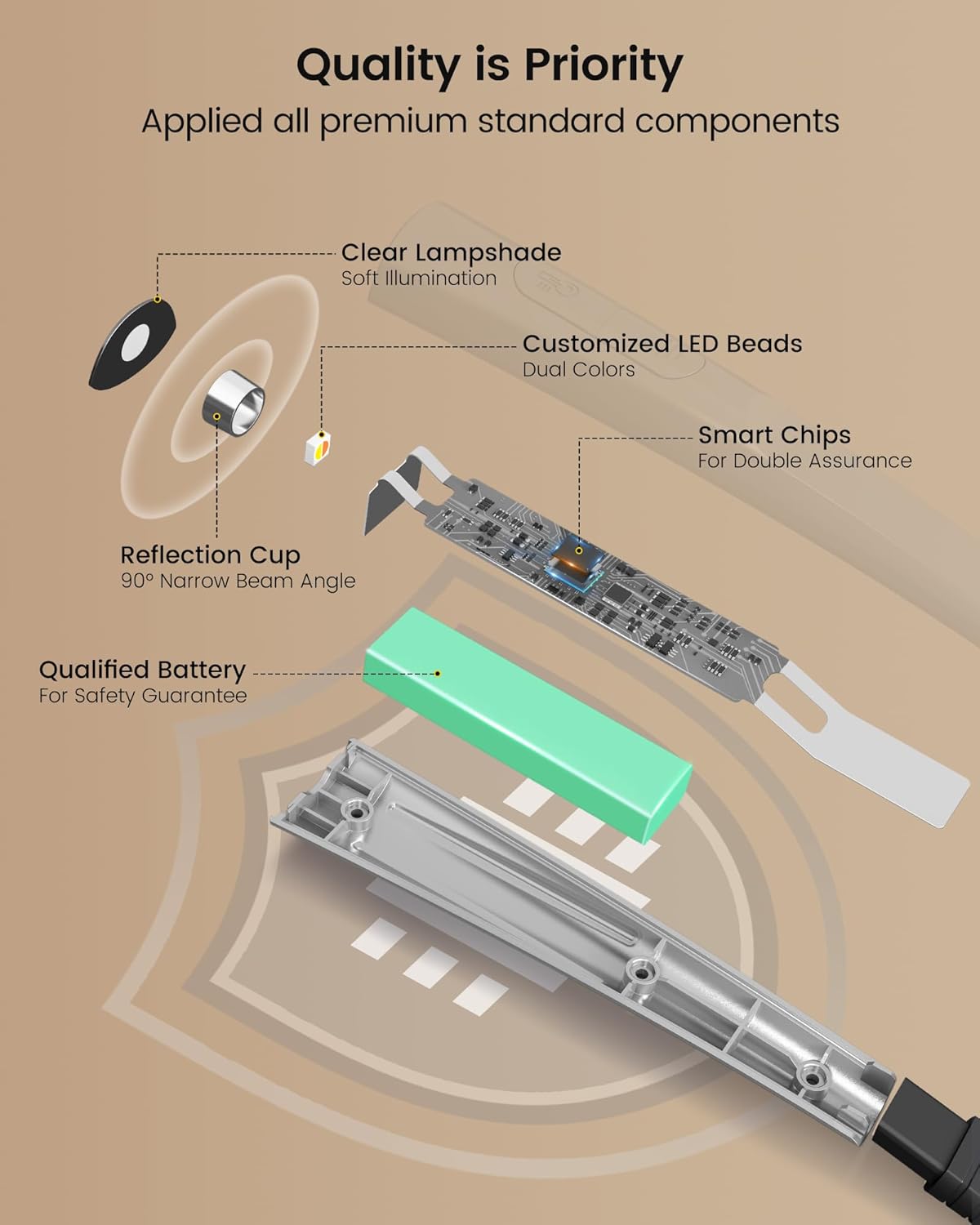
Image: The neck light being charged via USB-C, with power indicators visible.
คำแนะนำการใช้งาน
Wearing the Light
Gently place the Glocusent Neck Reading Light around your neck. Its ergonomic design ensures a comfortable and secure fit, allowing for hands-free operation.

Image: A person comfortably wearing the neck light, highlighting its lightweight and ergonomic design.
Adjusting Light Color and Brightness
The neck light features independent controls for each arm, allowing you to customize the lighting to your preference.
- เปิด/ปิดเครื่อง: Press the power button on either arm to turn the light on or off.
- การปรับความสว่าง: With the light on, repeatedly press the power button on an arm to cycle through 3 brightness levels (Low, Medium, High).
- การเปลี่ยนแปลงอุณหภูมิสี: Use the dedicated color temperature button (often located on the top of the neck band or near the power button) to switch between Amber (1800K), Warm White (3200K), and Cool White (6000K). The amber mode is specifically designed to block 99.99% of blue light for eye care.
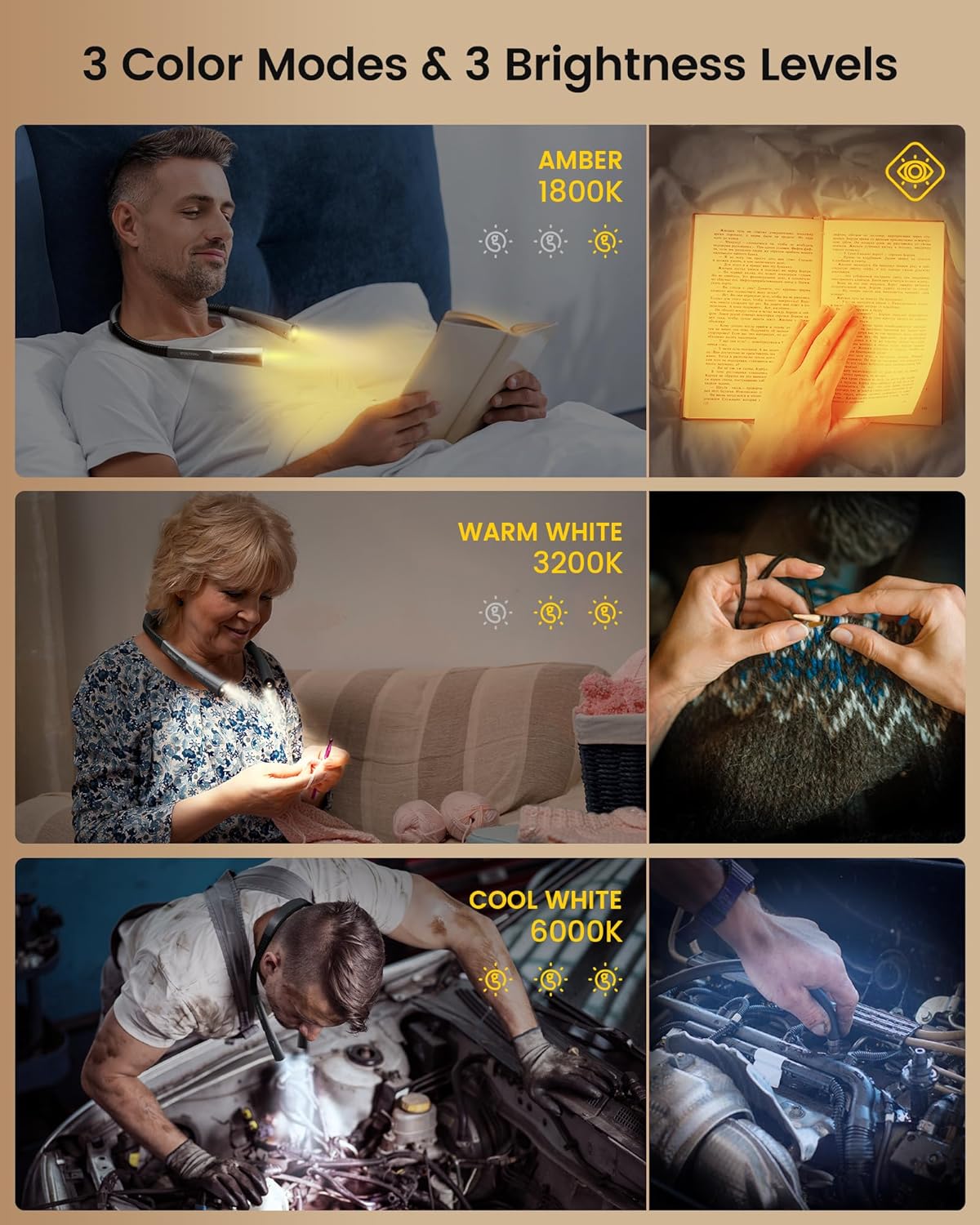
Image: Visual representation of the three distinct color temperatures and brightness settings.
Flexible Arms and Beam Angle
The flexible arms can be bent and positioned to direct the light exactly where you need it. The 90° narrow beam angle ensures that the light is concentrated on your task, creating a private illumination zone without disturbing others nearby.

Image: Comparison of the Glocusent's narrow beam angle versus a wider beam, illustrating its benefit for private use.
ตั้งเวลาปิดเครื่องอัตโนมัติ 30 นาที
To activate the 30-minute auto-off timer, locate the timer button (refer to the product diagram or physical device for exact location). Pressing this button will initiate a 30-minute countdown, after which the light will automatically turn off. This feature is particularly useful if you tend to fall asleep while reading.

Image: A visual detail of the timer function on the neck light.
การซ่อมบำรุง
- การทำความสะอาด: To clean the device, gently wipe it with a soft, dry cloth. Do not use liquid cleaners, aerosols, or abrasive materials, as these may damage the surface or internal components.
- พื้นที่จัดเก็บ: When not in use for extended periods, store the neck light in a cool, dry place away from direct sunlight and extreme temperatures.
- ความต้านทานน้ำ: This product is NOT waterproof. Avoid exposing it to water, rain, or high humidity to prevent damage.
การแก้ไขปัญหา
| ปัญหา | สาเหตุที่เป็นไปได้ | สารละลาย |
|---|---|---|
| ไฟไม่ติด | แบตเตอรี่เหลือน้อยหรือหมด | ชาร์จอุปกรณ์ให้เต็มโดยใช้สาย USB-C ที่ให้มา |
| แสงกะพริบหรือหรี่ลงโดยไม่คาดคิด | แบตเตอรี่ต่ำหรือการเชื่อมต่อไม่เสถียร | Recharge the device. Ensure the charging cable is securely connected if charging. |
| Cannot change color temperature or brightness | Incorrect button usage or temporary software glitch | Refer to 'Operating Instructions' for correct button functions. Try turning the device off and on again. |
| Device feels warm during use/charging | การทำงานปกติ | A slight warmth is normal. If it becomes excessively hot, discontinue use and contact customer support. |
ข้อมูลจำเพาะ
| คุณสมบัติ | รายละเอียด |
|---|---|
| หมายเลขรุ่น | GLCSNTBL007 |
| น้ำหนักสินค้า | 4.4 ออนซ์ (126 กรัม) |
| ขนาดสินค้า | ลึก 5.7 นิ้ว x กว้าง 4.05 นิ้ว x สูง 1.05 นิ้ว |
| ความจุของแบตเตอรี่ | 1000mAh ลิเธียมโพลิเมอร์ |
| ประเภทแหล่งกำเนิดแสง | นำ |
| อุณหภูมิสี | 1800K (Amber), 3200K (Warm White), 6000K (Cool White) |
| ความสว่าง | 102 Lumen (max) |
| แหล่งพลังงาน | ใช้พลังงานจากแบตเตอรี่ |
| อินเตอร์เฟซการชาร์จ | ยูเอสบี-ซี |
| วัสดุ | อะคริโลไนไตรล์ บิวทาไดอีน สไตรีน (ABS) |
| คุณสมบัติพิเศษ | Cordless, 30-min Timer, Adjustable Brightness, Flexible Arms |
การรับประกันและการสนับสนุน
Glocusent stands behind the quality of its products. This Glocusent Upgraded LED Neck Reading Light comes with a รับประกัน 24 เดือน ตั้งแต่วันที่ซื้อ ครอบคลุมถึงข้อบกพร่องในการผลิต
For any questions, technical support, or warranty claims, please contact the Glocusent Customer Experience Team. They are available 24/7 to assist you.
ข้อมูลติดต่อ: Please refer to the contact details provided in your product packaging or visit the official Glocusent webเว็บไซต์สำหรับข้อมูลสนับสนุนล่าสุด
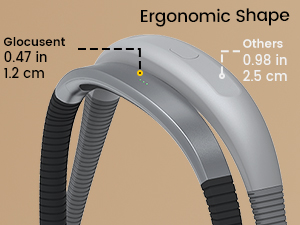
Image: Glocusent customer service is available to assist you.
วิดีโอผลิตภัณฑ์อย่างเป็นทางการ
ขณะนี้ยังไม่มีวิดีโอแนะนำผลิตภัณฑ์อย่างเป็นทางการจากผู้ขายให้นำมาฝังในคู่มือนี้