
1. บทนำ
The DURGOD Taurus K320 is a Tenkeyless (TKL) 80% mechanical keyboard designed for both gaming and typing. It features an 87-key layout, USB-C wired connectivity, and durable doubleshot PBT keycaps. This manual provides instructions for setting up, operating, and maintaining your keyboard.
2. เนื้อหาบรรจุภัณฑ์
โปรดตรวจสอบว่าสินค้าทั้งหมดมีอยู่ในแพ็คเกจของคุณ:
- DURGOD K320 Mechanical Keyboard
- Instruction Manual (English / Chinese)
- ผ้าคลุมป้องกันฝุ่น
- Type-C to Type-C USB Cable (3.3 ft / 1m)
- Type-C to Type-A USB Cable (5.9 ft / 1.8m)
- สติกเกอร์โลโก้
- ตัวดึงกุญแจ
3. คุณสมบัติของผลิตภัณฑ์
- Cherry MX Speed Silver Switches: Provides precise mechanical performance with a 50 million click life, suitable for fast typing and gaming.
- ดีไซน์แบบไม่มีแป้นตัวเลข (TKL): Compact 80% layout saves desk space and offers flexibility for mouse positioning.
- โครงสร้างทนทาน: Sturdy case with adjustable feet for three typing angles, optimizing comfort and visibility.
- คีย์แคป PBT แบบ Doubleshot: Enhanced durability and resistance to wear.
- การพลิก N-Key เต็มรูปแบบและการป้องกันภาพซ้อน: รับประกันว่าทุกการกดแป้นพิมพ์จะถูกบันทึกอย่างแม่นยำ แม้ในขณะป้อนข้อมูลอย่างรวดเร็ว
- ปุ่มที่ตั้งโปรแกรมได้: Supports macro creation and key remapping via DURGOD Zeus Engine software.
- Detachable USB-C Cables: Includes both Type-C to Type-C and Type-C to Type-A cables for versatile connectivity.
- การจัดการสายเคเบิล: Features 3-way cable routing options (left, center, right) on the underside of the keyboard.
- ความเข้ากันได้: Works with Windows 10, 8, 7, Vista, XP, and Mac OS (some key remapping may be required for Mac via software).
4. การตั้งค่า
Follow these steps to connect your DURGOD K320 keyboard:
- Select the appropriate USB cable (Type-C to Type-C or Type-C to Type-A) for your computer.
- Connect the Type-C end of the cable to the USB-C port on the back of the keyboard.
- Route the cable through one of the three channels on the underside of the keyboard for organized cable management.
- Connect the other end of the cable (Type-C or Type-A) to an available USB port on your computer.
- แป้นพิมพ์นี้เป็นแบบเสียบแล้วใช้งานได้ทันที และระบบปฏิบัติการของคุณจะรู้จักแป้นพิมพ์นี้โดยอัตโนมัติ
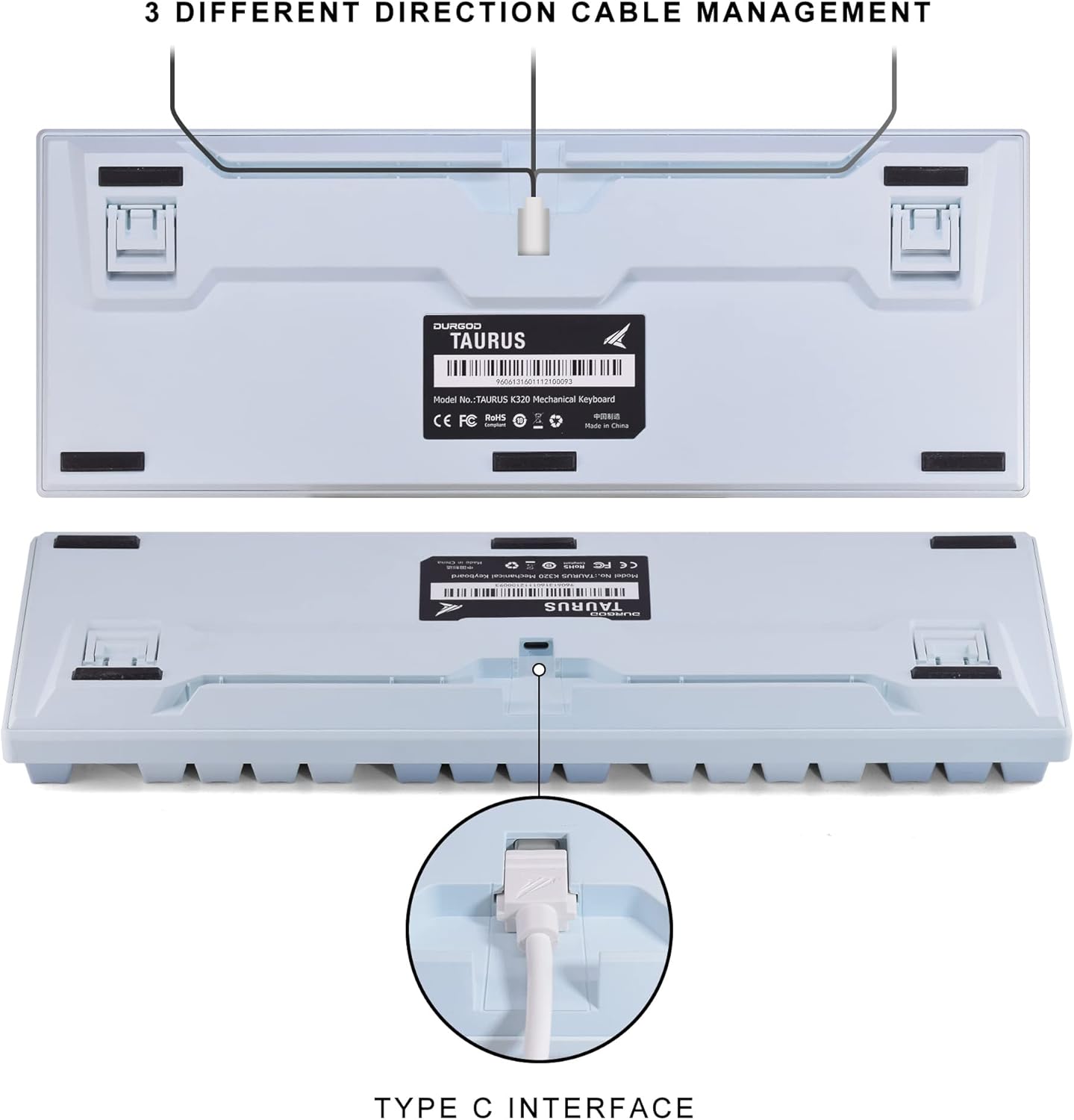
Image: The underside of the DURGOD K320 keyboard, illustrating the USB-C port and the three channels for cable management (left, center, right).
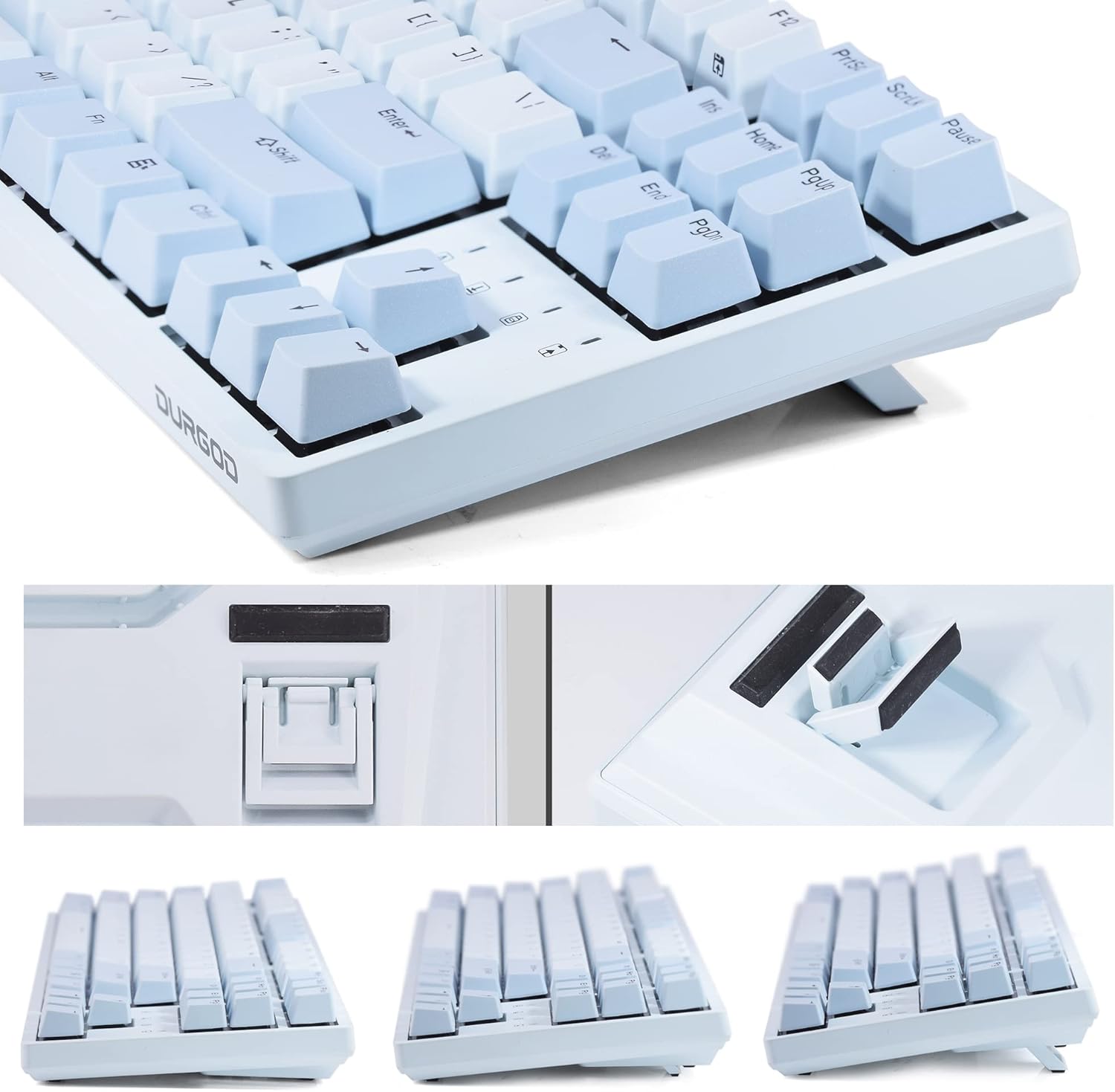
ภาพ: ระยะใกล้ view of the DURGOD K320 keyboard's adjustable feet, demonstrating the three possible typing angles for ergonomic comfort.
5. คู่มือการใช้งาน
5.1. การรวมคีย์ฟังก์ชัน
The DURGOD K320 features various multimedia and system control functions accessible via the FN key in combination with the F-keys. All keys except the FN key are programmable.
| การผสมผสาน | การทำงาน |
|---|---|
| เอฟเอ็น + เอฟ1 | เล่น/หยุดชั่วคราว |
| เอฟเอ็น + เอฟ2 | หยุด |
| เอฟเอ็น + เอฟ3 | เพลงก่อนหน้า |
| เอฟเอ็น + เอฟ4 | เพลงถัดไป |
| เอฟเอ็น + เอฟ5 | ปิดเสียง |
| เอฟเอ็น + เอฟ6 | ลดระดับเสียง |
| เอฟเอ็น + เอฟ7 | เพิ่มระดับเสียง |
| เอฟเอ็น + เอฟ12 | Switch Customize Profile (MR Mode: Profiles can be customized via Durgod Zeus Engine software and swapped on the keyboard.) |
| FN + ชนะซ้าย | ล็อคคีย์ Windows |

Image: The ANSI/QWERTY US International layout of the DURGOD K320 keyboard, with an overlay indicating the various FN key combinations and their corresponding functions.
5.2. DURGOD Zeus Engine Software
The DURGOD Zeus Engine software allows for advanced customization of your keyboard. With this software, you can:
- อัปเกรดเฟิร์มแวร์คีย์บอร์ด
- ตั้งค่ามาโครที่ซับซ้อน
- ตั้งค่าปุ่มใหม่
- Create and manage independent profiles.
- Program Windows key lock functions.
Please visit the official DURGOD website to download the latest version of the Zeus Engine software.
6. การบำรุงรักษา
To ensure the longevity and optimal performance of your DURGOD K320 keyboard, follow these maintenance guidelines:
- การทำความสะอาด: Use the included dust cover when the keyboard is not in use. For cleaning, disconnect the keyboard from your computer. Use a soft, dry cloth to wipe the surface. For deeper cleaning, use a keycap puller to remove keycaps and clean underneath with compressed air or a small brush.
- หลีกเลี่ยงของเหลว: อย่าให้แป้นพิมพ์สัมผัสกับของเหลว หากเกิดการหกใส่โดยไม่ตั้งใจ ให้ถอดปลั๊กแป้นพิมพ์ทันทีและปล่อยให้แห้งสนิทก่อนเสียบปลั๊กใหม่
- พื้นที่จัดเก็บ: เก็บแป้นพิมพ์ไว้ในที่แห้งและเย็น หลีกเลี่ยงแสงแดดโดยตรงและอุณหภูมิที่สูงหรือต่ำเกินไป
- การดูแลสายเคเบิล: Avoid bending or twisting the USB cables excessively to prevent damage.
7 การแก้ไขปัญหา
If you encounter issues with your DURGOD K320 keyboard, refer to the following common problems and solutions:
- แป้นพิมพ์ไม่ตอบสนอง:
- ตรวจสอบให้แน่ใจว่าสาย USB เชื่อมต่อกับคีย์บอร์ดและคอมพิวเตอร์อย่างแน่นหนา
- ลองเชื่อมต่อคีย์บอร์ดกับพอร์ต USB อื่นบนคอมพิวเตอร์ของคุณ
- Test with the alternative USB cable provided.
- รีสตาร์ทเครื่องคอมพิวเตอร์ของคุณ
- คีย์ไม่ลงทะเบียน / คีย์ค้าง:
- The keyboard features N-key rollover and anti-ghosting. If issues persist, ensure no debris is under the keycaps.
- Update keyboard firmware using the DURGOD Zeus Engine software.
- FN Key Functions Not Working:
- Ensure you are pressing the FN key simultaneously with the desired F-key.
- Check if any software conflicts are present.
- ปุ่ม Windows ถูกล็อก:
- กด FN + ชนะซ้าย to toggle the Windows key lock on or off.
- ปัญหาซอฟต์แวร์ (DURGOD Zeus Engine):
- โปรดตรวจสอบให้แน่ใจว่าคุณได้ติดตั้งซอฟต์แวร์เวอร์ชันล่าสุดจากเว็บไซต์ทางการของ DURGOD แล้ว webเว็บไซต์.
- เรียกใช้ซอฟต์แวร์ในฐานะผู้ดูแลระบบ
8. ข้อมูลจำเพาะ
| คุณสมบัติ | รายละเอียด |
|---|---|
| หมายเลขรุ่น | เค320 |
| เค้าโครง | 87 Keys, Tenkeyless (TKL), ANSI - US International |
| สวิตซ์ | Cherry MX Speed Silver |
| ปุ่มกด | ดับเบิลช็อต PBT |
| การเชื่อมต่อ | Wired, USB-C Interface |
| ป้องกันการโดนผีหลอก | โรลโอเวอร์ N-Key แบบเต็ม |
| ขนาด | 14.76 x 5.2 x 0.94 นิ้ว (37.5 x 13.2 x 2.4 ซม.) |
| น้ำหนัก | 3.03 ปอนด์ (1.37 กก.) |
| ระบบปฏิบัติการที่รองรับ | Windows 10/8/7/Vista/XP, Mac OS |
| ผู้ผลิต | เดอร์โกด |

ภาพ: ภาพระยะใกล้ view of the Cherry MX Speed Silver switches on the DURGOD K320 keyboard, with some keycaps removed to show the switch mechanism.

Image: The DURGOD K320 keyboard in use, demonstrating its versatility for both professional work environments and gaming setups.
9. การรับประกันและการสนับสนุน
DURGOD products are manufactured to high-quality standards. For warranty information, technical support, or service inquiries, please refer to the warranty card included in your package or visit the official DURGOD webไซต์นี้ โปรดเก็บใบเสร็จรับเงินที่ซื้อไว้เพื่อใช้เรียกร้องการรับประกัน