
1. บทนำ
ขอบคุณสำหรับการซื้อasing the zelotes T80 Wired Gaming Mouse. This manual provides essential information for setting up, operating, and maintaining your new gaming mouse. Please read it thoroughly to ensure optimal performance and longevity of your device.
2. การตั้งค่า
2.1 อะไรอยู่ในกล่อง
- 1 x T80 Gaming Mouse
- 1 x คู่มือการใช้งาน
2.2 การเชื่อมต่อเมาส์ของคุณ
- Unpack the zelotes T80 Gaming Mouse and the instruction manual from the box.
- ค้นหาพอร์ต USB ที่ว่างอยู่บนคอมพิวเตอร์ของคุณ (แล็ปท็อป, พีซี, แมค)
- เสียบขั้วต่อ USB ของเมาส์เข้ากับพอร์ต USB
- The mouse is plug-and-play and should be automatically recognized by your operating system (Windows 11/10/8/7, Mac OS). No additional drivers are typically required for basic functionality.
For advanced customization of buttons and lighting, please refer to the manufacturer's website for any available software downloads.
3. คู่มือการใช้งาน
3.1 ฟังก์ชันปุ่ม
The zelotes T80 Gaming Mouse features 7 programmable buttons designed for enhanced gaming and productivity.
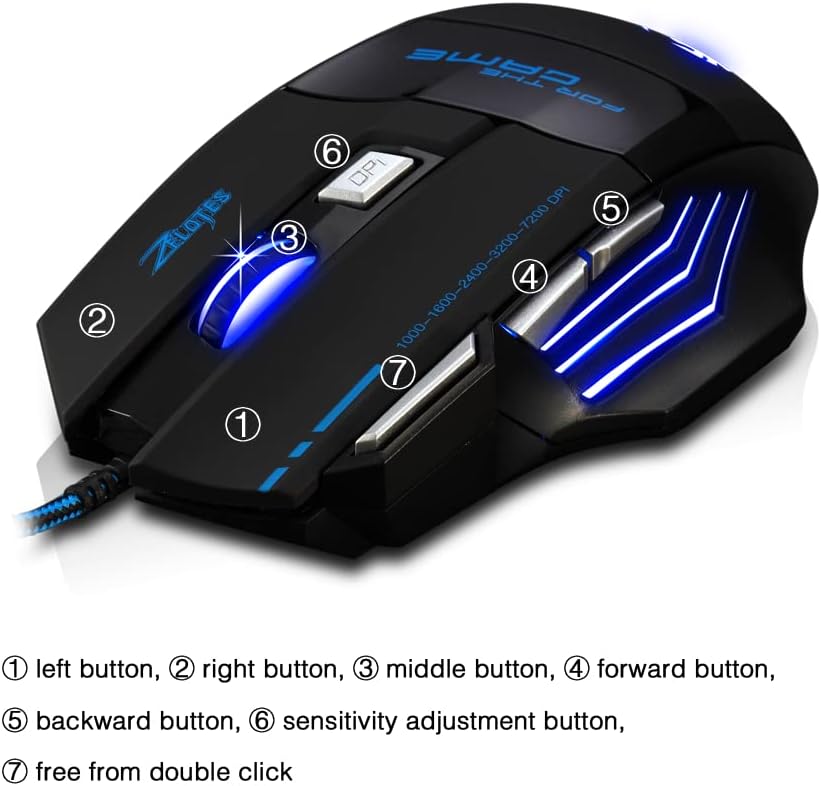
- ปุ่มซ้าย (1): ฟังก์ชั่นคลิกซ้ายมาตรฐาน
- ปุ่มขวา (2): ฟังก์ชั่นคลิกขวามาตรฐาน
- Middle Button / Scroll Wheel (3): Scrolls up/down and acts as a middle-click button.
- ปุ่มเดินหน้า (4): นำทางไปข้างหน้าใน web เบราว์เซอร์หรือ file นักสำรวจ
- ปุ่มย้อนกลับ (5): นำทางย้อนกลับใน web เบราว์เซอร์หรือ file นักสำรวจ
- Sensitivity Adjustment (DPI) Button (6): หมุนเวียนผ่านการตั้งค่า DPI
- Quick Fire Button (7): Equipped for rapid firing, allowing continuous shooting with a single press (functions as a double-click by default).
3.2 การปรับ DPI
The mouse offers 5 adjustable DPI settings to match your preference for gaming or office work. Use the Sensitivity Adjustment (DPI) Button (6) to cycle through the following settings:
- 1000 จุดต่อนิ้ว
- 1600 จุดต่อนิ้ว
- 2400 จุดต่อนิ้ว
- 3200 จุดต่อนิ้ว
- 7200 จุดต่อนิ้ว
3.3 LED Backlight Illumination
The zelotes T80 features multi-mode LED backlighting that enhances your visual experience and gaming atmosphere. The LED lights cycle through various colors, providing dynamic illumination.

3.4 การออกแบบตามหลักสรีรศาสตร์
The mouse is designed with an ergonomic shape and skin-friendly material for a comfortable grip and soft touch. Its sweat-resistant and anti-slip features ensure comfort during prolonged use, reducing arm fatigue.

4. การบำรุงรักษา
- รักษาเมาส์ให้สะอาดด้วยการเช็ดด้วยผ้าแห้งเนื้อนุ่ม
- ควรหลีกเลี่ยงการนำเมาส์ไปวางไว้ในที่ที่มีอุณหภูมิสูงหรือต่ำเกินไป แสงแดดโดยตรง หรือของเหลว
- ห้ามพยายามถอดชิ้นส่วนเมาส์ เนื่องจากอาจทำให้การรับประกันเป็นโมฆะ
5 การแก้ไขปัญหา
- เมาส์ไม่ตอบสนอง: Ensure the USB cable is securely plugged into the computer. Try a different USB port or restart your computer.
- การเคลื่อนไหวของเคอร์เซอร์ไม่แน่นอน: ทำความสะอาดเซ็นเซอร์รับภาพที่ด้านล่างของเมาส์ ตรวจสอบให้แน่ใจว่าคุณใช้เมาส์บนพื้นผิวที่เหมาะสม (เช่น แผ่นรองเมาส์)
- ไฟ LED ไม่ทำงาน: Check if the mouse is properly connected. Some operating systems or software might interfere with lighting controls.
6. ข้อมูลจำเพาะ
| คุณสมบัติ | คำอธิบาย |
|---|---|
| ขนาดสินค้า | 5.12 x 4.09 x 1.77 นิ้ว |
| น้ำหนักสินค้า | 5.5 ออนซ์ |
| หมายเลขรุ่น | T80 |
| ยี่ห้อ | เซโลเตส |
| สี | สีดำ |
| เทคโนโลยีการเชื่อมต่อ | USB (แบบมีสาย) |
| เทคโนโลยีตรวจจับการเคลื่อนไหว | ออฟติคอล |
| การตั้งค่า DPI | 1000/1600/2400/3200/7200 DPI (5 adjustable levels) |
| ปุ่ม | 7 (Programmable, including Quick Fire Button) |
| คุณสมบัติพิเศษ | Ergonomic Design, LED Illumination, Sweat-resistant, Anti-slip |
| ความเข้ากันได้ | ระบบปฏิบัติการ Windows 11/10/8/7 และ Mac OS |
7. วิดีโอผลิตภัณฑ์
7.1 T80 7200DPI Gaming Mouse Overview
วิดีโอนี้จะให้ข้อมูลสรุปสั้นๆview of the zelotes T80 Gaming Mouse, highlighting its 7200 DPI capability and overall design. It demonstrates the mouse's appearance and some features in action.
8. การรับประกันและการสนับสนุน
For warranty information or technical support, please refer to the contact details provided on the product packaging or visit the official zelotes webไซต์ โปรดเก็บใบเสร็จรับเงินของคุณไว้เป็นหลักฐานการซื้อสำหรับการเรียกร้องการรับประกันใดๆ