
1. สินค้าหมดview
The Yamaha MG12X CV is a 12-input unpowered mixing console designed for professional audio applications. It features a rugged steel chassis, D-PRE discrete Class-A microphone preamplifiers, and built-in SPX digital effects with 24 programs. This mixer provides versatile channel options and pristine audio quality for various sound reinforcement and recording needs.
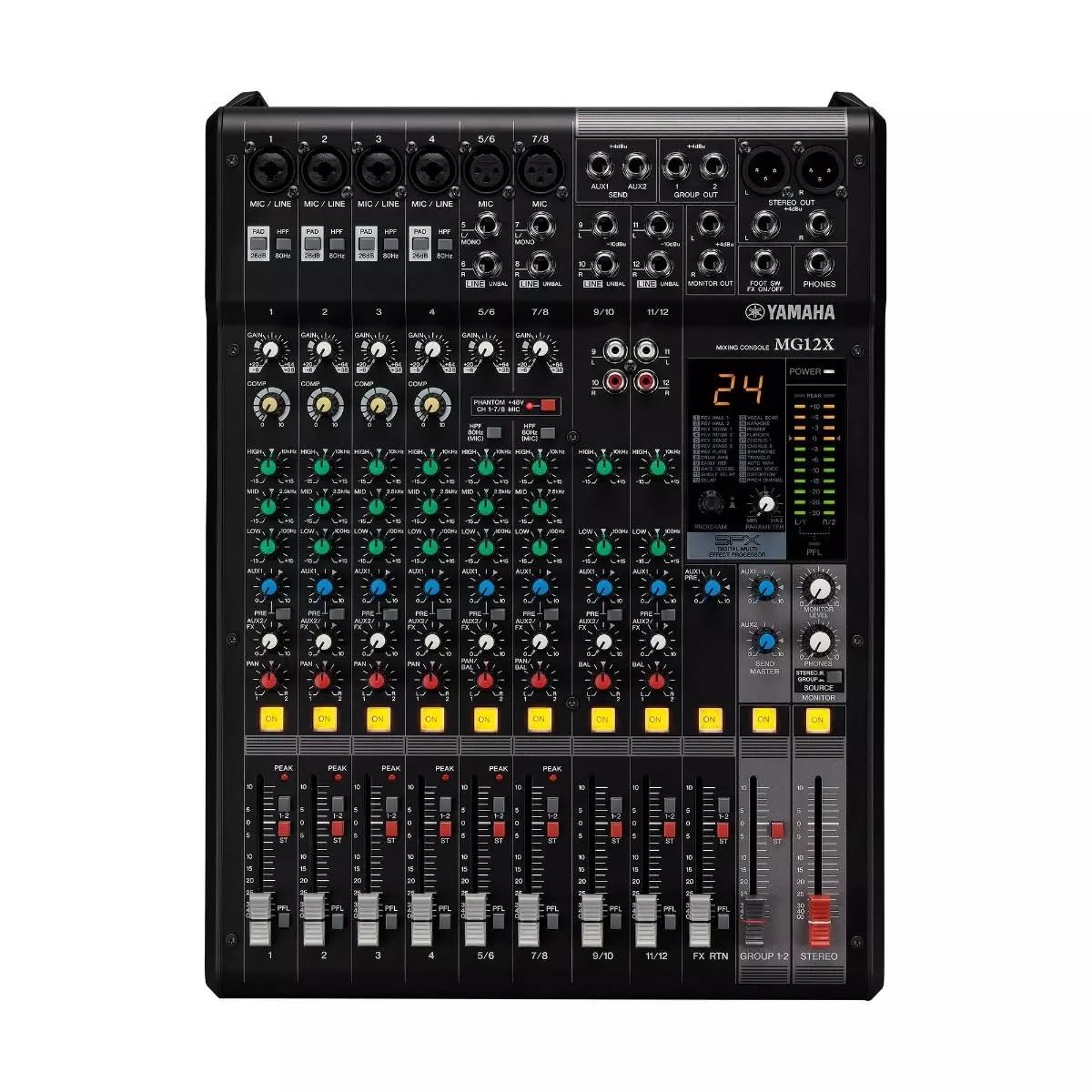
รูปที่ 1: จากบนลงล่าง view of the Yamaha MG12X CV 12-Input Mixer, showing all controls and input/output jacks.
คุณสมบัติหลัก:
- 12-Input, 2-Bus Plus Stereo Mixer with Effects
- Rugged, powder-coated steel chassis for superior durability
- ปรีแอมป์ไมโครโฟนคลาสเอแบบแยกส่วนamps
- เอฟเฟ็กต์ดิจิทัล SPX ในตัว พร้อมโปรแกรม 24 แบบ
- สวิตช์เปิด/ปิดไฟ Phantom +48V
2. คู่มือการติดตั้ง
Follow these steps to set up your Yamaha MG12X CV mixer:
- การแกะกล่อง: Carefully remove the mixer from its packaging. Retain all packaging materials for future transport or storage.
- การจัดวาง: Place the mixer on a stable, flat surface. Ensure adequate ventilation around the unit. The MG12X CV can also be rack-mounted using the optional RK-MG12 Rack Mount Kit.
- การเชื่อมต่อไฟฟ้า: Connect the supplied AC power cord to the mixer's AC IN jack on the rear panel and then to a suitable power outlet. Do not power on the unit yet.
- การเชื่อมต่ออินพุต: Connect your microphones, instruments, and other audio sources to the appropriate input jacks (XLR, 1/4" Phone, RCA) on the mixer.
- การเชื่อมต่อขาออก: เชื่อมต่อลำโพงแบบมีกำลังขับของคุณ amplifiers, or recording devices to the mixer's XLR or Phone output jacks.
- หูฟัง: เชื่อมต่อหูฟังเข้ากับแจ็ค PHONES เพื่อการตรวจสอบ
- เปิดเครื่องครั้งแรก: Ensure all volume controls (GAIN, LEVEL, MASTER) are set to their minimum positions before powering on the mixer. Power on the mixer, then power on any connected amplifiers หรือลำโพงขับเคลื่อน

Figure 2: Rear panel of the Yamaha MG12X CV Mixer, highlighting the power input and output connections.
3. คู่มือการใช้งาน
This section provides basic operating guidelines for your MG12X CV mixer.
3.1. Gain Stagกำลังทำ
- ปรับแต่ง ได้รับ knob for each input channel to achieve an optimal input level. The PEAK LED should flash only occasionally.
- สำหรับไมโครโฟนคอนเดนเซอร์ ให้เปิดใช้งาน +48V แฟนทอม power switch if required.
3.2. การปรับสมดุลเสียง (EQ)
- ใช้ สูง, กลาง, และ ต่ำ EQ knobs on each channel to shape the tone of your audio source.
3.3. Effects (SPX)
- The MG12X CV features 24 built-in SPX digital effects. Use the โปรแกรม knob to select an effect.
- ปรับแต่ง FX ส่ง knob on each channel to send a desired amount of signal to the effects processor.
- The overall effect level is controlled by the ผลตอบแทน FX level fader.
- A footswitch can be connected to the ฟุต SW input for hands-free effect muting.
3.4. การบีบอัด
- Four channels are equipped with a single-knob compressor. Turn the คอมพ์ knob clockwise to increase the compression amount.
3.5. Output Levels
- Adjust individual channel levels using the channel faders.
- Control the overall output level with the ผู้เชี่ยวชาญ stereo fader.
- Monitor output levels using the LED meters.
4. คุณสมบัติและการควบคุม
The Yamaha MG12X CV mixer offers a comprehensive set of features and controls for precise audio mixing.
4.1. Input Channels
Each input channel (1-12) includes:
- XLR and 1/4" TRS inputs for microphones and line-level devices.
- GAIN control for input sensitivity adjustment.
- HIGH-PASS FILTER (HPF) switch to cut unwanted low frequencies.
- 3-band EQ (HIGH, MID, LOW) for tonal shaping.
- AUX send for external effects or monitoring.
- FX send for internal digital effects.
- PAN control for stereo positioning.
- Channel ON switch.
- PEAK LED indicator.
- Channel fader for level control.
Channels 1-4 also feature a คอมพ์ (compressor) knob.
4.2. ส่วนหลัก
The master section includes:
- MASTER stereo fader.
- PHONES level control.
- STEREO OUT (XLR/TRS) and MONITOR OUT (TRS) jacks.
- LED level meters.

รูปที่ 3: รายละเอียด view of the mixer's controls, including gain, EQ, and effects knobs.
5. การเชื่อมต่อ
The MG12X CV offers a variety of input and output connectors to integrate with your audio system.
5.1. Input Connectors
- MIC/LINE (XLR/TRS Combo Jacks): Channels 1-4 for microphones and line-level signals.
- LINE (TRS Jacks): Channels 5/6, 7/8, 9/10, 11/12 for stereo line-level signals.
- RCA Pin Jacks: Channels 9/10, 11/12 for stereo line-level signals.
5.2. ขั้วต่อเอาต์พุต
- STEREO OUT (XLR/TRS): เอาท์พุตสเตอริโอหลักสำหรับเชื่อมต่อกับแหล่งจ่ายไฟ ampเครื่องขยายสัญญาณหรืออุปกรณ์บันทึกภาพ
- MONITOR OUT (TRS): Output for connecting to monitor speakers.
- PHONES (Stereo Phone Jack): สำหรับเชื่อมต่อหูฟัง.
- AUX SEND (TRS): Output for external effects or monitor mixes.
- FX SEND (TRS): Output for sending signal to external effects processors.

รูปที่ 4: ด้านข้าง view of the mixer, illustrating its compact and durable construction.
6. การบำรุงรักษา
การบำรุงรักษาอย่างถูกวิธีจะช่วยให้เครื่องผสมอาหารของคุณมีอายุการใช้งานยาวนานและทำงานได้อย่างมีประสิทธิภาพสูงสุด
- การทำความสะอาด: ใช้ผ้าแห้งเนื้อนุ่มเช็ดทำความสะอาดภายนอกเครื่องผสมอาหาร หลีกเลี่ยงการใช้สารทำความสะอาดที่มีฤทธิ์กัดกร่อนหรือตัวทำละลาย
- การป้องกันฝุ่น: ควรคลุมมิกเซอร์ไว้เมื่อไม่ใช้งานเพื่อป้องกันฝุ่นสะสม โดยเฉพาะบริเวณเฟดเดอร์และปุ่มหมุน
- การระบายอากาศ : Ensure ventilation openings are clear and unobstructed to prevent overheating.
- การจัดการสายเคเบิล: จัดระเบียบสายเคเบิลให้เรียบร้อยเพื่อป้องกันแรงดึงที่ขั้วต่อและการหลุดโดยไม่ตั้งใจ
7 การแก้ไขปัญหา
If you encounter issues with your MG12X CV, refer to the following common troubleshooting tips:
- ไม่มีเสียง:
- ตรวจสอบการเชื่อมต่อสายไฟทั้งหมดและตรวจสอบให้แน่ใจว่าเครื่องผสมอาหารเปิดอยู่
- Verify that input sources are connected correctly and active.
- Ensure channel GAIN, LEVEL faders, and MASTER fader are not at minimum.
- ตรวจสอบลำโพง/ampการเชื่อมต่อและแหล่งจ่ายไฟของเครื่องขยายเสียง
- เสียงผิดเพี้ยน:
- Reduce input GAIN if the PEAK LED is constantly lit.
- Check for proper impedance matching between sources and inputs.
- Ensure connected devices are not overdriving the mixer's inputs or outputs.
- ไม่มีผลกระทบ:
- Verify that an effect program is selected.
- Check the FX SEND knob on the channel and the FX RETURN fader are turned up.
- Ensure no footswitch is muting the effects.
8. ข้อมูลจำเพาะ
| แบบอย่าง | MG12X CV |
| ยี่ห้อ | ยามาฮ่า |
| ช่องใส่ | 12 |
| ไมโครโฟนพรีamps | Discrete Class-A D-PRE |
| เอฟเฟกต์ในตัว | SPX Digital Effects (24 Programs) |
| การบีบอัด | 4 channels with 1-knob compressor |
| พลังผี | +48V (สลับได้) |
| ประเภทของตัวเชื่อมต่อเอาต์พุต | เอ็กซ์แอลอาร์, ทีอาร์เอส |
| แหล่งพลังงาน | สายไฟ |
| น้ำหนักสินค้า | 12.8 ปอนด์ |
| ยูพีซี | 889025142687 |
9. การรับประกันและการสนับสนุน
The Yamaha MG12X CV comes with a รับประกันจากผู้ผลิต 1 ปี. Yamaha Corporation of America is committed to the quality and craftsmanship of its products. The limited warranty applies only to products purchased from authorized Yamaha retailers within the fifty United States (including the District of Columbia) and used in this area.
For detailed warranty information and support, please refer to the official Yamaha website or contact an authorized Yamaha service center. Authorized retailers are equipped with sales and service support materials and training not readily available to non-authorized retailers.
10. วิดีโอผลิตภัณฑ์
รับชมผลิตภัณฑ์อย่างเป็นทางการได้ที่นี่view video for the Yamaha MG Series Mixing Consoles:
Video 1: Yamaha MG Mixing Console Series Overviewวิดีโอนี้ให้ข้อมูลทั่วไปเกี่ยวกับview of the MG series, including key features and applications.