
1. บทนำ
This manual provides detailed instructions for the safe and effective operation of your Andoer 4K 48MP 60FPS WiFi Camcorder. Please read this manual thoroughly before using the device and retain it for future reference. This camcorder is designed for high-quality video recording and photography, featuring 4K Ultra HD resolution, 48-megapixel photos, a 3-inch IPS touchscreen, and infrared night vision capabilities. It is equipped with WiFi connectivity for easy file transfer and remote control, and comes with essential accessories such as an external microphone and a wide-angle macro lens.

Image 1.1: Andoer 4K Camcorder with included accessories.
2. เนื้อหาบรรจุภัณฑ์
ตรวจสอบว่าสินค้าทั้งหมดที่ระบุไว้ด้านล่างนี้รวมอยู่ในบรรจุภัณฑ์ของคุณแล้ว หากมีสินค้าใดสูญหายหรือเสียหาย โปรดติดต่อผู้ค้าปลีกของคุณ

ภาพที่ 2.1: ส่วนประกอบทั้งหมดที่บรรจุอยู่ในแพ็คเกจ
- กล้องวิดีโอ
- ไมโครโฟน
- กระจกกันฝุ่นสำหรับไมค์โครโฟน
- สายสัญญาณเสียง TRS ถึง TRS ขนาด 3.5 มม
- สาย USB
- ด้ามจับ
- Camera Lens (Wide-angle macro lens)
- วงแหวนอะแดปเตอร์เลนส์
- 2 x Lithium-polymer Batteries (2000mAh)
- รีโมทคอนโทรล
- Camcorder Storage Bag
- กระเป๋าเก็บเลนส์
- Camcorder User Manual
- คู่มือการใช้ไมโครโฟน
3. สินค้าหมดview
ทำความคุ้นเคยกับส่วนต่างๆ และปุ่มควบคุมของกล้องวิดีโอของคุณ
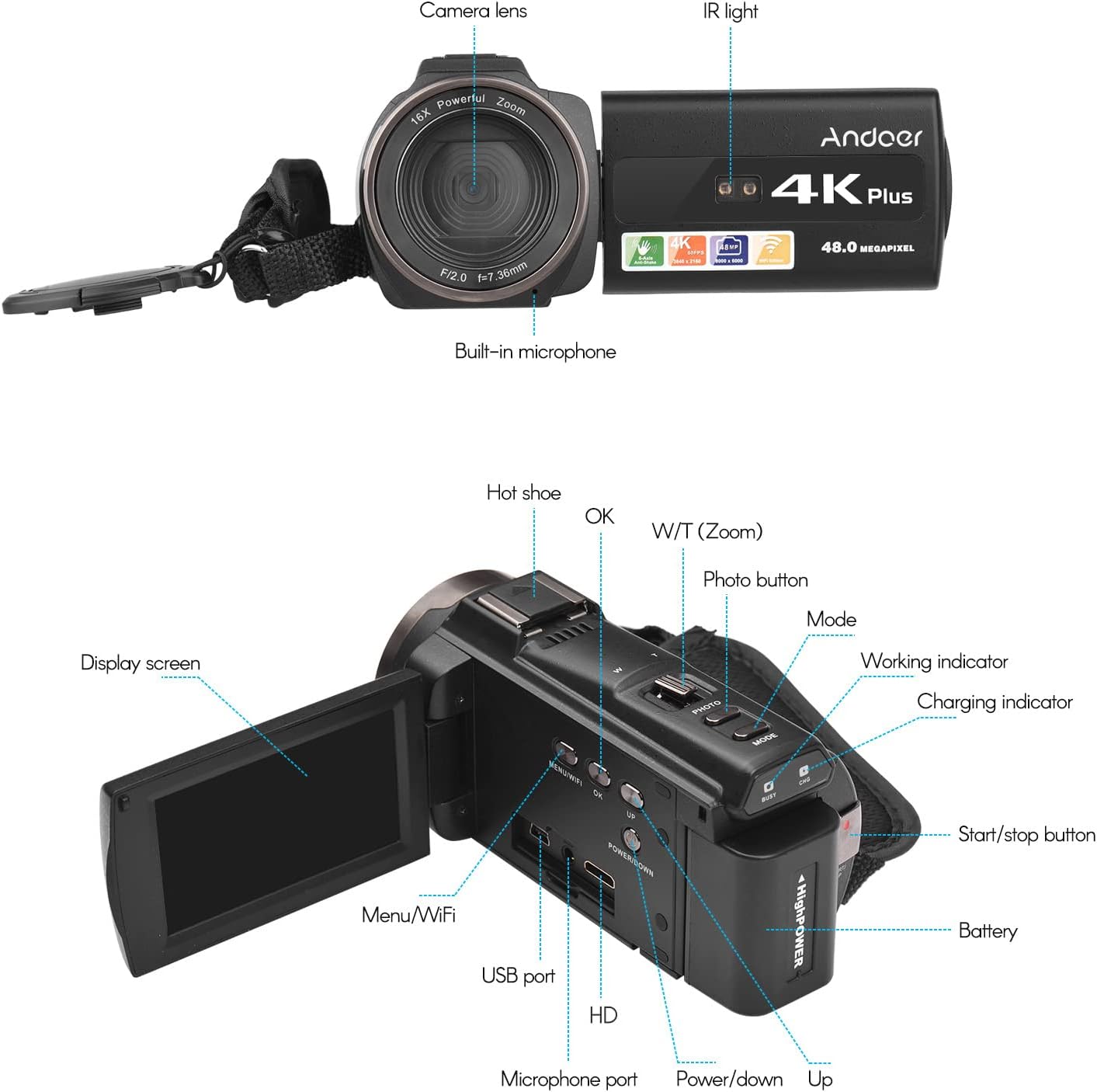
ภาพที่ 3.1: ด้านหน้าและด้านหลัง View of the Camcorder with labeled components.
ส่วนประกอบหลัก:
- เลนส์กล้อง: ส่วนประกอบทางแสงหลักสำหรับการถ่ายภาพและวิดีโอ
- แสง IR: Emits infrared light for night vision recording.
- ไมโครโฟนในตัว: Captures audio. An external microphone can be connected for enhanced sound quality.
- ฮอตชู: Mount for external accessories like the included microphone or an LED video light.
- Display Screen (3" IPS Touch Screen): สำหรับ viewอิงไลฟ์ฟูtage, playback, and navigating menus.
- ปุ่มควบคุม: Including Power, Mode, Photo, Zoom (W/T), OK, Menu/WiFi, Up/Down.
- พอร์ต: USB, HD (HDMI), Microphone port.
- ช่องใส่แบตเตอรี่: เป็นที่เก็บแบตเตอรี่แบบชาร์จไฟได้
4. การตั้งค่า
4.1 การชาร์จแบตเตอรี่
Before first use, fully charge the included lithium-polymer batteries. Insert one battery into the camcorder's battery compartment. Connect the camcorder to a power source using the provided USB cable. The charging indicator will illuminate during charging and turn off when fully charged. A full charge typically takes several hours.

Image 4.1: Battery installation and charging indication.
4.2 การใส่การ์ดหน่วยความจำ
The camcorder supports TF (MicroSD) cards up to 128GB. Ensure the card is formatted before first use in the camcorder's settings. Insert the memory card into the designated slot until it clicks into place.
- Use a Class 10 or higher speed rating for optimal performance, especially for 4K video recording.
- The camcorder supports V60 video speed class.
4.3 การเชื่อมต่อไมโครโฟนภายนอก
For improved audio quality, attach the external stereo microphone to the hot shoe mount on top of the camcorder. Connect the microphone's 3.5mm audio cable to the microphone input port on the camcorder.
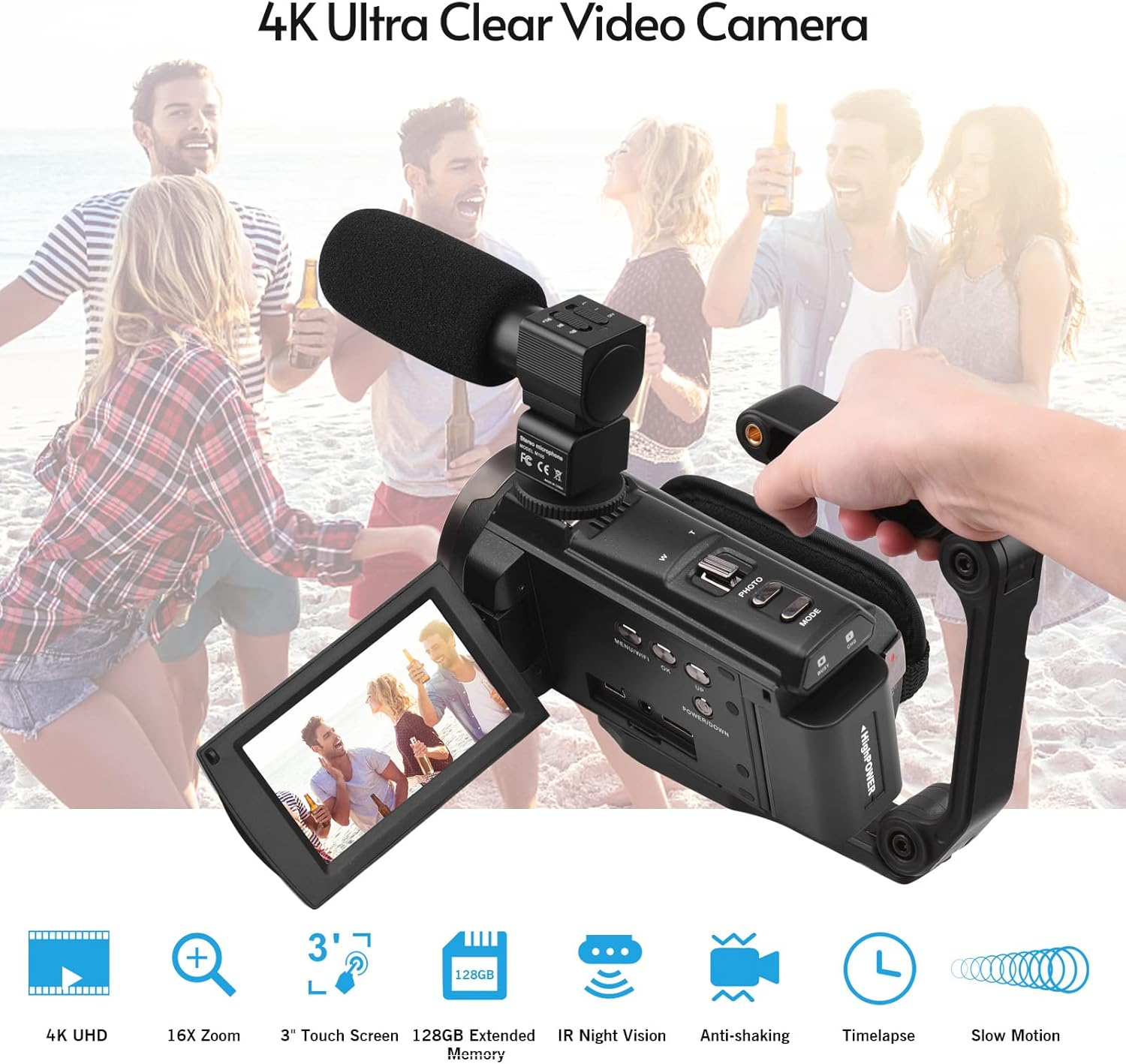
Image 4.2: External microphone attached to the camcorder.
4.4 Attaching the Wide-Angle Macro Lens
To use the wide-angle macro lens, first attach the lens adapter ring to the camcorder's main lens. Then, screw the wide-angle macro lens onto the adapter ring. This lens provides a broader perspective for your shots.

Image 4.3: Wide-angle macro lens for expanded field of view.
4.5 Attaching the Handgrip
The included handgrip can be attached to the bottom of the camcorder via the 1/4" screw hole for more stable handheld recording.
5. คู่มือการใช้งาน
5.1 การเปิด/ปิดเครื่อง
To power on the camcorder, open the display screen and press the Power button. To power off, press and hold the Power button, or close the display screen.
5.2 การบันทึกวิดีโอ
- เปิดเครื่องกล้องวิดีโอ
- กดปุ่ม โหมด ปุ่มสำหรับเลือกโหมดบันทึกวิดีโอ
- กดปุ่ม เริ่ม/หยุด button to begin recording. The recording indicator will flash.
- กดปุ่ม เริ่ม/หยุด ปุ่มอีกครั้งเพื่อหยุดการบันทึก
The camcorder supports 4K/60FPS video resolution for clear and smooth footage.
5.3 การถ่ายภาพ
- เปิดเครื่องกล้องวิดีโอ
- กดปุ่ม โหมด button to select photo mode.
- จัดกรอบภาพของคุณโดยใช้หน้าจอแสดงผล
- กดปุ่ม รูปถ่าย button to capture a 48-megapixel image.
5.4 Using the 3" IPS Touch Screen
The capacitive touchscreen allows for intuitive navigation of menus and settings. Tap to select options, swipe to scroll, and pinch to zoom (if supported in specific modes).
5.5 ฟังก์ชัน WiFi
The built-in WiFi allows for wireless transmission of files to a compatible smartphone or tablet via a dedicated app. It also enables remote control of the camcorder from your mobile device.
- Activate WiFi on the camcorder via the menu.
- Download and install the specified app on your mobile device.
- Connect your mobile device to the camcorder's WiFi network.
- Use the app to control recording, view อยู่ footagและโอนย้าย files.
5.6 การมองเห็นกลางคืนแบบอินฟราเรด
For recording in low-light or dark conditions, activate the IR Night Vision feature. This utilizes infrared light to capture clear black and white footage.

Image 5.1: IR Night Vision in operation.
5.7 ซูมดิจิตอล
Use the W/T (Wide/Telephoto) button to adjust the 16x digital zoom. Note that digital zoom can reduce image quality compared to optical zoom.
5.8 ระบบป้องกันภาพสั่นไหว
The camcorder features 6-axis image stabilization to reduce blur and shakiness in your recordings, especially during handheld use.
5.9 คุณสมบัติพิเศษ
- การตรวจจับการเคลื่อนไหว: The camcorder can be set to automatically start recording when motion is detected.
- Face Detection/Recognition: Optimizes focus and exposure for faces in the frame.
- รีโมทคอนโทรล: Use the included remote control to operate the camcorder from a distance, useful for self-recording or group shots.
- ตั้งเวลาถ่ายเอง: Set a delay before capturing a photo or starting a video recording.

Image 5.2: Tripod mounting for self-timer and stable shots.
5.10 การเชื่อมต่อกับอุปกรณ์ภายนอก
- ยูเอสบี: เชื่อมต่อกับคอมพิวเตอร์เพื่อ file โอน.
- ความละเอียดสูง (HDMI): Connect to a TV or monitor to view ชมวิดีโอที่คุณบันทึกไว้บนหน้าจอขนาดใหญ่ขึ้น
6. การบำรุงรักษา
- การทำความสะอาด: Use a soft, dry cloth to clean the camcorder body. For the lens, use a specialized lens cleaning cloth and solution. Avoid harsh chemicals.
- พื้นที่จัดเก็บ: เก็บกล้องวิดีโอไว้ในที่แห้งและเย็น หลีกเลี่ยงแสงแดดโดยตรงและอุณหภูมิที่สูงหรือต่ำเกินไป ถอดแบตเตอรี่ออกหากเก็บไว้เป็นเวลานาน
- การดูแลแบตเตอรี่ Do not expose batteries to high temperatures. Recharge regularly even if not in use to maintain battery health.
- อัพเดตเฟิร์มแวร์: ตรวจสอบของผู้ผลิต webไซต์เป็นระยะสำหรับการอัปเดตเฟิร์มแวร์ที่มีอยู่เพื่อให้มั่นใจถึงประสิทธิภาพที่ดีที่สุดและคุณสมบัติใหม่ๆ
7 การแก้ไขปัญหา
| ปัญหา | สาเหตุที่เป็นไปได้ | สารละลาย |
|---|---|---|
| กล้องวิดีโอไม่สามารถเปิดได้ | แบตเตอรี่หมดหรือไม่ได้ใส่แบตเตอรี่ถูกต้อง | Ensure battery is fully charged and correctly inserted. Try the second battery. |
| ไม่สามารถบันทึกวีดีโอ/ถ่ายภาพได้ | Memory card is full, not inserted, or corrupted. Incorrect mode selected. | Check memory card status, ensure it's inserted and has free space. Format if necessary (backup data first). Select the correct mode. |
| คุณภาพรูปภาพ/วิดีโอไม่ดี | Lens is dirty. Low light conditions without IR. Digital zoom used excessively. | Clean the lens. Activate IR Night Vision in dark environments. Avoid excessive digital zoom. Ensure sufficient lighting. |
| ปัญหาการเชื่อมต่อ WiFi | Incorrect WiFi settings. App not installed or updated. | Ensure WiFi is enabled on camcorder and mobile device. Re-establish connection. Update or reinstall the mobile app. |
| ไมโครโฟนไม่บันทึกเสียง | ไมโครโฟนอาจไม่ได้เชื่อมต่ออย่างถูกต้อง หรือตั้งค่าไม่ถูกต้อง | Check microphone cable connection. Verify audio input settings in the camcorder menu. |
8. ข้อมูลจำเพาะ
| คุณสมบัติ | รายละเอียด |
|---|---|
| หมายเลขรุ่น | ZOH0150584179474NZ |
| ความละเอียดวิดีโอ | 4K (3840x2160) at 60FPS |
| ความละเอียดของภาพ | 48 ล้านพิกเซล (8000x6000) |
| ระบบป้องกันภาพสั่นไหว | 6 แกน |
| หน้าจอแสดงผล | 3-inch IPS Capacitive Touch Screen |
| ซูมดิจิตอล | 16 เท่า |
| การเชื่อมต่อ | USB, Wi-Fi, HDMI |
| การรองรับการ์ดหน่วยความจำ | TF (MicroSD) up to 128GB (Class 10, V60 recommended) |
| คุณสมบัติพิเศษ | IR Night Vision, Motion Detection, Face Detection, Remote Control |
| แบตเตอรี่ | 2 x 2000mAh Lithium-polymer |
| รูรับแสงเลนส์ | เอฟ/2.0 |
| ความยาวโฟกัสต่ำสุด | 39มม. |
| อุปกรณ์ที่รองรับ | Tripod, Microphone, TV, Computer, Smartphone |
| ความเข้ากันได้ของระบบปฏิบัติการ | หน้าต่าง |
| ขนาด (แพ็คเกจ) | 18 x 15 x 11 ซม. |
| น้ำหนัก (แพ็คเกจ) | 1.01 กก. |
9. การรับประกันและการสนับสนุน
Andoer products are designed for reliability and performance. For any technical assistance, troubleshooting beyond this manual, or warranty inquiries, please contact Andoer customer support through their official webไซต์หรือร้านค้าปลีกของคุณ
โปรดเก็บหลักฐานการซื้อของคุณไว้เพื่อเรียกร้องการรับประกัน