
1. บทนำ
This manual provides essential information for the safe and efficient use of your Getac V110 Rugged Convertible Laptop/Tablet PC. Please read this manual thoroughly before operating the device and retain it for future reference. The Getac V110 is designed for durability and performance in challenging environments, offering versatility as both a laptop and a tablet.
2. ข้อมูลด้านความปลอดภัย
ปฏิบัติตามข้อควรระวังด้านความปลอดภัยต่อไปนี้เพื่อป้องกันความเสียหายต่ออุปกรณ์หรือการบาดเจ็บต่อตัวคุณเอง:
- อย่าให้เครื่องสัมผัสกับอุณหภูมิที่สูงหรือต่ำเกินไป แสงแดดโดยตรง หรือความชื้นที่มากเกินไป
- Use only Getac-approved power adapters and accessories.
- ควรหลีกเลี่ยงการทำตกหรือการกระแทกอย่างรุนแรง แม้ว่าอุปกรณ์จะได้รับการออกแบบมาให้ทนทานก็ตาม
- อย่าพยายามถอดประกอบหรือซ่อมแซมอุปกรณ์ด้วยตนเอง โปรดติดต่อช่างผู้ชำนาญการ
- รักษาช่องระบายอากาศให้ชัดเจนเพื่อป้องกันความร้อนสูงเกินไป
3. ทางกายภาพมากกว่าview
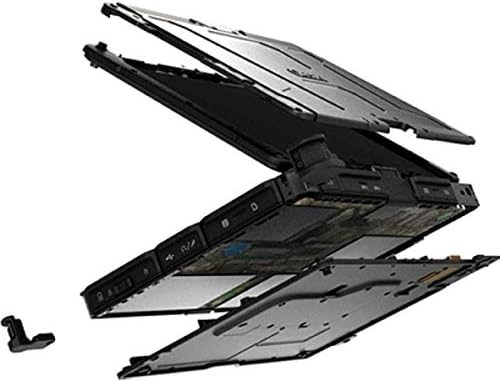
The Getac V110 is a versatile device designed for rugged use. It features a convertible design, allowing it to function as both a traditional laptop and a tablet. Key components include a durable chassis, an 11.6-inch touchscreen display, a full-sized keyboard, and various ports for connectivity.

รูปที่ 3.1: ระเบิด view illustrating the internal structure and ruggedized layers of the Getac V110.
3.1. คีย์บอร์ดและทัชแพด
The device includes a backlit keyboard for typing in various lighting conditions and a precision touchpad for navigation.
รูปที่ 3.2: จากบนลงล่าง view of the Getac V110 keyboard and integrated touchpad.
3.2. Convertible Design
The V110 can be easily converted between laptop and tablet modes by rotating the screen. This flexibility allows for optimal use in different scenarios.

Figure 3.3: The Getac V110 configured in laptop mode, displaying the screen and keyboard.

Figure 3.4: The Getac V110 in tablet mode, showcasing the touchscreen interface.
4. การตั้งค่า
4.1. เปิดเครื่องครั้งแรก
- เชื่อมต่ออะแดปเตอร์จ่ายไฟเข้ากับอุปกรณ์และเต้ารับไฟฟ้า
- Press the power button located on the side or front of the device.
- Follow the on-screen prompts to complete the initial Windows 8.1 setup, including language, region, and user account creation.
4.2. การเชื่อมต่อเครือข่าย
The Getac V110 supports both Wi-Fi and Ethernet for internet access.
- ไวไฟ : Access the network settings in Windows 8.1, select your desired Wi-Fi network, and enter the password if required.
- อีเธอร์เน็ต: Connect an Ethernet cable from your network router or switch to the Ethernet port on the device.
4.3. การจับคู่บลูทู ธ
การเชื่อมต่ออุปกรณ์บลูทูธ:
- ตรวจสอบให้แน่ใจว่าอุปกรณ์ Bluetooth อยู่ในโหมดจับคู่
- On the Getac V110, navigate to PC Settings > PC and devices > Bluetooth.
- Turn Bluetooth on and select the device from the list to pair.
5. การใช้งานอุปกรณ์
5.1. Switching Between Laptop and Tablet Modes
To convert the device:
- Gently rotate the screen 180 degrees clockwise or counter-clockwise.
- Fold the screen back over the keyboard to enter tablet mode.
- Unfold the screen and rotate it back to the original position for laptop mode.
5.2. การใช้หน้าจอสัมผัส
The 11.6-inch LED touchscreen supports multi-touch gestures. Use your fingers or a compatible stylus for navigation, selection, and input.
5.3. การจัดการพลังงาน
To conserve battery life, adjust power settings in Windows 8.1. You can configure sleep mode, display brightness, and other power-saving options.
- โหมดสลีป: กดปุ่มเปิด/ปิดเครื่องสั้นๆ เพื่อให้เครื่องเข้าสู่โหมดพักเครื่อง
- ปิดระบบ: Go to the Charms bar (swipe from right edge or move mouse to top-right corner), select Settings > Power > Shut down.
- เริ่มต้นใหม่อีกครั้ง: Go to the Charms bar, select Settings > Power > Restart.
6. การบำรุงรักษา
6.1. การทำความสะอาดอุปกรณ์
Regular cleaning helps maintain performance and appearance.
- ใช้ผ้านุ่มไม่เป็นขุยเช็ดเล็กน้อยampened with water or a mild, non-abrasive cleaner for the screen and exterior.
- หลีกเลี่ยงการฉีดของเหลวลงบนอุปกรณ์โดยตรง
- ห้ามใช้สารเคมีรุนแรง ตัวทำละลาย หรือวัสดุที่มีฤทธิ์กัดกร่อน
6.2. การดูแลแบตเตอรี่
เพื่อยืดอายุการใช้งานแบตเตอรี่ให้สูงสุด:
- หลีกเลี่ยงการปล่อยแบตเตอรี่จนหมดบ่อยครั้ง
- ควรเก็บอุปกรณ์ไว้ในที่แห้งและเย็นหากไม่ได้ใช้งานเป็นเวลานาน
- If the device has removable batteries, ensure they are properly seated.
6.3. การอัปเดตซอฟต์แวร์
Regularly check for and install operating system and driver updates to ensure optimal performance and security. Access Windows Update through PC Settings.
7 การแก้ไขปัญหา
This section addresses common issues you might encounter with your Getac V110.
7.1. อุปกรณ์ไม่เปิดเครื่อง
- ตรวจสอบให้แน่ใจว่าอะแดปเตอร์ไฟฟ้าเชื่อมต่ออย่างแน่นหนาและเต้ารับสามารถใช้งานได้
- Check if the battery is charged. If not, allow it to charge for at least 30 minutes before attempting to power on again.
- If the battery is removable, ensure it is correctly installed.
7.2. ปัญหาการเชื่อมต่อ Wi-Fi
- ตรวจสอบว่า Wi-Fi ได้เปิดใช้งานอยู่ในการตั้งค่า Windows
- Restart your router and the Getac V110.
- ตรวจสอบให้แน่ใจว่าคุณอยู่ในระยะสัญญาณของเครือข่าย Wi-Fi และมีรหัสผ่านที่ถูกต้อง
- ตรวจสอบให้แน่ใจว่าไดรเวอร์ Wi-Fi ของคุณได้รับการอัปเดตแล้ว
7.3. หน้าจอสัมผัสไม่ตอบสนอง
- รีสตาร์ทอุปกรณ์
- ตรวจสอบให้แน่ใจว่าหน้าจอสะอาดและไม่มีเศษขยะ
- Check for any recent software updates or driver issues.
7.4. ประสิทธิภาพช้า
- ปิดแอปพลิเคชันที่ไม่จำเป็นซึ่งทำงานอยู่เบื้องหลัง
- ตรวจสอบพื้นที่เก็บข้อมูลที่มีอยู่
- รันการสแกนไวรัส
- ตรวจสอบให้แน่ใจว่า Windows และไดรเวอร์ได้รับการอัปเดตแล้ว
8. ข้อมูลจำเพาะ
| คุณสมบัติ | รายละเอียด |
|---|---|
| ยี่ห้อ | เกแทค |
| หมายเลขรุ่น | วี110 |
| โปรเซสเซอร์ | อินเทล คอร์ i5-6300U (2.6 กิกะเฮิรตซ์) |
| หน่วยความจำแรม | แรม DDR8 4GB |
| ความจุในการเก็บข้อมูล | 128GB |
| ขนาดหน้าจอ | 11.6 นิ้ว |
| ความละเอียดการแสดงผล | 1366 x 768 พิกเซล |
| ประเภทจอภาพ | นำ |
| อินพุตอินเทอร์เฟซของมนุษย์ | หน้าจอสัมผัส |
| ระบบปฏิบัติการ | วินโดวส์ 8.1 |
| โคโปรเซสเซอร์กราฟิก | กราฟิก Intel HD 520 |
| เทคโนโลยีการเชื่อมต่อ | บลูทูธ, อีเทอร์เน็ต, HDMI, USB, Wi-Fi |
| น้ำหนักสินค้า | 4.4 ปอนด์ |
| Item Dimensions (L x W x Th) | 11.99" x 18.9" x 3.9" |
| ประเภทเซลล์แบตเตอรี่ | Lithium Ion (23 Watt Hours) |
9. ข้อมูลการรับประกัน
The Getac V110 Rugged Convertible Laptop/Tablet PC comes with a รับประกันจำกัด 90 วัน. This warranty covers manufacturing defects and malfunctions under normal use. It does not cover damage caused by misuse, accidents, unauthorized repairs, or modifications. Please retain your proof of purchase for warranty claims.
For detailed terms and conditions, refer to the warranty documentation provided with your device or contact Getac customer support.
10. การสนับสนุน
If you require further assistance or encounter issues not covered in this manual, please contact Getac customer support. You can typically find support contact information on the manufacturer's official website or within the device's pre-installed documentation.
When contacting support, please have your device's model number (V110) and serial number ready.