
Cherry JD-8560US-0
CHERRY Stream Desktop Recharge Keyboard and Mouse Wireless Combo
Model: JD-8560US-0
การแนะนำ
The CHERRY Stream Desktop Recharge Keyboard and Mouse Wireless Combo offers extended functionality, quiet keystroke, and a modern design. This premium wireless version features a convenient charging function for both the keyboard and mouse.
The keyboard and mouse utilize NiMH rechargeable batteries, providing months of use on a single charge. Both devices can be recharged via USB-C, allowing for uninterrupted work.

Image: The CHERRY Stream Desktop Recharge Keyboard and Mouse Wireless Combo in white, showcasing both the full-size keyboard and the ergonomic mouse.
เนื้อหาแพ็คเกจ
- CHERRY Stream Desktop Recharge Keyboard (White)
- CHERRY Stream Desktop Recharge Mouse (White)
- สายชาร์จ USB-C
- ตัวรับสัญญาณ USB
- NiMH Rechargeable Batteries (pre-installed or included)
- คู่มือการใช้งาน (เอกสารนี้)
การตั้งค่า
1. การชาร์จอุปกรณ์
Before initial use, it is recommended to fully charge both the keyboard and the mouse.
- Connect the supplied USB-C cable to the charging port on the keyboard (located on the top edge) and to a USB power source (e.g., computer USB port, USB wall adapter).
- Connect the supplied USB-C cable to the charging port on the mouse (located on the front edge) and to a USB power source.
- The charging indicator light on each device will show charging status (refer to the indicator section for details).

ภาพ: ด้านข้าง views of the keyboard and mouse, highlighting their respective USB-C charging ports.
2. การเชื่อมต่อตัวรับสัญญาณ USB
The keyboard and mouse connect wirelessly via a single USB receiver.
- Locate the USB receiver, typically stored within the mouse's battery compartment for safekeeping during transport.
- เสียบตัวรับสัญญาณ USB เข้ากับพอร์ต USB ที่พร้อมใช้งานบนคอมพิวเตอร์ของคุณ
- ระบบปฏิบัติการของคุณควรตรวจจับและติดตั้งไดรเวอร์ที่จำเป็นโดยอัตโนมัติ
3. Powering On the Devices
- For the keyboard, locate the On/Off switch on the top edge and slide it to the 'On' position.
- For the mouse, locate the On/Off switch on the underside and slide it to the 'On' position.
- The devices should automatically connect to the USB receiver.

ภาพ: ด้านบน view of the CHERRY Stream mouse, showing its ergonomic design.
คำแนะนำการใช้งาน
ฟังก์ชั่นคีย์บอร์ด
The CHERRY Stream keyboard features a full-size layout with dedicated function keys and media controls.
- ปุ่มฟังก์ชั่น (F1-F12): These keys may have secondary functions (e.g., media control, volume, brightness) accessible by pressing the Fn คีย์พร้อมกัน
- ปุ่มกดตัวเลข: For efficient data entry.
- Quiet Keystroke: Designed for a quiet typing experience, ideal for office environments.
ฟังก์ชั่นเมาส์
The CHERRY Stream mouse provides precise tracking and comfortable use.
- คลิกซ้ายและขวา: ปุ่มเมาส์มาตรฐาน
- ล้อเลื่อน: For vertical scrolling. The scroll wheel also functions as a middle click button.
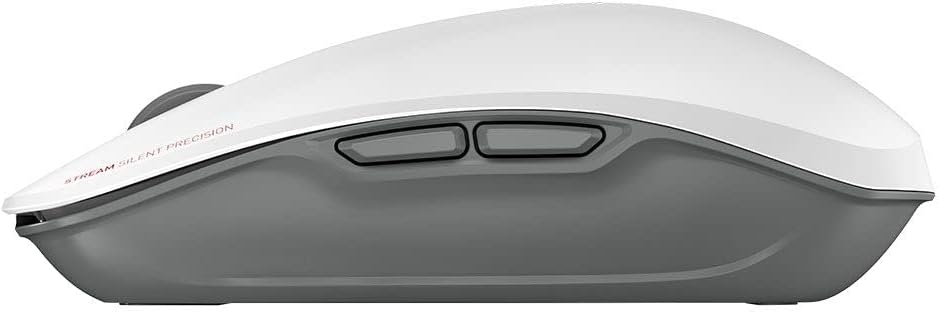
- ปุ่มด้านข้าง: Two programmable side buttons for enhanced productivity (functionality may vary by operating system or software).
- การเข้ารหัส AES: The mouse features Advanced Encryption Standard (AES) for secure data transmission.

Image: The CHERRY Stream mouse, highlighting its AES encryption capability.
การซ่อมบำรุง
การทำความสะอาด
To maintain the performance and appearance of your CHERRY Stream combo:
- ถอดอุปกรณ์ออกจากคอมพิวเตอร์ก่อนทำความสะอาด
- ใช้ผ้านุ่มไม่เป็นขุยเช็ดเล็กน้อยampลงด้วยน้ำหรือน้ำยาทำความสะอาดอ่อนๆ
- หลีกเลี่ยงการใช้สารเคมีรุนแรง น้ำยาทำความสะอาดที่มีฤทธิ์กัดกร่อน หรือตัวทำละลาย
- ห้ามจุ่มอุปกรณ์ลงในน้ำหรือของเหลวใดๆ
การดูแลแบตเตอรี่
The devices use NiMH rechargeable batteries. Proper care ensures long battery life:
- Recharge the batteries when the low battery indicator appears.
- ควรหลีกเลี่ยงการปล่อยให้แบตเตอรี่หมดเกลี้ยงบ่อยๆ
- If storing the devices for an extended period, charge them to about 50% and store in a cool, dry place.
- The batteries are user-replaceable. Refer to the battery compartment for instructions on replacement.

Image: The CHERRY Stream keyboard and mouse, emphasizing their long-lasting rechargeable batteries.
การแก้ไขปัญหา
| ปัญหา | สาเหตุที่เป็นไปได้ | สารละลาย |
|---|---|---|
| อุปกรณ์ไม่ตอบสนอง |
|
|
| Lag or delayed response. |
|
|
| Keys not working or mouse not tracking. |
|
|
ข้อมูลจำเพาะ
- ยี่ห้อ: เชอร์รี่
- แบบอย่าง: JD-8560US-0
- สี: สีขาว
- เทคโนโลยีการเชื่อมต่อ: ไร้สาย (ตัวรับสัญญาณ USB)
- คุณสมบัติพิเศษ: Rechargeable NiMH Batteries, AES Encryption
- อุปกรณ์ที่รองรับ: แล็ปท็อป, คอมพิวเตอร์ส่วนบุคคล
- ขนาดของผลิตภัณฑ์ (แป้นพิมพ์): 18.2 x 6.53 x 1.34 นิ้ว
- Item Weight (Combo): 3.09 ปอนด์
- ผู้ผลิต: เชอร์รี่
- ประเทศต้นกำเนิด: จีน
- วันที่เข้าใช้งานครั้งแรก: 16 กุมภาพันธ์ 2022
ข้อมูลการรับประกัน
CHERRY products are manufactured with high-quality materials and undergo strict quality control. For detailed warranty information, please refer to the official CHERRY webหรือติดต่อฝ่ายสนับสนุนลูกค้า เก็บหลักฐานการซื้อไว้เพื่อใช้ในการเคลมประกัน
สนับสนุน
For further assistance, technical support, or to download the latest drivers and software (such as CHERRY Keys software), please visit the official CHERRY webเว็บไซต์:
You can also find additional resources and FAQs on the CHERRY brand store on Amazon:
Ask a question about this manual
Ask about setup, troubleshooting, compatibility, parts, safety, or missing instructions. Manuals+ will review the question and use this page’s manual context to help answer it.