
1. บทนำ
This manual provides instructions for the NETVIP Bluetooth Car Speaker, a wireless hands-free device designed for in-car communication and media playback. It supports Bluetooth connectivity, voice assistants, and TF card playback, offering a convenient and safe way to manage calls and audio while driving.
2. เนื้อหาบรรจุภัณฑ์
ตรวจสอบว่ารายการทั้งหมดที่ระบุไว้ด้านล่างนี้รวมอยู่ในแพ็คเกจของคุณ:
- Bluetooth In-Car Speakerphone x 1
- สาย USB x1
- Magnetic Basement (Clip) x 1
- เชือกเส้นเล็ก x 1
- คู่มือการใช้งาน x 1
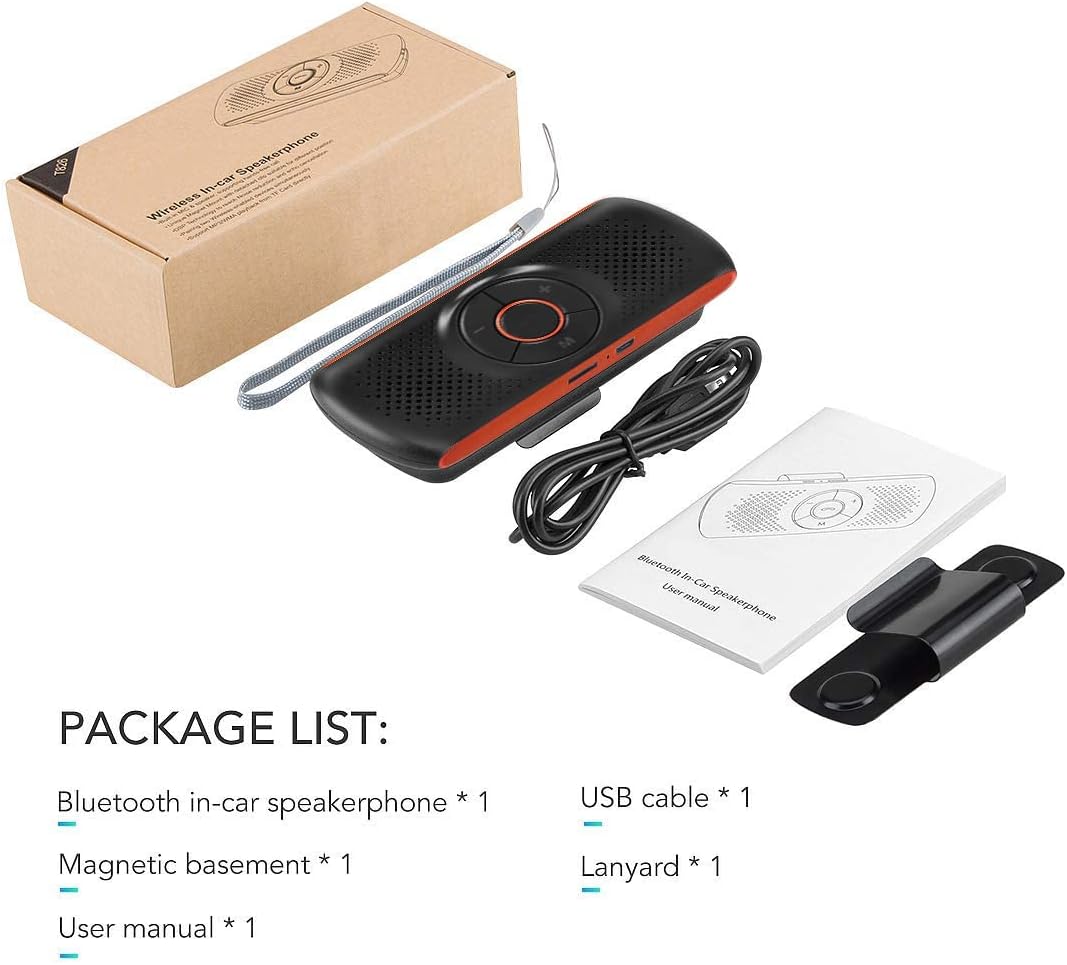
Image: Contents of the NETVIP Bluetooth Car Speaker package.
3. คุณสมบัติของผลิตภัณฑ์
- การโทรแบบแฮนด์ฟรี: Designed for safe communication while driving, allowing one-click call answering.
- Enhanced Bluetooth Connectivity: Features Bluetooth V4.2+EDR with echo noise reduction technology for clear audio.
- รองรับการควบคุมด้วยเสียง: สามารถใช้งานร่วมกับ Siri และ Google Assistant สำหรับคำสั่งเสียงได้
- การเชื่อมต่อใหม่อัตโนมัติ: Automatically reconnects to your paired phone upon power-on.
- ติดตั้งง่าย: Back-clip design with a durable magnetic base for sun visor mounting.
- Multiple Media Options: Supports music playback via Bluetooth, TF card, or USB cable.
- การเชื่อมต่อโทรศัพท์คู่: Capable of connecting to two phones simultaneously.
4. การตั้งค่า
4.1 การชาร์จอุปกรณ์
Before initial use, fully charge the speakerphone using the provided USB cable. Connect the USB cable to the device's charging port and a standard USB power source (e.g., car charger, computer USB port). The charging indicator light will show the charging status.
4.2 การติดตั้งลำโพงโทรศัพท์
The speakerphone features a magnetic clip for easy attachment to your car's sun visor.
- Attach the magnetic basement clip to the back of the speakerphone.
- Slide the clip onto your car's sun visor. The magnetic connection allows for easy removal and reattachment.
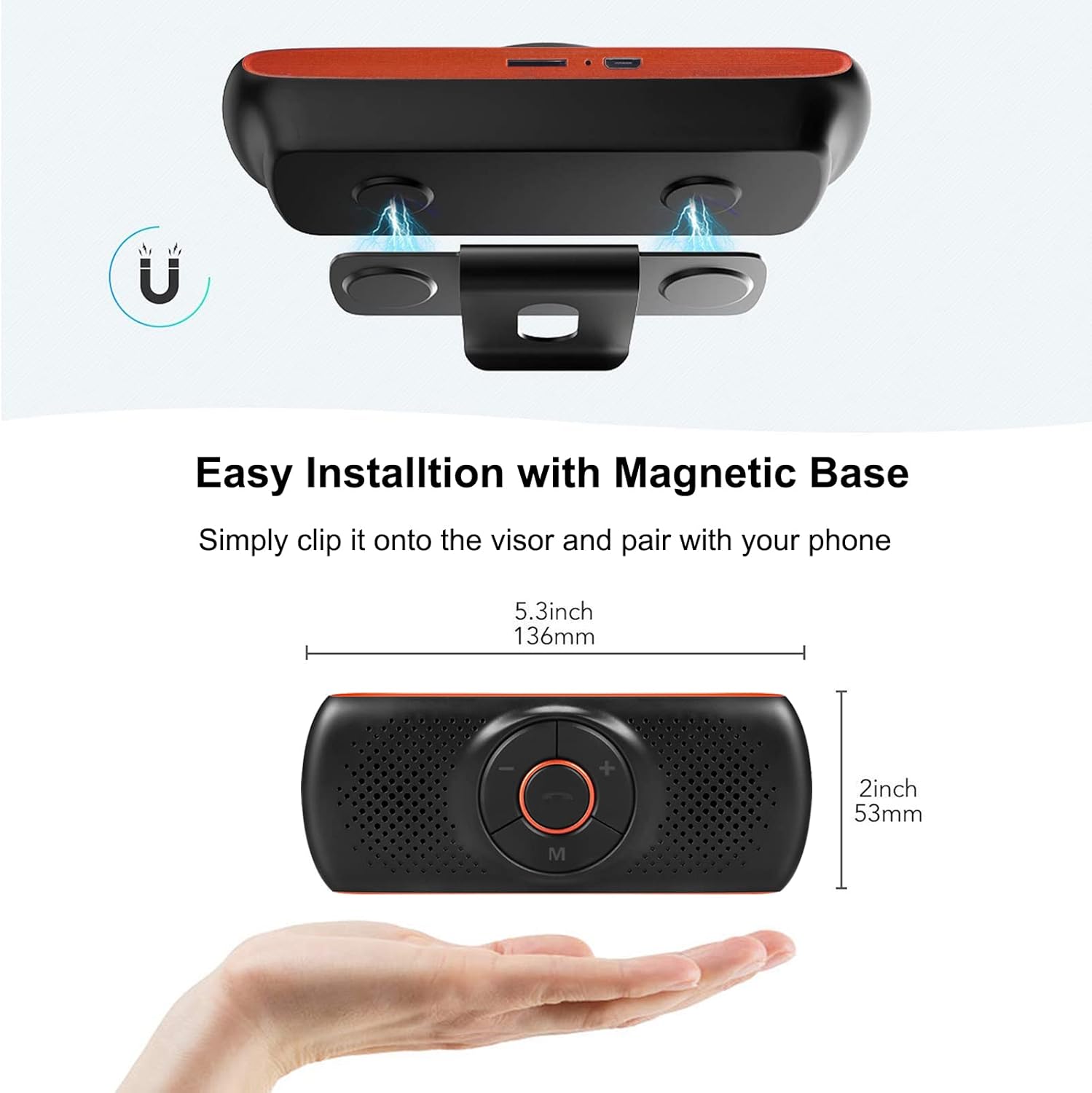
Image: Magnetic installation of the speakerphone on a car sun visor.
4.3 การจับคู่บลูทูธ
To connect the speakerphone to your mobile phone:
- Ensure the speakerphone is charged and powered on.
- เปิดใช้งานบลูทูธบนโทรศัพท์มือถือของคุณ
- ค้นหา available Bluetooth devices. The speakerphone will appear as "NETVIP" or a similar name.
- Select the speakerphone from the list to pair. A confirmation tone or voice prompt will indicate successful pairing.
- The device will automatically reconnect to the last paired phone when powered on and within range.
5. คู่มือการใช้งาน
5.1 เปิด/ปิดเครื่อง
- ในการเปิดเครื่อง ให้กดปุ่มเปิด/ปิดค้างไว้จนกว่าไฟแสดงสถานะจะสว่างขึ้น
- หากต้องการปิดเครื่อง ให้กดปุ่มเปิด/ปิดค้างไว้จนกว่าไฟแสดงสถานะจะดับลง
5.2 การโทรแบบแฮนด์ฟรี
When a call comes in, the speakerphone will announce the incoming call.
- รับสาย: Press the phone button once.
- วางสาย: Press the phone button once during a call.
- ปฏิเสธสาย: กดปุ่มโทรศัพท์ค้างไว้ 2 วินาที
- โทรซ้ำหมายเลขล่าสุด: Double-press the phone button.

Image: Driver using the NETVIP Bluetooth Car Speaker for hands-free communication.
5.3 Voice Assistant (Siri/Google Assistant)
The speakerphone supports voice commands through Siri or Google Assistant.
- เปิดใช้งาน Voice Assistant: Double-click the 'M' button to activate Siri or Google Assistant on your connected phone.
- Once activated, you can issue voice commands for tasks like making calls, sending messages, or getting directions.

Image: Illustrates using voice commands with Google Assistant and Siri via the speakerphone.
5.4 การเล่นเพลง
The speakerphone can play music from your phone via Bluetooth or directly from a TF card.
- เพลงบลูทูธ: Once paired, play music from your phone, and it will stream through the speakerphone.
- การเล่นการ์ด TF: ใส่การ์ด TF ที่มีไฟล์เสียง files into the designated slot. The speakerphone will automatically switch to TF card mode and begin playback.
- การควบคุมระดับเสียง: Use the '+' and '-' buttons on the speakerphone to adjust the volume.

Image: Detail of the TF card slot on the speakerphone for direct music playback.
5.5 Connecting Two Phones Simultaneously
The speakerphone can maintain a connection with two mobile phones at the same time.
- จับคู่โทรศัพท์เครื่องแรกตามที่อธิบายไว้ในหัวข้อ 4.3
- After the first phone is paired, disable Bluetooth on the first phone.
- Pair the second phone to the speakerphone.
- Re-enable Bluetooth on the first phone. Both phones should now be connected.
- The speakerphone will prioritize incoming calls from either connected device.

Image: Demonstrates the speakerphone's ability to connect to two mobile phones concurrently.
6. การบำรุงรักษา
To ensure the longevity and optimal performance of your NETVIP Bluetooth Car Speaker, follow these maintenance guidelines:
- การทำความสะอาด: Use a soft, dry cloth to clean the device. Avoid using abrasive cleaners, solvents, or harsh chemicals.
- พื้นที่จัดเก็บ: เก็บอุปกรณ์ไว้ในที่แห้งและเย็น หลีกเลี่ยงแสงแดดโดยตรงและอุณหภูมิที่สูงหรือต่ำเกินไป
- การดูแลแบตเตอรี่ Do not expose the battery to extreme heat or cold. Charge the device regularly, even if not in frequent use, to maintain battery health.
- หลีกเลี่ยงน้ำ: This device is not waterproof. Keep it away from liquids and moisture.
7 การแก้ไขปัญหา
If you encounter issues with your speakerphone, refer to the following common problems and solutions:
| ปัญหา | สาเหตุที่เป็นไปได้ | สารละลาย |
|---|---|---|
| อุปกรณ์ไม่เปิดเครื่อง | แบตเตอรี่ต่ำ | ชาร์จอุปกรณ์ให้เต็ม |
| ไม่สามารถจับคู่กับโทรศัพท์ได้ | Bluetooth not enabled on phone; device not in pairing mode; too far from phone | Ensure phone Bluetooth is on. Power cycle the speakerphone. Move phone closer to device. |
| ไม่มีเสียงระหว่างการโทร/ฟังเพลง | Volume too low; device not connected; incorrect audio output selected on phone | Increase volume on both speakerphone and phone. Re-pair the device. Check phone's audio output settings. |
| ผู้ช่วยเสียงไม่ตอบสนอง | Not activated correctly; phone's voice assistant not enabled | Double-click 'M' button. Ensure Siri/Google Assistant is enabled on your phone. |
| เพลงการ์ด TF ไม่เล่น | ใส่การ์ด TF ไม่ถูกต้อง ไม่รองรับ file รูปแบบ | Reinsert TF card. Ensure audio fileไฟล์ s อยู่ในรูปแบบที่รองรับ |
8. ข้อมูลจำเพาะ
| คุณสมบัติ | ข้อมูลจำเพาะ |
|---|---|
| ยี่ห้อ | เน็ตวีพี |
| เทคโนโลยีการเชื่อมต่อ | บลูทูธ, ยูเอสบี |
| เวอร์ชันบลูทูธ | 4.2 + EDR |
| แหล่งพลังงาน | ใช้พลังงานจากแบตเตอรี่ |
| เอาท์พุตของลำโพง | 3W |
| ความจุของแบตเตอรี่ | 500 mAh ลิเธียมไอออน |
| เวลาในการชาร์จแบตเตอรี่ | ประมาณ 3 ชั่วโมง |
| ประเภทสื่อที่รองรับ | บัตร TF |
| ประเภทการติดตั้ง | Spoke Clip (Magnetic) |
| ประเภทการควบคุม | Voice Control, Buttons |
| อุปกรณ์ที่รองรับ | Smartphones, Car Stereo Systems |
| อินพุต Voltage | 5 โวลต์ (กระแสตรง) |
9. ข้อมูลด้านความปลอดภัย
โปรดอ่านและปฏิบัติตามแนวทางความปลอดภัยต่อไปนี้:
- Avoid using the device near other wireless devices to prevent potential interference.
- Keep the battery away from extreme temperatures and high humidity.
- Dispose of the battery and product responsibly according to local regulations.
- ห้ามถอดประกอบ ซ่อมแซม หรือดัดแปลงอุปกรณ์ด้วยตนเอง โปรดติดต่อช่างผู้ชำนาญการเพื่อขอความช่วยเหลือ
- Ensure the device is securely mounted to avoid obstruction of vision or interference with vehicle controls.
10. วิดีโอผลิตภัณฑ์
Watch this video for an introduction to the NETVIP Wireless In-Car Speakerphone:
วิดีโอ: บทนำview of the NETVIP Wireless In-Car Speakerphone, demonstrating its features and usage.
11. การรับประกันและการสนับสนุน
For warranty information or technical support, please contact NETVIP customer service through the retailer's platform or the official NETVIP webไซต์นี้ โปรดเก็บใบเสร็จรับเงินที่ซื้อไว้เพื่อใช้เรียกร้องการรับประกัน