
1. บทนำ
This manual provides detailed instructions for the PRYME BTH-900-MAX Wireless Dual-Muff Headset. This professional-grade headset is designed for reliable communication in demanding environments, offering dual-link capability for simultaneous connection to two-way radios, cellphones, and tablets.
คุณสมบัติหลัก:
- Noise-Reducing Condenser Boom Microphone: Equipped with a replaceable wind sock for clear audio transmission.
- Fully Integrated Wireless Technology: Provides a clean, professional, and wire-free communication experience.
- ความสามารถในการเชื่อมต่อแบบคู่: Connects to both cellphones/tablets and two-way radios simultaneously.
- Broad Radio Compatibility: Works with all PrymeBLU radio adapters (V2 series), and ICOM, Kenwood, EFJ, and BK radios with internal Bluetooth.
- Dedicated Control Buttons: Separate buttons for Push-To-Talk (PTT) radio functions and cellphone (Answer/Call) operations.
- ดีไซน์กันน้ำ: Ensures durability and reliable performance in various conditions.
- ตัดเสียงรบกวน: ช่วยเพิ่มความคมชัดของเสียงโดยลดเสียงรบกวนรอบข้าง
- โครงสร้างพับได้: ช่วยให้จัดเก็บและขนส่งได้สะดวก

Figure 1: The PRYME BTH-900-MAX Wireless Dual-Muff Headset, showcasing its robust design and integrated boom microphone.
2. การตั้งค่า
2.1 การชาร์จชุดหูฟัง
Before initial use, fully charge the headset. The headset includes a Lithium Polymer battery. Use the provided USB charging cable and adapter.
- เสียบปลายสายชาร์จ USB ด้านเล็กเข้ากับพอร์ตชาร์จบนหูฟัง
- เชื่อมต่อปลายด้านที่ใหญ่กว่าของสาย USB เข้ากับอะแดปเตอร์ไฟ
- เสียบอะแดปเตอร์จ่ายไฟเข้ากับเต้ารับไฟฟ้ามาตรฐาน
- The LED indicator on the headset will show charging status (e.g., red for charging, blue for fully charged).
- Allow approximately [X hours - information not provided, user should refer to product packaging or full manual] for a full charge. A full charge provides up to 50 hours of battery life.

Figure 2: USB charging cable and power adapter for the headset.
2.2 การเปิด/ปิดเครื่อง
- การเปิดเครื่อง: Press and hold the Power button (usually marked with a power symbol) until the LED indicator illuminates.
- วิธีปิดเครื่อง: กดปุ่มเปิด/ปิดค้างไว้จนกว่าไฟ LED จะดับ
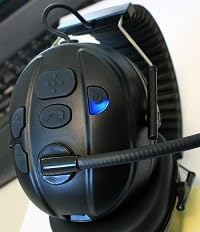
Figure 3: Headset controls showing the power button and a blue indicator light, typically indicating power on or pairing mode.

Figure 4: Headset controls showing the power button and a red indicator light, typically indicating low battery or charging status.
2.3 การจับคู่บลูทูธ
The BTH-900-MAX supports dual-link Bluetooth connectivity, allowing connection to two devices simultaneously (e.g., a radio adapter and a cellphone).
- เข้าสู่โหมดจับคู่: With the headset off, press and hold the Power button for approximately 5-7 seconds until the LED indicator flashes rapidly (e.g., alternating red and blue).
- Pair with First Device: On your first device (e.g., PrymeBLU radio adapter, cellphone, or tablet), enable Bluetooth and search for available devices. Select "BTH-900-MAX" from the list.
- ยืนยันการเชื่อมต่อ: Once paired, the LED indicator on the headset will change (e.g., slow blue flashes) to indicate a successful connection.
- Pair with Second Device (Dual Link): To connect a second device, repeat step 1 to enter pairing mode again. Then, on your second device, enable Bluetooth and select "BTH-900-MAX". The headset will attempt to connect to both devices.
- Ensure both devices show "BTH-900-MAX" as connected in their Bluetooth settings.
3. การดำเนินการ
3.1 การสวมชุดหูฟัง
The BTH-900-MAX features a behind-the-head racing style design for a secure and comfortable fit. Adjust the headband and earcups for optimal comfort and noise isolation.

Figure 5: The BTH-900-MAX headset positioned on a mannequin head, illustrating the behind-the-head wearing style.
3.2 การควบคุมมากกว่าview
The headset features dedicated control buttons for various functions. Familiarize yourself with their placement and operation.

รูปที่ 6: จากบนลงล่าง view of the headset's control panel, showing the layout of buttons for various functions.

รูปที่ 7: ภาพระยะใกล้ view of the side control buttons on the headset, including volume and call controls.
3.3 Radio Communication (PTT)
When connected to a compatible two-way radio via a PrymeBLU adapter or built-in Bluetooth:
- Press and hold the dedicated PTT button on the headset to transmit.
- ปล่อยปุ่ม PTT เพื่อฟัง
3.4 Cellphone/Tablet Communication
When connected to a cellphone or tablet:
- รับ/วางสาย: Press the dedicated Call button (usually marked with a phone icon) to answer an incoming call or end an active call.
- ผู้ช่วยเสียง: Long press the Call button to activate your device's voice assistant (e.g., Siri, Google Assistant).
- การควบคุมระดับเสียง: Use the Volume Up (+) and Volume Down (-) buttons to adjust audio levels.

รูปที่ 8: ตัวอย่างample of a Push-to-Talk (PTT) application on a smartphone, demonstrating compatibility for mobile communication.
3.5 การปรับแต่งไมโครโฟน
The boom microphone is flexible and can be adjusted for optimal voice pickup. Position it approximately 1-2 inches from your mouth.

รูปที่ 9: รายละเอียด view of the noise-reducing condenser boom microphone, including its protective wind sock.
4. การบำรุงรักษา
4.1 การทำความสะอาด
- เช็ดพื้นผิวของหูฟังด้วยผ้าเนื้อนุ่มและแห้งamp ผ้า. หลีกเลี่ยงการใช้สารเคมีที่รุนแรงหรือน้ำยาทำความสะอาดที่มีฤทธิ์กัดกร่อน
- The ear cushions can be gently cleaned with a mild soap solution if necessary. Ensure they are completely dry before reattaching.
- The microphone wind sock can be removed and cleaned or replaced if it becomes worn or dirty.

Figure 10: A close-up of the padded earphone, highlighting the comfortable and replaceable ear cushions.
4.2 พื้นที่จัดเก็บ
When not in use, store the headset in a cool, dry place. The foldable design allows for compact storage.
- Fold the headset to minimize its footprint.
- Avoid exposing the headset to extreme temperatures or direct sunlight for prolonged periods.
5 การแก้ไขปัญหา
ปัญหาทั่วไปและวิธีแก้ไข:
- ไม่มีไฟฟ้า:
- Ensure the headset is fully charged. Connect it to the charger and check the LED indicator.
- ไม่สามารถจับคู่กับอุปกรณ์ได้:
- Ensure the headset is in pairing mode (rapidly flashing LED).
- โปรดตรวจสอบให้แน่ใจว่าได้เปิดใช้งานบลูทูธบนอุปกรณ์ของคุณแล้ว และอยู่ในระยะ 10 เมตร
- ลองปิดและเปิดบลูทูธทั้งของหูฟังและอุปกรณ์ของคุณดู
- If previously paired, try "forgetting" the device on your phone/radio and re-pairing.
- Poor Audio Quality / No Sound:
- ตรวจสอบระดับเสียงทั้งบนหูฟังและอุปกรณ์ที่เชื่อมต่อ
- Ensure the microphone boom is correctly positioned and the wind sock is clean.
- Verify that the headset is properly connected via Bluetooth.
- Move closer to the connected device to ensure you are within the 10-meter Bluetooth range.
- Dual Link Issues:
- Ensure both devices are successfully paired and show as connected.
- Some devices may prioritize one connection over another. Test functionality with each device individually first.
6. ข้อมูลจำเพาะ
| ชื่อรุ่น : | BTH-900-MAX |
| เทคโนโลยีการเชื่อมต่อ: | ไร้สาย (Bluetooth) |
| ช่วงบลูทู ธ : | 10 เมตร |
| อายุการใช้งานแบตเตอรี่: | 50 ชั่วโมง |
| ประเภทแบตเตอรี่: | ลิเธียมโพลีเมอร์ 1 อัน (รวมอยู่ด้วย) |
| ประเภทการควบคุม: | Volume Control, Push Button (PTT) |
| คุณสมบัติพิเศษ: | Foldable, Lightweight, Noise Cancellation, Water Resistant, iOS Phone Control |
| ตำแหน่งหู: | ครอบหู |
| ฟอร์มแฟกเตอร์: | ครอบหู |
| การควบคุมเสียงรบกวน: | ระบบตัดเสียงรบกวนแบบแอคทีฟ |
| น้ำหนักสินค้า: | 14.4 ออนซ์ (0.9 ปอนด์) |
| ขนาดสินค้า : | 9.45 x 6.3 x 9.06 นิ้ว |
| ส่วนประกอบที่รวมอยู่: | แผ่นรองหูฟัง |
| ยูพีซี: | 638615134348 |
7. ข้อมูลการรับประกัน
Specific warranty details for the PRYME BTH-900-MAX Wireless Dual-Muff Headset are not provided in the product data. Please refer to the manufacturer's official website or the product packaging for comprehensive warranty terms and conditions.
8. การสนับสนุนลูกค้า
For technical assistance, troubleshooting beyond this manual, or inquiries regarding your PRYME BTH-900-MAX headset, please contact PRYME customer support. Contact information can typically be found on the official PRYME webไซต์หรือภายในบรรจุภัณฑ์ของผลิตภัณฑ์
9. คู่มือวิดีโอผลิตภัณฑ์
Video 1: An official product video demonstrating the PRYME Wireless Dual-Muff Headset with Boom Mic, highlighting its key features and professional applications. (Duration: 1:29)