
1. บทนำ
Welcome to the user manual for your new Electro-Voice EVERSE 8 Loudspeaker. The EVERSE 8 is a state-of-the-art, battery-powered, 8-inch, two-way loudspeaker designed to deliver exceptional audio performance in a highly portable and weatherized package. It combines decades of Electro-Voice engineering expertise with the latest technological advancements to provide a truly wireless and versatile audio experience.
This manual provides essential information for setting up, operating, and maintaining your EVERSE 8 loudspeaker, ensuring you get the most out of its advanced features, including Bluetooth audio streaming and control, automatic feedback suppression, and music ducking.

Figure 1.1: The EVERSE 8, a weatherized battery-powered loudspeaker with Bluetooth audio and control.
2. การตั้งค่า
2.1 การแกะกล่องและการตรวจสอบเบื้องต้น
นำส่วนประกอบทั้งหมดออกจากบรรจุภัณฑ์อย่างระมัดระวัง ตรวจสอบว่ามีรายการต่อไปนี้รวมอยู่ด้วย:
- EVERSE 8 Loudspeaker
- สายไฟ
- แบตเตอรี่แพ็ค
- Weatherized Input Cover
- คู่มือการใช้งาน (เอกสารนี้)
Inspect the loudspeaker for any signs of damage during transit. If any damage is found, contact your dealer immediately.
2.2 การชาร์จแบตเตอรี่
The EVERSE 8 is powered by a custom-designed high-capacity Li-ion battery pack. For optimal performance and longevity, fully charge the battery before first use.
- ตรวจสอบให้แน่ใจว่าสวิตช์เปิด/ปิดที่แผงด้านหลังอยู่ในตำแหน่งปิด (OFF)
- Connect the supplied power cable to the MAINS IN port on the rear panel and then to a suitable AC power outlet.
- The battery charging indicator will illuminate. A full charge typically takes several hours. The battery provides up to 12 hours of run time depending on usage.
2.3 การเปิด/ปิดเครื่อง
To power on the EVERSE 8, flip the power switch on the rear panel to the ON position. The QuickSmartDSP display will illuminate, indicating the unit is ready for operation. To power off, flip the switch back to the OFF position.

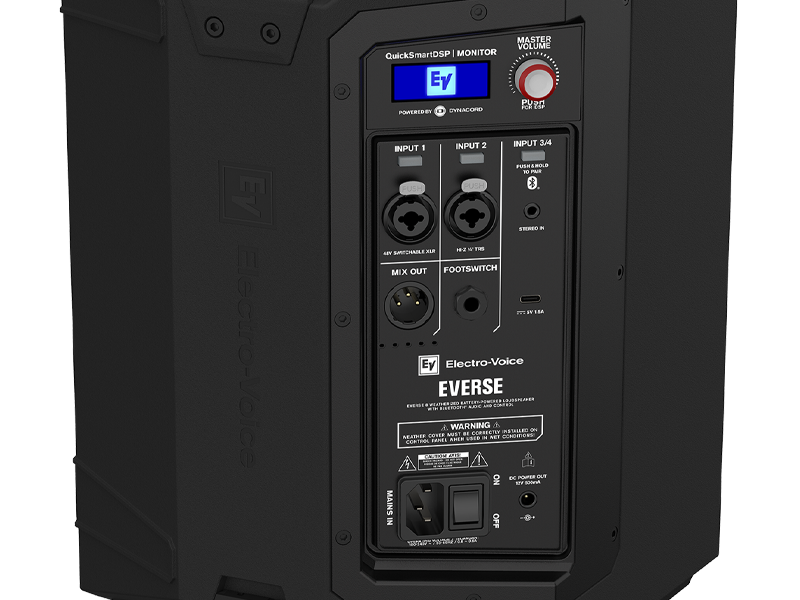
Figure 2.1: Rear panel of the EVERSE 8, showing power input and various audio connections.
2.4 ตัวเลือกการจัดวาง
The EVERSE 8 offers flexible placement options to suit various applications:
- ขาตั้งกล้อง: For a longer throw and wider coverage, mount the EVERSE 8 on a standard speaker tripod using the integrated pole mount socket on the bottom.
- Stage Wedge: Place the loudspeaker long-side down at a 55° monitor angle for use as a stagอี มอนิเตอร์
- Kick-back Angle: Use the 30° kick-back angle when placing the unit upright on the floor to project sound upwards from the performance area.

รูปที่ 2.2: ด้านล่าง view of the EVERSE 8, highlighting the integrated pole mount for tripod use.

Figure 2.3: The EVERSE 8 can be positioned at a kick-back angle for upward sound projection.
2.5 การเชื่อมต่อแหล่งเสียง
The EVERSE 8 features a versatile input panel:
- อินพุต 1 & 2: Combo XLR/TRS jacks for microphones or line-level instruments. Input 1 offers 48V switchable phantom power for condenser microphones. Input 2 is Hi-Z compatible for direct instrument connection.
- Input 3/4: Stereo 3.5mm input for connecting external audio devices.
- บลูทูธ: สำหรับการสตรีมเสียงแบบไร้สายจากอุปกรณ์ที่รองรับ
2.6 การจับคู่บลูทูธ
วิธีเชื่อมต่ออุปกรณ์บลูทูธเพื่อสตรีมเสียง:
- Press and hold the Bluetooth pairing button on the Input 3/4 section of the rear panel until the Bluetooth indicator flashes.
- On your mobile device, search for "EVERSE 8" in the Bluetooth settings and select it to pair.
- Once paired, the indicator will glow solid blue.
For true wireless stereo (TWS) streaming with a second EVERSE 8 unit, refer to the detailed instructions in the QuickSmart Mobile app or the full user manual.
รูปที่ 2.4: รายละเอียด view of the EVERSE 8 control panel, showing inputs and Bluetooth pairing button.
3. ปฏิบัติการ
3.1 QuickSmartDSP and Master Volume
The EVERSE 8 features an integrated QuickSmartDSP module, developed in collaboration with Dynacord, providing professional-grade audio processing. The Master Volume knob controls the overall output level of the loudspeaker. Push the knob to access and navigate the DSP menu for advanced settings.
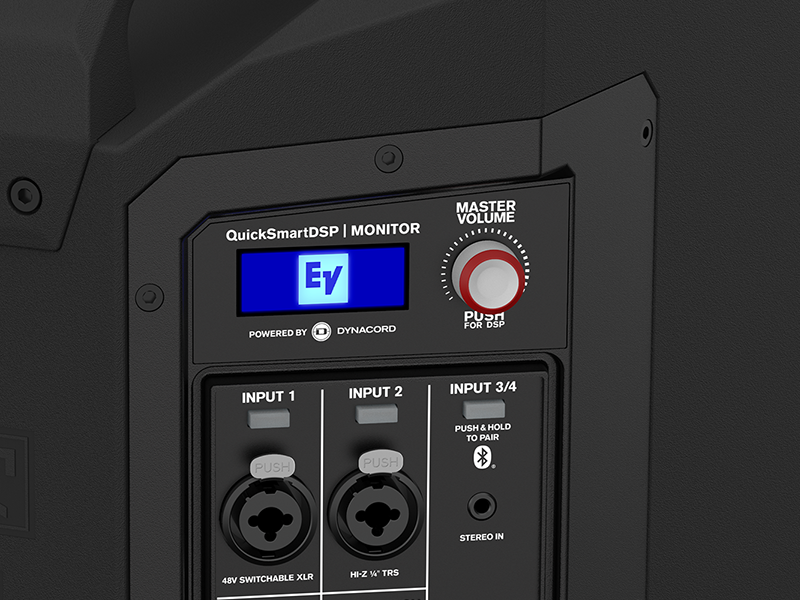
Figure 3.1: The QuickSmartDSP display and Master Volume knob for comprehensive control.
3.2 Input Controls and Features
- อัตราขยายอินพุต: Adjust the gain for each input channel using the dedicated controls on the rear panel or via the QuickSmart Mobile app.
- ผสมออก: An XLR output allows you to send the mixed audio signal to another EVERSE 8 unit or an external mixer.
- ฟุตสวิตช์: Connect an optional footswitch for remote control of certain DSP functions (e.g., effects mute).
- DC Power Out: A 12V DC port provides convenient power for wireless microphone systems, eliminating the need for separate power supplies.
- การชาร์จ USB: A charging port is included for mobile devices, allowing you to top up your phone or tablet while streaming.
3.3 ฟังก์ชัน DSP
The QuickSmartDSP offers a range of professional features:
- EQ: Built-in four-channel digital mixer with studio-quality effects and processing. Adjust equalization for each input to tailor the sound to your environment and source.
- ผลกระทบ: Access a variety of studio-quality effects to enhance vocals and instruments.
- ระบบระงับเสียงสะท้อนอัตโนมัติ (AFS): This feature automatically detects and eliminates feedback, ensuring clear and stable audio.
- การลดระดับเสียงเพลง: Automatically lowers the music volume when a microphone signal is detected, ideal for announcements or spoken word over background music.
3.4 QuickSmart Mobile App
For best-in-class control and streaming, download the QuickSmart Mobile app for iOS and Android devices. The app provides comprehensive control over all audio, effects, and mix functions of your EVERSE 8 from your smartphone or tablet.

Figure 3.2: Control your EVERSE 8 wirelessly using the QuickSmart Mobile app.
4. การบำรุงรักษา
4.1 การดูแลและจัดเก็บแบตเตอรี่
To maximize the lifespan of your Li-ion battery pack:
- หลีกเลี่ยงการปล่อยแบตเตอรี่จนหมดบ่อยครั้ง
- หากต้องการเก็บรักษาในระยะยาว ควรชาร์จแบตเตอรี่ให้เหลือประมาณ 50% และเก็บไว้ในที่แห้งและเย็น
- The battery pack is designed for easy removal with tool-free screws, allowing for convenient replacement if needed.
4.2 การทำความสะอาด
The EVERSE 8 features an IP43-rated weatherized design, making it resistant to splashes and light rain. To clean the unit:
- ใช้แบบนุ่มๆamp cloth to wipe down the polypropylene enclosure.
- ห้ามใช้น้ำยาทำความสะอาดที่มีฤทธิ์กัดกร่อนหรือตัวทำละลาย
- Ensure the weatherized input cover is properly installed when using the unit in wet conditions to maintain its IP43 rating.

Figure 4.1: The EVERSE 8 is designed to withstand light rain and splashes.
5 การแก้ไขปัญหา
This section addresses common issues you might encounter with your EVERSE 8 loudspeaker. For more detailed troubleshooting, refer to the QuickSmart Mobile app or the comprehensive user manual available on the Electro-Voice webเว็บไซต์.
5.1 ไม่มีเสียงออก
- พลัง: Ensure the unit is powered on and the battery is charged or connected to AC power.
- ปริมาณ: Check the Master Volume knob and individual input gain controls.
- การเชื่อมต่ออินพุต: Verify that audio sources are correctly connected to the appropriate inputs (XLR, TRS, 3.5mm, or Bluetooth).
- ปิดเสียง: Check if any channels or the master output are muted via the DSP or QuickSmart Mobile app.
5.2 ปัญหาการเชื่อมต่อบลูทูธ
- โหมดจับคู่: Ensure the EVERSE 8 is in Bluetooth pairing mode (flashing indicator).
- การมองเห็นอุปกรณ์: Make sure your mobile device's Bluetooth is enabled and visible.
- ระยะทาง: Keep the Bluetooth device within range (typically up to 30 feet/10 meters).
- การรบกวน: ย้ายออกห่างจากอุปกรณ์ไร้สายอื่นๆ ที่อาจก่อให้เกิดการรบกวน
5.3 Feedback (Squealing Sound)
- ตำแหน่งการวางไมโครโฟน: Reposition microphones further away from the loudspeaker or behind it.
- Gain Reduction: Lower the gain of the input channel connected to the microphone.
- ระบบระงับเสียงสะท้อนอัตโนมัติ (AFS): Ensure the AFS feature is enabled and configured correctly via the DSP or QuickSmart Mobile app.
6. ข้อมูลจำเพาะ
The following table outlines the key specifications for the Electro-Voice EVERSE 8 Loudspeaker:
| คุณสมบัติ | ข้อมูลจำเพาะ |
|---|---|
| ยี่ห้อ | อิเล็คโทร-วอยซ์ |
| ชื่อรุ่น | F.01U.399.423 (ELE EVERSE8US) |
| ประเภทลำโพง | เฝ้าสังเกต |
| คุณสมบัติพิเศษ | Portable, Weatherized (IP43) |
| การใช้ที่แนะนำ | For Music Players, Live Sound, Events |
| อุปกรณ์ที่รองรับ | Smartphone, Microphones, Instruments |
| เส้นผ่านศูนย์กลางวูฟเฟอร์ | 8 นิ้ว |
| เส้นผ่านศูนย์กลางทวีตเตอร์ | 1 นิ้ว |
| จำนวนหน่วย | 1.0 จำนวน |
| ประเภทตัวควบคุม | App Control, Voice Control (via app) |
| การกำหนดค่าช่องเสียงรอบทิศทาง | 2.0 (Stereo via Bluetooth TWS) |
| สี | สีดำ |
| อายุการใช้งานแบตเตอรี่ | นานถึง 12 ชั่วโมง |
| ส่วนประกอบที่รวมอยู่ | Power Cable, Battery Pack, Weatherized Input Cover, User Manual |
| ขนาดสินค้า | ลึก 19 นิ้ว x กว้าง 14 นิ้ว x สูง 15 นิ้ว |
| น้ำหนักสินค้า | 10.5 กิโลกรัม (23.1 ปอนด์) |
| วัสดุ | โพลีโพรพีลีน |
| แหล่งพลังงาน | ใช้พลังงานจากแบตเตอรี่ |
| เทคโนโลยีการเชื่อมต่อ | บลูทูธ |
| โหมดเอาต์พุตเสียง | Stereo (Bluetooth) |
| ประเภทการติดตั้ง | Freestanding, Pole Mount |
| ยูพีซี | 800549612746 |

Figure 6.1: Physical dimensions of the EVERSE 8 loudspeaker.
7. ข้อมูลการรับประกัน
The Electro-Voice EVERSE 8 Loudspeaker comes with a limited warranty. For specific terms, conditions, and registration details, please refer to the warranty card included with your product or visit the official Electro-Voice webไซต์นี้ โปรดเก็บหลักฐานการซื้อไว้เพื่อใช้ยืนยันการรับประกัน
8. การสนับสนุน
For further assistance, technical support, or to download the latest version of the QuickSmart Mobile app, please visit the official Electro-Voice support webไซต์ คุณยังสามารถค้นหาแหล่งข้อมูลเพิ่มเติม คำถามที่พบบ่อย และข้อมูลติดต่อฝ่ายบริการลูกค้าได้ที่นั่น
อิเล็กโทร-วอยซ์ อย่างเป็นทางการ Webเว็บไซต์: www.electrovoice.com