
1. บทนำ
Thank you for choosing the DELLA Umbra Series 9000 BTU WiFi Mini Split AC with Heat Pump. This manual provides essential information for the safe and efficient operation, installation, and maintenance of your unit. Please read this manual thoroughly before installation and use, and retain it for future reference.
ข้อมูลด้านความปลอดภัยที่สำคัญ
This appliance is designed for professional installation only. Attempting DIY installation without proper qualifications may result in injury, property damage, or voiding the warranty. Always consult a qualified HVAC technician for installation and complex maintenance tasks.
- ตรวจสอบให้แน่ใจว่าแหล่งจ่ายไฟตรงตามข้อกำหนดของเครื่อง
- ห้ามปิดกั้นช่องรับหรือช่องระบายอากาศ
- ให้เด็กและสัตว์เลี้ยงอยู่ห่างจากเครื่องภายนอก
- Turn off power before any maintenance or cleaning.
- Use only specified refrigerants (R32).
2. สินค้าหมดview
The DELLA Umbra Series Mini Split AC is an energy-efficient system designed for cooling and heating spaces up to 450 sq.ft. It features WiFi connectivity, Alexa compatibility, and a heat pump for year-round comfort.
คุณสมบัติหลัก:
- ประหยัดพลังงาน: 19 SEER2 rating with DC Inverter technology for up to 30% power savings.
- ฟังก์ชั่นอัจฉริยะ: 4D airflow (up-down, left-right), I Feel mode, 24-hour timer, sleep mode, eco energy-saving mode, multiple fan speeds, turbo function.
- เซ็นเซอร์อัจฉริยะ: Remote control senses room temperature for optimal comfort and energy savings.
- การทำงานที่เงียบ: ทำงานเงียบสนิทที่ระดับเสียงเพียง 42 เดซิเบล
- ครอบคลุมพื้นที่กว้าง: Cools and heats up to 450 sq.ft, operating in temperatures as low as 19°F.
- สารทำความเย็น R32: ใช้สารทำความเย็น R32 ที่เป็นมิตรต่อสิ่งแวดล้อม
Components Diagram:

Figure 2.1: Main components included with the DELLA Umbra Series Mini Split AC.
ผลิตภัณฑ์ View:

Figure 2.2: DELLA Umbra Series 9000 BTU WiFi Mini Split AC.
3. การตั้งค่าและการติดตั้ง
Professional installation is mandatory for this system. This is not a DIY mini split AC. Line-set vacuuming is required during installation. Any alteration of line-set length requires adjusting freon levels. Please consult a qualified HVAC professional for proper installation to ensure safety and optimal performance.
การติดตั้งเสร็จสิ้นview วีดีโอ:
Video 3.1: General guidance on installing your DELLA Mini Split AC unit. This video is for informational purposes only; professional installation is required.
Key Installation Steps (Summary):
- ทำเครื่องหมายสถานที่: Use the provided template to mark the locations for the line set wall hole and the mini split bracket.
- ตัวยึด: Securely attach the mini split bracket to the wall using the provided screws. Ensure the bracket is properly leveled.
- Routing Lines: Route the line set, drain hose, and electrical wiring through the wall opening.
- การติดตั้งชุดภายในอาคาร: Securely mount the indoor mini split unit onto the bracket.
- Taping Lines: ใช้เทปพันท่อระบายน้ำและชุดท่อต่างๆ เข้าด้วยกันเพื่อให้การติดตั้งดูเรียบร้อยและเป็นระเบียบ
- Securing Electrical Wires: ใช้เคเบิลไทร์รัดสายไฟให้แน่นรอบท่อที่พันเทปไว้และท่อระบายน้ำ
- Positioning Outdoor Condenser: Place the outdoor condenser unit in its designated location.
- Connecting Line Set: Connect the unit line set to the condenser line set and tighten down firmly. Use a digital torque wrench if available to ensure proper tightening according to specifications.
- การเชื่อมต่อไฟฟ้า: Connect the electrical wires (red, black, green ground) to their corresponding terminals on the condenser unit. Each wire is designated with a specific letter and number.
- การดูดฝุ่นระบบ: Connect a vacuum pump to the system via a gauge. Open the valves on the gauge and activate the vacuum. Monitor the micron reading closely and close the valves once it reaches 350 microns. Turn off the vacuum pump.
- การฟื้นฟูพลัง: Restore power to the outdoor unit.
- Initiating Cooling: Turn on the mini split unit and set it to the lowest cold setting. Allow a few minutes for the outdoor condenser fan to initiate.
- การเปิดวาล์ว: Gradually open the high side (top) valve using a service wrench. Monitor the gauge as readings will decrease into the negative range. After the high side valve is open, promptly open the low side (bottom) valve. Monitor the gauge closely as the readings will increase, which is expected.
Your DELLA mini split unit installation is complete once these steps are followed and the unit is operating correctly.
การติดตั้งเบื้องต้นview วีดีโอ:
วิดีโอ 3.2: บทนำสั้น ๆview of the DELLA Mini Split AC installation process, highlighting key steps.
4. คู่มือการใช้งาน
Your DELLA Umbra Series Mini Split AC can be controlled via the included remote control, the Della+ mobile app, or voice commands through Alexa.
รีโมทคอนโทรล:

Figure 4.1: DELLA Mini Split AC Remote Control.
Use the remote control to adjust temperature, select operating modes, set fan speed, and activate special functions like Sleep Mode or Turbo. Refer to the remote control's specific instructions for detailed button functions.
Della+ Mobile App:
The Della+ app allows you to control your unit remotely, set schedules, and utilize smart features like Geo-Location.
Video 4.2: Learn how to set up and customize Geo-Location using the Della+ App for smart AC controls.
วิดีโอ 4.3: บทนำสั้น ๆview demonstrating the features and interface of the Della+ App.

Figure 4.2: Della+ App Interface.
- ดาวน์โหลด: ค้นหา "Della+" in your mobile app store.
- การจับคู่: Follow the in-app instructions to pair your device with the AC unit.
- โหมด: Select from Cool, Heat, Dry (dehumidify), Fan Only, or ECO mode.
- ความเร็วพัดลม: Adjust fan speed from Quiet, Low, Mid, High, to Turbo.
- การไหลเวียนของอากาศ: Control vertical and horizontal oscillation for optimal air distribution.
- การกำหนดเวลาและตัวจับเวลา: Set weekly schedules or countdown timers for automatic operation.
- Geo-Location: Configure automatic AC control based on your location.
การควบคุมด้วยเสียง (Alexa):
The unit seamlessly integrates with Amazon Alexa for convenient voice control. Ensure your Della+ app is linked to your Alexa account.

Figure 4.3: Voice Control Compatibility with Alexa.
5. การบำรุงรักษา
Regular maintenance ensures optimal performance and longevity of your DELLA Mini Split AC unit. Always disconnect power before performing any maintenance.
การทำความสะอาดตัวกรอง:
The indoor unit features washable air filters. Clean them every two weeks or more frequently depending on usage and air quality.
- เปิดแผงด้านหน้าของตัวเครื่องภายใน
- ถอดตัวกรองอากาศออก
- ล้างตัวกรองด้วยน้ำอุ่นและผงซักฟอกอ่อนๆ
- ล้างให้สะอาดและปล่อยให้แห้งสนิทก่อนนำกลับมาใส่ใหม่
- ปิดแผงด้านหน้า
การทำความสะอาดตัวเครื่องภายใน:
เช็ดพื้นผิวของตัวเครื่องภายในด้วยผ้าเนื้อนุ่มและแห้งamp cloth. Do not use harsh chemicals or abrasive cleaners. The unit also features PureClean tech to prevent dust buildup and defrost the indoor unit, contributing to cleaner air.
รูปที่ 5.1: ภายใน view of the indoor unit highlighting PureClean technology.
การทำความสะอาดยูนิตภายนอก:
Periodically clean the outdoor unit's coils and fins to remove dirt, leaves, and debris. Use a soft brush or vacuum cleaner. Ensure the area around the outdoor unit is clear of obstructions for proper airflow.

Figure 5.2: Outdoor unit with gold-plated fins for corrosion prevention.
6 การแก้ไขปัญหา
ก่อนติดต่อฝ่ายสนับสนุนลูกค้า โปรดตรวจสอบอีกครั้งview ปัญหาและวิธีแก้ไขทั่วไปต่อไปนี้:
| ปัญหา | สาเหตุที่เป็นไปได้ | สารละลาย |
|---|---|---|
| เครื่องไม่เริ่มทำงาน | ไม่มีไฟฟ้า เบรกเกอร์สะดุด แบตเตอรี่รีโมทคอนโทรลเหลือน้อย | ตรวจสอบแหล่งจ่ายไฟ รีเซ็ตเบรกเกอร์วงจร เปลี่ยนแบตเตอรี่รีโมท |
| การทำความเย็น/ทำความร้อนไม่เพียงพอ | แผ่นกรองอากาศสกปรก, ชุดภายนอกอุดตัน, การตั้งค่าโหมดไม่ถูกต้อง, สารทำความเย็นเหลือน้อย | Clean air filters, clear obstructions from outdoor unit, select correct mode, contact professional for refrigerant check. |
| มีเสียงผิดปกติจากตัวเครื่อง | ชิ้นส่วนหลวม พัดลมอุดตัน เสียงการทำงานปกติ (เช่น การไหลของสารทำความเย็น) | Check for loose parts or obstructions. If noise persists or is unusual, contact support. |
| น้ำรั่วจากตัวเครื่องภายใน | ท่อระบายน้ำอุดตัน มุมการติดตั้งไม่เหมาะสม | Check and clear drain hose. If issue persists, professional re-installation may be needed. |
| รีโมทคอนโทรลไม่ทำงาน | แบตเตอรี่หมด รีโมทอยู่นอกระยะ สัญญาณถูกกีดขวาง | Replace batteries, ensure clear line of sight to indoor unit, operate within range. |
For issues not listed here or if solutions do not resolve the problem, please contact DELLA customer support.
7. ข้อมูลจำเพาะ
| คุณสมบัติ | รายละเอียด |
|---|---|
| หมายเลขรุ่น | 9K1VR-19S-JPB-I+O |
| ขนาด | 9,000 BTU - 115V -- 19 SEER2 |
| ความสามารถในการทำความเย็น | 9000 บีทียู/ชม. |
| ความสามารถในการให้ความร้อน | 10000 บีทียู/ชม. |
| แหล่งจ่ายไฟ | 115V~/60Hz/1PH |
| กำลังไฟฟ้าเข้าสูงสุด | 1200 วัตต์ |
| ปริมาณการไหลของอากาศ | 560 ม³/ชม. |
| สูงสุด ขนาดฟิวส์ | 20เอ |
| ระดับเสียง | 42 เดซิเบล |
| ขนาดสินค้า | 31.18 x 7.91 x 11.5 นิ้ว |
| น้ำหนักสินค้า | 58.6 ปอนด์ |
| คุณสมบัติพิเศษ | Alexa and WiFi Enabled, DeHumidifier, Fast Cooling and Heating, Remote Control |
| ประเภทสารทำความเย็น | R32 |

รูปที่ 7.1: ขนาดผลิตภัณฑ์
8. การรับประกันและการสนับสนุน
DELLA is committed to providing high-quality products and excellent customer service.
การรับประกันตลอดอายุการใช้งานแบบจำกัด:
Your DELLA Umbra Series Mini Split AC comes with a limited lifetime warranty, offering peace of mind against manufacturing defects. This warranty is designed to cover the product for its expected lifespan under normal use and service. Please refer to the warranty card included with your product for full terms and conditions.

Figure 8.1: DELLA Lifetime Coverage.
การสนับสนุนลูกค้า:
Our dedicated customer support team is available to assist you with any questions or concerns regarding your DELLA product.
- การสนับสนุนทางโทรศัพท์: Available Monday - Friday, 6 AM - 4 PM PST.
- แชทสด: 24/7 support for immediate assistance.
Please have your model number (9K1VR-19S-JPB-I+O) and purchase information ready when contacting support.
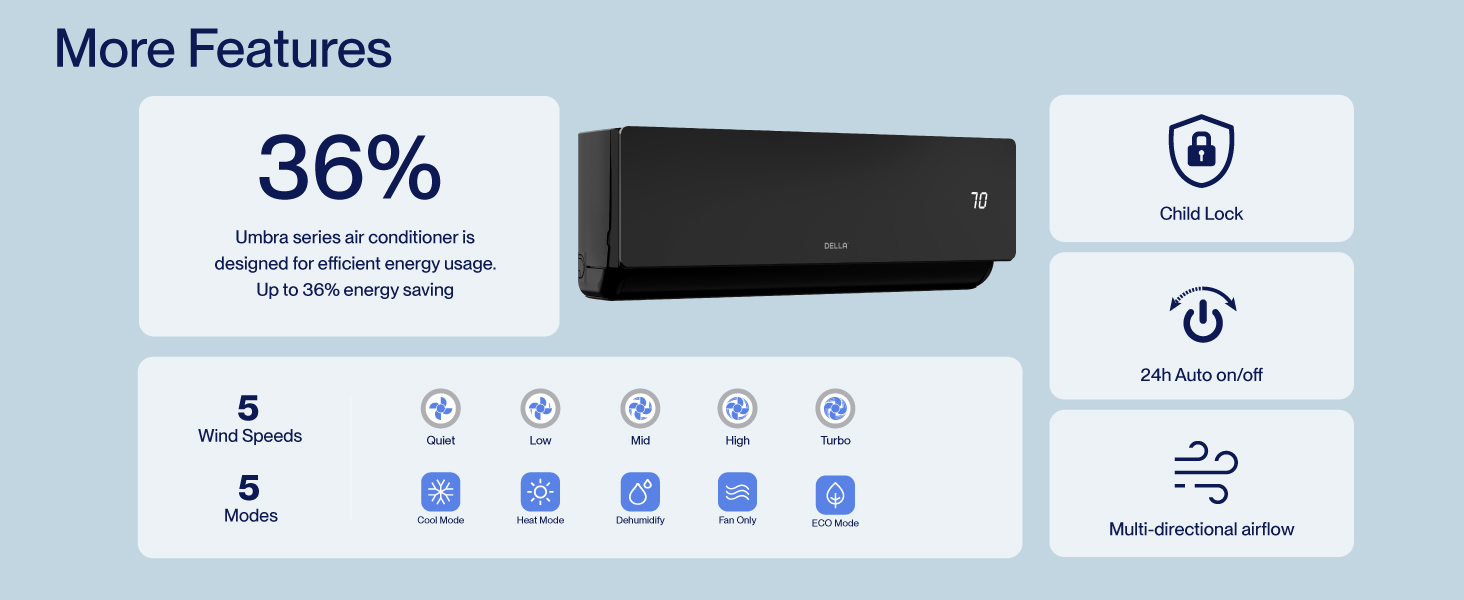
Figure 8.2: DELLA Customer Support Options.