
การแนะนำ
This manual provides detailed instructions for the VEDINDUST HDMI ARC Digital to Analog Audio Converter. This device is designed to extract audio from an HDMI ARC-enabled television and convert digital audio signals (Toslink/Coaxial) into analog L/R stereo or 3.5mm jack outputs. It supports various audio formats and offers multiple input options for versatile connectivity.
Please read this manual carefully before using the product to ensure proper operation and to maximize its performance.
เนื้อหาแพ็คเกจ
โปรดตรวจสอบว่าสินค้าทั้งหมดมีอยู่ในแพ็คเกจ:
- 1x VEDINDUST HDMI ARC Digital to Analog Audio Converter
- 1x สายไฟ USB
- สาย HDMI 1x
- 1x คู่มือผู้ใช้

สินค้าเกินview
The VEDINDUST HDMI ARC Digital to Analog Audio Converter is a compact device designed to manage various audio signals. It features multiple input and output ports for flexible audio routing.
การจัดวางอุปกรณ์
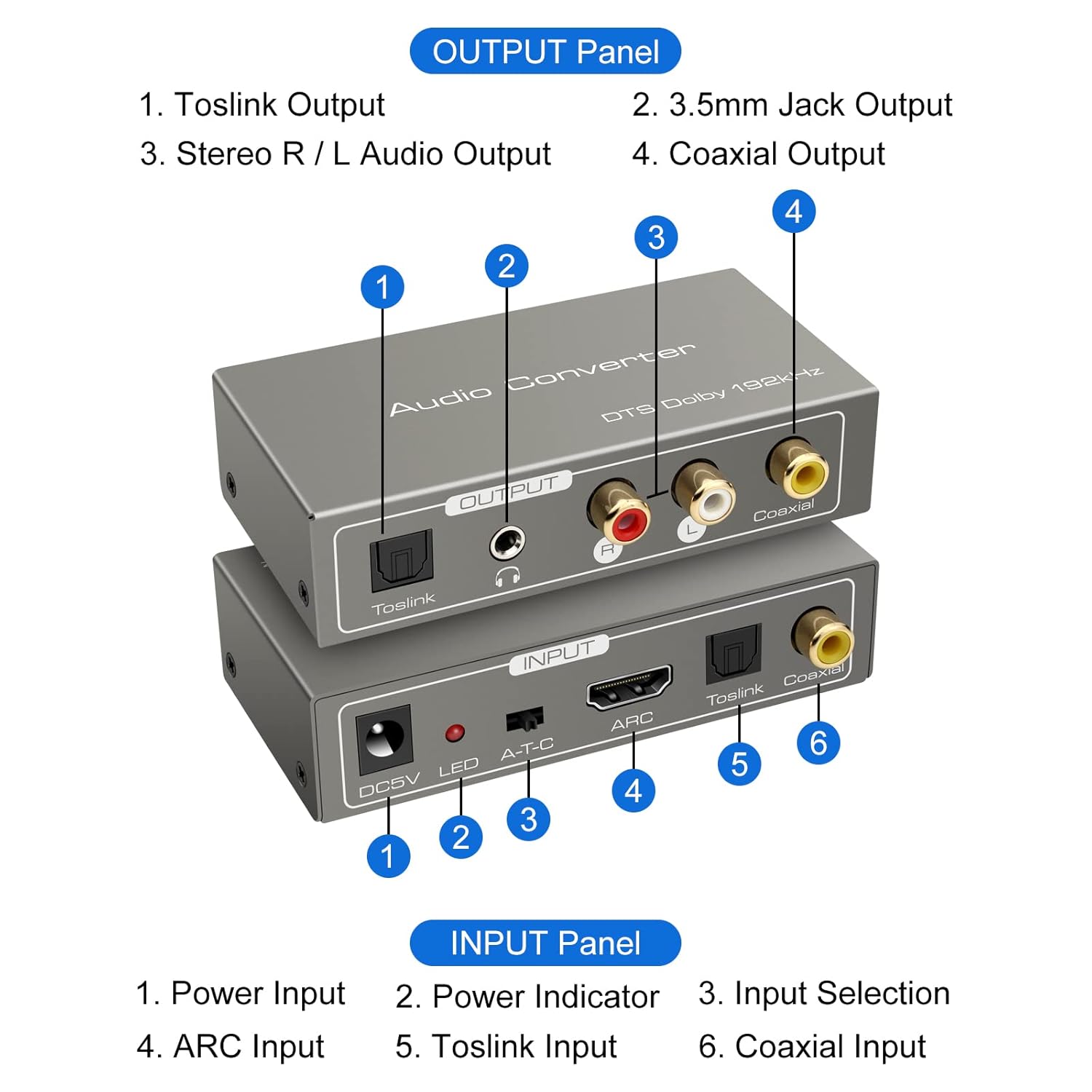
แผงป้อนข้อมูล:
- กำลังไฟเข้า DC5V: Connect the provided USB power cable here.
- ไฟแสดงสถานะ LED: ไฟจะสว่างขึ้นเมื่อเปิดใช้งานอุปกรณ์
- A-T-C Input Selection Switch: Used to select the audio input mode (A for ARC, T for Toslink, C for Coaxial).
- อินพุต ARC: Connect an HDMI cable from an ARC-compatible TV's HDMI ARC port.
- อินพุต Toslink: Connect an optical fiber cable from your audio source.
- อินพุตโคแอกเชียล: Connect a coaxial cable from your audio source.
Output Panel:
- เอาต์พุต Toslink: Connect to an optical input on an amplifier หรือระบบเสียง
- 3.5mm Jack Output: Connect to headphones or an auxiliary input on an audio device.
- Stereo R/L Audio Output: Connect RCA cables to the L/R analog inputs of an amplifier หรือลำโพง
- เอาต์พุตโคแอกเชียล: Connect to a coaxial input on an amplifier หรือระบบเสียง
คำแนะนำการตั้งค่า
Follow these steps to correctly set up your VEDINDUST audio converter:
1. การเชื่อมต่อไฟฟ้า
- Connect the provided USB power cable to the DC5V input port on the converter.
- Plug the other end of the USB power cable into a 5V USB power adapter (not included) or a USB port on your TV/device.
- Ensure the LED indicator on the converter illuminates, indicating it is powered on.
2. การเชื่อมต่ออินพุตเสียง
เลือกวิธีการป้อนข้อมูลอย่างใดอย่างหนึ่งต่อไปนี้ตามแหล่งที่มาของเสียงของคุณ:

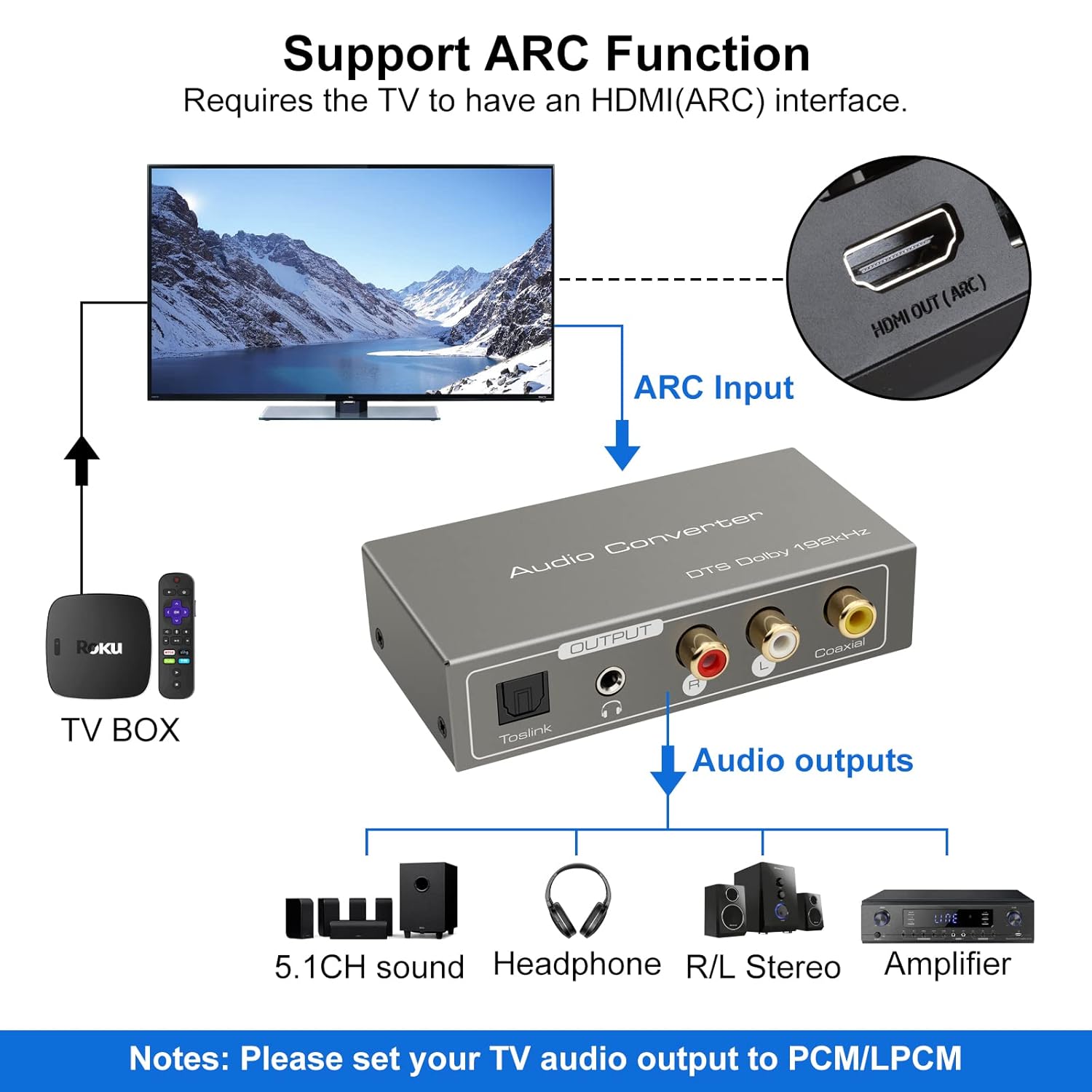
ARC Input Mode:
- Connect an HDMI cable from your ARC-compatible television's HDMI ARC output port to the ARC input port on the converter.
- Ensure your television's HDMI port supports ARC functionality.

TOSLink Input Mode:
- Connect an optical fiber cable from your audio source (e.g., game console, Blu-ray player) to the Toslink input port on the converter.
Coaxial Input Mode:
- Connect a coaxial cable from your audio source to the Coaxial input port on the converter.
3. ช่องต่อสัญญาณเสียงออก
Connect the converter's output ports to your desired audio receiving devices:
- For Digital Audio: Connect an optical fiber cable to the Toslink Output or a coaxial cable to the Coaxial Output, then connect to your amplifier, soundbar, or home cinema system.
- For Analog Audio: Connect RCA L/R cables to the Stereo R/L Audio Output, or a 3.5mm audio cable to the 3.5mm Jack Output. Connect these to your amplifier, speakers, or headphones.
คำแนะนำการใช้งาน
1. การเลือกโหมดอินพุต
Use the A-T-C switch on the input panel to select the active audio input:
- ตั้งสวิตช์ไปที่ 'A' for HDMI ARC input.
- ตั้งสวิตช์ไปที่ 'ที' for TOSLink optical input.
- ตั้งสวิตช์ไปที่ 'C' for Coaxial input.

2. Audio Format Configuration
For optimal performance and to ensure audio output, especially when using the R/L or 3.5mm jack outputs, it is crucial to configure the audio format on your source device (e.g., TV, game console).
- สำคัญ: If you experience no sound output, set the audio format of your signal source (e.g., TV audio settings) to พีซีเอ็ม or แอล.พี.ซี.เอ็ม.
- The converter supports DTS / DSD / LPCM formats for Toslink/Coaxial output. However, for R/L or 3.5mm jack outputs, only LPCM/PCM audio format input is supported.
การแก้ไขปัญหา
If you encounter issues while using the VEDINDUST HDMI ARC Digital to Analog Audio Converter, please refer to the following common problems and solutions:
-
ไม่มีเสียงออก:
- Ensure the converter is properly powered via the DC5V input and the LED indicator is on.
- Verify that the A-T-C input selection switch is set to the correct input mode (A for ARC, T for Toslink, C for Coaxial).
- Check the audio settings on your source device (TV, game console, etc.). The audio output format must be set to พีซีเอ็ม or แอล.พี.ซี.เอ็ม, especially for analog (RCA L/R or 3.5mm) outputs.
- Confirm that all audio cables (HDMI, optical, coaxial, RCA, 3.5mm) are securely connected to both the converter and your audio devices.
- Test with different audio cables if possible, to rule out faulty cables.
-
ฟังก์ชัน ARC ใช้งานไม่ได้:
- Ensure your television's HDMI port specifically supports Audio Return Channel (ARC). Not all HDMI ports are ARC-enabled.
- Check your TV's audio settings to ensure ARC is enabled and configured correctly.
- Try restarting both your TV and the converter.
-
คุณภาพเสียงไม่ดี:
- ตรวจสอบให้แน่ใจว่าการเชื่อมต่อทั้งหมดแน่นหนาและปราศจากสิ่งกีดขวาง
- Verify that the audio format from your source is compatible with the converter's outputs (LPCM/PCM for analog outputs).
- Avoid using excessively long or low-quality cables, which can degrade signal integrity.
ข้อมูลจำเพาะทางเทคนิค
| ขนาดสินค้า (กว้าง x ยาว x สูง) | 9.8 x 5 x 0.1 ซม. |
| น้ำหนัก | 250 กรัม |
| ผู้ผลิต | ความมั่นใจ |
| หมายเลขรุ่น | 20220119 |
| ประเทศต้นกำเนิด | จีน |
| สี | สีเทา |
| ประเภทขั้วต่อ | HDMI, 3.5mm Jack, Toslink, Coaxial |
| อุปกรณ์ที่รองรับ | Game Console, Blu-ray Player, Television, DVD Player, Satellite Receiver, Apple TV, HDTV, Soundbar, Amplifier, Speakers, Home Cinema System, AV Ampชีวิต |
| ประเภทสายเคเบิล | HDMI, Optical, Coaxial, Auxiliary |
| จำนวนพอร์ต | 5 |
| ยูพีซี | 798610310694 |
| รองรับ Sampความถี่ลิง | 32 KHz, 44.1 KHz, 48 KHz, 96 KHz, 192 KHz (24-bit) |
| Supported Audio Formats (Digital Output) | DTS, Dolby-AC3, DSD, LPCM |
| Supported Audio Formats (Analog Output) | LPCM, PCM |
การดูแลรักษา
To ensure the longevity and optimal performance of your VEDINDUST audio converter, please follow these care guidelines:
- การทำความสะอาด: Use a soft, dry cloth to clean the device. Do not use liquid cleaners or aerosol sprays, as they may damage the unit.
- พื้นที่จัดเก็บ: เก็บอุปกรณ์ไว้ในที่แห้งและเย็น หลีกเลี่ยงแสงแดดโดยตรงและอุณหภูมิที่สูงหรือต่ำเกินไป
- การจัดการ: หลีกเลี่ยงการทำอุปกรณ์หล่นหรือกระแทกอย่างรุนแรง
- สิ่งแวดล้อม: ควรเก็บอุปกรณ์ให้ห่างจากน้ำ ความชื้น และสภาพแวดล้อมที่มีความชื้นสูง
การรับประกันและการสนับสนุนลูกค้า
For warranty information or if you require further assistance with your VEDINDUST HDMI ARC Digital to Analog Audio Converter, please contact VEDINDUST customer support through the retailer where you purchased the product or refer to the contact information provided with your purchase documentation.
โปรดเก็บหลักฐานการซื้อไว้เพื่อใช้ในกรณีเรียกร้องการรับประกัน