
การแนะนำ
This manual provides detailed instructions for the Onten USB 3.0 to HDMI/VGA Display Adapter, Model 5201b. This adapter allows you to connect your computer or laptop to external displays using either HDMI or VGA ports, supporting simultaneous output to two screens. Please read this manual carefully before using the product to ensure proper operation and to maximize its performance.
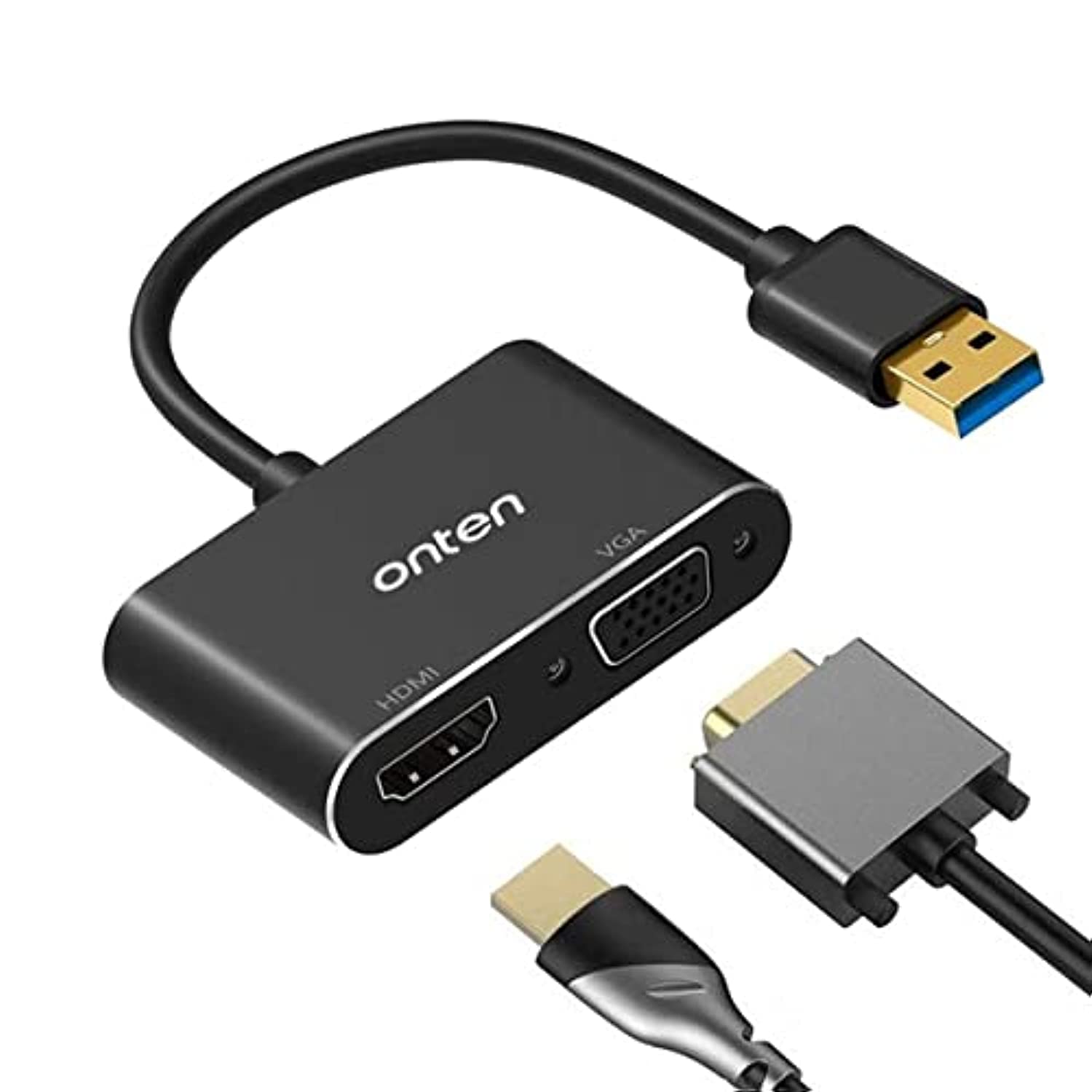
Image: The Onten USB 3.0 to HDMI/VGA Display Adapter, showing its USB 3.0 input and HDMI/VGA outputs.
ข้อมูลด้านความปลอดภัย
- เก็บอุปกรณ์ให้ห่างจากน้ำ ไฟ และอุณหภูมิสูง
- อย่าพยายามถอดประกอบหรือซ่อมแซมอุปกรณ์ด้วยตนเอง โปรดติดต่อช่างผู้ชำนาญการ
- ใช้กับอุปกรณ์และสายเคเบิลที่เข้ากันได้ตามที่ระบุไว้ในคู่มือนี้เท่านั้น
- หลีกเลี่ยงการทำอุปกรณ์หล่นหรือกระแทกอย่างรุนแรง
เนื้อหาแพ็คเกจ
กรุณาตรวจสอบสิ่งของภายในบรรจุภัณฑ์เมื่อเปิดออกเพื่อให้แน่ใจว่ามีสินค้าครบทั้งหมด:
- 1 x Onten USB 3.0 to HDMI/VGA Display Adapter (Model 5201b)
- 1 x USB 3.0 Cable (removable)
- 1 x คู่มือผู้ใช้
การตั้งค่า
- Connect the USB 3.0 Cable: Attach the removable USB 3.0 cable to the adapter.
- เชื่อมต่อกับคอมพิวเตอร์: Plug the USB 3.0 end of the cable into an available USB 3.0 port on your Windows computer or laptop. For optimal performance and resolution (up to 1920x1080), a USB 3.0 port is highly recommended. Connecting to a USB 2.0 port will limit the resolution to 800x600.
- เชื่อมต่อจอแสดงผล:
- For HDMI display: Connect an HDMI cable from your display to the HDMI port on the adapter.
- For VGA display: Connect a VGA cable from your display to the VGA port on the adapter.
- การติดตั้งไดร์เวอร์: The adapter is designed for plug-and-play functionality on Windows 7, 8, and 10. The necessary drivers should install automatically. If prompted, follow the on-screen instructions. If the display does not activate, you may need to manually install drivers from the manufacturer's website (if available) or check your display settings.
คำแนะนำการใช้งาน
- ความเข้ากันได้: This adapter is compatible exclusively with Windows 7, Windows 8, and Windows 10 operating systems. It does ไม่ support Mac OS, Linux, Vista, or Chrome OS.
- เอาต์พุตพร้อมกัน: The adapter supports simultaneous output to both HDMI and VGA displays. Both external displays will mirror the image from your computer's primary display.
- ปณิธาน:
- When connected to a USB 3.0 port: Supports resolutions up to 1920x1080 (Full HD).
- When connected to a USB 2.0 port: Resolution is limited to 800x600.
- เอาต์พุตเสียง: The HDMI port transmits both video and audio. The VGA port also supports audio output. Ensure your display or connected audio system is configured correctly to receive audio.
- การตั้งค่าการแสดงผล: After connecting, you may need to adjust your display settings in Windows (e.g., 'Display settings' or 'Screen Resolution') to extend or duplicate your desktop, if not automatically detected.
การแก้ไขปัญหา
| ปัญหา | สาเหตุที่เป็นไปได้ | สารละลาย |
|---|---|---|
| No display or low resolution (800x600) | Adapter connected to a USB 2.0 port instead of USB 3.0. | Ensure the adapter is plugged into a USB 3.0 port on your computer. USB 3.0 ports are typically blue or marked with a 'SS' symbol. |
| ไม่มีภาพแสดงบนจอภาพภายนอก | Incorrect connection, incompatible operating system, or driver issue. | 1. Verify all cables are securely connected. 2. Confirm your computer runs Windows 7/8/10. 3. Check Windows display settings. 4. Restart your computer. |
| No audio from VGA display | Audio settings not configured, or display does not support audio input via VGA. | 1. Check your computer's sound output settings. 2. Ensure your VGA display or connected audio system is capable of receiving audio. |
| Adapter not recognized by computer | Driver installation failed or USB port issue. | 1. Try a different USB port. 2. Check Device Manager in Windows for any unrecognized devices and attempt to update drivers. |
ข้อมูลจำเพาะ
| คุณสมบัติ | รายละเอียด |
|---|---|
| แบบอย่าง | 5201ข |
| อินเตอร์เฟซการป้อนข้อมูล | ยูเอสบี 3.0 |
| อินเทอร์เฟซเอาท์พุต | hdmi, vga |
| ความละเอียดสูงสุด (USB 3.0) | ขนาด 1920x1080 |
| ความละเอียดสูงสุด (USB 2.0) | ขนาด 800x600 |
| ระบบปฏิบัติการที่รองรับ | วินโดว์ 7, วินโดว์ 8, วินโดว์ 10 |
| Incompatible Operating Systems | Mac OS, Linux, Vista, Chrome OS |
| เอาต์พุตพร้อมกัน | Yes (mirrored display) |
| แหล่งพลังงาน | USB Bus-powered (Plugless) |
| ประเภทการเสร็จสิ้น | ไม่มันเงา |
| ผู้ผลิต | ออนเท็น |
การซ่อมบำรุง
- Clean the adapter with a soft, dry cloth. Do not use liquid cleaners or aerosols.
- เก็บอะแดปเตอร์ไว้ในที่แห้งและเย็นเมื่อไม่ได้ใช้งาน
- ควรหลีกเลี่ยงการดัดหรือบิดสายเคเบิลมากเกินไปเพื่อป้องกันความเสียหาย
การรับประกันและการสนับสนุน
This Onten USB 3.0 to HDMI/VGA Display Adapter (Model 5201b) comes with a รับประกัน 1 ปี ตั้งแต่วันที่ซื้อ ครอบคลุมถึงข้อบกพร่องในการผลิต
For technical support, warranty claims, or any product-related inquiries, please do not hesitate to contact us via email. Refer to your purchase documentation for specific contact details or visit the official Onten support webเว็บไซต์.