
การแนะนำ
This manual provides essential information for the safe and effective use of your Vividia CT-6010 LCD/WiFi Flexible Two-Way Articulating Inspection Camera Borescope Videoscope. Please read these instructions carefully before operating the device and retain them for future reference.

Figure 1: Vividia CT-6010 Borescope main unit with flexible probe.
การตั้งค่า
1. การแกะกล่องและการระบุส่วนประกอบ
Carefully unpack all items from the packaging. Ensure all components are present and undamaged. The package typically includes:
- Vividia CT-6010 Main Unit with LCD Display
- Flexible Articulating Probe (6mm diameter, 1.0m length)
- อะแดปเตอร์ไฟฟ้า/เครื่องชาร์จ
- สาย USB
- กระเป๋าใส่อุปกรณ์
- สายสะพายไหล่

Figure 2: Contents of the Vividia CT-6010 package.
2. การชาร์จอุปกรณ์
Before first use, fully charge the device. Connect the power adapter to the ดีซี ใน port on the main unit and plug it into a power outlet. The charging indicator will show the charging status.
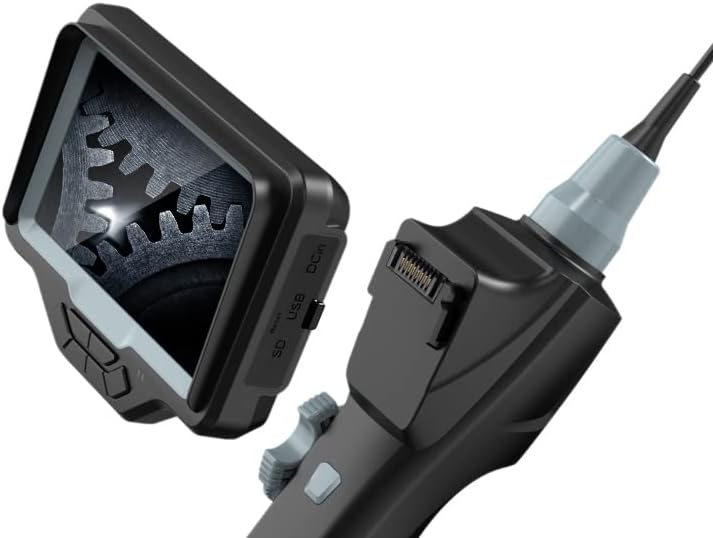
Figure 3: DC In port for charging, along with SD and USB ports.
3. การใส่การ์ด SD
To save photos and videos, insert a compatible Micro SD card (not included) into the SD card slot on the side of the main unit. Ensure the card is inserted correctly until it clicks into place.
4. การเปิด/ปิดเครื่อง
กดปุ่มค้างไว้ พลัง button located on the control panel to turn the device on or off. The LCD screen will illuminate upon startup.
5. WiFi Connection (Optional)
The CT-6010 features built-in WiFi for connecting to iPhone, iPad, or Android devices. Follow these steps:
- Turn on the CT-6010 device.
- Enable WiFi on your mobile device.
- ค้นหา the CT-6010's WiFi network (usually named 'Vividia_XXXX').
- Connect to the network using the provided password (refer to the device screen or a sticker on the unit).
- Open the dedicated Vividia app on your mobile device to view the live feed and control functions.

รูปที่ 4: อดีตample of WiFi connection to a mobile device.
คำแนะนำการใช้งาน
1. การควบคุมพื้นฐาน
The main unit features several buttons for operation:
- ปุ่มเปิด/ปิด: เปิด/ปิดอุปกรณ์
- ปุ่มตกลง: Confirms selections in the menu or captures media.
- ปุ่มเมนู: เข้าถึงการตั้งค่าอุปกรณ์
- ปุ่มไฟ (*): Adjusts the brightness of the LED lights on the probe tip.
- Photo/Video Capture Button: A dedicated button on the handle for quick photo or video recording.

Figure 5: Location of the Photo/Video Capture button.
2. Probe Articulation
The CT-6010 features a two-way articulating probe. Use the articulation knob on the handle to precisely control the bending direction of the probe tip. The probe can bend more than 180 degrees in two directions, allowing for comprehensive inspection of hard-to-reach areas.
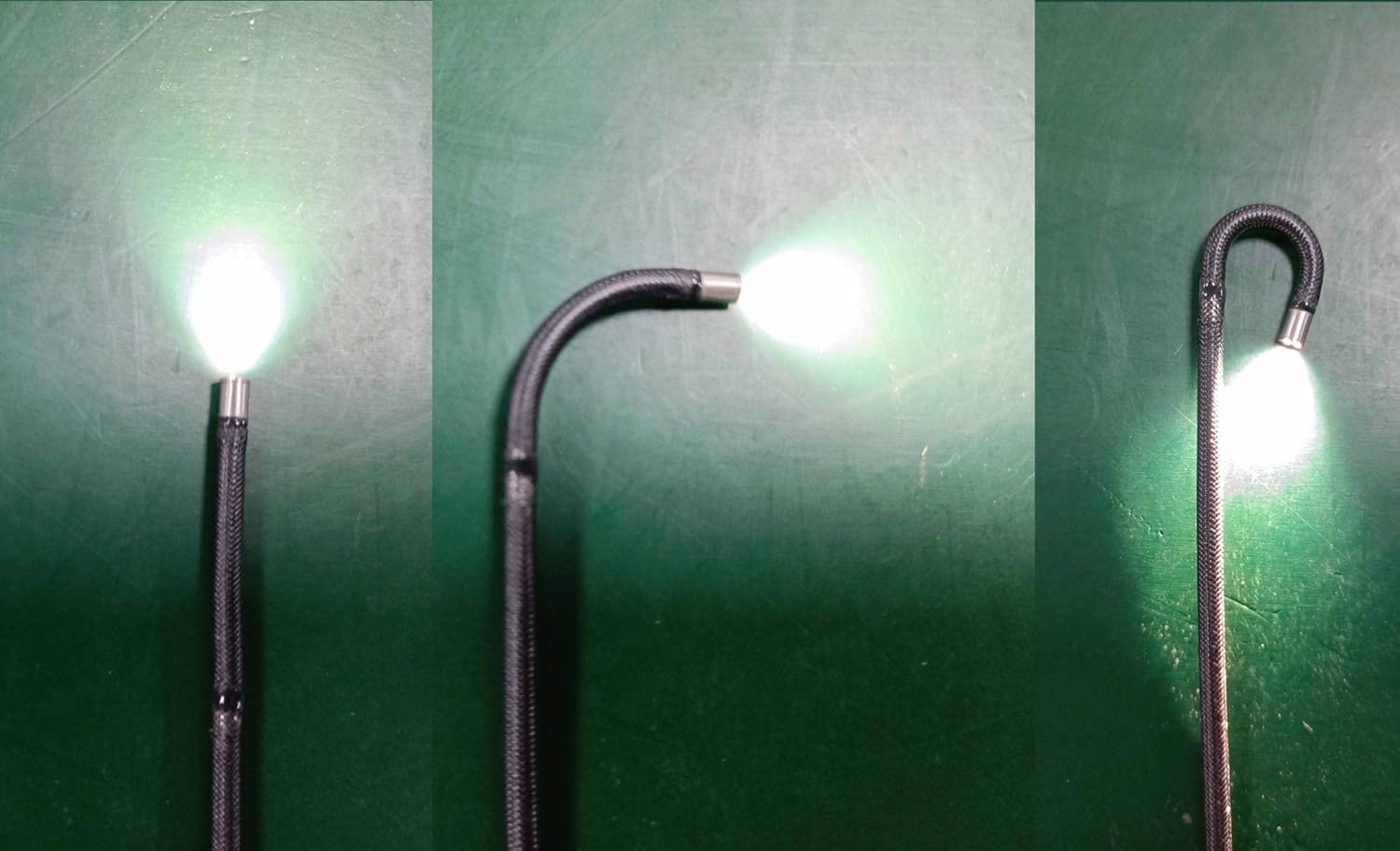
รูปที่ 6: อดีตamples of probe articulation.

Figure 7: Close-up of the articulating probe tip.
3. Adjusting Illumination
กดปุ่ม * (Light) button to cycle through different brightness levels for the LED lights at the probe tip. Adjust the illumination to achieve optimal visibility in various inspection environments.
4. การถ่ายภาพและวิดีโอ
ในขณะที่ viewหากต้องการรับชมการถ่ายทอดสด ให้กดปุ่ม ปุ่มถ่ายภาพ/วิดีโอ on the handle to take a still image. To record a video, press and hold the button briefly to start recording, and press it again to stop. Captured media is saved to the inserted SD card.
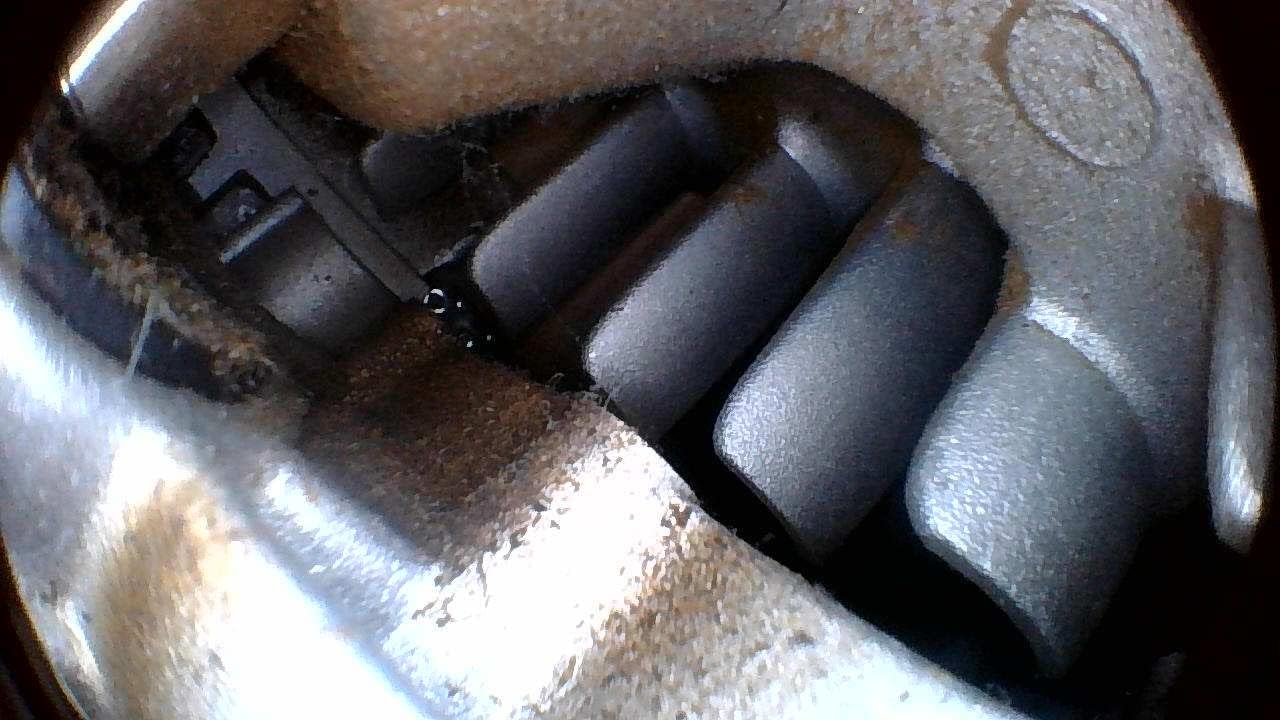
รูปที่ 8: อดีตample of an inspection view.
5. การนำทางเมนูและการตั้งค่า
กดปุ่ม เมนู button to access device settings. Use the directional buttons (often integrated with OK/Light buttons) to navigate through options such as resolution, date/time, language, and playback. Press OK เพื่อยืนยันการเลือกและ เมนู อีกครั้งเพื่อออก
การซ่อมบำรุง
1. การทำความสะอาด
- โพรบ: After each use, gently wipe the probe and camera lens with a soft, damp cloth. For stubborn dirt, use a mild cleaning solution. Ensure no liquid enters the main unit.
- หน่วยหลัก: Wipe the main unit with a dry, soft cloth. Avoid using abrasive cleaners or solvents.
2. การดูแลแบตเตอรี่
เพื่อยืดอายุแบตเตอรี่:
- Charge the device fully before long periods of storage.
- หลีกเลี่ยงการจัดเก็บอุปกรณ์ในสภาพแวดล้อมที่ร้อนหรือเย็นจัด
- If not used for an extended period, charge the battery every 3-6 months.
3. การจัดเก็บ
Store the CT-6010 in its carrying case in a cool, dry place, away from direct sunlight and extreme temperatures. Ensure the probe is coiled loosely and not sharply bent to prevent damage.
4. ความทนทานต่อน้ำ
The flexible probe is rated IP67 waterproof, meaning it can withstand immersion in water up to 1 meter for 30 minutes. The main unit is NOT waterproof. Do not immerse the main unit in water or expose it to heavy rain.
การแก้ไขปัญหา
| ปัญหา | สาเหตุที่เป็นไปได้ | สารละลาย |
|---|---|---|
| อุปกรณ์ไม่เปิดเครื่อง | แบตเตอรี่อ่อน; กดปุ่มเปิด/ปิดไม่ถูกต้อง | Charge the device fully; Press and hold the Power button for a few seconds. |
| ไม่มีภาพปรากฏบนหน้าจอ | Probe not connected properly; Camera lens obstructed/dirty. | Ensure the probe is securely connected; Clean the camera lens. |
| การเชื่อมต่อ WiFi ล้มเหลว | Incorrect password; App not installed; Device out of range. | Verify WiFi password; Install the correct Vividia app; Move closer to the device. |
| Probe articulation is stiff or stuck. | สิ่งกีดขวาง; ปัญหาทางกลไก | Do not force the articulation. Gently retract the probe and check for obstructions. If the issue persists, contact support. |
| คุณภาพของภาพไม่ดี | Insufficient lighting; Dirty lens; Incorrect focus (if adjustable). | Adjust LED brightness; Clean the camera lens; Ensure proper distance from object. |
ข้อมูลจำเพาะ
| คุณสมบัติ | รายละเอียด |
|---|---|
| เส้นผ่านศูนย์กลางของโพรบ | 6 มม. (0.236 นิ้ว) |
| ความยาวโพรบ | 1.0 เมตร (3.3 ฟุต) |
| ความละเอียดของกล้อง | ความละเอียดสูง 1280x720 |
| การออกเสียง | 2-way, max. bending angle >180 degrees |
| การเชื่อมต่อ | Built-in WiFi (for iPhone, iPad, Android) |
| ระดับการกันน้ำ | IP67 (เฉพาะหัววัด) |
| แสดง | จอ LCD ในตัว |
| ความละเอียดในการจับภาพวิดีโอ | 720p |
| แฟลชกล้อง | ไฟ LED ในตัว |
| ผู้ผลิต | วิวิเดียเทคโนโลยี |
| วันที่พร้อมใช้งานครั้งแรก | 12 มกราคม 2022 |

Figure 9: Probe diameter measurement.

Figure 10: Probe length illustration.
การรับประกันและการสนับสนุน
ข้อมูลการรับประกัน
The Vividia CT-6010 is covered by a manufacturer's warranty. Please refer to the warranty card included with your product or visit the official Vividia Technologies webเว็บไซต์สำหรับข้อกำหนดและเงื่อนไขการรับประกันโดยละเอียด
การสนับสนุนลูกค้า
For technical assistance, troubleshooting beyond this manual, or warranty claims, please contact Vividia Technologies customer support. Contact information can typically be found on the manufacturer's webไซต์หรือในเอกสารผลิตภัณฑ์ของคุณ