
1. บทนำ
The DORHEA Buck Boost Converter is a versatile adjustable voltage regulator designed to convert an input DC voltage (6V-36V) to a stable output DC voltage (0.6V-36V). It features both step-up and step-down capabilities, constant current functionality, and various protection mechanisms, making it suitable for a wide range of applications including power supply, battery charging, and LED driving.
2. ข้อมูลด้านความปลอดภัย
- ตรวจสอบให้แน่ใจเสมอว่าปริมาตรอินพุตถูกต้องtage is within the specified range (DC 6V-36V). Exceeding this range can damage the device.
- Observe correct polarity when connecting input and output terminals. Reverse polarity protection is included, but incorrect wiring can still lead to issues.
- Do not exceed the maximum output current of 5A or output power of 80W to prevent overheating and damage.
- Ensure proper ventilation, especially when operating at higher power levels, as the device may generate heat.
- ควรเก็บอุปกรณ์ให้ห่างจากความชื้น ฝุ่น และอุณหภูมิที่สูงหรือต่ำเกินไป
- โปรดตัดกระแสไฟก่อนทำการเปลี่ยนแปลงหรือปรับแต่งสายไฟใดๆ
3. คุณสมบัติของผลิตภัณฑ์
- อินพุตกว้างVoltagอี ช่วง: DC 6V-36V
- เอาท์พุทที่ปรับได้Voltage: DC 0.6V-36V, with 0.01V resolution.
- กระแสไฟขาออกปรับได้: 0-5A, with 0.001A resolution.
- กำลังขับสูงสุด: 80 วัตต์.
- Constant Current (CC) Function: Ideal for charging rechargeable batteries (0.6V-36V).
- จอแสดงผลอเนกประสงค์: แสดงระดับเสียงขาเข้า/ขาออกtage (V), current (A), temperature (T), power (W), electric capacity (AH), electric quantity (WH), and running time.
- จอแสดงผลแบบกราฟิก: เล่มที่tage and current curves interface.
- การแสดงผลที่ปรับแต่งได้: Flip/rotate display, change background/parameter colors, switch day/night display mode.
- ฟังก์ชั่นหน่วยความจำ: Saves voltage and current settings after power down.
- การป้องกันที่ครอบคลุม: เกินปริมาณtage protection (OVP), over-current protection (OCP), over-power protection (OPP), low-voltage protection (LVP), over-temperature protection (OTP), reverse protection, and short circuit protection.
4. ข้อมูลจำเพาะ
| พารามิเตอร์ | ค่า |
|---|---|
| อินพุต Voltagอี เรนจ์ | กระแสตรง 6.0V-36V |
| ปริมาณการส่งออกtagอี เรนจ์ | กระแสตรง 0.6V-36V |
| กระแสไฟขาออก | 0-5.0ก |
| กำลังขับ | 80W (สูงสุด) |
| ขีดจำกัดกระแสไฟเข้า | 6A (สูงสุด) |
| เล่มที่tage ความละเอียด | 0.01โวลต์ |
| ความละเอียดปัจจุบัน | 0.001เอ |
| เล่มที่tagอี พรีซิชั่น | ±0.3% + 1 byte |
| ความแม่นยำในปัจจุบัน | ±0.4% + 3 ไบต์ |
| การวัดความจุ | 0-999999อา. |
| การวัดพลังงาน | 0-999999 วัตต์ |
| การวัดเวลา | 0-1000 ชั่วโมง |
| ประเภทการติดตั้ง | Portable (Panel Mount Design) |
| ขนาด (โดยประมาณ) | 79mm x 43mm x 53mm (ยาว x กว้าง x สูง) |
5. เนื้อหาบรรจุภัณฑ์
- 2 x DORHEA DC 6.0V-36V to DC 0.6-36V 5A Buck Boost Converter Modules
6. การตั้งค่า
6.1 ทางกายภาพview

ภาพที่ 1: ด้านหน้า view of the DORHEA Buck Boost Converter. This image shows the main display screen, the rotary encoder knob for adjustments, and the ON/OFF button. The display is active, showing output voltage (05.00V), current (0.121A), and power (00.60W).

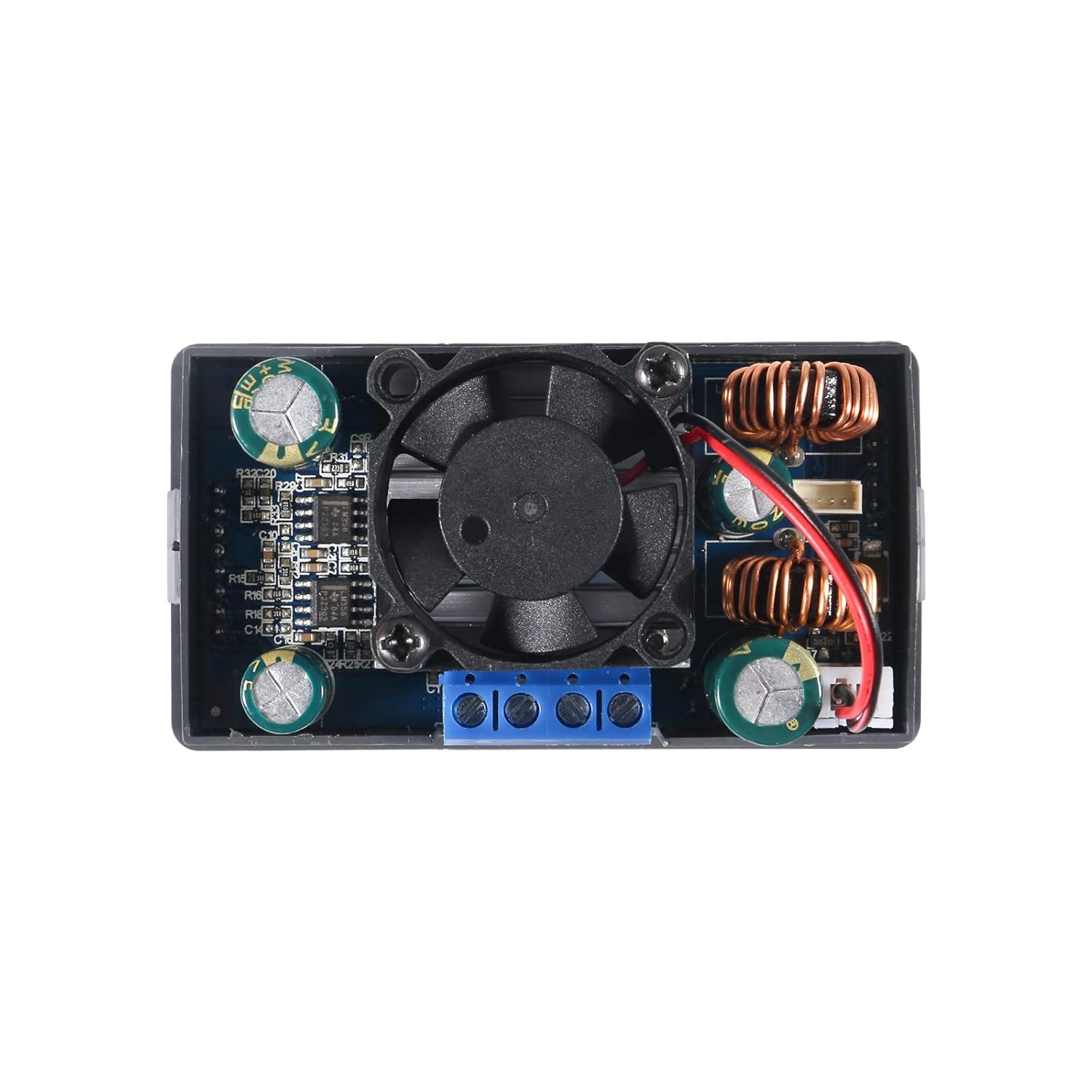
ภาพที่ 2: จากบนลงล่าง view of the converter's internal components. This image highlights the cooling fan, inductors, capacitors, and the screw terminals for input and output connections. The fan is centrally located for heat dissipation.
6.2 ขนาดและการติดตั้ง
ภาพที่ 3: Dimensional drawing of the converter. This image provides key measurements for the device, including a length of 79mm (3.11in), width of 43mm (1.69in), and height of 53mm (2.09in). These dimensions are crucial for enclosure design and mounting.
The converter is designed for panel mounting. The cutout dimensions required for installation are approximately 72มม. x 40มม., ด้วย 12mm x 2.5mm notch centered on each narrow side for securing the unit.
6.3 การเชื่อมต่อสายไฟ
Identify the input and output terminals on the back of the module. These are typically labeled:
- วิน+: Positive input voltage
- วิน-: Negative input voltage (Ground)
- ออก+: Positive output voltage
- ออก-: Negative output voltage (Ground)
Use appropriate gauge wires for your input power source and load. Ensure all connections are secure within the screw terminals. For stranded wires, it is recommended to twist and tin the ends with solder for a more reliable connection.

ภาพที่ 4: หลัง view of the converter, highlighting the screw terminals. The labels VIN+, VIN-, OUT+, and OUT- are visible, indicating where to connect the input power source and the load.
7. คู่มือการใช้งาน
7.1 เปิด/ปิดเครื่อง
Once wired, apply input power. The unit will typically power on automatically. Use the dedicated เปิด/ปิด button on the front panel to toggle the output power.
7.2 การปรับปริมาตรtagอีและปัจจุบัน
The rotary encoder knob is used to adjust parameters. Press the knob to select a parameter (e.g., voltage or current). Rotate the knob to change the value. You may need to cycle through digit positions to set precise values. Press the knob again to confirm or move to the next digit/parameter.
7.3 Display Pages and Settings
The converter features multiple display pages that can be cycled through to view various operational parameters:
- อินพุต/เอาต์พุต Voltagอี (วี)
- กระแสไฟฟ้า (เอ)
- อุณหภูมิ (T)
- กำลังไฟฟ้า (วัตต์)
- Electric Capacity (AH)
- Electric Quantity (WH)
- ระยะเวลาการทำงาน
- เล่มที่tage and Current Graphs
- การตั้งค่าพารามิเตอร์ระบบ
Refer to the on-screen menu for navigation and customization options, which may include flipping or rotating the display, changing background and parameter colors, and switching between day and night display modes.
7.4 Constant Current (CC) Function
The constant current function allows the module to maintain a set output current regardless of load changes (within its operational limits). This is particularly useful for charging batteries or driving LEDs that require a stable current. To use this function, set the desired current limit. The module will then regulate the output current to this value.
7.5 ฟังก์ชันการป้องกัน
The module includes several built-in protection features:
- เกินVoltagการป้องกัน (OVP): Shuts down output if voltage เกินขีดจำกัดที่กำหนดไว้
- การป้องกันกระแสเกิน (OCP): Limits or shuts down output if current exceeds a set limit.
- ระบบป้องกันไฟเกิน (Over-Power Protection: OPP): Limits or shuts down output if power exceeds a set limit.
- ปริมาณต่ำtagการป้องกันทางอิเล็กทรอนิกส์ (LVP): ปิดเอาต์พุตหากระดับเสียงอินพุตtage drops below a set threshold.
- ระบบป้องกันอุณหภูมิสูงเกิน (OTP): Shuts down output if the module's temperature becomes too high.
- การป้องกันย้อนกลับ: Protects against damage from incorrect input polarity.
- การป้องกันไฟฟ้าลัดวงจร: Protects against damage from output short circuits.
These protections are designed to safeguard both the converter and the connected load. If a protection is triggered, the display will typically indicate the fault.
8. การบำรุงรักษา
- การทำความสะอาด: Keep the module clean and free from dust. Use a soft, dry cloth for cleaning. Avoid using liquids or solvents.
- Heat Sink/Fan: Periodically check the cooling fan for obstructions and ensure it operates freely. Ensure the heat sink is securely attached to the components for effective heat dissipation. If the heat sink or fan circuit board appears loose, it can be secured with a small amount of non-conductive adhesive.
- การเชื่อมต่อเทอร์มินัล: Regularly inspect screw terminal connections to ensure they remain tight and secure. Loose connections can lead to intermittent operation or overheating.
9 การแก้ไขปัญหา
- ไม่มีเอาท์พุทVoltage:
- ตรวจสอบแหล่งจ่ายไฟขาเข้าและการเชื่อมต่อ
- Ensure the ON/OFF button has been pressed to enable output.
- Verify that no protection functions (e.g., OVP, OCP, LVP) have been triggered.
- Inaccurate Output Voltagอี/ปัจจุบัน:
- Use a calibrated external multimeter to verify the output.
- Ensure the load is not drawing more current than the set limit or the module's maximum capacity.
- If significant discrepancies persist, the unit may require calibration or be faulty.
- โมดูลร้อนเกินไป:
- Reduce the load or ensure it is within the 80W power limit.
- Check for proper ventilation around the module.
- ตรวจสอบให้แน่ใจว่าพัดลมระบายความร้อนทำงานอย่างถูกต้องและไม่มีสิ่งกีดขวาง
- Intermittent Operation or Display Issues:
- Check all wiring connections for looseness.
- Inspect the internal circuit board, especially the heat sink/fan board, for any loose connections or components. Gently re-seat or secure if necessary (e.g., with a small dab of hot glue on non-critical areas).
10. การรับประกันและการสนับสนุน
For warranty information or technical support, please refer to the product listing on the retailer's website or contact DORHEA directly through their official channels. You can often find support contact information on the brand's store page, such as the DORHEA Store on Amazon.


