
1. บทนำ
This manual provides essential information for the proper use and maintenance of your new replacement remote control. This remote is designed as a direct replacement for specific ONKYO models, offering full functionality without the need for complex setup procedures.
คุณสมบัติหลัก:
- Direct replacement for ONKYO TXDS595, 24140447, RC447M remote controls.
- No setup code required; ready to use upon battery installation.
- Replicates all functions of the original remote control.
2. การตั้งค่า
2.1. การติดตั้งแบตเตอรี่
Your replacement remote control requires two AAA batteries (not included). Follow these steps to install them:
- ค้นหาช่องใส่แบตเตอรี่ที่ด้านหลังของรีโมทคอนโทรล
- กดสลักลงแล้วเลื่อนฝาครอบแบตเตอรี่ลงด้านล่างเพื่อเปิด
- ใส่แบตเตอรี่ AAA สองก้อน โดยตรวจสอบให้แน่ใจว่าขั้วบวก (+) และขั้วลบ (-) ตรงกับเครื่องหมายภายในช่อง
- เลื่อนฝาครอบแบตเตอรี่กลับเข้าที่จนกระทั่งคลิกเข้าที่
Once batteries are installed, the remote is ready for immediate use with compatible ONKYO devices. No programming or code entry is necessary.
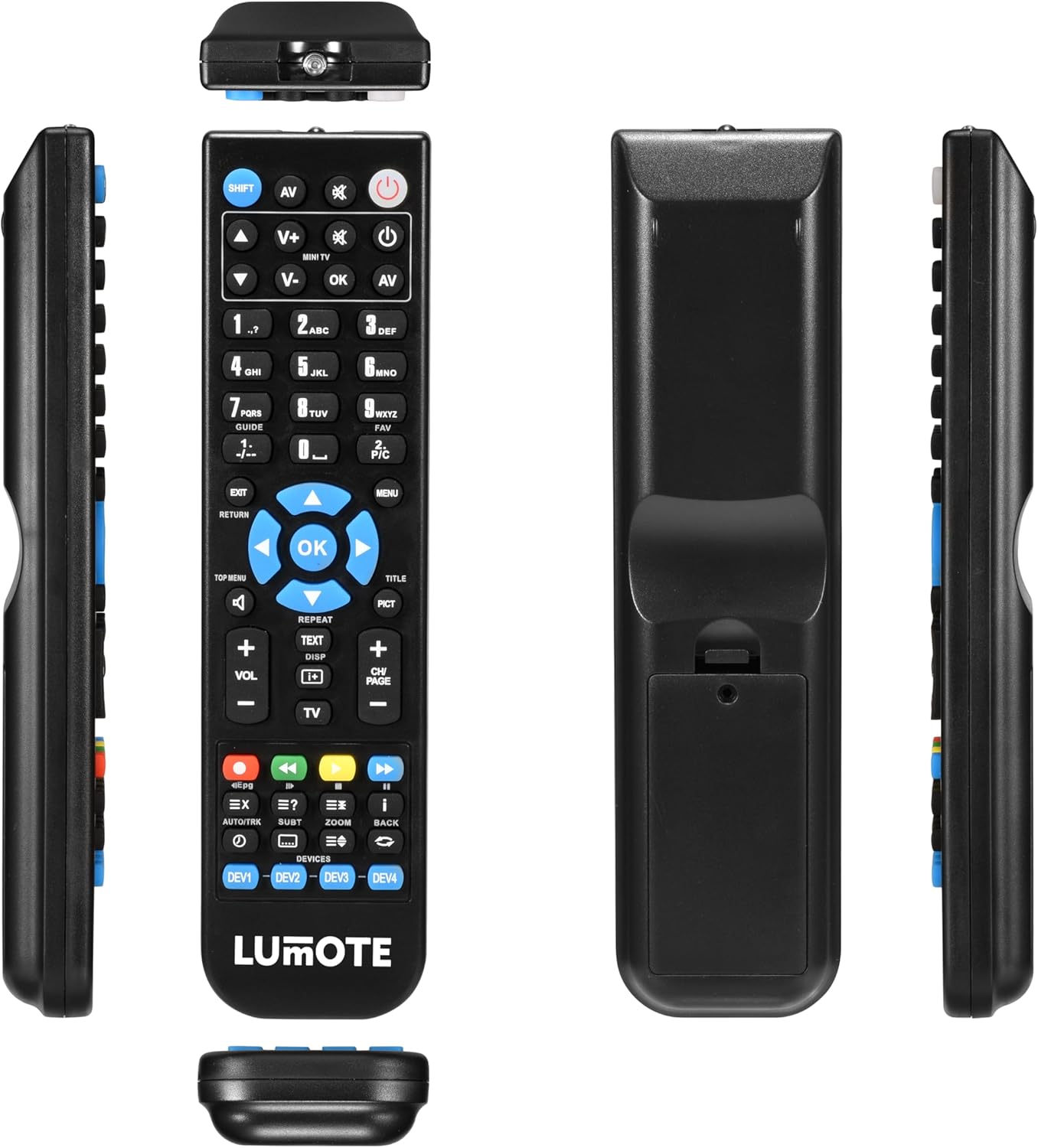
รูปที่ 2.1 : ต่างๆ views of the remote control, illustrating the battery compartment on the back.
3. คู่มือการใช้งาน
This remote control is designed to replicate the functions of your original ONKYO remote. Point the remote directly at your ONKYO receiver (TXDS595, 24140447, RC447M) for optimal performance.

รูปที่ 3.1 : ด้านหน้า view ของรีโมทคอนโทรลพร้อมรูปแบบปุ่ม
3.1. ฟังก์ชั่นพื้นฐาน
- ปุ่มเปิด/ปิด (Ⓘ): Located at the top right, press to turn your ONKYO receiver on or off.
- การควบคุมระดับเสียง (VOL+ / VOL-): Located below the directional pad, use these buttons to increase or decrease the audio volume.
- Input Selector (AV, SHIFT): Use the 'AV' button to cycle through audio/video inputs. The 'SHIFT' button may be used in conjunction with other buttons for secondary functions, if applicable to your original remote's design.
- Directional Pad and OK Button: The central circular pad with arrow keys (up, down, left, right) and an 'OK' button in the center is used for navigating menus and confirming selections on your receiver's display.
- ปุ่มเมนู: Accesses the main menu of your ONKYO receiver.
- Return/Exit Buttons: Used to go back to the previous screen or exit a menu.
Refer to your ONKYO receiver's original manual for specific functions and menu navigation details, as this remote replicates those commands.
4. การบำรุงรักษา
4.1. การเปลี่ยนแบตเตอรี่
เปลี่ยนแบตเตอรี่เมื่อรีโมทตอบสนองช้าลงหรือหยุดทำงาน ควรเปลี่ยนแบตเตอรี่ทั้งสองก้อนพร้อมกันด้วยแบตเตอรี่ AAA ใหม่เสมอ ห้ามใช้แบตเตอรี่เก่าและใหม่ปะปนกัน หรือใช้แบตเตอรี่ต่างชนิดกัน
4.2. การทำความสะอาด
To clean the remote control, wipe it with a soft, dry cloth. For stubborn dirt, slightly dampเช็ดทำความสะอาดด้วยผ้าชุบน้ำหมาดๆ ห้ามใช้สารทำความสะอาดที่มีฤทธิ์กัดกร่อน ตัวทำละลาย หรือแอลกอฮอล์ เพราะอาจทำให้พื้นผิวหรือชิ้นส่วนภายในของรีโมทเสียหายได้
4.3. การจัดเก็บ
เก็บรีโมทคอนโทรลไว้ในที่แห้งและเย็น หลีกเลี่ยงแสงแดดโดยตรงและอุณหภูมิที่สูงหรือต่ำเกินไป หากไม่ได้ใช้งานรีโมทเป็นเวลานาน ควรนำแบตเตอรี่ออกเพื่อป้องกันการรั่วไหลและความเสียหายที่อาจเกิดขึ้น
5 การแก้ไขปัญหา
If you experience issues with your replacement remote control, please refer to the following common solutions:
- รีโมตไม่ตอบสนอง:
- ตรวจสอบว่าใส่แบตเตอรี่ถูกต้องตามขั้ว (+/-)
- เปลี่ยนแบตเตอรี่เก่าด้วยแบตเตอรี่ใหม่
- Ensure there are no obstructions between the remote and your ONKYO receiver.
- Make sure you are within the effective operating range and pointing the remote directly at the receiver's IR sensor.
- ฟังก์ชั่นบางอย่างไม่ทำงาน:
- This remote is a direct replacement and does not require setup codes. If a specific function is not working, verify that the corresponding button on the remote is clean and not stuck.
- Confirm that your ONKYO receiver model (TXDS595, 24140447, RC447M) is listed as compatible.
- Note that some ONKYO receiver models, like the TXDS595, may have specific power-on sequences. If the remote turns off but not on, this behavior might be consistent with the original unit's design or a known characteristic for certain older models, as reported by some users. The remote is designed to replicate the original's functions as closely as possible.
- การทำงานจากระยะไกลเป็นไปแบบไม่ต่อเนื่อง:
- มักบ่งชี้ว่าแบตเตอรี่ใกล้หมด ควรเปลี่ยนแบตเตอรี่
- Ensure no strong light sources (like direct sunlight or bright fluorescent lights) are interfering with the receiver's IR sensor.
6. ข้อมูลจำเพาะ
| หมายเลขรุ่น | RC447M |
| อุปกรณ์ที่รองรับ | ONKYO TXDS595, ONKYO 24140447, ONKYO RC447M |
| ยี่ห้อ | ทั่วไป |
| คุณสมบัติพิเศษ | การยศาสตร์ |
| จำนวนอุปกรณ์ที่รองรับสูงสุด | 1 |
| สี | Standard v1 |
7. การรับประกันและการสนับสนุน
7.1. การรับประกันสินค้า
รีโมทคอนโทรลสำรองนี้มาพร้อมกับ... รับประกัน 12 เดือน from the date of purchase. This guarantee covers manufacturing defects and ensures the remote functions as described. Please retain your proof of purchase for warranty claims.
7.2. การสนับสนุนลูกค้า
For any questions, concerns, or issues not covered in this manual, please contact the seller or retailer from whom you purchased this product. They will be able to provide further assistance and support regarding your replacement remote control.