
1. บทนำ
Thank you for choosing the HISTTON Fanless Mini PC J4125. This compact and robust industrial-grade mini computer is designed for stable and efficient operation in various environments. Featuring a fanless design for silent performance and dust protection, it is equipped with an Intel Celeron J4125 processor, ample RAM, and versatile connectivity options. This manual provides essential information for setting up, operating, maintaining, and troubleshooting your device.

Image 1.1: The HISTTON Fanless Mini PC J4125, a compact black device with a ribbed top for heat dissipation, featuring various ports on its front and back panels.
2. เนื้อหาบรรจุภัณฑ์
กรุณาทำเครื่องหมายในช่องสำหรับรายการต่อไปนี้:
- 1 x HISTTON Mini PC (J4125)
- อะแดปเตอร์ไฟฟ้า 1 ตัว
- 1 x คู่มือผู้ใช้
- สาย HDMI 1 เส้น
- 1 x ขาตั้ง VESA
- 1 x ชุดสกรู
- สาย 1 x SATA
3. สินค้าหมดview
3.1 คุณสมบัติหลัก
- โปรเซสเซอร์: Intel Celeron J4125 (4 Cores 4 Threads, 2.00GHz Base, 2.70GHz Turbo)
- กราฟิก: กราฟิก Intel UHD 600
- ระบบปฏิบัติการ: Pre-installed Windows 11 Pro (64-bit, activated)
- หน่วยความจำ: DDR4 RAM (Single SODIMM slot, up to 32GB supported)
- พื้นที่จัดเก็บ: 1x mSATA SSD slot, 1x SATA 3.0 for 2.5-inch HDD/SSD
- การเชื่อมต่อ: Dual Gigabit RJ45 LAN, Dual-band Wi-Fi (2.4G+5.0G), Bluetooth 4.0
- เอาท์พุตวิดีโอ: 1x HDMI, 1x VGA (Dual display support)
- พอร์ต: 2x USB 3.0, 2x USB 2.0, 2x RS232 COM, 1x 3.5mm Mic/SPK out
- คุณสมบัติพิเศษ: Fanless design, RTC wake up, Wake on LAN, Auto Power on (BIOS setting), Network boot
3.2 แผงด้านหน้าและด้านหลัง
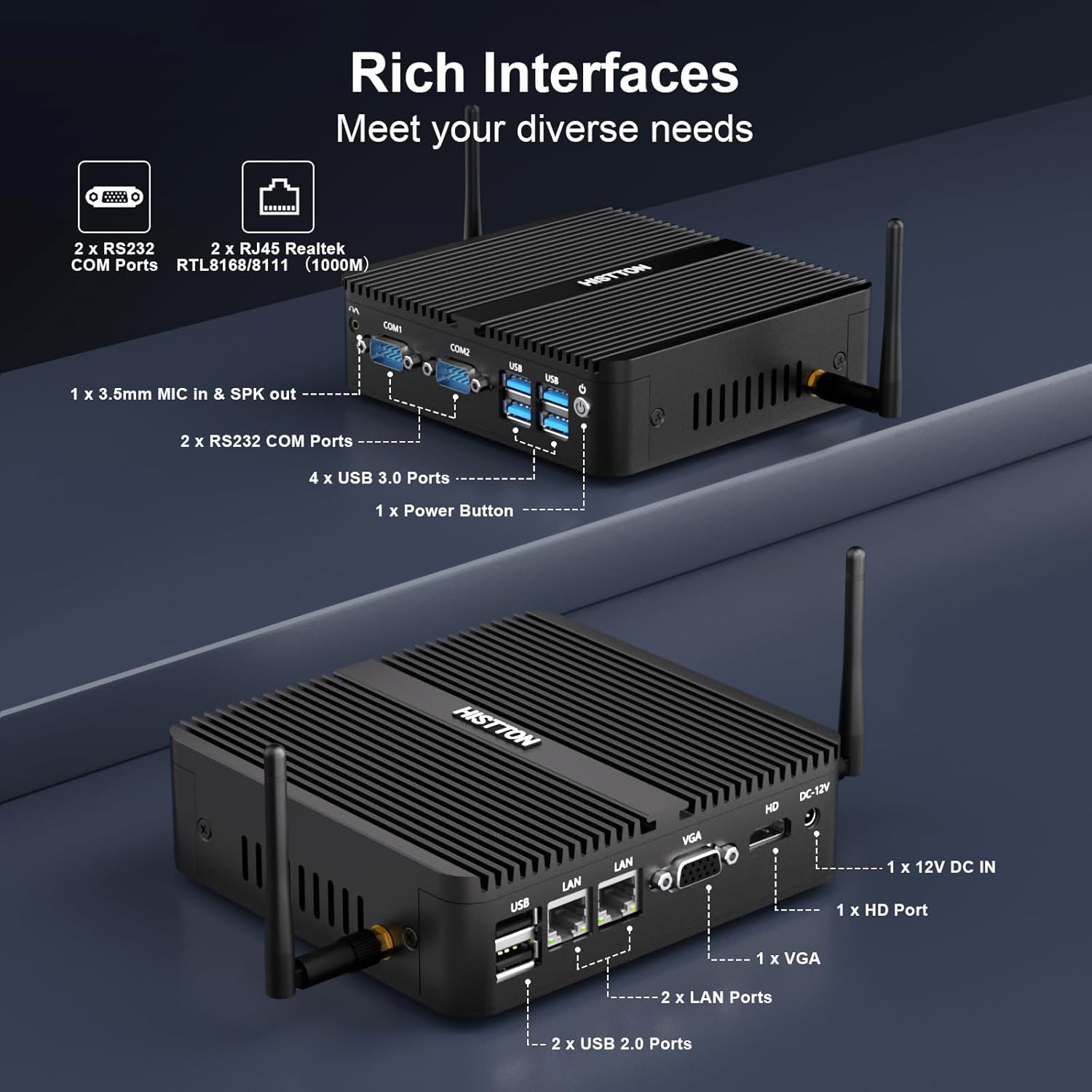
ภาพที่ 3.1: รายละเอียด view of the HISTTON Mini PC's front and rear panels, highlighting the various input/output ports including USB, COM, LAN, HDMI, and VGA.
- แผงด้านหน้า: Power button, 2x USB 3.0 ports, 2x USB 2.0 ports, 2x RS232 COM ports (COM1, COM2), 3.5mm audio jack (Mic/SPK out).
- แผงด้านหลัง: DC-12V power input, 1x HDMI port, 1x VGA port, 2x Gigabit RJ45 LAN ports, Wi-Fi antenna connectors.
3.3 ส่วนประกอบภายในและความสามารถในการขยาย
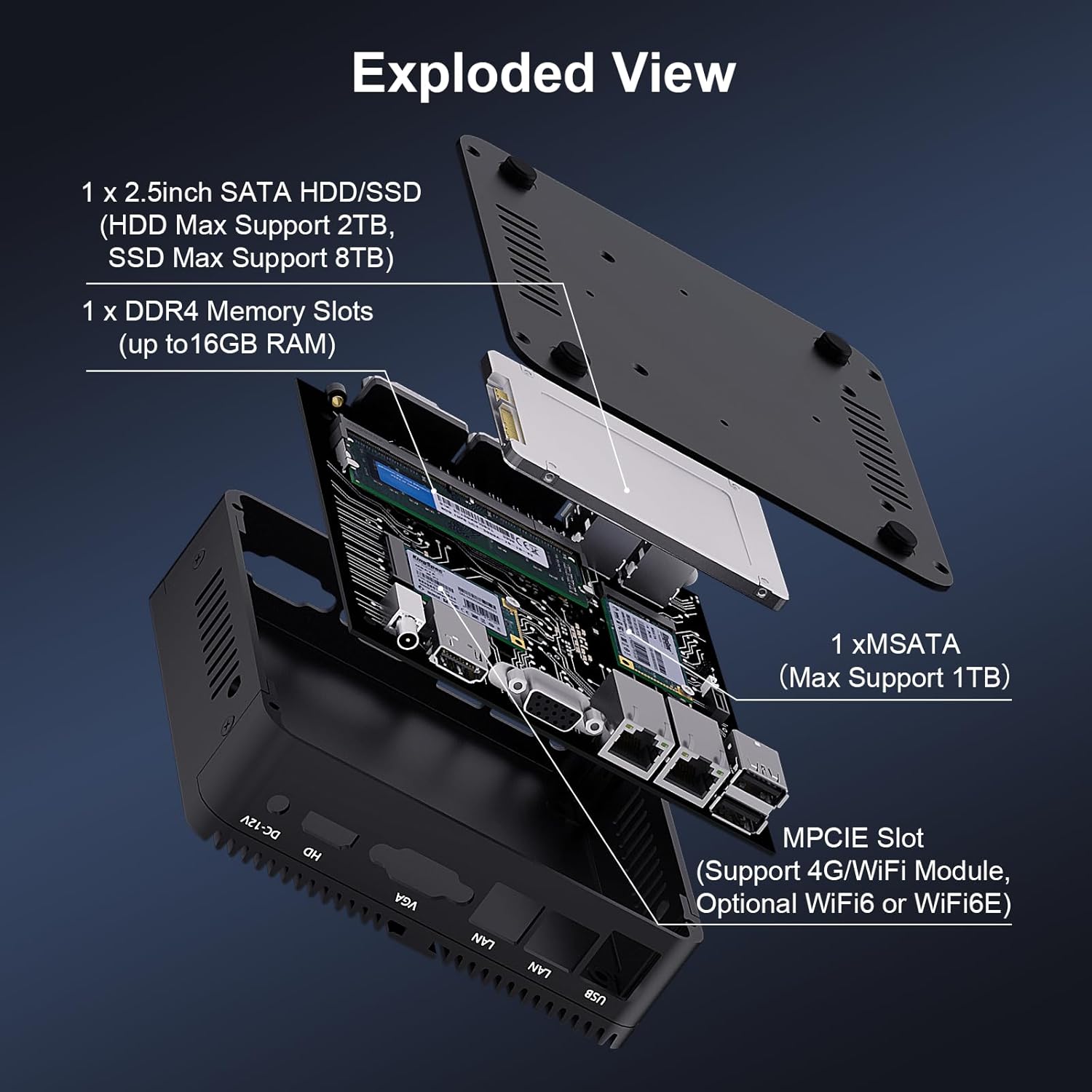
ภาพที่ 3.2: ระเบิด view of the HISTTON Mini PC, showing the internal layout including the mSATA SSD slot, DDR4 memory slot, and space for a 2.5-inch SATA drive.
- แรม : Single SODIMM slot for DDR4 memory, supporting up to 32GB.
- เอสดีเอสดี: 1x mSATA slot (Max Support 1TB).
- ฮาร์ดดิสก์/SSD: 1x SATA 3.0 port for a 2.5-inch HDD (Max Support 2TB) or SSD (Max Support 8TB).
- ไร้สาย: MPCIE slot for 4G/WiFi module (Optional WiFi6 or WiFi6E).
4. คำแนะนำในการตั้งค่า
4.1 การเชื่อมต่ออุปกรณ์ต่อพ่วง
- Connect your monitor(s) to the HDMI and/or VGA ports on the rear panel.
- Connect your keyboard and mouse to the USB ports on the front panel.
- Attach the Wi-Fi antennas to the connectors on the rear panel.
- For wired network access, connect an Ethernet cable to one of the RJ45 LAN ports.
- Connect the power adapter to the DC-12V input port on the rear panel, then plug it into a power outlet.
4.2 การเปิดเครื่อง
Press the power button on the front panel to turn on the Mini PC. The power indicator light will illuminate.
4.3 การติดตั้ง VESA Mount (ทางเลือก)
The Mini PC supports VESA mounting, allowing you to attach it to the back of a compatible monitor or to a wall mount. Use the provided VESA mount and screws to secure the Mini PC. Ensure the monitor's VESA holes are compatible with the mount.
Video 4.1: An official product video demonstrating the physical features of the HISTTON Fanless Mini PC and its VESA mounting process.
5. คู่มือการใช้งาน
5.1 การตั้งค่า Windows เบื้องต้น
Upon first boot, follow the on-screen instructions to complete the Windows 11 Pro setup, including language, region, network connection, and user account creation.
5.2 การตั้งค่าจอแสดงผลคู่
The Mini PC supports dual display output via its HDMI and VGA ports. Connect two monitors and configure display settings within Windows (Right-click on desktop > Display settings) to extend or duplicate your desktop.

Image 5.1: The HISTTON Mini PC connected to two monitors, demonstrating its dual display capability via HDMI and VGA ports.
5.3 การตั้งค่าไบออส
To access the BIOS, press the เดล key repeatedly during startup. The BIOS allows configuration of advanced features such as:
- RTC Wake Up: Schedule the PC to power on at a specific time.
- ปลุกผ่าน LAN: Power on the PC remotely via a network signal.
- เปิดเครื่องอัตโนมัติ: Automatically power on the PC when power is restored after an outage.
- การบูตเครือข่าย: Boot the PC from a network server.
6. การบำรุงรักษา
6.1 การทำความสะอาด
Regularly clean the exterior of the Mini PC with a soft, dry cloth. Avoid using liquid cleaners or abrasive materials. As it is fanless, internal dust accumulation is minimized, but ensure the ribbed chassis remains clear of obstructions for optimal heat dissipation.
6.2 การอัปเดตซอฟต์แวร์
หมั่นอัปเดตระบบปฏิบัติการ Windows และไดรเวอร์อยู่เสมอ เพื่อให้มั่นใจได้ถึงประสิทธิภาพและความปลอดภัยสูงสุด คุณสามารถเข้าถึง Windows Update ได้ที่ การตั้งค่า > Windows Update
7 การแก้ไขปัญหา
| ปัญหา | สาเหตุที่เป็นไปได้ | สารละลาย |
|---|---|---|
| มินิพีซีเปิดไม่ติด | No power, faulty power adapter, loose connection. | ตรวจสอบการเชื่อมต่อสายไฟ ตรวจสอบให้แน่ใจว่าอะแดปเตอร์แปลงไฟใช้งานได้ ลองเสียบปลั๊กไฟกับเต้ารับอื่นดู |
| ไม่มีการแสดงผลบนจอภาพ | Loose video cable, incorrect input source on monitor, monitor off. | Ensure video cables (HDMI/VGA) are securely connected. Select correct input source on monitor. Turn on monitor. |
| ไม่มีการเชื่อมต่อเครือข่าย | สายอีเธอร์เน็ตหลวม, Wi-Fi ถูกปิดใช้งาน, ปัญหาไดรเวอร์ | Check Ethernet cable connection. Ensure Wi-Fi is enabled and connected to a network. Reinstall network drivers if necessary. |
| ประสิทธิภาพการทำงานช้า | มีแอปพลิเคชันทำงานมากเกินไป พื้นที่เก็บข้อมูลต่ำ ไดรเวอร์ล้าสมัย | Close unnecessary applications. Free up disk space. Update drivers and Windows. |
8. ข้อมูลจำเพาะ
| คุณสมบัติ | รายละเอียด |
|---|---|
| ยี่ห้อ | ฮิสตัน |
| หมายเลขรุ่น | เจ 4125 |
| ระบบปฏิบัติการ | วินโดวส์ 11 โปร |
| รุ่นซีพียู | เซเลรอน J4125 |
| ความเร็วซีพียู | 2 GHz (up to 2.7 GHz Turbo) |
| โคโปรเซสเซอร์กราฟิก | กราฟิก Intel UHD 600 |
| ติดตั้งหน่วยความจำ RAM แล้ว | 16 GB DDR4 (สูงสุด 32 GB) |
| ความจุของหน่วยความจำ | SSD ความจุ 512GB |
| คำอธิบายฮาร์ดดิสก์ | HDD, SSD (1x mSATA, 1x 2.5-inch SATA) |
| อินเทอร์เฟซเอาท์พุตวิดีโอ | hdmi, vga |
| เทคโนโลยีการเชื่อมต่อ | Ethernet, HDMI, LAN, Wi-Fi, Bluetooth |
| เทคโนโลยีไร้สาย | Bluetooth 4.0, Dual-band Wi-Fi (2.4G+5.0G) |
| ขนาดรายการ | 5.31 x 5 x 1.54 นิ้ว (13.5 x 12.6 x 4.0 ซม.) |
| น้ำหนักสินค้า | 0.6 กิโลกรัม |
| พอร์ต USB รวม | 4 (2x USB 3.0, 2x USB 2.0) |
| พอร์ต COM | 2x อาร์เอส232 |
| พอร์ตแลน | 2x พอร์ต RJ45 กิกะบิต |
9. การรับประกันและการสนับสนุน
HISTTON provides customer support for your Mini PC. If you encounter any issues or have questions, please refer to the following contact methods:
- การสนับสนุนของ Amazon: เข้าสู่ระบบบัญชี Amazon ของคุณ ไปที่ "คำสั่งซื้อของคุณ" และเลือก "ถามคำถามเกี่ยวกับผลิตภัณฑ์" เพื่อขอความช่วยเหลือ
- การสนับสนุนหลังการขาย: For direct technical assistance, you may send an email to the HISTTON After-Sales Team at minipc_service@yeah.net.
โปรดเก็บหลักฐานการซื้อของคุณไว้เพื่อเรียกร้องการรับประกัน