
การแนะนำ
This manual provides detailed instructions for the setup, operation, maintenance, and troubleshooting of your Vabiooth Constant Temperature Lab Monocular Compound Microscope. Please read this manual thoroughly before using the microscope to ensure proper function and longevity of the device.
คุณสมบัติผลิตภัณฑ์
- กำลังขยาย: 40X-2500X magnification with wide-field 10X/25X glass eyepieces and 4X/10X/40X/100X achromatic objective lenses.
- หน้าจอ LCD ขนาด 7 นิ้ว: Integrated 7-inch LCD display and 5MP electronic eyepiece for direct viewing and sharing, reducing neck strain with its ergonomic 30-degree tilt.
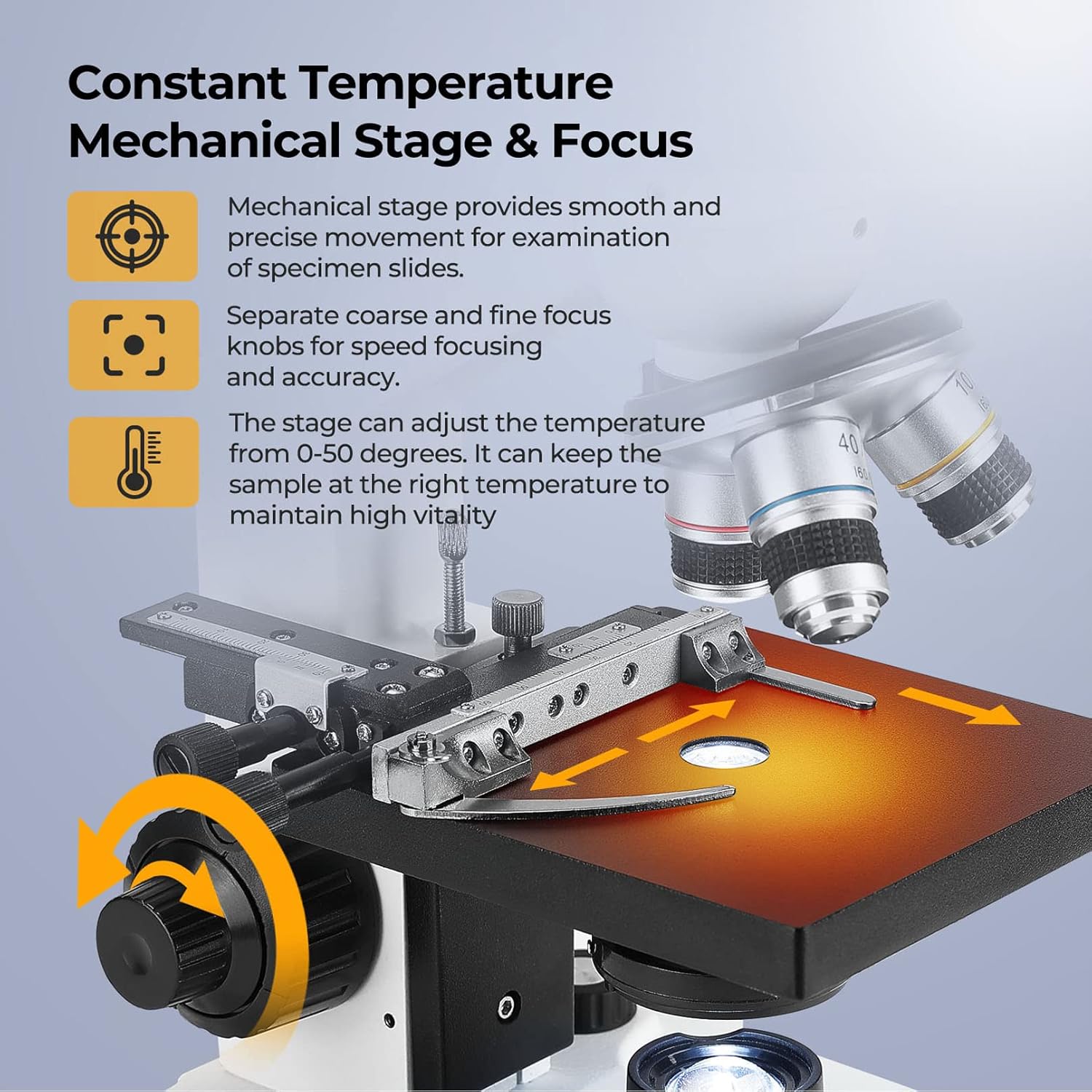
- Constant Temperature Mechanical Stage: Features an adjustable thermostat mechanical stage (0-50°C) to maintain optimal sample vitality, ideal for artificial breeding and insemination research. Includes 1.0mm stage divisions for precise slide manipulation.
- การโฟกัส: Separate coarse and fine focus knobs for speed and accuracy.
- การให้แสงสว่าง: Variable LED intensity transmitted illumination with a 1.25 NA Abbe condenser and iris diaphragm for clear examination and light control.
- ความสามารถในการพกพา: Comes with a durable aluminum carry case for protection and easy transport.
- การจับภาพและวิดีโอ: Supports still photo and video capture with a video capture card (sold separately).


การติดตั้งและการตั้งค่า
Follow these steps to set up your Vabiooth microscope:
- การแกะกล่อง: Carefully remove all components from the aluminum carry case.
- Attach LCD Screen: Securely attach the 7-inch LCD screen to the top of the microscope head. Connect the necessary cables.
- Install Mechanical Stage: If not pre-installed, attach the mechanical stage to the microscope base. Ensure it is firmly secured.
- ใส่เลนส์ใกล้ตา: Place the desired eyepieces (10X or 25X) into the eyepiece tubes.
- การเชื่อมต่อไฟฟ้า: Connect the power adapter to the microscope and plug it into a suitable power outlet (110 Volts).
วีดีโอ: VB-M001 Vabiooth Dual-View Lab Compound Monocular Microscope. This video demonstrates the assembly and key features of the microscope.
วีดีโอ: Vabiooth Monocular Microscope. A general overview of the microscope's components and basic setup.
คำแนะนำการใช้งาน
- เปิดเครื่อง: เปิดกล้องจุลทรรศน์โดยใช้สวิตช์ไฟ
- ตัวอย่างสถานที่: Secure your specimen slide on the mechanical stage ใช้ stagอีคลิป
- ปรับการขยาย: Rotate the revolving nosepiece to select the desired objective lens (4X, 10X, 40X, or 100X).
- การโฟกัส: Use the coarse adjustment knob for large focus changes and the fine adjustment knob for precise focusing.
- ปรับความสว่าง: Use the dimming handwheel to adjust the brightness of the LED light source. Adjust the Abbe condenser and iris diaphragm for optimal contrast and resolution.
- อุณหภูมิคงที่ Stage: Use the control buttons on the base to set the desired temperature for the mechanical stage (0-50°C). The current temperature will be displayed digitally.
- หัวหมุน: The 360-degree rotatable head allows for flexible viewมุมการเอียง
การปฏิบัติการขั้นสูง
- การถ่ายภาพและวิดีโอ: To capture still photos or videos, connect a USB 2.0 Audio Video Capture Card and RCA cables (male to male) to your microscope and PC. Install the provided software on your PC. The video below demonstrates the connection and software usage.
- Setting Screen Language: To change the language on the 7-inch LCD screen, turn on the monitor, click the 'M' button 6 times, then click the '>' button to cycle through and select your preferred language.
- Adjusting Rotating Head: The microscope head can be rotated 360 degrees. Loosen the securing screw, adjust the head to the desired angle, and then tighten the screw to fix its position.
วีดีโอ: How to take still photos and videos? This video guides you through connecting the microscope to a PC for image and video capture.
วีดีโอ: How to set the language of the screen? Learn how to navigate the monitor's menu to select your preferred language.
วีดีโอ: How to adjust the 360-degree rotating head? This video demonstrates the process of adjusting the microscope's rotating head.
การซ่อมบำรุง
- การทำความสะอาดเลนส์: Use only specialized lens cleaning paper and solution. Gently wipe objective lenses and eyepieces.
- การทำความสะอาดร่างกาย: Wipe the microscope body with a soft, dry cloth. Avoid using harsh chemicals.
- พื้นที่จัดเก็บ: When not in use, store the microscope in its aluminum carry case in a dry, dust-free environment. Use a dust cover to protect it from dust and debris.
- น้ำมันแช่: For the 100X objective, use a small drop of immersion oil. After use, clean the oil from the lens immediately.
การแก้ไขปัญหา
- ไม่มีภาพบนหน้าจอ: Check all cable connections, especially the AV cable to the monitor. Ensure the microscope is powered on.
- ภาพเบลอ: Adjust the coarse and fine focus knobs. Ensure the objective lens is clean and correctly positioned. If using the 100X objective, verify immersion oil application.
- Image Misalignment (Eyepiece vs. Screen): Due to movement during transportation, the angular position might shift. Loosen the screw on the eyepiece tube, adjust the image angle on the screen to match the eyepiece view, then tighten the screw.
วีดีโอ: Angle misalignment solution of eyepiece view และหน้าจอ view. This video demonstrates how to correct image misalignment between the eyepiece and the screen.
ข้อมูลจำเพาะ
| คุณสมบัติ | ข้อมูลจำเพาะ |
|---|---|
| ยี่ห้อ | วาบิโอธ |
| หมายเลขรุ่น | VB-M001-C-US |
| กำลังขยายสูงสุด | 2500 เท่า |
| เลนส์สายตา | Wide-Field 10X/25X |
| เลนส์วัตถุ | 4X, 10X, 40X, 100X (Achromatic) |
| หน้าจอ LCD | 7" LCD Screen, 5MP Electronic Eyepiece |
| Stagอี ประเภท | Adjustable Thermostat Mechanical Stage |
| Stage ช่วงอุณหภูมิ | 0-50 องศาเซลเซียส |
| ประเภทแหล่งกำเนิดแสง | นำ |
| คอนเดนเซอร์ | 1.25 NA Abbe Condenser พร้อมไอริสไดอะแฟรม |
| มุมจริงของ View | 30 องศา |
| วัสดุ | อลูมิเนียม |
| เล่มที่tage | 110 โวลต์ |
| ยูพีซี | 617737842768 |
การรับประกันและการสนับสนุน
The manufacturer's warranty period is 18 เดือน ตั้งแต่วันที่ซื้อสินค้า
การสนับสนุนลูกค้า
For any questions or support, please contact the Vabiooth Customer Care Center:
- Email & WhatsApp: Vabiooth@outlook.com
- โทรศัพท์: +86 17306342950
- เวลาทำการ (EST): Monday through Friday, 9:00-11:00 or 20:00-24:00 (excluding public holidays).
- When contacting us, please provide your order number.