
cellularline BTKEENTWSK
คู่มือผู้ใช้หูฟัง Cellularline Keen TWS
Model: BTKEENTWSK
การแนะนำ
The Cellularline Keen True Wireless Stereo (TWS) earbuds are designed for an optimal audio experience, whether for calls or music. Featuring a soft-touch finish and intuitive touch controls, these earbuds offer convenience and high-quality sound for everyday use. The Keen earbuds provide up to 6 hours of playback on a single charge, with the included charging case extending total battery life to over 24 hours.

This image shows the Cellularline Keen True Wireless Stereo (TWS) earbuds. The earbuds are black with a soft-touch finish, and one earbud is visible resting in its open charging case. The charging case is also black with a silver interior, designed to store and charge the earbuds.
เนื้อหาแพ็คเกจ
ก่อนเริ่มต้น โปรดตรวจสอบให้แน่ใจว่ามีสินค้าทั้งหมดอยู่ในแพ็คเกจ:
- Cellularline Keen TWS Earbuds (Left and Right)
- เคสชาร์จไฟ
- สายชาร์จ
- Eartips in 3 Sizes (Small, Medium, Large)
- คู่มือการใช้งาน
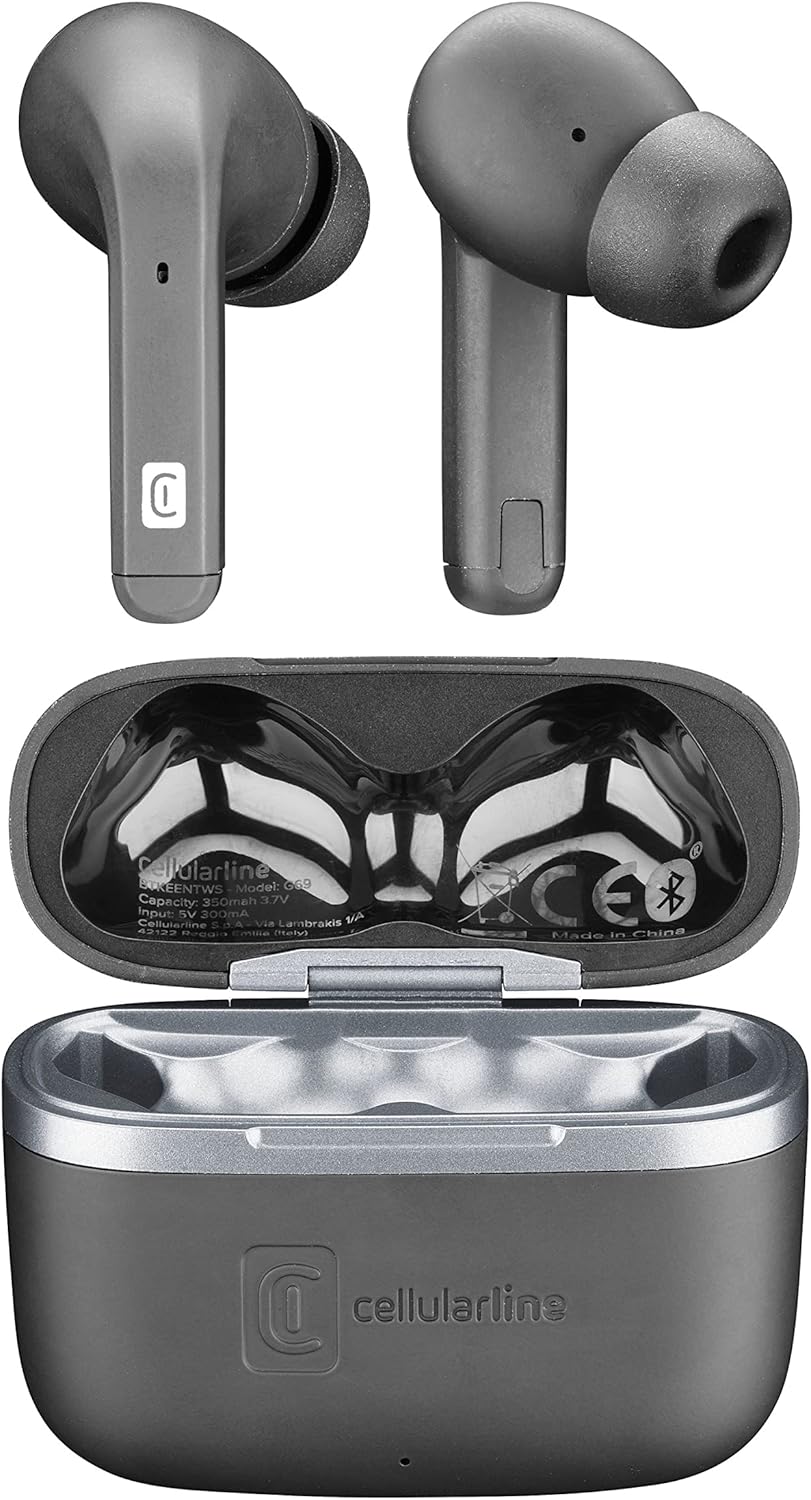
ภาพนี้แสดงมุมมองจากบนลงล่าง view of the Cellularline Keen earbuds and their charging case. Both earbuds are shown outside the case, highlighting their design. The open charging case reveals the charging cradles and internal markings, including the Cellularline logo and regulatory information.
การตั้งค่า
1. การชาร์จครั้งแรก
Before first use, it is recommended to fully charge the earbuds and the charging case. Connect the provided charging cable to the charging case and a compatible USB power source. The charging indicators on the case will show the charging status. A full charge provides up to 6 hours of earbud playtime, with the case offering an additional 24 hours of battery life.
2. การจับคู่กับอุปกรณ์ของคุณ
The Cellularline Keen earbuds are designed for easy pairing with any Bluetooth-enabled device (smartphones, tablets, laptops, etc.).
- ตรวจสอบให้แน่ใจว่าหูฟังอยู่ในเคสชาร์จและฝาเคสเปิดอยู่
- บนอุปกรณ์ของคุณ ให้ไปที่การตั้งค่า Bluetooth
- Activate Bluetooth if it is not already enabled.
- ค้นหา new devices. You should see "Cellularline Keen" or a similar name appear in the list of available devices.
- Select "Cellularline Keen" to initiate the pairing process.
- Once paired, your device will confirm the connection, and the earbuds are ready for use.
The earbuds will automatically connect to the last paired device when removed from the case, provided Bluetooth is active on the device.
คำแนะนำการใช้งาน
The Keen earbuds feature intuitive touch controls for managing audio playback and calls.
การเล่นเพลง
- เล่น/หยุดชั่วคราว: แตะที่หูฟังข้างใดข้างหนึ่งเพียงครั้งเดียว
- เพลงถัดไป: แตะสองครั้งที่หูฟังด้านขวา
- แทร็กก่อนหน้า: แตะสองครั้งที่หูฟังด้านซ้าย
- ปรับระดับเสียงขึ้น: แตะสามครั้งที่หูฟังด้านขวา
- ลดเสียงลง: แตะสามครั้งที่หูฟังด้านซ้าย
การจัดการการโทร
- รับ/วางสาย: แตะที่หูฟังข้างใดข้างหนึ่งเพียงครั้งเดียว
- ปฏิเสธสาย: กดเอียร์บัดข้างใดข้างหนึ่งค้างไว้ 2 วินาที
ผู้ช่วยเสียง
- เปิดใช้งาน Voice Assistant: กดหูฟังข้างใดข้างหนึ่งค้างไว้ 3 วินาที (เช่น ใช้กับ Siri หรือ Google Assistant)
การซ่อมบำรุง
Proper maintenance ensures the longevity and optimal performance of your Cellularline Keen earbuds.
- การทำความสะอาด: Regularly clean the earbuds and charging case with a soft, dry, lint-free cloth. Do not use abrasive cleaners or solvents. For eartips, remove them and clean with a damp ผ้า โดยให้แน่ใจว่าแห้งสนิทก่อนจะติดกลับเข้าไป
- ความต้านทานน้ำ: The earbuds are rated as waterproof. However, this does not mean they are suitable for prolonged submersion or use during swimming. Avoid exposing them to strong jets of water or saltwater. Always ensure the charging port is dry before charging.
- พื้นที่จัดเก็บ: เมื่อไม่ใช้งาน ให้เก็บหูฟังไว้ในกล่องชาร์จเพื่อป้องกันฝุ่นและความเสียหาย เก็บในที่แห้งและเย็น หลีกเลี่ยงแสงแดดโดยตรงและอุณหภูมิที่สูงหรือต่ำเกินไป
- การดูแลแบตเตอรี่ เพื่อยืดอายุการใช้งานแบตเตอรี่ ควรหลีกเลี่ยงการปล่อยประจุแบตเตอรี่จนหมดบ่อยเกินไป ควรชาร์จหูฟังและเคสเป็นประจำ แม้จะไม่ได้ใช้งานบ่อยก็ตาม
การแก้ไขปัญหา
If you encounter any issues with your Cellularline Keen earbuds, refer to the following common solutions:
| ปัญหา | วิธีแก้ปัญหาที่เป็นไปได้ |
|---|---|
| หูฟังไม่จับคู่/เชื่อมต่อ |
|
| ไม่มีเสียงจากหูฟังข้างหนึ่งหรือทั้งสองข้าง |
|
| เคสชาร์จไม่ชาร์จ |
|
| ระบบควบคุมแบบสัมผัสไม่ตอบสนอง |
|
ข้อมูลจำเพาะ
| คุณสมบัติ | รายละเอียด |
|---|---|
| ชื่อรุ่น | BTKEENTWSK |
| ยี่ห้อ | เซลลูลาร์ไลน์ |
| เทคโนโลยีการเชื่อมต่อ | ไร้สาย (Bluetooth) |
| ฟอร์มแฟกเตอร์ | อินเอียร์ |
| ประเภทการควบคุม | การควบคุมแบบสัมผัส |
| เวลาเล่นหูฟัง | นานถึง 6 ชั่วโมง |
| เวลาเล่นทั้งหมด (รวมเคส) | Over 24 hours (up to 30 hours) |
| องค์ประกอบของแบตเตอรี่ | ลิเธียมโพลิเมอร์ (รวม 2 ชิ้น) |
| คุณสมบัติพิเศษ | Fast Charging, Wireless |
| ระดับความต้านทานต่อน้ำ | กันน้ำ |
| ช่วงความถี่ | 20 เฮิรตซ์ - 20,000 เฮิรตซ์ |
| วัสดุ | พลาสติก |
| น้ำหนักสินค้า | 40 กรัม |
| สี | สีดำ |
การรับประกันและการสนับสนุน
For warranty information, technical support, or service inquiries regarding your Cellularline Keen earbuds, please refer to the warranty card included in your package or visit the official Cellularline website. Information regarding spare parts availability and software updates is not provided in this manual.
You can also contact Cellularline customer support directly for assistance.
Ask a question about this manual
Ask about setup, troubleshooting, compatibility, parts, safety, or missing instructions. Manuals+ will review the question and use this page’s manual context to help answer it.