
1. บทนำ
ขอบคุณสำหรับการซื้อasing the MAXDONE A4 Laminator. This device is designed to protect your documents and photos from wear, tear, and moisture using both hot and cold lamination processes. Please read this manual carefully before operating the laminator to ensure safe and efficient use. Keep this manual for future reference.
2. คำแนะนำด้านความปลอดภัย
- เชื่อมต่อเครื่องเคลือบเข้ากับเต้ารับไฟฟ้าที่มีสายดินเสมอ
- ห้ามใช้งานเครื่องเคลือบเอกสารขณะมือเปียกหรืออยู่ใกล้น้ำ
- ให้เด็กและสัตว์เลี้ยงอยู่ห่างจากเครื่องเคลือบในระหว่างการทำงาน
- ห้ามใส่วัตถุอื่นใดนอกจากซองเคลือบพลาสติกเข้าไปในเครื่อง
- ถอดปลั๊กเครื่องเคลือบบัตรเมื่อไม่ใช้งานหรือก่อนทำความสะอาด
- ตรวจสอบให้แน่ใจว่ามีการระบายอากาศที่เหมาะสมรอบๆ เครื่องระหว่างการใช้งาน
- อย่าพยายามเปิดหรือซ่อมแซมเครื่องเคลือบด้วยตัวเอง โปรดติดต่อเจ้าหน้าที่บริการที่ผ่านการรับรอง
- Avoid laminating heat-sensitive materials in hot lamination mode.
3. เนื้อหาบรรจุภัณฑ์
กรุณาตรวจสอบแพ็คเกจสำหรับรายการต่อไปนี้:
- MAXDONE A4 Laminator (Model FN333)
- สายไฟ
- 10 Laminating Pouches (various sizes: A4, A5, A6)
- เครื่องตัดกระดาษ
- ตัวปัดมุม
- คู่มือการใช้งาน
4. สินค้าหมดview
ทำความรู้จักกับส่วนประกอบต่างๆ ของเครื่องเคลือบเอกสารของคุณ:
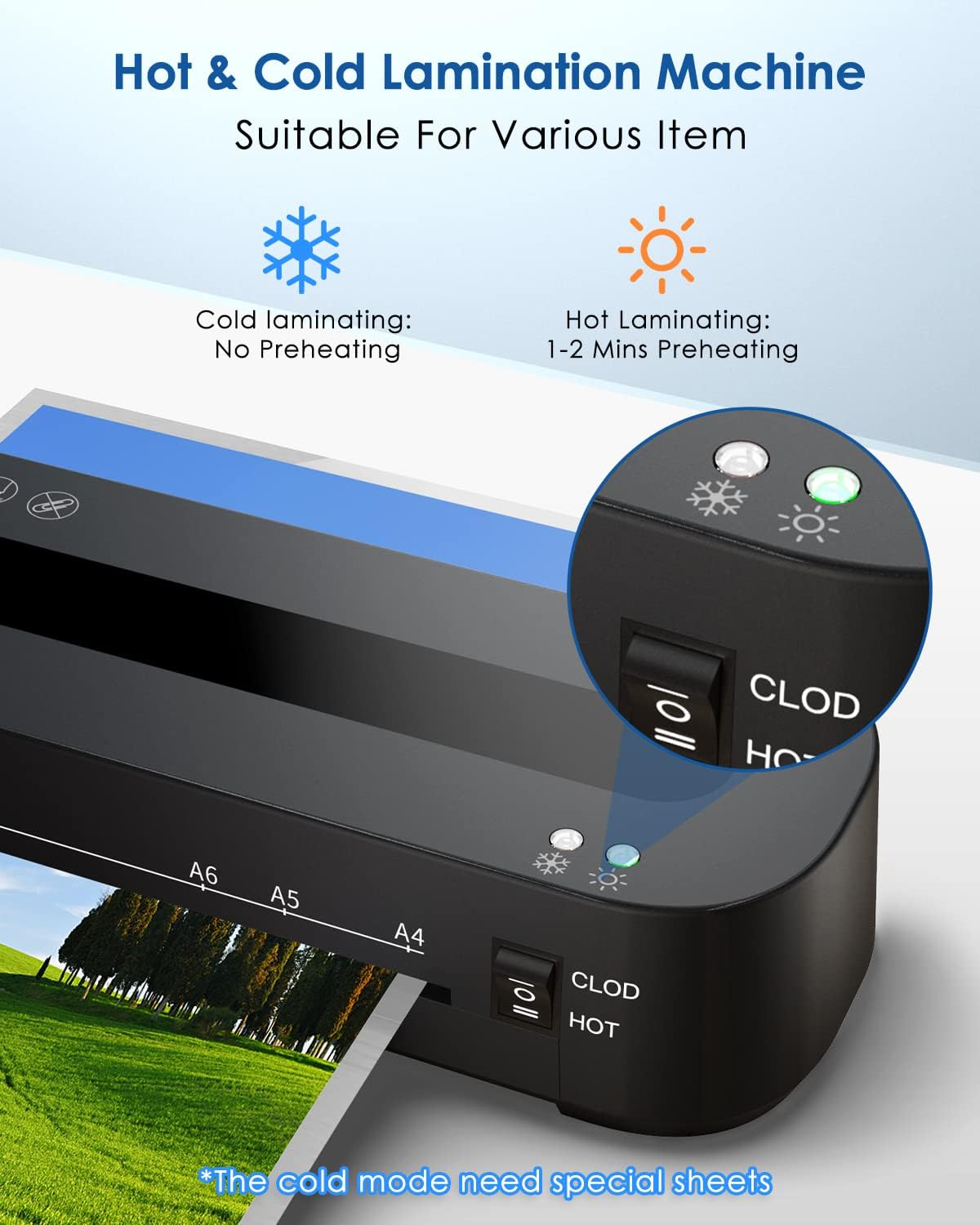
Image: Control panel showing the 'CLOD' (Cold) and 'HOT' mode switch, and indicator lights for power and readiness.

ภาพ: ด้านข้าง view of the laminator highlighting the 'ABS' button for jam release.
- สวิตช์ไฟ: เปิดและปิดเครื่องเคลือบเอกสาร
- Mode Switch (CLOD/HOT): Selects between cold lamination and hot lamination modes.
- ไฟแสดงสถานะ: Show power status and readiness for lamination (green for ready).
- ช่องทางเข้า: บริเวณที่ใส่ซองเคลือบพลาสติก
- ช่องทางออก: ที่มาของเอกสารเคลือบพลาสติก
- ปุ่ม ABS: Used to release jammed documents.
5. การตั้งค่า
- Unpack the laminator and all accessories.
- Place the laminator on a stable, flat surface with adequate space for document entry and exit.
- ตรวจสอบให้แน่ใจว่าสวิตช์ไฟอยู่ในตำแหน่ง "ปิด"
- Plug the power cord into the laminator and then into a suitable electrical outlet.
6. คู่มือการใช้งาน
6.1 การเคลือบด้วยความร้อน

Image: Visual guide for hot lamination steps, including turning on, waiting for green light, inserting pouch, and switching off.
- เปิดเครื่องเคลือบโดยใช้สวิตช์เปิด/ปิด
- Switch the mode selector to 'HOT'. The red indicator light will illuminate.
- Wait approximately 1-2 minutes for the laminator to preheat. The green 'Ready' indicator light will turn on when the machine is ready for use.
- Place your document inside a laminating pouch, ensuring it is centered and there is an even border around the document.
- Insert the sealed edge of the laminating pouch squarely into the entry slot. The laminator will automatically feed the pouch through.
- Once the laminated document exits the machine, place it on a flat surface to cool.
- After completing lamination, switch the mode selector to 'OFF' and unplug the device.
บันทึก: This laminator supports pouch thicknesses between 80 and 125 microns.
6.2 การเคลือบเย็น
Cold lamination does not require preheating. It uses pressure-sensitive pouches.
- เปิดเครื่องเคลือบโดยใช้สวิตช์เปิด/ปิด
- Switch the mode selector to 'CLOD' (Cold).
- Place your document inside a special cold laminating pouch.
- Insert the sealed edge of the cold laminating pouch squarely into the entry slot.
- Once the laminated document exits the machine, it is ready for use.
- After completing lamination, switch the mode selector to 'OFF' and unplug the device.
6.3 การปล่อยแยม
In case of a paper jam:
- Immediately switch off the laminator.
- Press and hold the 'ABS' (Anti-Blocking System) button located on the side of the machine.
- Gently pull the jammed pouch out of the entry or exit slot.
- Release the 'ABS' button.
- Check the pouch for damage. If damaged, discard it.
7. การบำรุงรักษา
- การทำความสะอาด: Ensure the laminator is unplugged and cool before cleaning. Wipe the exterior with a soft, dry cloth. Do not use abrasive cleaners or solvents.
- การทำความสะอาดลูกกลิ้ง: Periodically run a folded sheet of paper through the laminator to clean the rollers of any adhesive residue.
- พื้นที่จัดเก็บ: เก็บเครื่องเคลือบไว้ในที่แห้งและปราศจากฝุ่นเมื่อไม่ได้ใช้งาน
8 การแก้ไขปัญหา
| ปัญหา | สาเหตุที่เป็นไปได้ | สารละลาย |
|---|---|---|
| เครื่องเคลือบบัตรไม่เปิด | ไม่มีแหล่งจ่ายไฟ | ตรวจสอบการเชื่อมต่อสายไฟและเต้ารับไฟฟ้าที่ผนัง |
| Laminator not heating up (Hot mode). | Incorrect mode selected or insufficient warm-up time. | Ensure 'HOT' mode is selected and wait for the green 'Ready' light. |
| เอกสารติดขัด | Pouch inserted incorrectly or too quickly; pouch too thick. | Press the 'ABS' button to release the jam. Ensure pouches are inserted straight and within recommended thickness (80-125 microns). |
| Poor lamination quality (bubbles, cloudy). | Insufficient heat or incorrect pouch thickness. | Ensure laminator is fully preheated. Use appropriate pouch thickness for hot lamination. |
| Laminated document is wavy. | Pouch too thin for temperature or document not flat. | Use a slightly thicker pouch or ensure the document is completely flat before lamination. |
9. ข้อมูลจำเพาะ
| คุณสมบัติ | ข้อมูลจำเพาะ |
|---|---|
| ยี่ห้อ | แม็กซ์โดน |
| หมายเลขรุ่น | FN333 |
| Lamination Type | ร้อนและเย็น |
| ความกว้างสูงสุดของการเคลือบ | 210 มม. (A4) |
| Supported Pouch Thickness | 80-125 ไมครอน |
| เวลาวอร์มอัพ | 1-2 นาที |
| ความเร็วในการเคลือบ | 1.05 feet per minute (approx. 32 cm/min) |
| จำนวนลูกกลิ้ง | 2 |
| ขนาดสินค้า (กว้าง x ยาว x สูง) | 32 x 10 x 6.2 ซม. |
| น้ำหนักผลิตภัณฑ์ | 900 กรัม |
| สี | สีดำ |
10. การรับประกันและการสนับสนุน
This product comes with a standard manufacturer's warranty. For specific warranty details, please refer to the documentation included with your purchase or contact the seller directly. If you encounter any issues or require technical assistance, please reach out to MAXDONE customer support or your retailer.