
1. บทนำ
Thank you for choosing the iPega PG-P4008 Wireless Game Controller. This manual provides detailed instructions on how to set up, operate, and maintain your controller. The PG-P4008 offers broad compatibility with PS4, PS3, Android (10.0+), iOS (13.0+), and Windows PC, connecting wirelessly via Bluetooth for an enhanced gaming experience.
2. สินค้าหมดview
The iPega PG-P4008 is designed for versatile gaming across multiple platforms. It features a comfortable ergonomic design, responsive controls, and several advanced functionalities to immerse you in your games.
คุณสมบัติหลัก:
- Wireless Bluetooth connectivity (BT2.1+EDR) with up to 8 meters range.
- No driver installation required for connection.
- Integrated colored LED light indicator for operational status.
- Dual motors for realistic vibration feedback during gameplay.
- Built-in three-dimensional acceleration sensor and gyroscope sensor with six-axis induction.
- Integrated speaker and 3.5mm earphone jack for game audio.
- Dual-point capacitive touchpad for enhanced control.
- Compatible with PS4, PS3, Android (10.0+), iOS (13.0+), and Windows PC.
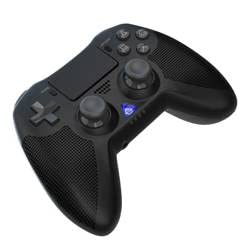
ภาพที่ 1: ด้านหน้า view of the iPega PG-P4008 Wireless Game Controller. This image displays the controller's ergonomic design, dual analog sticks, D-pad, action buttons, touchpad, and the central LED indicator.
3. การตั้งค่าและการเชื่อมต่อ
The PG-P4008 controller connects wirelessly via Bluetooth. Follow these steps to pair your controller with your device:
- เปิดเครื่อง: Ensure the controller is charged. Press and hold the ปุ่ม PS (or equivalent power button) to turn on the controller.
- โหมดจับคู่:
- For PS4/PS3: Connect the controller to the console using a USB cable. Once recognized, you can disconnect the cable for wireless play. The connection method is similar to the official P4 controller.
- For Android/iOS: Activate Bluetooth on your mobile device. On the controller, press and hold the SHARE button + PS button simultaneously until the LED indicator flashes rapidly, indicating pairing mode. Select "PG-P4008" (or similar) from your device's Bluetooth list to connect.
- For Windows PC: Ensure your PC has Bluetooth capability. On the controller, press and hold the PS button + OPTIONS button simultaneously until the LED indicator flashes rapidly. On your PC, go to Bluetooth settings, add a new device, and select "PG-P4008" (or similar) to pair.
- การเชื่อมต่อที่ประสบความสำเร็จ: Once connected, the LED indicator on the controller will change to a solid color, indicating a successful pairing.
บันทึก: No additional driver software is required for operation. The controller supports a stable connection up to 8 meters.
4. คู่มือการใช้งาน
ไฟแสดงสถานะ LED:
The built-in colored LED light indicates the controller's operational status and player assignment, similar to the official PS4 controller. Different colors will signify different stages or player numbers.
ข้อเสนอแนะการสั่นสะเทือน:
The controller features dual motors embedded in the handles, providing tactile vibration feedback to enhance your gaming immersion. This feedback will vary based on in-game events.
ทัชแพด:
The dual-point capacitive touchpad allows for intuitive control in games that support touch input, offering an additional layer of interaction.
ฟังก์ชั่นเสียง:
Connect your 3.5mm earphones to the integrated jack on the controller to experience game audio directly, providing a private and immersive sound experience.
5. การบำรุงรักษา
- Keep the controller dry and away from moisture to prevent damage to internal components.
- ควรทำความสะอาดตัวควบคุมเป็นประจำด้วยผ้าแห้งเนื้อนุ่ม หลีกเลี่ยงการใช้สารเคมีรุนแรงหรือวัสดุที่มีฤทธิ์กัดกร่อน
- เก็บตัวควบคุมไว้ในที่แห้งและเย็นเมื่อไม่ได้ใช้งาน
- ควรหลีกเลี่ยงการวางตัวควบคุมไว้ในที่ที่มีอุณหภูมิสูงหรือต่ำเกินไป หรือโดนแสงแดดโดยตรง
- Do not attempt to disassemble or modify the controller, as this will void any potential warranty and may cause damage.
6 การแก้ไขปัญหา
- ตัวควบคุมไม่ได้เชื่อมต่อ:
- ตรวจสอบให้แน่ใจว่าตัวควบคุมมีประจุไฟเต็ม
- ตรวจสอบว่าได้เปิดใช้งานบลูทูธบนอุปกรณ์ของคุณแล้ว
- Make sure the controller is in the correct pairing mode for your device (refer to Section 3).
- ลองรีสตาร์ททั้งตัวควบคุมและอุปกรณ์ของคุณ
- ลบการจับคู่เก่าออกจากรายการบลูทูธของอุปกรณ์ของคุณ แล้วลองจับคู่ใหม่อีกครั้ง
- ความล่าช้าของอินพุตหรือการตัดการเชื่อมต่อ:
- โปรดตรวจสอบให้แน่ใจว่าคุณอยู่ในระยะการใช้งาน 8 เมตร
- ลดการรบกวนจากอุปกรณ์ไร้สายอื่น ๆ
- Check for any physical obstructions between the controller and the device.
- การสั่นสะเทือนไม่ทำงาน:
- ตรวจสอบให้แน่ใจว่าเกมที่คุณกำลังเล่นรองรับการตอบสนองการสั่นสะเทือน
- ตรวจสอบการตั้งค่าในเกมเพื่อให้แน่ใจว่าได้เปิดใช้งานการสั่นสะเทือนแล้ว
- Audio not working via 3.5mm jack:
- Ensure your earphones are properly plugged in.
- Check the volume settings on your device and in-game.
- Test with another pair of earphones to rule out earphone issues.
7. ข้อมูลจำเพาะ
| หมายเลขรุ่น | PG-P4008 |
| ยี่ห้อ | ไอเปก้า |
| การเชื่อมต่อ | Bluetooth (BT2.1+EDR) |
| ช่วงสาย | สูงสุด 8 เมตร |
| อุปกรณ์ที่รองรับ | PS4, PS3, Android (10.0+), iOS (13.0+), Windows PC |
| คุณสมบัติพิเศษ | Wireless, Touchpad, Vibration, 6-axis Gyroscope, Built-in Speaker, 3.5mm Audio Jack |
| จำนวนปุ่ม | 17 |
| แหล่งพลังงาน | ใช้พลังงานจากแบตเตอรี่ |
8. การรับประกันและการสนับสนุน
คู่มือนี้ไม่ได้ให้ข้อมูลเกี่ยวกับเงื่อนไขการรับประกันสินค้าและการบริการลูกค้า โปรดดูข้อมูลเพิ่มเติมจากบรรจุภัณฑ์สินค้าหรือข้อมูลจากผู้จำหน่าย webดูรายละเอียดเกี่ยวกับการรับประกันและวิธีการติดต่อฝ่ายบริการลูกค้าเพื่อขอความช่วยเหลือได้ที่เว็บไซต์นี้