
ARMODD Squarz 9 Pro Gold
คู่มือผู้ใช้ ARMODD Squarz 9 Pro Smart Watch
Model: Squarz 9 Pro Gold
การแนะนำ
Welcome to the user manual for your new ARMODD Squarz 9 Pro Smart Watch. This guide provides comprehensive instructions on how to set up, operate, and maintain your smartwatch, ensuring you get the most out of its advanced features. The ARMODD Squarz 9 Pro is designed for both men and women, featuring a vibrant 1.72-inch touch screen, IP68 waterproofing, and a wide array of health and fitness tracking capabilities.
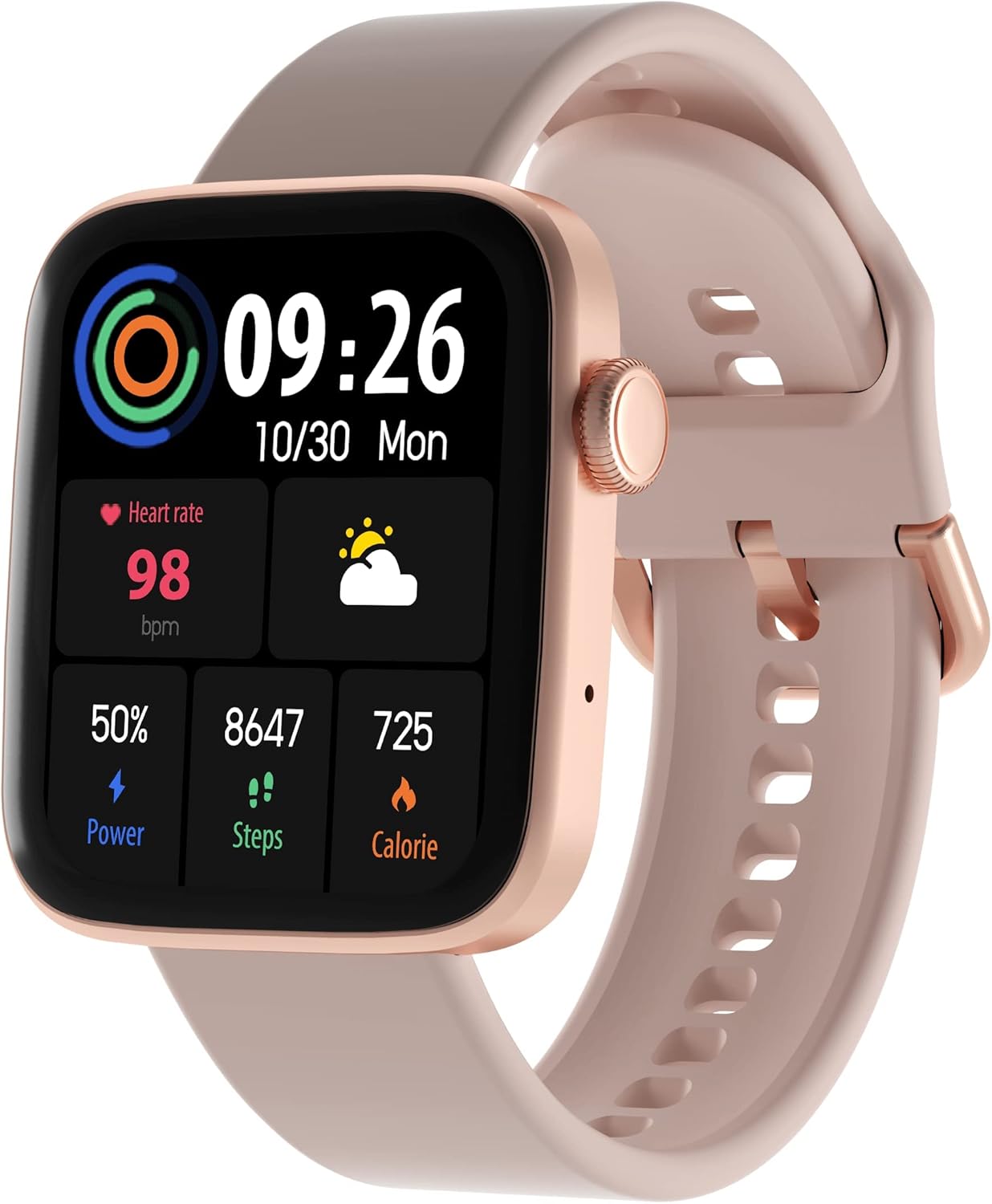
Figure 1: ARMODD Squarz 9 Pro Smart Watch with its main display showing various metrics.
การตั้งค่า
1. การชาร์จสมาร์ทวอทช์
Before first use, fully charge your ARMODD Squarz 9 Pro Smart Watch.
- เสียบสายชาร์จเข้ากับพอร์ตชาร์จที่ด้านหลังของนาฬิกา
- เสียบปลายสาย USB เข้ากับอะแดปเตอร์ไฟ USB มาตรฐาน (แนะนำ 5V/1A) หรือพอร์ต USB ของคอมพิวเตอร์
- หน้าจอของนาฬิกาจะแสดงไฟแสดงสถานะการชาร์จ โดยปกติการชาร์จเต็มจะใช้เวลาประมาณ 2 ชั่วโมง
2. การจับคู่กับสมาร์ทโฟนของคุณ
To unlock all features and synchronize data, pair your smartwatch with the dedicated mobile application.
- ดาวน์โหลดแอป: ค้นหา the "WearPro" app (or the app specified in your watch's quick start guide) on the App Store (iOS) or Google Play Store (Android).
- เปิดใช้งานบลูทูธ: ตรวจสอบให้แน่ใจว่าได้เปิดใช้งาน Bluetooth บนสมาร์ทโฟนของคุณแล้ว
- เปิดแอป: Launch the downloaded app and follow the on-screen instructions to create an account or log in.
- เพิ่มอุปกรณ์: In the app, navigate to the "Device" or "Add Device" section. The app will search for nearby Bluetooth devices.
- เลือกนาฬิกาของคุณ: Select "ARMODD Squarz 9 Pro" from the list of found devices.
- ยืนยันการจับคู่: อาจมีคำขอจับคู่ปรากฏขึ้นทั้งบนโทรศัพท์และนาฬิกาของคุณ โปรดยืนยันการจับคู่บนอุปกรณ์ทั้งสอง
- การซิงโครไนซ์: เมื่อจับคู่แล้ว นาฬิกาจะซิงโครไนซ์เวลาและข้อมูลกับโทรศัพท์ของคุณ

รูปที่ 2: อดีตample of the mobile application interface for the ARMODD Squarz 9 Pro.
คำแนะนำการใช้งาน
การนำทางพื้นฐาน
- หน้าจอสัมผัส: ปัดไปทางซ้าย/ขวา และขึ้น/ลง เพื่อเลื่อนดูเมนูและฟีเจอร์ต่างๆ แตะเพื่อเลือก
- ปุ่มด้านข้าง/เม็ดมะยม: Press the side button to wake the screen, return to the home screen, or access the main menu. Rotate the crown to scroll through options or change watch faces.
การปรับแต่งหน้าปัดนาฬิกา
The ARMODD Squarz 9 Pro offers over 100 watch faces and the ability to upload your own photos.
- เฝ้าดู: From the home screen, long-press the display to enter watch face selection mode. Swipe left/right to browse pre-installed faces and tap to select.
- ผ่านแอป: Open the mobile app, go to the "Watch Faces" or "Dial Market" section. Browse and download new watch faces, or select an image from your phone's gallery to set as a custom watch face.

Figure 3: The smartwatch displaying a customizable watch face.
การโทรด้วยบลูทูธ
Make and receive calls directly from your smartwatch when connected to your smartphone via Bluetooth.
- Ensure your watch is connected to your phone's Bluetooth.
- Access the "Phone" or "Dialer" function on your watch.
- You can dial numbers directly or access your phone's contacts/call history through the watch.
- สายเรียกเข้าจะแสดงบนนาฬิกา ทำให้คุณสามารถรับสายหรือปฏิเสธสายได้

Figure 4: The smartwatch displaying the Bluetooth calling function.
การติดตามสุขภาพ
The watch monitors various health metrics to help you stay informed about your well-being.
- อัตราการเต้นของหัวใจ: Access the heart rate monitor function on the watch to measure your current heart rate. Continuous monitoring can be enabled via the app.
- การติดตามการนอนหลับ: Wear the watch to bed to automatically track your sleep patterns, including deep sleep, light sleep, and awake times. View รายงานโดยละเอียดในแอป
- ความดันโลหิตและระดับออกซิเจนในเลือด (SpO2): The watch can estimate blood pressure and blood oxygen levels. For medical accuracy, consult professional medical devices.

Figure 5: Heart rate monitoring feature in action.
โหมดกีฬาและการติดตามกิจกรรม
Track your workouts and daily activity with multiple sports modes and a built-in pedometer.
- pedometer: The watch automatically counts your steps, distance, and calories burned throughout the day.
- โหมดกีฬา: Select from various sports modes (e.g., running, walking, cycling) to get real-time data during your activity.
- การซิงโครไนซ์ข้อมูล: All activity data is synchronized with the mobile app for detailed analysis and historical records.

Figure 6: Tracking sports activity with the smartwatch.
การแจ้งเตือน
รับการแจ้งเตือนจากสมาร์ทโฟนของคุณโดยตรงบนนาฬิกาของคุณ
- Enable app notifications in your phone's settings and within the smartwatch app.
- The watch will vibrate and display incoming calls, messages, and app alerts.
การซ่อมบำรุง
การทำความสะอาดสมาร์ทวอทช์ของคุณ
การทำความสะอาดเป็นประจำจะช่วยรักษารูปลักษณ์และการทำงานของนาฬิกาไว้ได้
- เช็ดหน้าจอและตัวเรือนนาฬิกาด้วยผ้าที่ไม่เป็นขุยและนุ่ม
- สำหรับจุดที่ดื้อดึง ให้เช็ดออกเล็กน้อยampชุบผ้าด้วยน้ำ หลีกเลี่ยงการใช้สารเคมีรุนแรงหรือวัสดุที่มีฤทธิ์กัดกร่อน
- ทำความสะอาดหน้าสัมผัสการชาร์จเป็นระยะเพื่อให้แน่ใจว่าชาร์จได้อย่างถูกต้อง
ความต้านทานต่อน้ำ (IP68)
The ARMODD Squarz 9 Pro is IP68 waterproof, meaning it is resistant to dust and can withstand immersion in water up to 1.5 meters for up to 30 minutes.
- เหมาะสำหรับใช้ในชีวิตประจำวัน เช่น ล้างมือ ฝนตก และว่ายน้ำในน้ำตื้น
- Avoid hot water, steam, or prolonged immersion in deep water.
- ห้ามกดปุ่มนาฬิกาใต้น้ำ
- หลังจากโดนน้ำ ให้เช็ดนาฬิกาให้แห้งก่อนชาร์จ
การแก้ไขปัญหา
| ปัญหา | สาเหตุที่เป็นไปได้ / วิธีแก้ไข |
|---|---|
| นาฬิกาไม่เปิด | Battery might be depleted. Charge the watch for at least 30 minutes. |
| ไม่สามารถจับคู่กับสมาร์ทโฟนได้ |
|
| ข้อมูลสุขภาพที่ไม่ถูกต้อง |
|
| ไม่ได้รับการแจ้งเตือน |
|
| อายุการใช้งานแบตเตอรี่สั้น |
|
ข้อมูลจำเพาะ
| คุณสมบัติ | รายละเอียด |
|---|---|
| ชื่อรุ่น | Squarz 9 Pro Gold |
| ยี่ห้อ | อาร์มอดด์ |
| ขนาดจอแสดงผล | 1.72 นิ้ว |
| เทคโนโลยีการเชื่อมต่อ | บลูทูธ |
| ความต้านทานต่อน้ำ | IP68 |
| คุณสมบัติพิเศษ | Time Display, Pedometer, Alarm Clock, Heart Rate Monitor, Sleep Monitor, Bluetooth Calling |
| อุปกรณ์ที่รองรับ | Smartphone (iOS / Android) |
| แบตเตอรี่ | ลิเธียมไอออน 1 ก้อน (รวมอยู่ด้วย) |
การรับประกันและการสนับสนุน
For warranty information and customer support, please refer to the documentation included with your purchase or visit the official ARMODD webเว็บไซต์.