
ELEFOCUS RC-815S, TX-8030, RC-816S, RC-903S, RC-904S, TX-8160, TX-8050, TX-8140
ELEFOCUS Replacement Remote Control User Manual
For Onkyo RC-815S, TX-8030, RC-816S, RC-903S, RC-904S, TX-8160, TX-8050, TX-8140 Network Audio/Video AV Stereo Receivers
การแนะนำ
This manual provides essential information for the proper use and maintenance of your ELEFOCUS replacement remote control. This remote is designed as a direct replacement for various Onkyo Network Audio/Video AV Stereo Receivers, including models RC-815S, TX-8030, RC-816S, RC-903S, RC-904S, TX-8160, TX-8050, and TX-8140.
Please note that this is a replacement item and while it functions out of the box with compatible models, some advanced or specific functions of your original remote may not be fully supported. No complex programming is required; simply insert batteries to begin use.
การตั้งค่า
1. การติดตั้งแบตเตอรี่
รีโมทคอนโทรลต้องใช้แบตเตอรี่ AAA จำนวนสอง (2) ก้อน (ไม่ได้รวมมาให้) โปรดทำตามขั้นตอนต่อไปนี้เพื่อติดตั้งแบตเตอรี่:
- ค้นหาช่องใส่แบตเตอรี่ที่ด้านหลังของรีโมทคอนโทรล
- กดแถบลงแล้วเลื่อนฝาครอบแบตเตอรี่ลงด้านล่างเพื่อเปิดออก
- ใส่แบตเตอรี่ AAA สองก้อน โดยตรวจสอบให้แน่ใจว่าขั้วบวก (+) และขั้วลบ (-) ตรงกับเครื่องหมายภายในช่อง
- เลื่อนฝาครอบแบตเตอรี่กลับเข้าที่จนกระทั่งคลิกเข้าที่
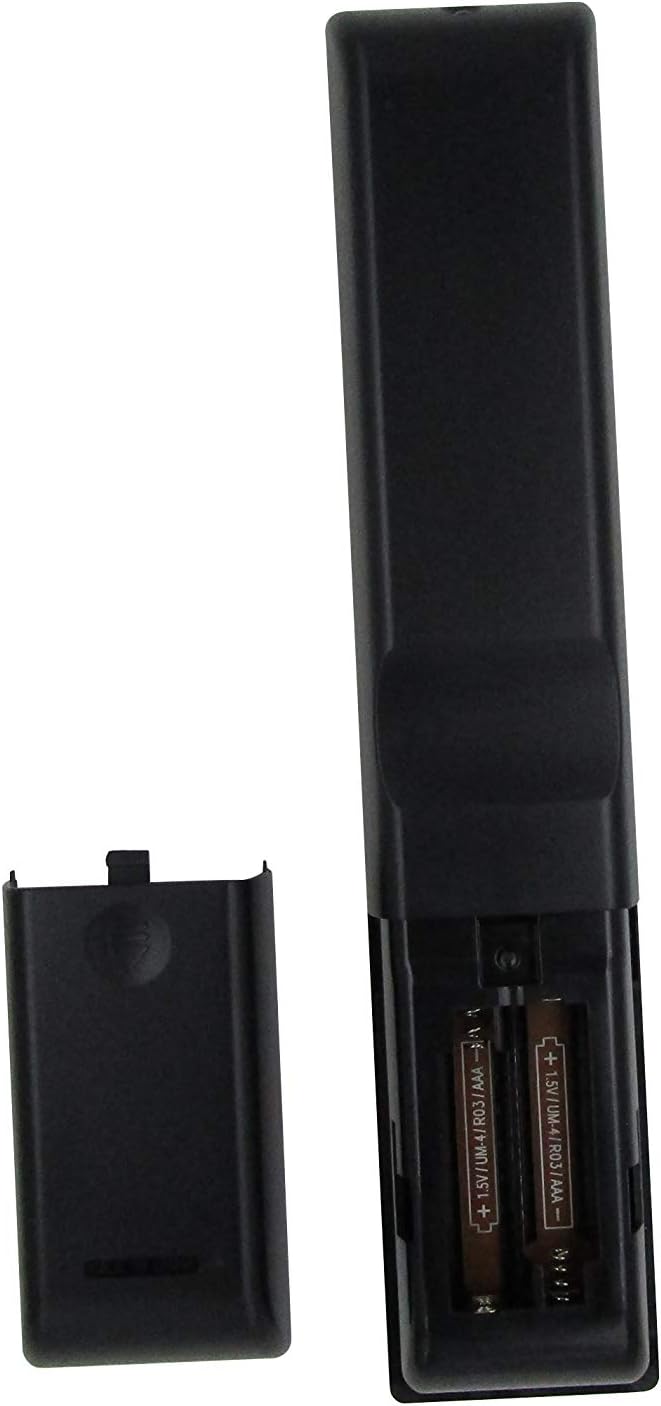
รูปที่ 1: Battery compartment with AAA batteries. Ensure correct polarity when inserting batteries.
Once batteries are installed, the remote is ready for use. No additional programming or setup is typically required for compatible Onkyo receiver models.
คำแนะนำการใช้งาน
This replacement remote control provides essential functions for your Onkyo receiver. Point the remote directly at the receiver's infrared (IR) sensor for optimal performance.

รูปที่ 2: เกินview ของรูปแบบรีโมทคอนโทรล
ฟังก์ชั่นหลัก:
- ปุ่มเพาเวอร์ (⏻): เปิดหรือปิดเครื่องรับ
- Input Selector Buttons (BD/DVD, CBL/SAT, PC, Game, TV/Tape, CD, Phono, Tuner, NET, Bluetooth): เลือกแหล่งสัญญาณเสียง/วิดีโอที่ต้องการ
- เพิ่ม/ลดระดับเสียง (▲ / ▼): ปรับระดับเสียงหลัก
- ปิดเสียง: ปิดเสียงหรือเปิดเสียงเอาต์พุตเสียง
- ปุ่มควบคุมทิศทาง (ขึ้น, ลง, ซ้าย, ขวา, Enter): Used to navigate menus and confirm selections on your receiver's display.
- เมนู: เข้าสู่เมนูหลักของเครื่องรับสัญญาณ
- การตั้งค่า: Enters the setup menu for configuration.
- กลับ: กลับไปยังเมนูหรือหน้าจอก่อนหน้า
- เสียง: Cycles through audio modes or settings.
- Playback Controls (Rewind, Play/Pause, Fast Forward, Stop, Previous Track, Play, Next Track): Controls media playback for connected devices.
- ทำซ้ำ: สลับโหมดการเล่นซ้ำ
- สุ่ม: Toggles random/shuffle playback mode.
- ผู้พูด A/B: Selects speaker output groups.
- แผงปุ่มกดตัวเลข (0-9): For direct input of numbers, such as radio frequencies or track numbers.
- หมวก: Functionality may vary by receiver model.
- >10: For entering numbers greater than 9 on some systems.
- D.TUN: Direct tuning for radio.
- แสดง: Changes display information on the receiver.
- หรี่: ปรับความสว่างของหน้าจอแสดงผลของเครื่องรับสัญญาณ
- นอน: Sets a sleep timer for the receiver.
- ซีแอลอาร์: Clears current input or selection.
หมายเหตุสำคัญ:
As a replacement remote, some advanced or specific functions present on your original Onkyo remote may not be replicated or fully functional. This remote is designed to cover the primary and most commonly used features.
การซ่อมบำรุง
1. การเปลี่ยนแบตเตอรี่
เปลี่ยนแบตเตอรี่เมื่อรีโมทตอบสนองช้าลงหรือหยุดทำงาน ควรเปลี่ยนแบตเตอรี่ทั้งสองก้อนพร้อมกันด้วยแบตเตอรี่ AAA ใหม่เสมอ ห้ามใช้แบตเตอรี่เก่าและใหม่ปะปนกัน หรือใช้แบตเตอรี่ต่างชนิดกัน
2. การทำความสะอาด
ในการทำความสะอาดรีโมทคอนโทรล ให้ใช้ผ้าแห้งนุ่มๆ เช็ด สำหรับคราบสกปรกที่ติดแน่น ให้ใช้ผ้าชุบน้ำหมาดๆ เช็ดเบาๆampชุบผ้าด้วยน้ำหรือน้ำยาทำความสะอาดอ่อนๆ ที่ไม่ทำให้เกิดรอยขีดข่วน ห้ามใช้สารเคมีรุนแรง ตัวทำละลาย หรือแผ่นทำความสะอาดที่มีฤทธิ์กัดกร่อน เพราะอาจทำให้พื้นผิวหรือชิ้นส่วนภายในของรีโมทเสียหายได้
3. การจัดเก็บ
When not in use for extended periods, it is recommended to remove the batteries to prevent leakage, which can damage the remote. Store the remote in a cool, dry place away from direct sunlight and extreme temperatures.
การแก้ไขปัญหา
| ปัญหา | สาเหตุที่เป็นไปได้ | สารละลาย |
|---|---|---|
| รีโมทใช้งานไม่ได้เลย |
|
|
| ฟังก์ชั่นบางอย่างไม่ทำงาน |
|
|
| การทำงานระยะไกลมีเป็นระยะๆ |
|
|
If your specific Onkyo receiver model is not listed in the product title (RC-815S, TX-8030, RC-816S, RC-903S, RC-904S, TX-8160, TX-8050, TX-8140), this remote may not be compatible. Please verify compatibility before purchase.
ข้อมูลจำเพาะ
- ยี่ห้อ: ELEFOCUS
- อุปกรณ์ที่รองรับ: Onkyo Network Audio/Video AV Stereo Receivers (Models: RC-815S, TX-8030, RC-816S, RC-903S, RC-904S, TX-8160, TX-8050, TX-8140)
- เทคโนโลยีการเชื่อมต่อ: อินฟาเรด (IR)
- แหล่งพลังงาน: 2 x แบตเตอรี่ AAA (ไม่รวม)
- คุณสมบัติพิเศษ: การออกแบบตามหลักสรีรศาสตร์
- จำนวนสูงสุดของอุปกรณ์ที่รองรับ: 1 (specific Onkyo receiver)
ข้อมูลการรับประกัน
Specific warranty details for this ELEFOCUS replacement remote control are not provided in the product information. Please refer to the seller's return policy or contact the seller directly for information regarding warranty coverage and terms.
การสนับสนุนลูกค้า
For further assistance or inquiries regarding your ELEFOCUS replacement remote control, please contact the seller directly through the platform where the purchase was made. As this is a third-party replacement product, direct manufacturer support may not be available.
For general information about your Onkyo receiver, please refer to the original user manual provided with your receiver or visit the official Onkyo support webเว็บไซต์.
สินค้าเพิ่มเติม Views

รูปที่ 3: มุม view ของรีโมทคอนโทรล

รูปที่ 4: Close-up of the upper section of the remote, showing input and media controls.
วิดีโอผลิตภัณฑ์อย่างเป็นทางการ
No official product videos from the seller were provided for this item.