
1. บทนำ
This manual provides essential information for the safe operation, maintenance, and troubleshooting of your yeedi vac 2 pro Robot Vacuum and Mop Combo. Please read this manual thoroughly before using the product and retain it for future reference.
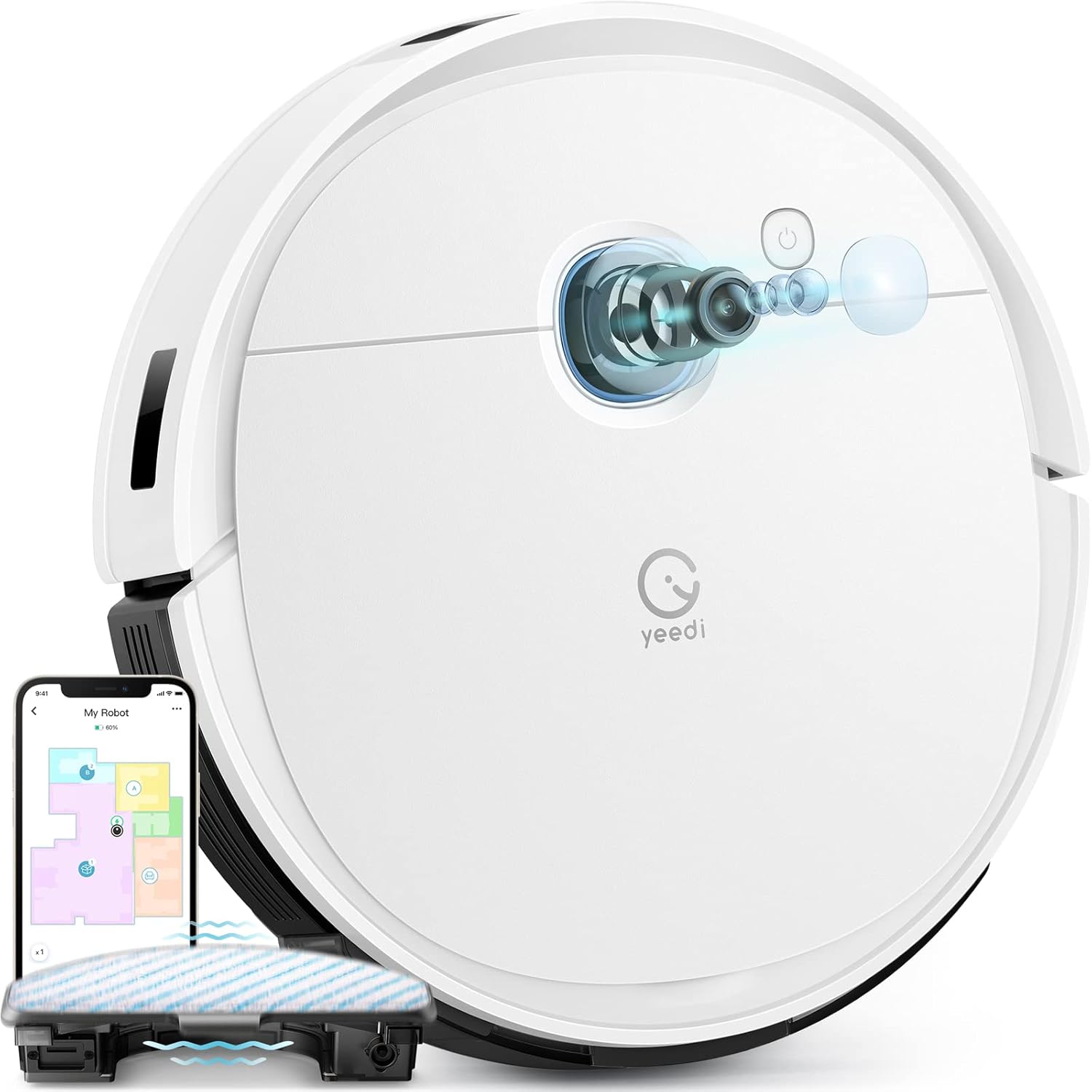
Image 1.1: The yeedi vac 2 pro Robot Vacuum and Mop Combo, showcasing its sleek design and integrated app control interface.
2. คุณสมบัติของผลิตภัณฑ์
The yeedi vac 2 pro is designed to provide comprehensive floor cleaning with advanced functionalities.
- การทำความสะอาดแบบครบวงจร: Simultaneous vacuuming and oscillating mopping with 3000Pa suction for effective removal of dirt and dried-on stains on various floor types.
- Advanced 3D Obstacle Avoidance: Detects and navigates around common household obstacles such as shoes, pet bowls, and toys, reducing the need for pre-cleaning preparation.
- Smart Visual Navigation: Utilizes visual navigation technology for precise mapping of your home layout, enabling efficient cleaning paths and full floor coverage.
- Intelligent Carpet Detection: Automatically adjusts cleaning mode; avoids carpets during mopping and increases suction power when vacuuming carpets.
- ปรับแต่งการทำความสะอาดได้ตามต้องการผ่านแอป: Control vacuuming and water flow levels, select specific areas for cleaning, define cleaning sequences, and manage editable home maps through the yeedi app. Compatible with Amazon Alexa and Google Assistant.
- รันไทม์ขยาย: Up to 240 minutes of cleaning on a single charge, suitable for large homes. Features automatic recharging and resume cleaning functionality.
- Optional Auto Dustbin Empty: Compatible with the yeedi self-empty station (sold separately) for up to 60 days of hands-free dust disposal.

ภาพที่ 2.1: ภาพระยะใกล้ view of the oscillating mopping system, designed to mimic hand-mopping for effective stain removal.

Image 2.2: The robot vacuum navigating around various obstacles, demonstrating its 3D obstacle avoidance capabilities.
3. การตั้งค่า
3.1 การแกะและการจัดวาง
- นำส่วนประกอบทั้งหมดออกจากบรรจุภัณฑ์อย่างระมัดระวัง
- ลอกฟิล์มป้องกันและสติกเกอร์ทั้งหมดออกจากหุ่นยนต์และแท่นชาร์จ
- Place the charging dock against a wall in an open area, ensuring there are no obstacles within 0.5 meters (1.6 feet) to either side and 1.5 meters (4.9 feet) in front.
- เชื่อมต่ออะแดปเตอร์ไฟฟ้ากับแท่นชาร์จและเสียบเข้ากับเต้ารับไฟฟ้า
3.2 การชาร์จเริ่มต้น
วางหุ่นยนต์ลงบนแท่นชาร์จ ตรวจสอบให้แน่ใจว่าหน้าสัมผัสการชาร์จของหุ่นยนต์ตรงกับบนแท่นชาร์จ หุ่นยนต์จะเริ่มชาร์จโดยอัตโนมัติ สำหรับการใช้งานครั้งแรก ควรชาร์จหุ่นยนต์ให้เต็มก่อนใช้งาน
3.3 การติดตั้งและการเชื่อมต่อแอป
- Download the 'yeedi' app from your mobile device's app store (iOS or Android).
- เปิดแอปและปฏิบัติตามคำแนะนำบนหน้าจอเพื่อสร้างบัญชี
- Add your yeedi vac 2 pro by selecting the model from the device list.
- Follow the app's instructions to connect the robot to your 2.4GHz Wi-Fi network. (Note: 5GHz Wi-Fi is not supported).
4. คู่มือการใช้งาน
4.1 การเริ่มรอบการทำความสะอาด
You can start a cleaning cycle using the physical button on the robot or through the yeedi app.
- ปุ่มหุ่นยนต์: กดปุ่มเปิด/ปิดหนึ่งครั้งเพื่อเริ่มหรือหยุดการทำความสะอาดชั่วคราว
- yeedi App: Open the app, select your robot, and tap 'Start Cleaning'.
4.2 ฟังก์ชันถูพื้น
To use the mopping function, ensure the water tank is filled and the mopping pad is attached.
- Fill the water tank with clean water. Do not use cleaning solutions not approved by Yeedi.
- Attach the mopping pad securely to the water tank module.
- Insert the water tank module into the robot.
- Start a cleaning cycle. The robot will automatically engage mopping mode on hard floors and avoid carpets.

Image 4.1: Illustration of the robot's carpet detection feature, showing it avoiding carpets in mopping mode and boosting suction in vacuuming mode.
4.3 การควบคุมแอปและการทำแผนที่
The yeedi app provides advanced control and customization options.
- การสร้างแผนที่: The robot will create a map of your home during its first few cleaning cycles. Ensure all doors are open and obstacles are minimized for accurate mapping.
- การปรับแต่ง: Use the app to set virtual boundaries, no-go zones, specific cleaning areas, and adjust suction power or water flow levels.
- การทำแผนที่หลายชั้น: The robot supports saving multiple maps, allowing it to operate efficiently in multi-story homes.

Image 4.2: Screenshots of the yeedi app interface, demonstrating options for setting cleaning sequences, cleaning specific areas, and customizing settings.

Image 4.3: Visual representation of the robot's ability to create and save multiple floor maps, beneficial for multi-level homes.
5. การบำรุงรักษา
Regular maintenance ensures optimal performance and extends the lifespan of your yeedi vac 2 pro.
5.1 ถังขยะและตัวกรอง
- เททิ้งถังขยะหลังแต่ละรอบการทำความสะอาด
- Clean the filter regularly by tapping out dust. Replace the filter every 3-6 months, or as needed.
5.2 แปรงหลักและแปรงด้านข้าง
- Remove the main brush and clean any tangled hair or debris using the cleaning tool provided.
- ตรวจสอบแปรงด้านข้างว่ามีการสึกหรอหรือไม่ หากชำรุดหรือสึกหรอมากเกินไป ให้เปลี่ยนใหม่
5.3 Mopping Pad and Water Tank
- ถอดและซักแผ่นถูพื้นหลังการใช้งานทุกครั้ง ปล่อยให้แห้งสนิทเมื่อผึ่งลม
- เทน้ำที่เหลืออยู่ในถังเก็บน้ำทิ้งให้หมดหลังจากถูพื้นเสร็จแล้ว
5.4 เซ็นเซอร์และหน้าสัมผัสการชาร์จ
- Wipe all sensors (anti-drop, anti-collision, etc.) and charging contacts on both the robot and the charging dock with a clean, dry cloth.
6 การแก้ไขปัญหา
This section addresses common issues you might encounter with your yeedi vac 2 pro.
| ปัญหา | สาเหตุที่เป็นไปได้ | สารละลาย |
|---|---|---|
| หุ่นยนต์ไม่เริ่มต้นหรือตอบสนอง | แบตเตอรี่ต่ำ, สวิตช์ไฟปิด, หุ่นยนต์ติดขัด | ชาร์จแบตเตอรี่หุ่นยนต์ ตรวจสอบให้แน่ใจว่าสวิตช์เปิดปิดอยู่ในตำแหน่ง ON และกำจัดสิ่งกีดขวางใดๆ ออก |
| หุ่นยนต์ไม่สามารถเชื่อมต่อกับ Wi-Fi ได้ | Incorrect Wi-Fi password; 5GHz network; poor signal. | Verify password; ensure 2.4GHz network is used; move robot closer to router. |
| ประสิทธิภาพการทำความสะอาดไม่ดี | ถังขยะเต็ม ตัวกรองอุดตัน แปรงสึกหรอ | ล้างถังขยะ; ทำความสะอาด/เปลี่ยนตัวกรอง; ทำความสะอาด/เปลี่ยนแปรง |
| ฟังก์ชั่นถูพื้นไม่ทำงาน | Empty water tank; dry mopping pad; incorrect installation. | Fill water tank; wet mopping pad; ensure water tank is correctly installed. |
| หุ่นยนต์ติดขัดบ่อยครั้ง | Excessive obstacles; dirty sensors. | Clear floor of small objects; clean all sensors. |
7. ข้อมูลจำเพาะ
| คุณสมบัติ | รายละเอียด |
|---|---|
| ยี่ห้อ | Yeedi |
| ชื่อรุ่น | Vac 2 Pro |
| หมายเลขรุ่นสินค้า | เค960 |
| พลังดูด | 3000ปาสคาล |
| อายุการใช้งานแบตเตอรี่ | Up to 240 minutes runtime |
| ประเภทแบตเตอรี่ | ลิเธียมไอออน (ต้องใช้ 1 อัน รวมอยู่ด้วย) |
| ความจุถังน้ำ | 420 มิลลิลิตร |
| ขนาดสินค้า | ยาว 24.25 นิ้ว x กว้าง 16 นิ้ว x สูง 4.5 นิ้ว |
| น้ำหนักสินค้า | 13.16 ปอนด์ |
| วิธีการควบคุม | แอปพลิเคชัน, ระบบสั่งงานด้วยเสียง (Amazon Alexa, Google Assistant) |
| ความเข้ากันได้กับ Wi-Fi | 2.4GHz เท่านั้น |
8. การรับประกันและการสนับสนุน
8.1 ข้อมูลการรับประกัน
The yeedi vac 2 pro comes with a รับประกัน 1 ปี ไร้กังวล. In the event of a quality issue occurring within the warranty period, Yeedi commits to replacing your robot vacuum with a new one.
8.2 การสนับสนุนลูกค้า
For any inquiries, technical assistance, or warranty claims, please contact Yeedi's responsive customer service. Refer to the yeedi app or the official Yeedi webเว็บไซต์สำหรับรายละเอียดการติดต่อ

Image 8.1: Information regarding Yeedi's customer service, 1-year free maintenance, and free replacement policy for quality issues.