
การแนะนำ
Thank you for choosing the SOMIC GS510 Cat Ear Wireless Gaming Headset. This manual provides detailed instructions on how to set up, operate, and maintain your new headset. Please read this manual thoroughly before use to ensure optimal performance and longevity of your device.
มีอะไรอยู่ในกล่อง
Carefully unpack your SOMIC GS510 headset and ensure all items are present:
- ชุดหูฟังไร้สาย x 1
- ลำโพง Tags x 4 (2 pre-installed, 2 extra)
- USB Transmitter x 1
- 3.5MM Audio Cable x 1
- สายชาร์จ Type-C x 1

Image: The SOMIC GS510 headset in black with its detachable cat ears and the included USB wireless transmitter.
สินค้าเกินview
Familiarize yourself with the key components and controls of your SOMIC GS510 headset:
- แถบคาดศีรษะปรับได้: เพื่อให้สวมใส่สบายกับศีรษะหลายขนาด
- Soft PU Earpads: ออกแบบมาเพื่อความสบายในการสวมใส่เป็นเวลานาน
- Flexible Earcaps: Allow for slight rotation to conform to your ears.
- ไมโครโฟนแบบยืดหดได้: An omnidirectional microphone that can be extended or retracted as needed.
- การควบคุมบนหูฟัง: Located on the earcups for easy access to power, volume, mode switching, and microphone mute.
- ลำโพงแม่เหล็ก Tags: Customizable outer earcup covers that can be easily swapped.

ภาพ: รายละเอียด view of the headset's comfort features, including the adjustable headband, soft PU earpads, flexible earcaps, and the retractable microphone.
การตั้งค่า
1. การชาร์จชุดหูฟัง
ก่อนใช้งานครั้งแรก โปรดชาร์จหูฟังให้เต็ม การชาร์จจนเต็มใช้เวลาประมาณ 2 ชั่วโมง
- เชื่อมต่อสายชาร์จ Type-C ที่ให้มากับพอร์ตชาร์จบนหูฟัง
- เชื่อมต่อปลายสายอีกด้านหนึ่งเข้ากับแหล่งพลังงาน USB (เช่น พอร์ต USB ของคอมพิวเตอร์ อะแดปเตอร์ติดผนัง USB)
- The LED indicator on the headset will show charging status and turn off or change color when fully charged.
2. Wireless Connection (2.4GHz USB Transmitter)
For wireless use with PS4, PS5, PC, or Laptop:
- Insert the USB transmitter into an available USB port on your console or computer.
- Power on the SOMIC GS510 headset by pressing and holding the power button.
- The headset will automatically pair with the USB transmitter. A stable indicator light on both devices confirms a successful connection.
- ตรวจสอบให้แน่ใจว่าได้เลือกชุดหูฟังเป็นอุปกรณ์รับและส่งสัญญาณเสียงในการตั้งค่าเสียงของระบบแล้ว

Image: The SOMIC GS510 headset demonstrating its 2.4GHz wireless connection to a laptop using the USB transmitter, indicating up to 8 hours working time and 33 feet transmission distance.
3. การเชื่อมต่อแบบมีสาย (สายสัญญาณเสียง 3.5 มม.)
For wired use with PS5 Controller, PS4 Controller, Xbox Series X/One Controller, and other mobile devices:
- ต่อปลายด้านหนึ่งของสายสัญญาณเสียงขนาด 3.5 มม. เข้ากับแจ็คขนาด 3.5 มม. ของหูฟัง
- ต่อปลายอีกด้านหนึ่งเข้ากับพอร์ตเสียง 3.5 มม. บนอุปกรณ์ของคุณ
- For older Xbox One controllers, a Microsoft adapter (not included) may be required.
คำแนะนำการใช้งาน
เปิด/ปิดเครื่อง
- ในการเปิดเครื่อง ให้กดปุ่มเปิด/ปิดค้างไว้จนกว่าไฟแสดงสถานะจะสว่างขึ้น
- หากต้องการปิดเครื่อง ให้กดปุ่มเปิด/ปิดค้างไว้จนกว่าไฟแสดงสถานะจะดับลง
โหมดเสียง
The headset features three professional sound modes for different scenarios:
- โหมดเกม: Optimized for immersive gaming audio, enhancing footsteps, gunfire, and explosions.
- โหมดเสียง: โปรเสียงสมดุลfile for music and general listening.
- โหมดสด: Clearer voice reproduction, ideal for live streaming or voice chat.
Press the 'Mode Switch' button on the earcup to cycle through these modes.

Image: The headset's earcup controls with labels for ON/OFF, Mode Switch, Mic Mute Button, and Volume Wheel, illustrating the three distinct audio modes: Gaming, Audio, and Live.
ระบบเสียงรอบทิศทาง 7.1 เสมือนจริง
Experience enhanced spatial awareness with virtual 7.1 surround sound, allowing you to pinpoint audio cues like footsteps and gunfire in games.

Image: The headset positioned above a graphic representing virtual 7.1 surround sound, highlighting its ability to render distinct audio details such as footsteps, gunfire, explosions, and general surround sound.
การใช้งานไมโครโฟน
- Extend the retractable microphone for use.
- Press the 'Mic Mute Button' on the earcup to toggle microphone mute on or off. The microphone may have an indicator light to show its status.
- The omnidirectional microphone is designed to capture clear voice communication while reducing background noise.
เอฟเฟกต์แสง RGB
The headset features 8 RGB lighting effects and a multi-color cycling mode.
- Press the light touch key on the earcup to switch between different RGB colors and modes.
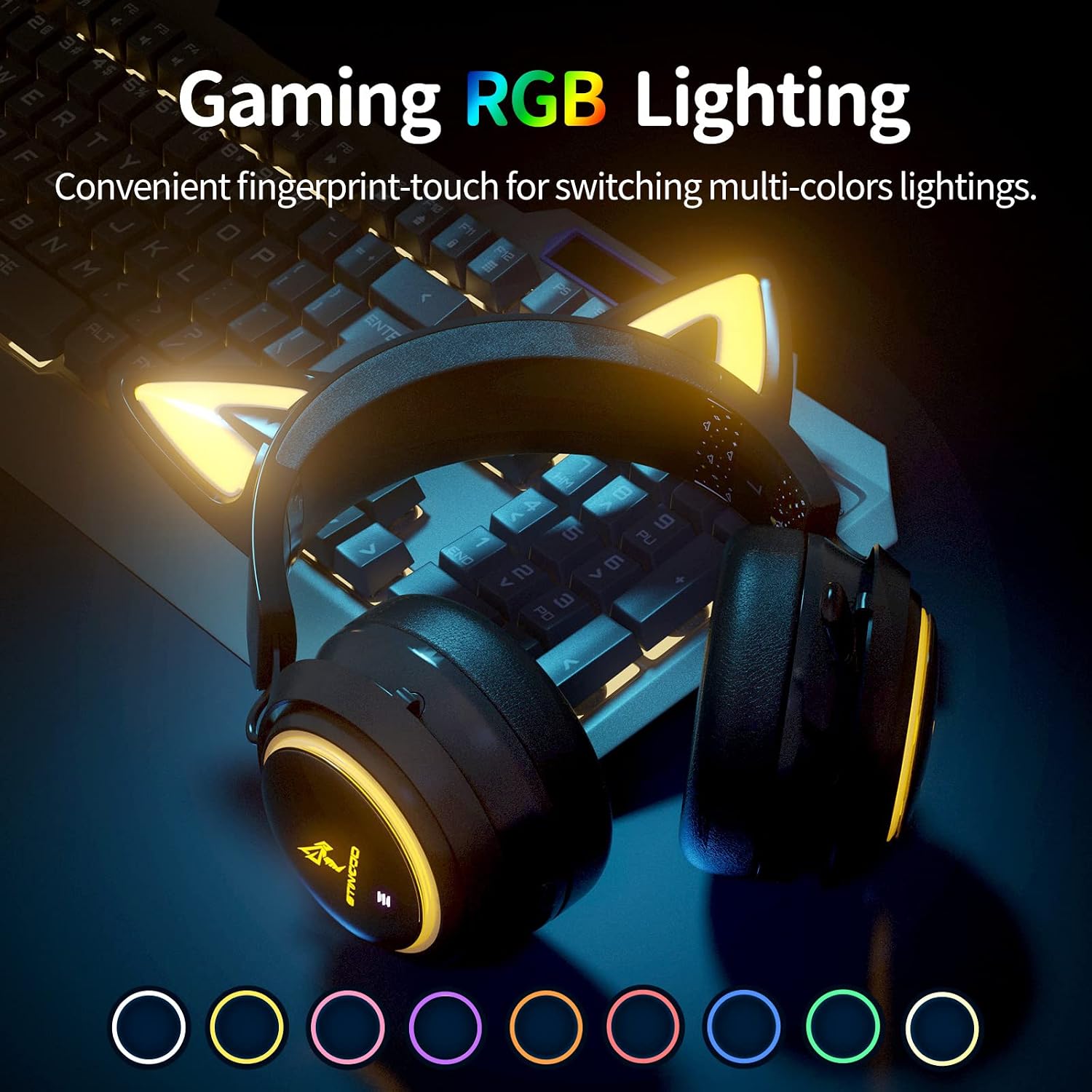
Image: The SOMIC GS510 headset showcasing its vibrant RGB lighting on the earcups and cat ears, with a row of colored circles indicating the available lighting options.
การควบคุมระดับเสียง
- Adjust the volume using the 'Volume Wheel' located on the earcup.
ความเข้ากันได้
The SOMIC GS510 headset offers wide compatibility:
- Wireless (2.4GHz USB Transmitter): PC, Laptop, PS4, PS5.
- ต่อสาย (สายสัญญาณเสียง 3.5 มม.): PS5 Controller, PS4 Controller, Xbox Series X Controller, Xbox One Controller, Nintendo Switch, MAC, and other mobile devices with a 3.5mm jack.
Note: This headset does not have Bluetooth functionality. Xbox consoles only support wired mode.

Image: The SOMIC GS510 headset displayed alongside icons representing its wide compatibility with devices such as Nintendo Switch, PS4/PS5, Laptops, PCs, Mobile devices, and Xbox One/S/X.
การซ่อมบำรุง
เพื่อให้มั่นใจถึงอายุการใช้งานที่ยาวนานและประสิทธิภาพสูงสุดของชุดหูฟัง โปรดปฏิบัติตามคำแนะนำในการบำรุงรักษาดังต่อไปนี้:
- การทำความสะอาด: ใช้ผ้าแห้งนุ่มๆ เช็ดทำความสะอาดหูฟัง สำหรับแผ่นรองหูฟัง ให้ใช้ผ้าที่นุ่มกว่าเล็กน้อยเช็ดamp สามารถใช้ผ้าได้ แต่ควรหลีกเลี่ยงความชื้นที่มากเกินไป ห้ามใช้สารเคมีรุนแรงหรือน้ำยาทำความสะอาดที่มีฤทธิ์กัดกร่อน
- พื้นที่จัดเก็บ: เก็บหูฟังไว้ในที่แห้งและเย็น หลีกเลี่ยงแสงแดดโดยตรงและอุณหภูมิที่สูงหรือต่ำเกินไป
- การดูแลสายเคเบิล: Avoid sharp bends or kinks in the charging and audio cables. Disconnect cables by pulling the plug, not the cord.
- หลีกเลี่ยงการหยด: While durable, repeated drops can damage internal components.
การแก้ไขปัญหา
If you encounter issues with your SOMIC GS510 headset, refer to the following common problems and solutions:
| ปัญหา | สาเหตุที่เป็นไปได้ | สารละลาย |
|---|---|---|
| ไม่มีเสียงหรือเสียงเบา | Headset not powered on; Volume too low; Incorrect audio output selected; Loose connection. | Ensure headset is powered on and charged. Increase volume on headset and device. Check system audio settings to ensure SOMIC GS510 is selected. Reconnect USB transmitter or 3.5mm cable. |
| ไมโครโฟนไม่ทำงาน | Microphone muted; Incorrect audio input selected; Microphone not fully extended. | Press the mic mute button to unmute. Check system audio settings to ensure SOMIC GS510 is selected as input. Ensure microphone is fully extended. |
| Wireless connection unstable or disconnected | นอกระยะ; สัญญาณรบกวน; แบตเตอรี่เหลือน้อย | Move closer to the USB transmitter. Avoid strong electromagnetic interference. Recharge the headset. Re-pair the headset with the USB transmitter if necessary. |
| ไฟ RGB ไม่ทำงานหรือค้าง | Software glitch; Low battery; Wired mode (RGB may not work in wired mode). | Ensure headset is sufficiently charged. Try cycling through lighting modes. If in wired mode, RGB functionality may be limited or unavailable. |
| อายุการใช้งานแบตเตอรี่สั้น | RGB lighting enabled; High volume usage; Battery degradation over time. | Disable or reduce RGB lighting effects. Lower volume if possible. Ensure full charge before use. |
ข้อมูลจำเพาะ
Key technical specifications for the SOMIC GS510 Cat Ear Wireless Gaming Headset:
| คุณสมบัติ | รายละเอียด |
|---|---|
| ชื่อรุ่น | GS510-2.4G-BlACK |
| เทคโนโลยีการเชื่อมต่อ | Wireless (2.4GHz USB Transmitter), Wired (3.5mm Jack) |
| ขนาดไดร์เวอร์เสียง | 50 มิลลิเมตร |
| การตอบสนองความถี่ | 20 เฮิรตซ์ - 20,000 เฮิรตซ์ |
| ความไวของไมโครโฟน | 36 เดซิเบล |
| อายุการใช้งานแบตเตอรี่ | ใช้งานได้นานสูงสุด 10 ชั่วโมง (แบบไร้สาย) |
| เวลาในการชาร์จ | 2 ชั่วโมง |
| วัสดุ | หนัง, พลาสติก |
| น้ำหนักสินค้า | 630 กรัม (1.39 ปอนด์) |
| ขนาดสินค้า | 8.66 x 4.33 x 10.24 นิ้ว |
| ประเภทการควบคุม | On-ear audio controls (Touch) |
| การวางตำแหน่งหู | ครอบหู |
การรับประกันและการสนับสนุน
SOMIC provides a warranty for its products. For specific warranty terms, duration, and to register your product, please refer to the warranty card included in your product packaging or visit the official SOMIC website. If you require technical support or have questions not covered in this manual, please contact SOMIC customer service through their official channels.
สำหรับแหล่งข้อมูลเพิ่มเติม คุณสามารถเยี่ยมชม SOMIC Store on Amazon.


