
Yesido HM05
Yesido HM05 3-in-1 HDMI Cable User Manual
Model: HM05 | Brand: Yesido
1. บทนำ
This manual provides detailed instructions for the safe and efficient use of your Yesido HM05 3-in-1 HDMI Cable. Please read this manual thoroughly before use and retain it for future reference. This cable is designed to connect your compatible smartphone or tablet to an HD television or projector, enabling high-definition video and audio output.
2. สินค้าหมดview
The Yesido HM05 is a versatile 3-in-1 HDMI cable designed for seamless connectivity between mobile devices and larger displays. It features multiple connectors to support a wide range of smartphones and tablets.
คุณสมบัติหลัก:
- การเชื่อมต่อ 3-in-1: Equipped with Lightning, Micro USB, and USB-C connectors for broad device compatibility.
- เอาท์พุตความละเอียดสูง: Supports video output up to 1080p resolution.
- ความเข้ากันได้กว้าง: Connects to projectors, smartphones, and televisions.
- การออกแบบไม่พันกัน: Engineered for ease of use and storage.
- การชาร์จพร้อมกัน: Allows for device charging while connected and displaying content.
สิ่งที่รวมอยู่:
- 1 x Yesido HM05 3-in-1 HDMI Cable
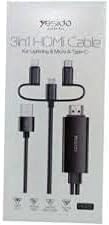
Image 1: Packaging of the Yesido HM05 3-in-1 HDMI Cable, showing the cable with Lightning, Micro USB, USB-C, and HDMI connectors.
3. คำแนะนำในการตั้งค่า
Follow these steps to connect your Yesido HM05 3-in-1 HDMI Cable to your devices.
- ระบุตัวเชื่อมต่อ: Locate the appropriate connector on the Yesido HM05 cable for your mobile device (Lightning for iPhone/iPad, Micro USB for older Android devices, or USB-C for newer Android devices).
- เชื่อมต่อกับอุปกรณ์มือถือ: Plug the identified connector firmly into the charging/data port of your smartphone or tablet.
- เชื่อมต่อกับจอแสดงผล: Insert the HDMI end of the Yesido HM05 cable into an available HDMI input port on your television or projector.
- เลือกแหล่งสัญญาณเข้า: On your television or projector, use the remote control to select the corresponding HDMI input source (e.g., HDMI 1, HDMI 2) that the cable is connected to.
- Provide Power (if necessary): The cable may require external power for stable operation, especially for longer usage or with certain devices. Connect the USB-A connector of the Yesido HM05 cable to a USB power adapter (5V/1A or higher, not included) or a USB port on your TV/projector.
- Display Synchronization: Your mobile device's screen should now be mirrored on the connected display. If not, refer to the Troubleshooting section.
Important Note for USB-C Devices:
The Yesido HM05 cable supports video signals via USB-C interfaces that utilize the DisplayPort Alternate Mode (DP++) protocol. Mobile phones featuring USB-C 3.0 data transfer capabilities that do not support DP++ (e.g., some specific models like Lexus Millet mentioned in original product description) may not be compatible for video output. Please verify your device's USB-C video output capabilities.

Image 2: Diagram illustrating the synchronization between phone and TV using the Yesido HM05 cable, highlighting the Lightning, Micro USB, and Type-C connectors, and 1080P support.
4. คู่มือการใช้งาน
Once successfully set up, operating the Yesido HM05 cable is straightforward.
- มิเรอร์หน้าจอ: The cable automatically mirrors your mobile device's screen to the connected display. Any content displayed on your phone or tablet, including apps, photos, videos, and presentations, will appear on the larger screen.
- เอาต์พุตเสียง: Audio will typically be transmitted through the HDMI cable to your television or projector's speakers. Ensure your display device's volume is adjusted appropriately.
- ปณิธาน: The cable supports up to 1080p high-definition resolution. The actual output resolution may depend on your mobile device's capabilities and the content being displayed.
- ฟังก์ชั่นการชาร์จ: When the USB-A connector is plugged into a power source, your mobile device will charge simultaneously while connected to the display.

Image 3: Close-up of the Yesido HM05 HDMI connector, illustrating its capability for 1080P high-definition visual effects and clear image quality on a television screen.
5. การบำรุงรักษา
Proper care and maintenance will extend the life of your Yesido HM05 HDMI Cable.
- การทำความสะอาด: ใช้ผ้าแห้งเนื้อนุ่มที่ไม่เป็นขุยเช็ดทำความสะอาดสายเคเบิลและขั้วต่อ หลีกเลี่ยงการใช้น้ำยาทำความสะอาดหรือตัวทำละลาย
- พื้นที่จัดเก็บ: Store the cable in a cool, dry place away from direct sunlight and extreme temperatures. Avoid tightly coiling or sharply bending the cable, as this can damage internal wires. The tangle-free design helps with neat storage.
- การจัดการ: Always grasp the connector ends when plugging or unplugging the cable. Do not pull on the cable itself, as this can strain the connections and cause damage.
- การป้องกัน: Keep the connectors free from dust and debris. Consider using dust caps if the cable is stored for extended periods.
6 การแก้ไขปัญหา
If you encounter issues with your Yesido HM05 HDMI Cable, refer to the following common problems and solutions.
| ปัญหา | สาเหตุที่เป็นไปได้ | สารละลาย |
|---|---|---|
| No signal or blank screen on TV/projector. | Incorrect input source selected; loose connections; insufficient power; incompatible device. | Ensure the correct HDMI input is selected on your display. Check all cable connections are secure. Connect the USB-A power cable to a reliable power source. Verify your mobile device supports video output via the connected port (especially for USB-C, check DP++ compatibility). |
| Poor image quality or resolution. | Mobile device settings; display device settings; cable limitation. | Ensure your mobile device's display settings are configured for optimal output. Check your TV/projector's resolution settings. The cable supports up to 1080p; ensure your content and display are also 1080p capable. |
| ไม่มีเอาต์พุตเสียง | TV/projector audio settings; mobile device audio settings. | Check the volume levels on both your mobile device and the connected TV/projector. Ensure the TV/projector's audio input is set to the HDMI source. |
| Intermittent connection or flickering screen. | Loose connection; power fluctuations; cable damage. | Secure all connections. Ensure the USB-A power source is stable and provides sufficient power. Inspect the cable for any visible damage. |
| USB-C device not working. | Device incompatibility with DP++ protocol. | As noted in the Setup section, some USB-C devices do not support video output via DP++ protocol. Confirm your device's compatibility. |
7. ข้อมูลจำเพาะ
Detailed technical specifications for the Yesido HM05 3-in-1 HDMI Cable.
- ยี่ห้อ: เยซิโด
- แบบอย่าง: HM05
- ประเภทตัวเชื่อมต่อ: HDMI, Lightning, Micro USB, USB-C
- ประเภทสายเคเบิล: HDMI
- อุปกรณ์ที่รองรับ: Projector, Smartphone, Television
- คุณสมบัติพิเศษ: ยุ่งเหยิงฟรี
- สี: สีดำ
- Cable Connection Type: ชายกับชาย
- รูปร่างรายการ: กลม
- การปฏิบัติตาม: CE
- Max Resolution Support: 1080p
8. การรับประกันและการสนับสนุน
สำหรับข้อมูลการรับประกันหรือการสนับสนุนทางเทคนิค โปรดดูที่บรรจุภัณฑ์ของผลิตภัณฑ์หรือติดต่อร้านค้าที่คุณซื้อผลิตภัณฑ์ เก็บหลักฐานการซื้อไว้เพื่อใช้ในการเรียกร้องการรับประกัน
Ask a question about this manual
Ask about setup, troubleshooting, compatibility, parts, safety, or missing instructions. Manuals+ will review the question and use this page’s manual context to help answer it.