
การแนะนำ
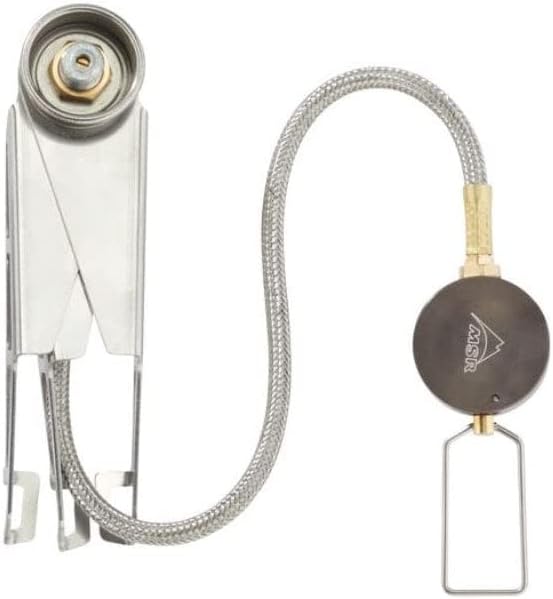
The MSR LowDown Remote Stove Adapter is designed to enhance the stability and versatility of your canister stove or stove system. This adapter lowers the stove's center of gravity and provides a wider base, allowing for safer use with larger cookware and on uneven terrain. It also features a remote fuel line and flame control for improved safety and ease of adjustment during cooking.
ข้อมูลด้านความปลอดภัย
- ใช้กลางแจ้งเท่านั้น: Never use this stove adapter or any camping stove indoors, in a tent, or in any unventilated area. Carbon monoxide poisoning can occur.
- พื้นผิวที่มั่นคง: Always place the stove adapter on a firm, level, non-combustible surface.
- การจัดการถังเชื้อเพลิง: Ensure the fuel canister is securely connected and upright. Disconnect the canister when not in use.
- พื้นที่ที่ชัดเจน: Keep flammable materials, children, and pets away from the operating stove.
- พื้นผิวที่ร้อน: The stove and cookware will become extremely hot during use. Use appropriate heat protection (e.g., gloves) when handling.
- การระบายอากาศ : Ensure adequate ventilation to prevent carbon monoxide buildup.
เนื้อหาแพ็คเกจ
The MSR LowDown Remote Stove Adapter package includes:
- 1 x MSR LowDown Remote Stove Adapter
คุณสมบัติ
- เพิ่มเสถียรภาพ: Low, wide, and strong base significantly lowers your stove's center of gravity for increased stability on uneven ground.
- Remote Flame Control: Fuel line and remote valve move flame control away from the stove and hot cookware, making adjustments safer and easier.
- Increased Cookware Capacity: Allows smaller stoves to support larger pots and pans for group or gourmet cooking.
- การออกแบบที่กะทัดรัด: Folding legs and flexible fuel line pack down small for easy transport and storage.
- โครงสร้างทนทาน: Made from corrosion-resistant stainless steel for long-lasting performance.
- ความเข้ากันได้กว้าง: Works with most MSR canister-fuel stoves and stove systems (excluding SuperFly stove).
คำแนะนำการตั้งค่า
- Unfold the Adapter: Gently unfold the legs of the LowDown Remote Stove Adapter until they lock into place, forming a stable tripod base. Ensure all legs are fully extended and stable.
- Attach Stove: Screw your MSR canister stove onto the adapter's central connection point. Hand-tighten until secure.
- Connect Fuel Canister: Attach the remote fuel line's regulator to your fuel canister. Ensure a tight seal to prevent leaks.
- ส่วนประกอบตำแหน่ง: Place the stove adapter on a stable, level surface. Position the fuel canister a safe distance from the stove, ensuring the fuel line is not kinked or stretched.
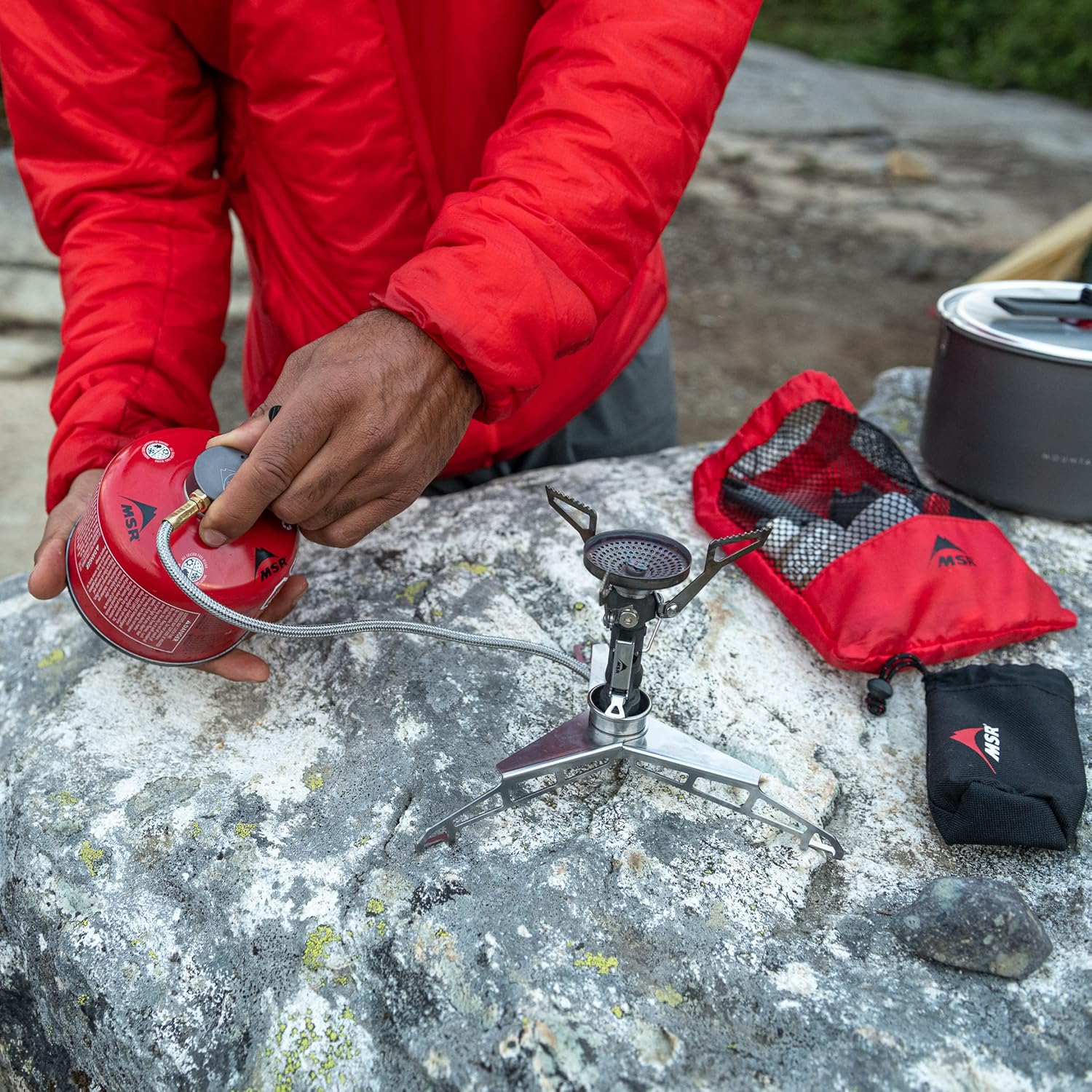

Video: MSR LowDown Remote Stove Adapter - Setup
Video: This video demonstrates the process of setting up the MSR LowDown Remote Stove Adapter, including unfolding the legs, attaching a stove, and connecting the fuel canister.
คำแนะนำการใช้งาน
- เตรียมภาชนะทำอาหาร: Place your pot or pan securely on the stove's pot supports.
- เปิดวาล์วน้ำมันเชื้อเพลิง: Slowly open the fuel valve on the remote regulator. You should hear a faint hiss of gas.
- จุดเตา: Use an igniter or match to light the gas at the stove burner.
- ปรับเปลวไฟ: Use the remote regulator to adjust the flame to your desired cooking intensity. Turn clockwise to decrease flame, counter-clockwise to increase.
- ติดตามการทำอาหาร: Always supervise the stove while it is in operation.
- ปิด: When finished cooking, turn the fuel valve on the remote regulator fully clockwise to shut off the gas supply. Allow the stove and cookware to cool completely before handling.


Video: MSR LowDown Remote Stove Adapter - Overview และการใช้
วิดีโอ: วิดีโอนี้ให้ข้อมูลโดยรวมview of the MSR LowDown Remote Stove Adapter, showcasing its features, setup, and practical use in a campการปรับปรุงสิ่งแวดล้อม
การซ่อมบำรุง
- การทำความสะอาด: After each use, ensure the adapter is cool. Wipe down any spills or residue with a damp ผ้า. หลีกเลี่ยงน้ำยาทำความสะอาดที่มีฤทธิ์กัดกร่อน
- การตรวจสอบ: Regularly inspect the fuel line for any signs of wear, cracks, or damage. Check connections for tightness.
- พื้นที่จัดเก็บ: Store the adapter in a clean, dry place. Fold the legs for compact storage.
การแก้ไขปัญหา
- ไม่มีการไหลของก๊าซ: Ensure the fuel canister is not empty and is properly connected. Check that the remote valve is fully open.
- Unstable Flame: Verify that the stove adapter is on a level surface and all legs are fully extended. Ensure the fuel line is not kinked.
- แก๊สรั่ว: Immediately turn off the fuel supply. Check all connections for tightness. If a leak persists, discontinue use and contact MSR support.
ข้อมูลจำเพาะ
| ยี่ห้อ | เอ็มเอสอาร์ |
| ชื่อรุ่น | อะแดปเตอร์เตาระยะไกล LowDown |
| หมายเลขชิ้นส่วน | 11582 |
| ชนิดเชื้อเพลิง | Isobutane (compatible with MSR canister-fuel stoves) |
| วัสดุ | สแตนเลส,อลูมิเนียม |
| น้ำหนักสินค้า | 0.39 ปอนด์ (176 กรัม) |
| ขนาดสินค้า (กxยxส) | 5.1"L x 1.4"W x 1.7"H (พับ) |
| แหล่งพลังงาน | ขับเคลื่อนด้วยเชื้อเพลิง |
| ยูพีซี | 040818115824 |
การรับประกันและการสนับสนุน
The MSR LowDown Remote Stove Adapter comes with a Limited Warranty. For specific warranty details, claims, or technical support, please refer to the official MSR website or contact MSR customer service directly. Keep your proof of purchase for warranty purposes.
For additional information or assistance, visit the MSR Store.