
1. บทนำ
The NETVIP N300 WiFi Extender is designed to expand the coverage of your existing wireless network, eliminating areas with weak signal and providing a stable 2.4GHz WiFi signal. This manual provides detailed instructions for setup, operation, and troubleshooting to ensure proper use of your device.
2. สินค้าหมดview
Familiarize yourself with the physical components and indicators of your NETVIP N300 WiFi Extender.

ภาพที่ 2.1: รายละเอียด view of the NETVIP N300 WiFi Extender, highlighting the LAN Port, Reset button, WPS button, Power LED, Wireless LED, WPS LED, and LAN LED. The device features a US plug for direct wall outlet connection.
- กำลังไฟ LED: บ่งชี้สถานะพลังงาน
- ไฟ LED ไร้สาย: บ่งชี้ถึงกิจกรรมไร้สาย
- ไฟ LED WPS: ระบุสถานะฟังก์ชั่น WPS
- แลน LED: แสดงสถานะการทำงานของพอร์ตอีเธอร์เน็ต
- พอร์ต LAN: For wired connections.
- ปุ่มรีเซ็ต: ใช้เพื่อคืนค่าการตั้งค่าจากโรงงาน
- ปุ่ม WPS: For quick, secure connection setup.
3. Setup Instructions (Repeater Mode)
Follow these steps to configure your WiFi Extender in Repeater Mode, which extends the range of your current WiFi network.
- เปิดเครื่อง: Plug the repeater into a power socket. Wait until the green WPS light begins blinking.
- Connect to Repeater: On your phone, tablet, or laptop, connect to the WiFi signal named "Wireless-N-c". This is the extender's temporary network, not your home's existing WiFi.
- เข้าสู่หน้าการตั้งค่า: The device should automatically redirect you to the settings page. If not, open a web เบราว์เซอร์และป้อนข้อมูลด้วยตนเอง 192.168.10.1 ในแถบที่อยู่
- เข้าสู่ระบบ: Enter "admin" for both the username and password.
- เลือกโหมด Repeater: Click on "Repeater" under the Wizard section.
- เลือกเครือข่าย: Select your existing home WiFi network from the list and click "Apply".
- Configure Repeater SSID: Set a new name (SSID) for your extended network, or keep the default name. Enter your home WiFi password as the Security Key for this new Repeater network. Click "Apply".
- เสร็จสิ้น: Wait for the settings to be applied. Close the page and reconnect your devices to the newly created extended network.
หมายเหตุสำคัญ: When setting up in Repeater Mode, the password for the extended network must be exactly the same as your home WiFi password for internet access.
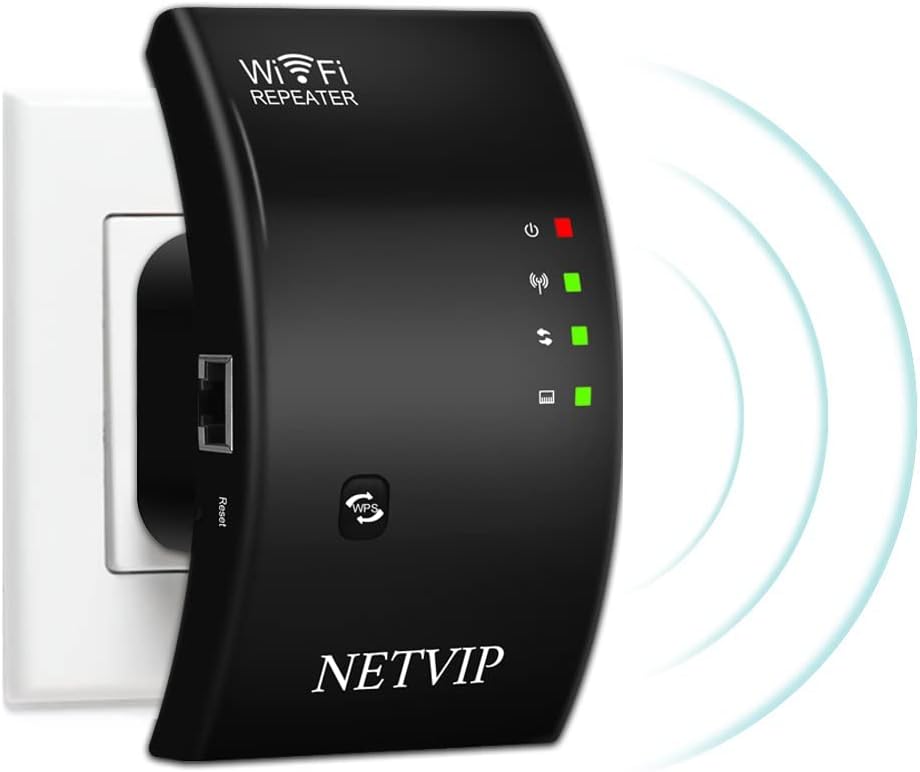
ภาพที่ 3.1: The NETVIP N300 WiFi Extender plugged into a wall socket, ready for setup.
4. โหมดการทำงาน
The NETVIP N300 WiFi Extender supports two primary operating modes: Repeater Mode and Access Point (AP) Mode.

ภาพที่ 4.1: Diagram showing the two working modes: Repeater Mode (extending a router's signal) and AP Mode (creating a new WiFi hotspot from a modem).
- โหมดทวน: This mode extends the coverage of your existing 2.4GHz Wi-Fi network, boosting the signal to areas with weak or no coverage. It connects wirelessly to your main router.
- โหมด AP (โหมดจุดเชื่อมต่อ): In this mode, the extender creates a new WiFi hotspot. You connect the extender to your modem or router via an Ethernet cable, and it broadcasts a new wireless network. This is useful for converting a wired network into a wireless one.
5. ข้อมูลจำเพาะ
| คุณสมบัติ | รายละเอียด |
|---|---|
| ย่านความถี่ | 2.4 กิกะเฮิรตซ์ |
| รองรับ Voltage | 110V-240V |
| ความปลอดภัย WLAN | WPA2, WPA, WEP (128/64-bit) |
| เสาอากาศ | บูรณาการ |
| ไร้มาตรฐาน | 802.11bgn |
| อัตราการถ่ายโอนข้อมูล | สูงสุดถึง 300 Mbps |
| ขนาดสินค้า | 4.33 x 2.36 x 3.15 นิ้ว |
| น้ำหนักสินค้า | 5.6 ออนซ์ |
6 การแก้ไขปัญหา
If you encounter issues with your WiFi Extender, the following information may assist in resolving common problems.
How to Reset the Device:
If you forget your password, need to change settings, or experience setup failures, a factory reset can resolve many issues.
- ค้นหาตำแหน่ง ปุ่มรีเซ็ต on the device (refer to Image 2.1).
- ใช้คลิปหนีบกระดาษหรือวัตถุปลายแหลมที่คล้ายกัน กดปุ่มรีเซ็ตค้างไว้นานกว่า 20 วินาที
- Continue holding until you observe the green light turning off and then turning on again. This indicates the device has reset to its factory default settings.
- After resetting, you will need to reconfigure the extender following the setup instructions.
7. เนื้อหาบรรจุภัณฑ์
The following items are included with your NETVIP N300 WiFi Extender:
ภาพที่ 7.1: The NETVIP N300 WiFi Extender package contents, showing the WiFi Repeater, User Manual, and RJ45 Ethernet Cable.
- 1x WiFi Repeater (NETVIP N300 WiFi Extender)
- 1x RJ-45 สายอีเธอร์เน็ต
- 1x User Manual (available in 5 languages)
8. การรับประกันและการสนับสนุน
The NETVIP N300 WiFi Extender includes a 1-year warranty. For technical assistance or inquiries, please contact NETVIP customer support via email. They are committed to providing a satisfactory solution.