
1. บทนำ
The Beyution RM-L1593 is a universal infrared replacement remote control designed for use with a wide range of Samsung Smart TVs. This remote control provides immediate functionality upon battery insertion, requiring no complex programming. It includes dedicated shortcut buttons for popular streaming services such as Netflix and Prime Video, as well as a WWW button for web เรียกดู

ภาพที่ 1.1: ด้านหน้า view of the Beyution RM-L1593 Universal Remote Control, showing its ergonomic design and button layout.
2. การตั้งค่า
2.1 การติดตั้งแบตเตอรี่
- ค้นหาช่องใส่แบตเตอรี่ที่ด้านหลังของรีโมทคอนโทรล
- เลื่อนฝาครอบแบตเตอรี่ลงด้านล่าง หรือกดสลักเพื่อเปิดออก
- Insert two (2) AAA batteries (not included) into the compartment, ensuring correct polarity (+ and -) as indicated inside.
- ใส่ฝาครอบแบตเตอรี่กลับเข้าไปโดยให้แน่ใจว่าล็อคเข้าที่อย่างแน่นหนา
The remote control is an infrared (IR) device and does not require pairing. It will function immediately after batteries are correctly installed.

ภาพที่ 2.1: ด้านหลัง view ภาพแสดงรีโมทคอนโทรลที่มีช่องใส่แบตเตอรี่เปิดอยู่ โดยแสดงตำแหน่งที่จะใส่แบตเตอรี่ AAA สองก้อน
3. คู่มือการใช้งาน
This remote control provides standard functions for navigating and controlling your Samsung Smart TV, along with dedicated shortcut buttons for quick access to streaming services.
3.1 ฟังก์ชันปุ่ม
- ปุ่มเปิดปิด (⏻): เปิดหรือปิดทีวี
- 123 ปุ่ม: Accesses the virtual numeric keypad.
- Menu/List Button: Opens the TV's menu or displays a list of options.
- Extra Button: Provides access to additional TV functions or information.
- แผงนำทาง (ขึ้น, ลง, ซ้าย, ขวา, ตกลง): ใช้สำหรับเลื่อนดูเมนูและเลือกรายการต่างๆ
- ปุ่มย้อนกลับ (↶): กลับไปยังหน้าจอหรือเมนูก่อนหน้า
- ปุ่มโฮม (⌂): Returns to the TV's Smart Hub or home screen.
- ปุ่มเล่น/หยุดชั่วคราว (⏸): ควบคุมการเล่นสื่อ
- Volume Up/Down (VOL): ปรับระดับเสียงของทีวี
- Channel Up/Down (CH): เปลี่ยนช่องทีวี
- ปุ่ม Netflix: เข้าถึงแอปพลิเคชัน Netflix ได้โดยตรง
- ปุ่ม Prime Video: เข้าถึงแอปพลิเคชัน Prime Video ได้โดยตรง
- ปุ่ม WWW: Direct access to the TV's web เบราว์เซอร์
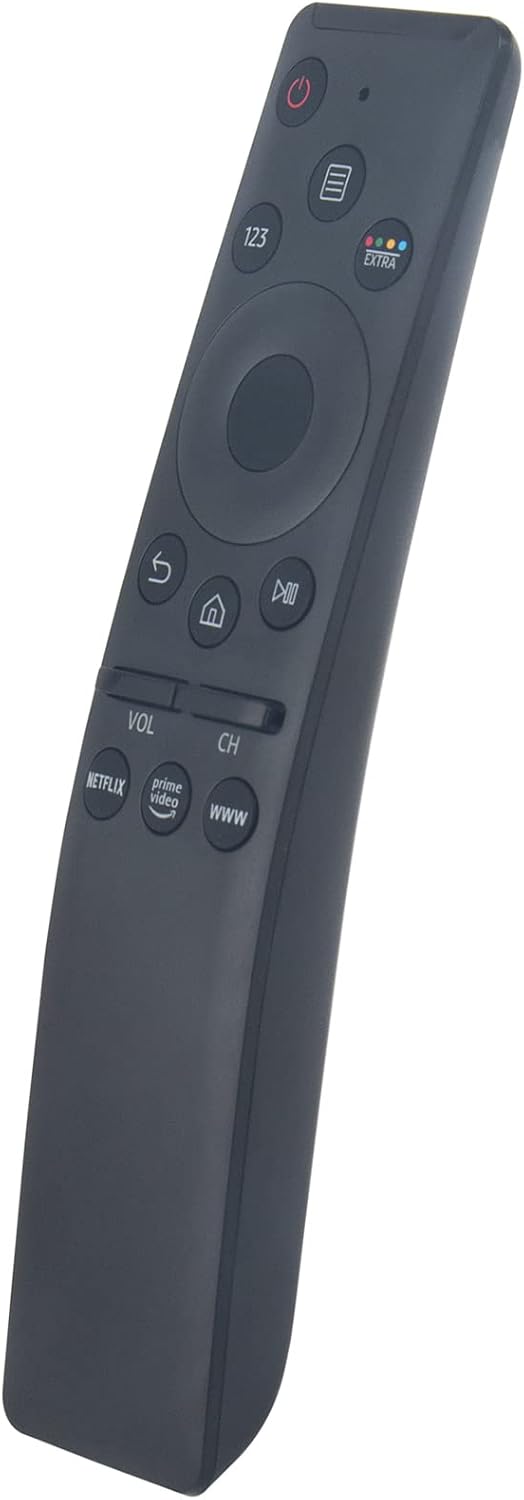
ภาพที่ 3.1: ด้านหน้าเอียง view of the remote control, showing the layout of the navigation and shortcut buttons.
4. ความเข้ากันได้
The RM-L1593 remote control is compatible with a broad range of Samsung Smart TV models and can replace many original Samsung remote controls. This is an infrared (IR) remote and does not support voice control or pointer functions.
4.1 รุ่นทีวี Samsung ที่รองรับ
- Smart TV Series: ซีรีส์ 6, ซีรีส์ 7, ซีรีส์ 8, ซีรีส์ 9
- Specific Models: KU6290, KU6270, KU7000, RU7100, Q60T, TU8000, TU8200, TU8300, TU850D, TU9000, Q70T, Q80T, Q90T, Q800T, Q900TS, Q950TS, LST7, LS05, LS03, RU8000, Q50, Q60, Q70, Q80, Q90, Q900, NU8000, NU8500, MU8000, Q6F, Q7F, Q7C, Q8F, Q9F, N5300, NU6900, NU7100, NU7300, MU630, MU650, MU700, MU800, MU850, MU6300, MU6500, MU7000, MU7500, MU8000, MU9000 Series, LS27AM500NNXZA, LS32AM702UNXZA, LS32AM500NNXZA Series, etc.
4.2 Compatible Samsung Remote Models
- BN59-01266A, BN59-01312A, BN59-01312G, BN59-01310A, BN59-01259E, BN59-01330A, BN59-01329A, BN59-01298A, BN59-01298H, BN59-01292A, BN59-01241A, BN59-01293A, BN59-01199F, BN59-01301A, BN59-01289A, BN59-01298G, BN59-01300G, BN59-01274A, BN59-01298E, BN59-01298D, BN59-01265A, BN59-01270A, BN59-01298C, BN59-01259B, BN59-01259D, BN59-01300F, BN59-01300J, BN59-01300H, BN59-01279A, BN59-01327B, BN59-01242A, BN59-01329B, BN59-01330B, BN59-01312M, BN59-01311B, BN59-01312B, BN59-01242C, BN59-01328A, BN59-01300L, BN59-01311G, BN59-01312D, BN59-01311E, BN59-01312F, BN59-01330C, etc.
5 การแก้ไขปัญหา
- รีโมตไม่ตอบสนอง:
- ตรวจสอบให้แน่ใจว่าได้ใส่แบตเตอรี่ถูกต้องและขั้วถูกด้านแล้ว
- เปลี่ยนแบตเตอรี่เก่าด้วยแบตเตอรี่ AAA ใหม่
- Ensure there is a clear line of sight between the remote control and the TV's infrared receiver. Remove any obstructions.
- ยืนยันว่ารีโมทชี้ไปที่ทีวีโดยตรง
- ฟังก์ชั่นบางอย่างไม่ทำงาน:
- Verify that your specific TV model is listed in the compatibility section. While universal, some advanced features of newer Samsung TVs might require a specific original remote.
- ตรวจสอบให้แน่ใจว่าเฟิร์มแวร์ของทีวีเป็นเวอร์ชันล่าสุด
- Remote feels sluggish or intermittent:
- สิ่งนี้มักบ่งบอกว่าแบตเตอรี่เหลือน้อย ควรเปลี่ยนแบตเตอรี่
If issues persist after following these steps, please refer to the Support section for further assistance.
6. การบำรุงรักษา
- การทำความสะอาด: เช็ดรีโมทคอนโทรลด้วยผ้านุ่มและแห้ง ห้ามใช้น้ำยาทำความสะอาดหรือสารละลายที่มีฤทธิ์กัดกร่อน
- การสัมผัสของเหลว: Avoid exposing the remote control to water or other liquids. If it gets wet, remove batteries immediately and allow it to dry completely before reinserting them.
- การเปลี่ยนแบตเตอรี่: Replace batteries promptly when the remote's performance declines to prevent battery leakage, which can damage the device.
- พื้นที่จัดเก็บ: เก็บรีโมทไว้ในที่แห้งและเย็น ห่างจากแสงแดดโดยตรงและอุณหภูมิที่สูงหรือต่ำมาก
7. ข้อมูลจำเพาะ
| หมายเลขรุ่น | อาร์เอ็ม-แอล1593 |
| ยี่ห้อ | เบยูชั่น |
| เทคโนโลยีการเชื่อมต่อ | อินฟาเรด (IR) |
| อุปกรณ์ที่รองรับ | โทรทัศน์ซัมซุง |
| จำนวนอุปกรณ์ที่รองรับสูงสุด | 1 |
| แบตเตอรี่ที่จำเป็น | 2 x AAA (ไม่รวม) |
| ขนาดสินค้า | 7 x 2 x 0.6 นิ้ว (17.8 x 5.1 x 1.5 ซม.) |
| น้ำหนักสินค้า | 1.44 ออนซ์ (40.8 กรัม) |
8. การสนับสนุน
For further assistance, compatibility inquiries, or if you encounter any issues not covered in this manual, please contact the seller directly through your purchase platform. Providing your TV's exact model number can help expedite support.