
การแนะนำ
This manual provides important information regarding the safe operation, installation, and maintenance of your Power Dynamics DS65MB 2-Way Bluetooth Speaker system. Please read this manual thoroughly before using the product to ensure proper function and to prevent damage.
คำแนะนำเพื่อความปลอดภัย
- อ่านคำแนะนำทั้งหมดอย่างละเอียดก่อนใช้งาน
- เก็บคู่มือนี้ไว้เพื่อใช้อ้างอิงในอนาคต
- อย่าให้ลำโพงโดนฝนหรือความชื้น
- ตรวจสอบให้แน่ใจว่ามีการระบายอากาศที่เหมาะสมรอบ ๆ ลำโพง
- Only connect to a grounded mains outlet with the correct voltage (230V/50Hz)
- อย่าเปิดลำโพงasing; ไม่มีชิ้นส่วนใดที่ผู้ใช้สามารถซ่อมบำรุงเองได้ภายใน
- ควรหลีกเลี่ยงการวางลำโพงไว้ใกล้แหล่งความร้อนหรือในที่ที่มีแสงแดดส่องโดยตรง
คุณสมบัติผลิตภัณฑ์
- Set of 2 speakers (1 active, 1 passive)
- Built-in Class D stereo ampชีวิต
- Bluetooth for wireless audio streaming
- Integrated USB MP3 player
- 2-way speaker design (woofer and tweeter)
- Bass reflex system for enhanced low frequencies
- Line input (RCA) and microphone input (6.3mm jack)
- Adjustable bass, treble, and master volume controls
- Durable metal speaker grilles
- Includes mounting brackets and power cable
เนื้อหาแพ็คเกจ
- 1x Active DS65MB Speaker
- 1x Passive DS65MB Speaker
- ขายึด
- สายไฟ
- สายลำโพง (สำหรับเชื่อมต่อลำโพงแอคทีฟกับลำโพงพาสซีฟ)
- คู่มือการใช้งาน

Image: The Power Dynamics DS65MB speaker pair, illustrating their front grilles and overall design.
การติดตั้งและการตั้งค่า
การติดตั้งลำโพง
The DS65MB speakers are supplied with adjustable mounting brackets for flexible installation. They can be mounted horizontally or vertically on walls or ceilings.

Image: A single Power Dynamics DS65MB speaker shown with its adjustable mounting bracket and hardware.
- Attach the bracket to the speaker using the provided knob.
- Secure the bracket to your desired mounting surface (wall or ceiling) using appropriate screws and anchors (not included). Ensure the surface can support the speaker's weight.
- Adjust the speaker angle as desired and tighten the knob to secure its position.
การเชื่อมต่อลำโพง
The system comprises one active speaker, which houses the amplifier and controls, and one passive speaker.

Image: A pair of Power Dynamics DS65MB speakers, illustrating their design and how they can be positioned.
- Connect the passive speaker to the active speaker using the supplied speaker cable. Ensure correct polarity (+ to + and - to -).
- Connect the active speaker to a standard power outlet (230V/50Hz) using the included power cable.
คำแนะนำการใช้งาน
แผงควบคุมโอเวอร์view
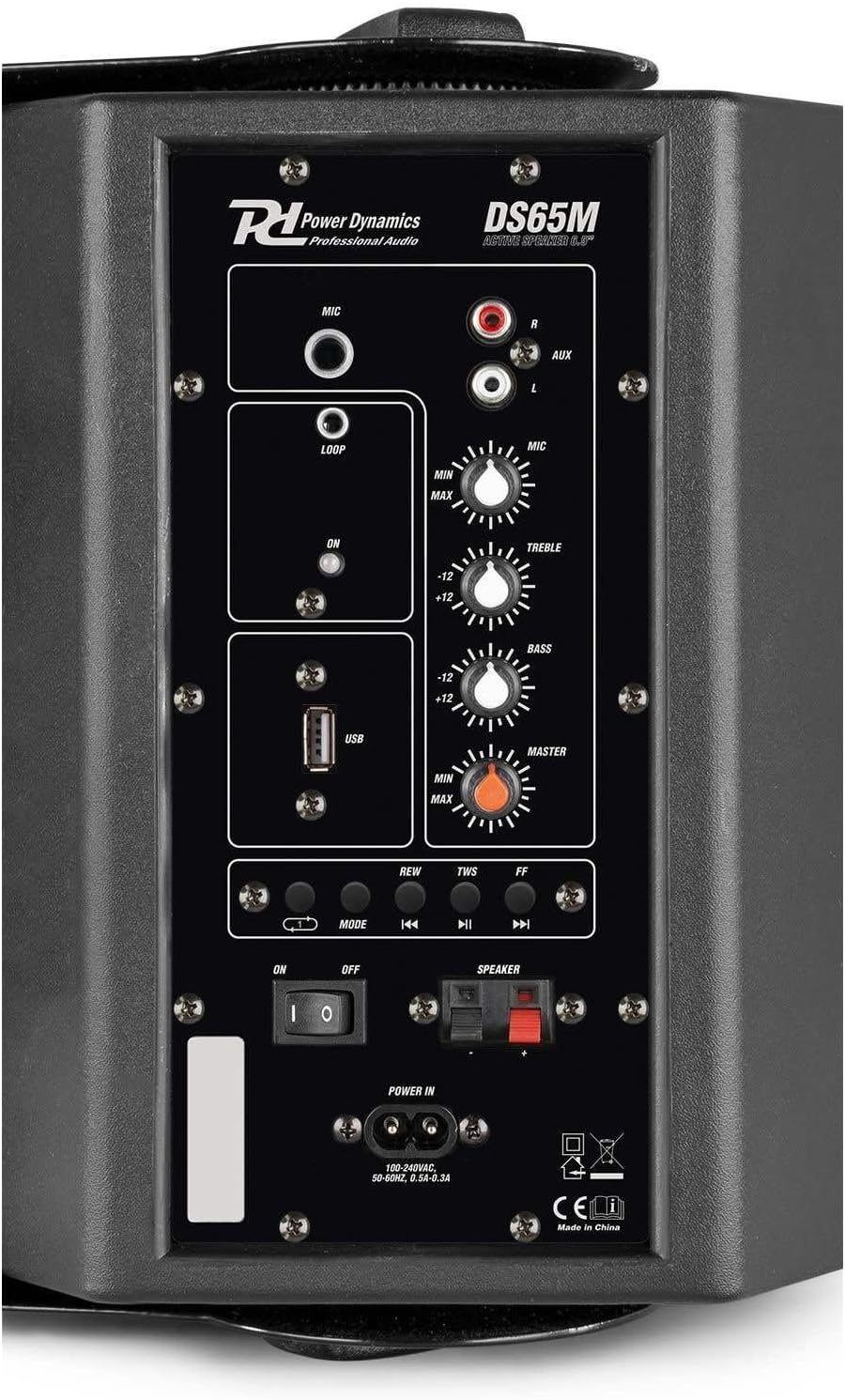
Image: The rear control panel of the active Power Dynamics DS65MB speaker, showing microphone input, AUX input, USB port, and various control knobs for volume, treble, and bass.
- อินพุตไมโครโฟน: แจ็คขนาด 6.3 มม. สำหรับเชื่อมต่อไมโครโฟน
- อินพุต AUX (อาร์ซีเอ): For connecting external audio sources like CD players or mixers.
- พอร์ต USB: สำหรับเล่นไฟล์เสียง MP3 fileโดยตรงจากแฟลชไดรฟ์ USB
- ปุ่มโหมด: Press to cycle through input modes: Bluetooth, USB, AUX.
- Volume Control (MASTER): Adjusts the overall output volume of the speaker system.
- การควบคุมเสียงแหลม: ปรับการตอบสนองความถี่สูงของเสียง
- การควบคุมเบส: ปรับการตอบสนองความถี่ต่ำของเสียง
- สวิตช์ไฟ: Turns the speaker system on or off.
การเชื่อมต่อบลูทูธ
- Turn on the active speaker using the power switch.
- กดปุ่ม โหมด button repeatedly until "Bluetooth" mode is selected. The indicator light will flash.
- On your Bluetooth-enabled device (e.g., smartphone, tablet), search for available devices and select "DS65MB" to pair.
- Once successfully connected, you can stream audio wirelessly to the speakers.
การเล่นไฟล์ MP3 ผ่าน USB
- ใส่แฟลชไดรฟ์ USB ที่มีไฟล์เสียง MP3 fileลงในพอร์ต USB
- กดปุ่ม โหมด button repeatedly until "USB" mode is selected.
- Use the playback control buttons (REW, TWS, FF) on the control panel to navigate and play tracks.
Line Input (AUX)
- Connect your external audio source (e.g., CD player, mixer) to the RCA AUX input on the active speaker using an appropriate cable.
- กดปุ่ม โหมด กดปุ่มซ้ำๆ จนกว่าจะเลือกโหมด "AUX"
- เล่นไฟล์เสียงจากอุปกรณ์ที่เชื่อมต่อของคุณ
การใช้งานไมโครโฟน
- Connect a microphone to the 6.3mm MIC input jack.
- Adjust the dedicated MIC volume knob on the control panel to achieve the desired microphone level.
การซ่อมบำรุง
- Clean the speaker cabinets with a soft, dry, lint-free cloth.
- Do not use abrasive cleaners, solvents, or strong detergents, as these may damage the finish.
- Ensure that the speaker grilles are free from dust and debris to maintain optimal sound quality.
- ควรเก็บลำโพงไว้ในที่แห้งและเย็นเมื่อไม่ได้ใช้งานเป็นเวลานาน
การแก้ไขปัญหา
| ปัญหา | สาเหตุที่เป็นไปได้ | สารละลาย |
|---|---|---|
| ไม่มีไฟฟ้า | สายไฟไม่ได้เชื่อมต่อ เต้ารับไฟฟ้าชำรุด | Ensure power cable is securely plugged in; Try a different power outlet |
| ไม่มีเสียงออก | Incorrect input mode selected; Volume too low; Speaker cables loose/incorrectly connected | Press MODE to select the correct input; Increase MASTER volume; Check speaker cable connections (active to passive) and polarity |
| บลูทูธไม่เชื่อมต่อ | Speaker not in Bluetooth pairing mode; Device too far from speaker; Bluetooth on device is off | Ensure speaker is in Bluetooth mode (flashing indicator); Move device closer to speaker; Enable Bluetooth on your device |
| เสียงเพี้ยน | Volume too high (clipping); Faulty audio cable; Source audio quality is poor | Reduce MASTER volume; Try a different audio cable; Check the quality of the audio source |
ข้อมูลจำเพาะ
| คุณสมบัติ | ข้อมูลจำเพาะ |
|---|---|
| พลังสูงสุด | 125 วัตต์ |
| กำลัง RMS | 60 วัตต์ |
| ขนาดวูฟเฟอร์ | 6.5 นิ้ว |
| ขนาดทวีตเตอร์ | 1/2 นิ้ว |
| ช่วงความถี่ | 60 เฮิรตซ์ - 16,000 เฮิรตซ์ |
| SPL @ 1w/1m | 87 เดซิเบล |
| การป้อนเส้น | อาร์ซีเอ |
| การเชื่อมต่อไมโครโฟน | แจ็ค 6.3 มม. |
| การเชื่อมต่อฉบับที่tage | 230 V / 50 Hz |
| ขนาด (ต่อลำโพง) | 22 x 20 x 29 ซม. |
| น้ำหนัก (ต่อลำโพง) | 4.4 กก. |
| หมายเลขรุ่น | DS65MB |
| ผู้ผลิต | Tronios BV |
การรับประกันและการสนับสนุน
สำหรับข้อมูลการรับประกันและการสนับสนุนทางเทคนิค โปรดดูเอกสารประกอบที่ให้มาพร้อมกับสินค้าที่คุณซื้อ หรือติดต่อตัวแทนจำหน่าย โปรดเก็บหลักฐานการซื้อไว้เพื่อใช้ในกรณีที่ต้องการเคลมประกัน