
1. บทนำ
This manual provides instructions for the HCDZ Replacement Remote Control, designed for use with various Epson 3LCD 4K Large Venue Laser Projectors. This remote offers direct functionality without the need for programming.
เนื้อหาแพ็คเกจ:
- 1 x HCDZ Replacement Remote Control
Note: Batteries and additional instructions are not included in the package.
2. การตั้งค่า
2.1 การติดตั้งแบตเตอรี่
รีโมทคอนโทรลต้องใช้แบตเตอรี่ AAA สองก้อน (ไม่ได้รวมอยู่ด้วย) ทำตามขั้นตอนเหล่านี้เพื่อติดตั้ง:
- ค้นหาฝาปิดช่องใส่แบตเตอรี่ที่ด้านหลังของรีโมทคอนโทรล
- เลื่อนฝาครอบลงหรือกดที่สลักและยกขึ้นเพื่อเปิดช่อง
- ใส่แบตเตอรี่ AAA สองก้อน โดยตรวจสอบให้แน่ใจว่าขั้วบวก (+) และขั้วลบ (-) ตรงกับเครื่องหมายภายในช่อง
- ปิดฝาช่องใส่แบตเตอรี่ โดยเลื่อนกลับเข้าที่จนกระทั่งได้ยินเสียงคลิกและแน่นสนิท

Image: Back of the remote control with the battery compartment open, illustrating correct AAA battery placement.
2.2 การใช้งานเบื้องต้น
Once batteries are correctly installed, the remote control is ready for immediate use. No programming or pairing is required. Point the remote directly at your Epson projector's infrared (IR) sensor.
3. การใช้งานรีโมทคอนโทรล
This remote control provides full functionality for your compatible Epson projector. Refer to your projector's original user manual for specific functions of each button.
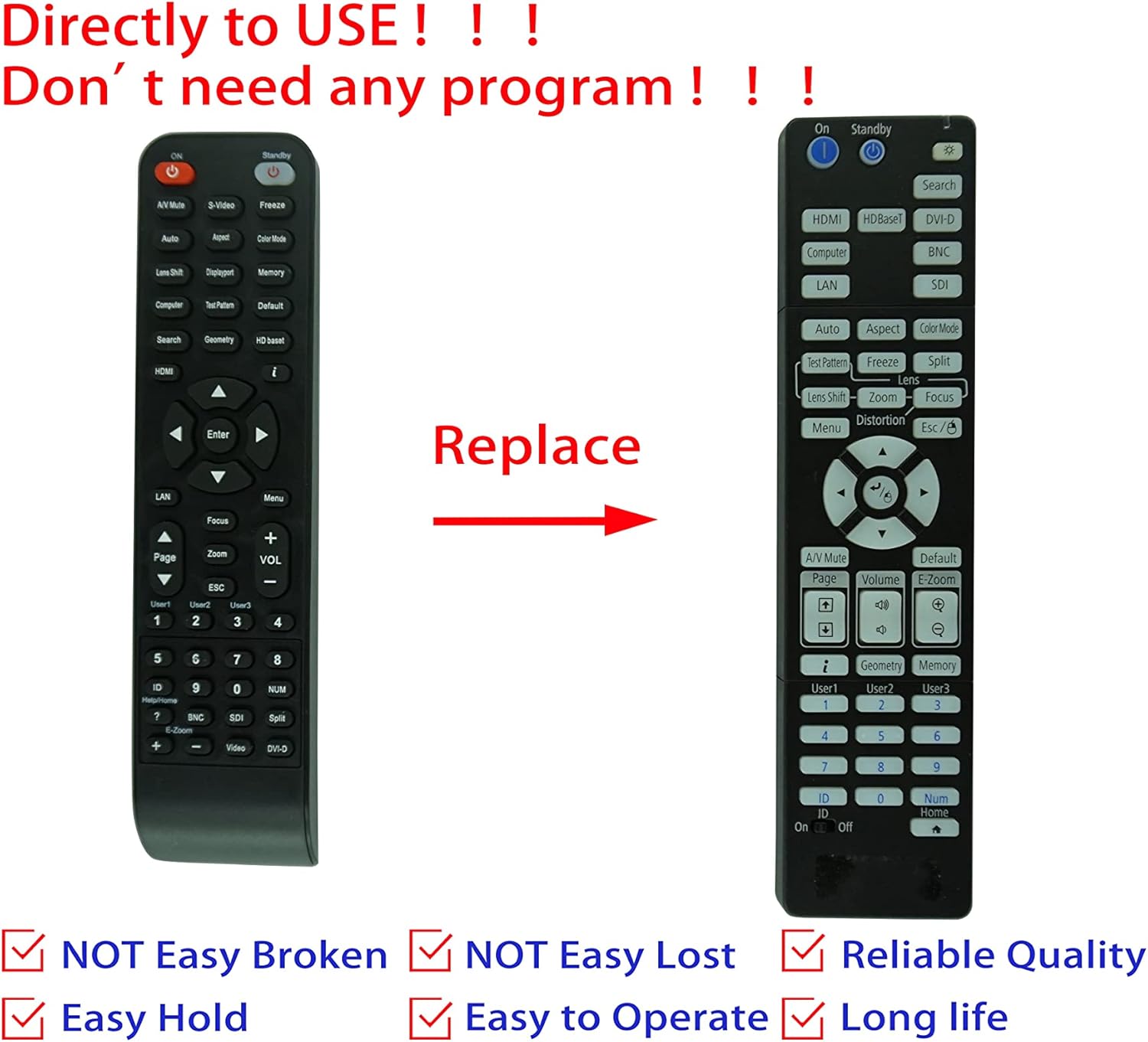
Image: Comparison of an original Epson remote (left) and the HCDZ replacement remote (right), highlighting the replacement functionality.
3.1 Key Functions (General)
- เปิด/ปิดเครื่อง: Typically a dedicated button, often red or clearly marked.
- การเลือกอินพุต: Buttons for HDMI, Computer, Video, etc., to switch input sources.
- การนำทาง: Arrow keys (Up, Down, Left, Right) and an Enter/OK button for menu navigation.
- เมนู: Accesses the projector's on-screen display (OSD) menu.
- ปริมาณ: Adjusts audio output if the projector has built-in speakers or audio pass-through.
- ซูม/โฟกัส: Adjusts the projected image size and clarity.
- ปุ่มกดตัวเลข: For direct input or selecting specific functions.
4. การบำรุงรักษาและการดูแล
To ensure the longevity and proper functioning of your remote control, observe the following guidelines:
- การทำความสะอาด: เช็ดรีโมทด้วยผ้าแห้งนุ่มๆ ห้ามใช้น้ำยาทำความสะอาดหรือวัสดุที่มีฤทธิ์กัดกร่อน
- สิ่งแวดล้อม: หลีกเลี่ยงการเปิดเผยรีโมทในอุณหภูมิที่สูงหรือความชื้นสูงหรือแสงแดดโดยตรง
- การเปลี่ยนแบตเตอรี่: Replace both batteries simultaneously. Do not mix new and old batteries, or different types of batteries.
- พื้นที่จัดเก็บ: หากจะไม่ใช้รีโมตเป็นเวลานาน ควรถอดแบตเตอรี่ออกเพื่อป้องกันการรั่วไหลและความเสียหายที่อาจเกิดขึ้น
- ผลกระทบ: หลีกเลี่ยงการทำรีโมทตกหรือโดนแรงกระแทกรุนแรง

ภาพ: ด้านหลัง view of the HCDZ remote control, illustrating its design.
5 การแก้ไขปัญหา
หากคุณประสบปัญหาเกี่ยวกับรีโมทคอนโทรล ให้ลองทำตามขั้นตอนการแก้ไขปัญหาต่อไปนี้:
- รีโมตไม่ตอบสนอง:
- ตรวจสอบให้แน่ใจว่าใส่แบตเตอรี่อย่างถูกต้องและขั้วที่ถูกต้อง
- เปลี่ยนแบตเตอรี่เก่าด้วยแบตเตอรี่ AAA ใหม่
- Check for any obstructions between the remote and the projector's IR sensor.
- Ensure you are within the effective range and pointing the remote directly at the projector.
- ฟังก์ชั่นไม่ต่อเนื่อง:
- Strong light sources (e.g., direct sunlight, fluorescent lights) can interfere with IR signals. Try operating the remote in a different lighting condition.
- ตรวจสอบให้แน่ใจว่าหน้าสัมผัสแบตเตอรี่สะอาดและไม่มีการกัดกร่อน
6. ข้อมูลจำเพาะ
| คุณสมบัติ | รายละเอียด |
|---|---|
| ยี่ห้อ | เอชซีดีซ |
| ความเข้ากันได้ | Epson EB-PU2010B, EB-PU1007B, EB-PU2010W, EB-PU1007W, EB-PU1008B, EB-PU1006W, EB-PU1008W Projectors |
| เทคโนโลยีการเชื่อมต่อ | อินฟาเรด (IR) |
| แหล่งพลังงาน | 2 x แบตเตอรี่ AAA (ไม่รวม) |
| จำเป็นต้องมีการเขียนโปรแกรม | เลขที่ |
| สี | สีดำ |
7. การรับประกันและการสนับสนุน
This HCDZ replacement remote control comes with a 90-day warranty from the date of purchase. This warranty covers manufacturing defects under normal use.
For warranty claims or technical support, please contact your retailer or the HCDZ customer service department with your purchase details.
โปรดเก็บหลักฐานการซื้อไว้เพื่อวัตถุประสงค์การรับประกัน